Vscode: Login to Microsoft products aren't working anymore
Version: 1.31.0 (user setup)
Commit: 7c66f58312b48ed8ca4e387ebd9ffe9605332caa
Date: 2019-02-05T22:35:56.624Z
Electron: 3.1.2
Chrome: 66.0.3359.181
Node.js: 10.2.0
V8: 6.6.346.32
OS: Windows_NT x64 10.0.17134
Steps to Reproduce:
- Install any version of VSCode (it will upgrade by itself) || when did that start? not NodeJS style!
- Create an extension, which tries to authenticate to a Microsoft-service/product (TFS/SharePoint) programmatically.
Did come with the last update. It is very embarrassing that my boss has prepared a showcase and would like to present it very promptly. Since you seem to have introduced an automatic update for all versions, there is no workaround for the meeting. This looks very unprofessional.
Very embarrassing.
I used "https://www.npmjs.com/package/node-sp-auth" for authentification.
Someone else seems to have a problem with TFS:
https://github.com/Microsoft/vscode/issues/68442
 peni4142
All 26 comments
@peni4142 For your boss:
- First disable automatic updates in the settings:
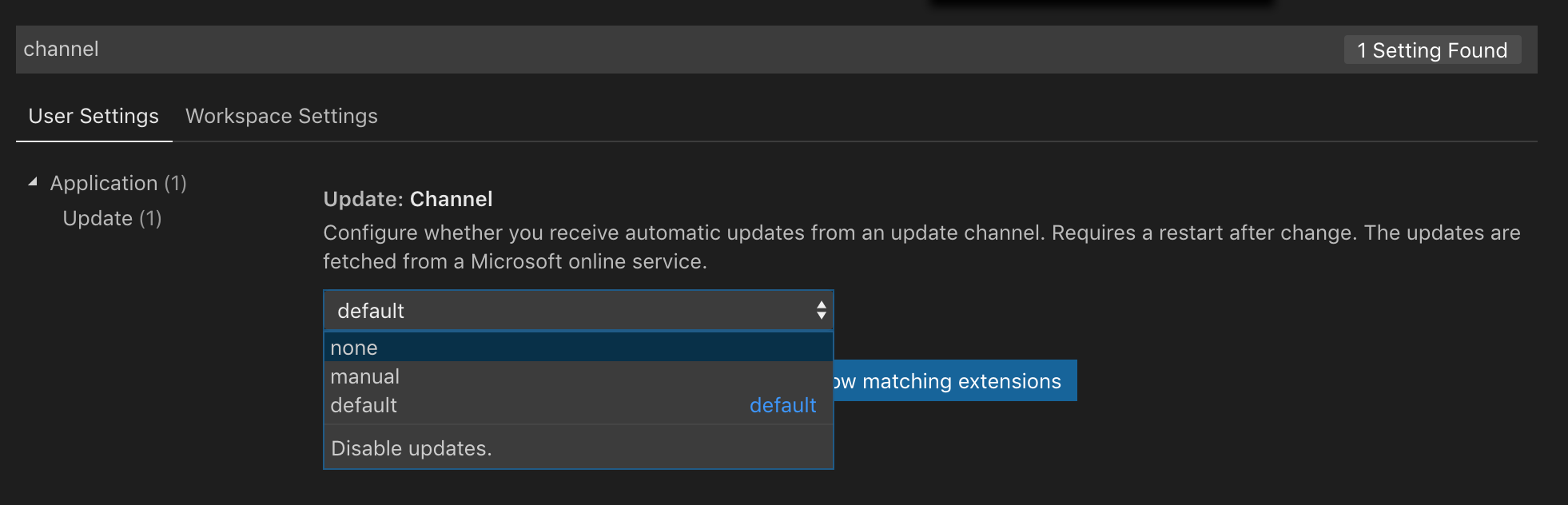
- Then install the old version of VS Code: https://code.visualstudio.com/updates/v1_30
For you: Check if your extension uses any native modules. These need to be recompiled for VS Code 1.31. If that's not the cause we need more information on what is going wrong.
 chrmarti
on 12 Feb 2019
chrmarti
on 12 Feb 2019
That are dependencies
"dependencies": {
        "@types/request": "^2.47.1",
        "@types/ws": "^5.1.2",
        "@types/xml2js": "^0.4.3",
        "await-notify": "1.0.1",
        "node-sp-auth": "2.5.7",
        "setenv": "^1.0.3",
        "vscode": "^1.1.21",
        "vscode-debugadapter": "1.27.0",
        "vscode-debugprotocol": "1.27.0",
        "vscode-languageclient": "^4.4.2",
        "vscode-languageserver": "^4.4.2",
        "ws": "^5.2.2",
        "xml2js": "^0.4.19"
    }
I don't have written native code on my own. Does that mean I have to wait till third-party modules are recompiled and newly provided?
I am using pretty much this code:
import * as spauth from 'node-sp-auth';
import * as request from 'request-promise';

spauth
  .getAuth('http://xxx.botshop.cloudappsportal.com/', {
    username: 'administrator',
    password: '[password]',
    domain: 'sp'
  })
  .then(data =>{
    let headers = data.headers;
    headers['Accept'] = 'application/json;odata=verbose';
    let requestOpts = data.options;
    requestOpts.json = true;
    requestOpts.headers = headers;
    requestOpts.url = 'http://xxx.botshop.cloudappsportal.com/_api/web/lists/getbytitle('myfile')/items';

    request.get(requestOpts).then(response => {
      console.log(response.d.Title);
    });
});
snipptet is from: https://stackoverflow.com/questions/51993317/access-sharepoint-document-from-node-js-in-ibm-cloud-function
out of the box, it is working. Using it in a VSCode context, it does not work. In one of the out of the box tests, I used NodeJS v10.2.0 as used in VSCode. If it helps I run very frequently npm i.
peni4142
on 12 Feb 2019
I'm having the same problem. After updating to the newest version of VSCode, I am unable to connect to TFS using Azure Repos. I downgraded VSCode to the november release (https://code.visualstudio.com/updates/v1_30) and the issue was fixed. My VSCode also auto-updated and the issue reappeared.
@chrmarti Thanks for the tip on disabling auto-update. :)
 grizzlysol
on 12 Feb 2019
grizzlysol
on 12 Feb 2019
@chrmarti Oh yes, thanks for the tip. That will help for the showcase.
peni4142
on 12 Feb 2019
@peni4142 Your dependencies could include or depend on native modules.
Can you also try with the new proxy support disabled in the settings?
chrmarti
on 13 Feb 2019
Yeah that is it. Disabling Proxy Support
(Http: Proxy Support
Use the proxy support for extensions.)
"solve" the problem...
peni4142
on 13 Feb 2019
--funny: The German translation of the wording contains different information content than in English. Both describe it more precisely in different respects.
peni4142
on 13 Feb 2019
Is there something I have to do, that it works with the new proxy feature or do you have to fix it?
peni4142
on 13 Feb 2019
@peni4142 Are you or one of the node modules using an agent on the options to http/s.get/request? I need to better understand why this is failing before I tell what the best way forward is.
chrmarti
on 13 Feb 2019
Working with Authorization-Token.
Thats what my header looks like:
{
"Connection":"Close",
"Authorization":"Nonsense",
"Accept":"*/*"
}
Seems to be fixed in 1.31.1.
peni4142
on 13 Feb 2019
My co-worker says it still does not work. Did you do something about that?
peni4142
on 13 Feb 2019
@peni4142 Nothing changed in that area between 1.31.0 and 1.31.1. Make sure you have that proxy support set to override (the default).
Can you add error logging to your code, so we see why it fails?
chrmarti
on 13 Feb 2019
Another colleague has confirmed this, but apparently, I can not reactivate the feature. That means I can not test whether the problem is resolved.
peni4142
on 13 Feb 2019
I had an empty 401, but I can't reproduce that. Seems I can't reactivate that Feature.
peni4142
on 13 Feb 2019
I am the author of SPGo and I can confirm users who are using NTLM authentication are also experiencing this issue as of VSCode 1.31.x:
@chrmarti I can confirm the workaround of changing the value of http.proxySupport from Override to either on or off will resolve the issue.
My question is why the default value is set to Override rather than either of the other non-intrusive values? Do you have a suggestion for extension authors (not end users who may not know to disable auto-updates for properties) for how to work around situations such as this?
More Context (from https://github.com/readysitego/spgo/issues/73):
- This error does not occur unless the code is run inside of VSCode. Running these packages from the command line (with node 10.3.x) results in correct behavior. I believe it is because VSCode is overwriting the http.Agent and https.Agent objects when loading extensions, possibly proxying the call and interfering with the NTLM auth process.
- The VSCode CPPTools team actually wrote code to manually disable Proxy Override in their solution https://github.com/Microsoft/vscode-cpptools/pull/2931/files
- VSCode is rewriting all http.agent objects: https://github.com/Microsoft/vscode/blob/43d02af42f42e4d51d6121482c9e49e2461f9693/src/vs/workbench/services/extensions/node/proxyResolver.ts#L256
- I ran wireshark against a successful and unsuccessful ntlm request, and there were no obvious differences between the two request/response pairs. ...although this is likely due to weak wireshark-fu on my part.
Finally, here is a simple set of reproduction steps you can perform to reproduce the issue:
- Use
yo codeYeoman generator to create a new VSCode extension - Add sp-request to the project:
npm install --save sp-request - Add a require reference to
sp-requestat the top of the file, then replace the default code inside theextension.sayHellocommand registration with the following code: (obviously specifying your owndomain,passwordandusernamevalues)
let credentialOptions = {
    domain : 'domain'
    password : 'xxxx',
    username : 'username'
}
let endpoint = '<ntlm-secured SharePoint site>';

let spr = sprequest.create(credentialOptions);

spr.requestDigest(endpoint)
    .then(function(requestResults) {
        console.log("auth success!");
        console.log("For more, please check the results\n", JSON.stringify(requestResults));
    })
    .catch(function(err) {
        console.log("Core error has happened \n", err);
    });
- run the extension and you will receive the error:
401 - undefined. The "undefined" value comes from the empty body returned from the remote server.
Happy to help debug this further or provide any more info to help resolve as it is affecting a large number of users.
_updated: added a few clarifying details_
 sg-chrishasz
on 14 Feb 2019
sg-chrishasz
on 14 Feb 2019
@sg-chrishasz Thanks for the analysis. We figured we can improve the proxy support for all extensions if we override any existing agent (which is often used to support proxies) with our own that can use the OS proxy configuration.
It looks like in this case proxies are not necessarily part of the system's configuration. A possible fix appears to be to just use the original agent (e.g., from node-sp-auth) when there is no proxy configured for the contacted host. This would fix the breakage, it would not help users behind network proxies, but for these node-sp-auth did not work before either, so there would be no loss of functionality from what I see.
chrmarti
on 14 Feb 2019
How would it be handled in the future? Do I have to tell everybody to change the proxy entry? or would it be fixed in newer versions?
peni4142
on 14 Feb 2019
@peni4142 The goal is to make it work in newer versions.
chrmarti
on 14 Feb 2019
@chrmarti - Thanks for the response. I like the proxy override capability and the original intent makes sense in that context, but definitely think it should not be the default option.
Please let us know when you expect an update to the default proxy setting (or similar remediation) to be released.
sg-chrishasz
on 14 Feb 2019
"StatusCodeError: 401 - undefined
at new StatusCodeError (C:__GIT\Repo\ext\node_modules\request-promise-core\lib\errors.js:32:15)
at Request.module.exports.plumbing.callback (C:__GIT\Repo\ext\node_modules\request-promise-core\lib\plumbing.js:104:33)
at Request.RP$callback [as _callback] (C:__GIT\Repo\ext\node_modules\request-promise-core\lib\plumbing.js:46:31)
at Request.init.self.callback (C:__GIT\Repo\ext\node_modules\request\request.js:185:22)
at Request.emit (events.js:182:13)
at Request.
at Request.emit (events.js:182:13)
at IncomingMessage.
at Object.onceWrapper (events.js:273:13)
at IncomingMessage.emit (events.js:187:15)
at endReadableNT (_stream_readable.js:1090:12)
at process._tickCallback (internal/process/next_tick.js:63:19)"
peni4142
on 15 Feb 2019
@peni4142 @grizzlysol @sg-chrishasz I have added a fix for today's insiders build, could you give that a try and let me know if that fixes the problem with the setting set to 'override'? Download: https://code.visualstudio.com/insiders/
chrmarti
on 19 Feb 2019
@chrmarti I'm node-sp-auth author, I tested insiders build with SPGo extension and everything looks good with default override setting! Thank you!
Let's wait for confirmation from other guys as well.
 s-KaiNet
on 19 Feb 2019
s-KaiNet
on 19 Feb 2019
Hello @chrmarti - I can also confirm that NTLM authentication for SPGo is again working in the latest insider's build when proxy is set to override.
Thanks for the quick turn-around!
sg-chrishasz
on 19 Feb 2019
Closing as fixed, thanks!
chrmarti
on 20 Feb 2019
Marking as verified by users
 mjbvz
on 26 Feb 2019
mjbvz
on 26 Feb 2019
Related issues
 sirius1024
·
3Comments
sirius1024
·
3Comments
 villiv
·
3Comments
villiv
·
3Comments
 lukehoban
·
3Comments
lukehoban
·
3Comments
 v-pavanp
·
3Comments
v-pavanp
·
3Comments
 VitorLuizC
·
3Comments
VitorLuizC
·
3Comments
Most helpful comment
@chrmarti I'm
node-sp-authauthor, I tested insiders build with SPGo extension and everything looks good with defaultoverridesetting! Thank you!Let's wait for confirmation from other guys as well.