Vscode: Team signin: Unauthorized although TFS credential is valid
Version: 1.31.0 (system setup)
Commit: 7c66f58312b48ed8ca4e387ebd9ffe9605332caa
Date: 2019-02-05T22:35:56.624Z
Electron: 3.1.2
Chrome: 66.0.3359.181
Node.js: 10.2.0
V8: 6.6.346.32
OS: Windows_NT x64 10.0.14393
[Main Instruction]
Visual Studio Code
[Content]
Although VS code is tracking changes from source control, there is a bug preventing it from connecting to TFS (this happened after upgrading to 1.31.0)
[OK] [Copy]

Steps to Reproduce:
- Upgrade to 1.31.0
- Try signin in to TFS
Does this issue occur when all extensions are disabled?: Yes
 Yeg-A
Yeg-A
All 10 comments
Same for SharePoint, using node-sp-auth
            .getAuth(url, {
                username: UserName,
                password: password,
                domain: UserDomain
            })
            .then(data => {
                let headers: any = data.headers;
                headers.Accept = "application/json;odata=verbose";
                let requestOpts: any = data.options;
                requestOpts.json = true;
                requestOpts.headers = headers;
                requestOpts.url = uri;
                requestOpts.form = postOptions.form;

                request.get(requestOpts).then(response => {
                    this.logSuccess(response);
                }).catch(er => {
                    console.log(er);
                    }
                }).then(() => {
                    console.log("end");
                });
            });
 peni4142
on 11 Feb 2019
peni4142
on 11 Feb 2019
This issue is caused by an extension, please file it with the repository (or contact) the extension has linked in its overview in VS Code or the marketplace for VS Code. See also our issue reporting guidelines.
Happy Coding!
![vscodebot[bot] picture](https://avatars2.githubusercontent.com/in/2406?v=4&s=40) vscodebot[bot]
on 12 Feb 2019
vscodebot[bot]
on 12 Feb 2019
Reporting a bug to Microsoft is like hell.
-- Not my bug... Report it to xyz. (Mostly another Microsoft repository. Can't you write a bot for something like that?)
Yeah please reopen this. I have exactly the same code running in a VSCode extension and also without VSCode. Without VSCode it is working. Till version 1.30.2 it is working. With Version 1.31.0 it is not working.
In the end, our customer and partners will not update VSCode until it is fixed. And I think that is not in your interest.
And of course, I tried also in NodeJS v10.2.0
peni4142
on 12 Feb 2019
Solved!
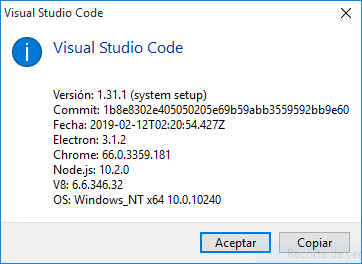
My version of Code:
Steps to fix:
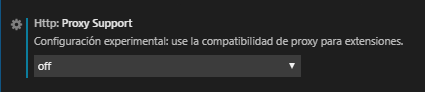
1)- Open VS Code settings (Ctrl + ,)
2)- Search by "Proxy"
3)- Change Http Proxy support from Override to OFF
:D
 thezuliano
on 14 Feb 2019
thezuliano
on 14 Feb 2019
This should be fixed in current insiders builds of VS Code with the Proxy Support setting set to 'override'. Let me know if you still see any issues with that. Download: https://code.visualstudio.com/insiders/
 chrmarti
on 20 Feb 2019
chrmarti
on 20 Feb 2019
I was experiencing this issue. I followed the instructions (set proxy to off) and downloaded the insiders build. While I can now authenticate, either VS Code or the Azure Repos extensions sees all of my local workspaces as server.
 erikread
on 20 Feb 2019
erikread
on 20 Feb 2019
This should be fixed in current insiders builds of VS Code with the Proxy Support setting set to 'override'. Let me know if you still see any issues with that. Download: https://code.visualstudio.com/insiders/
There is also another bug associated with v 1.31: https://github.com/angular/vscode-ng-language-service/issues/312#issuecomment-462230536
Yeg-A
on 20 Feb 2019
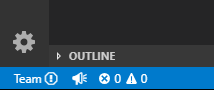
I have downloaded the latest insider build. All of my workspaces are local. For a minute or so VS Code acts like everything is fine then it pops up the error.
Extension information:
Name: Azure Repos
Id: ms-vsts.team
Description: Connect to Azure Repos and work with Git and Team Foundation Version Control (TFVC) repositories. Manage your pull requests, work items, and more.
Version: 1.144.1
Publisher: Microsoft
VS Marketplace Link: https://marketplace.visualstudio.com/items?itemName=ms-vsts.team


 erikread
on 20 Feb 2019
erikread
on 20 Feb 2019
@erikread That looks like an issue with the extension, could you check if they have an issue open for this and create one if they don't at https://github.com/Microsoft/azure-repos-vscode/issues ?
chrmarti
on 21 Feb 2019
Normally I would agree with you but I went back to 1.29.1 (October Release) and all is good. Same version of the extension. So, at the very least, it is a combination of changes in the release and something in the extension. There is an open issue for this problem and have added my information.
erikread
on 21 Feb 2019
Related issues
 lukehoban
·
3Comments
lukehoban
·
3Comments
 sirius1024
·
3Comments
sirius1024
·
3Comments
 NikosEfthias
·
3Comments
NikosEfthias
·
3Comments
 borekb
·
3Comments
borekb
·
3Comments
 vsccarl
·
3Comments
vsccarl
·
3Comments
Most helpful comment
Solved!
My version of Code:
Steps to fix:
1)- Open VS Code settings (Ctrl + ,)
2)- Search by "Proxy"
3)- Change Http Proxy support from Override to OFF
:D