Vscode: Split JSON settings editor discussion issue
So as you can see here:

when I open my settings.json file I don't have it split up. Before updating whenever I opened settings.json I had all the settings on the left hand side and those changed by me on the right hand side. Now I only have the thing, which was previously on the right.
- VSCode Version: 1.31.0
- OS Version: Windows 10
Steps to Reproduce:
- Open settings
- Click
{}to opensettings.json
Does this issue occur when all extensions are disabled?: Yes
 dabljues
All 13 comments
(Experimental duplicate detection)
Thanks for submitting this issue. Please also check if it is already covered by an existing one, like:
![vscodebot[bot] picture](https://avatars2.githubusercontent.com/in/2406?v=4&s=40) vscodebot[bot]
on 11 Feb 2019
vscodebot[bot]
on 11 Feb 2019
Having the same issue with 1.31.0, and I have to Open Raw Default Settings and Open Settings (JSON) one by one.
 StevenLi-DS
on 11 Feb 2019
StevenLi-DS
on 11 Feb 2019
Duplicate of #68301 and several others.
Intentional change, described in the 1.31 "What's New?" at https://code.visualstudio.com/updates/v1_31#_use-simple-text-editor-for-editing-settings-as-json which also describes how to reinstate old behaviour.
 gjsjohnmurray
on 11 Feb 2019
gjsjohnmurray
on 11 Feb 2019
Thanks @gjsjohnmurray. Really miss the old behavior which show side-by-side and make searching settings faster. Wish it won't be removed in future. (Please give some thumbs up if you also like the old behavior)
 johnnytemp
on 12 Feb 2019
johnnytemp
on 12 Feb 2019
Thanks for keeping the old behaviour around via workbench.settings.useSplitJSON. It really helps navigate fast through all the settings.
 mihaiconstantin
on 12 Feb 2019
mihaiconstantin
on 12 Feb 2019
If I click the text to "Edit in settings.json" in the settings UI it now drops me into a json file with no defaults. I think that that is a bad experience. The old behavior would search for the setting in the panel on the left so users could easily copy the defaults to their own settings and modify them.
Or, in gif form:
Worse:

Better:
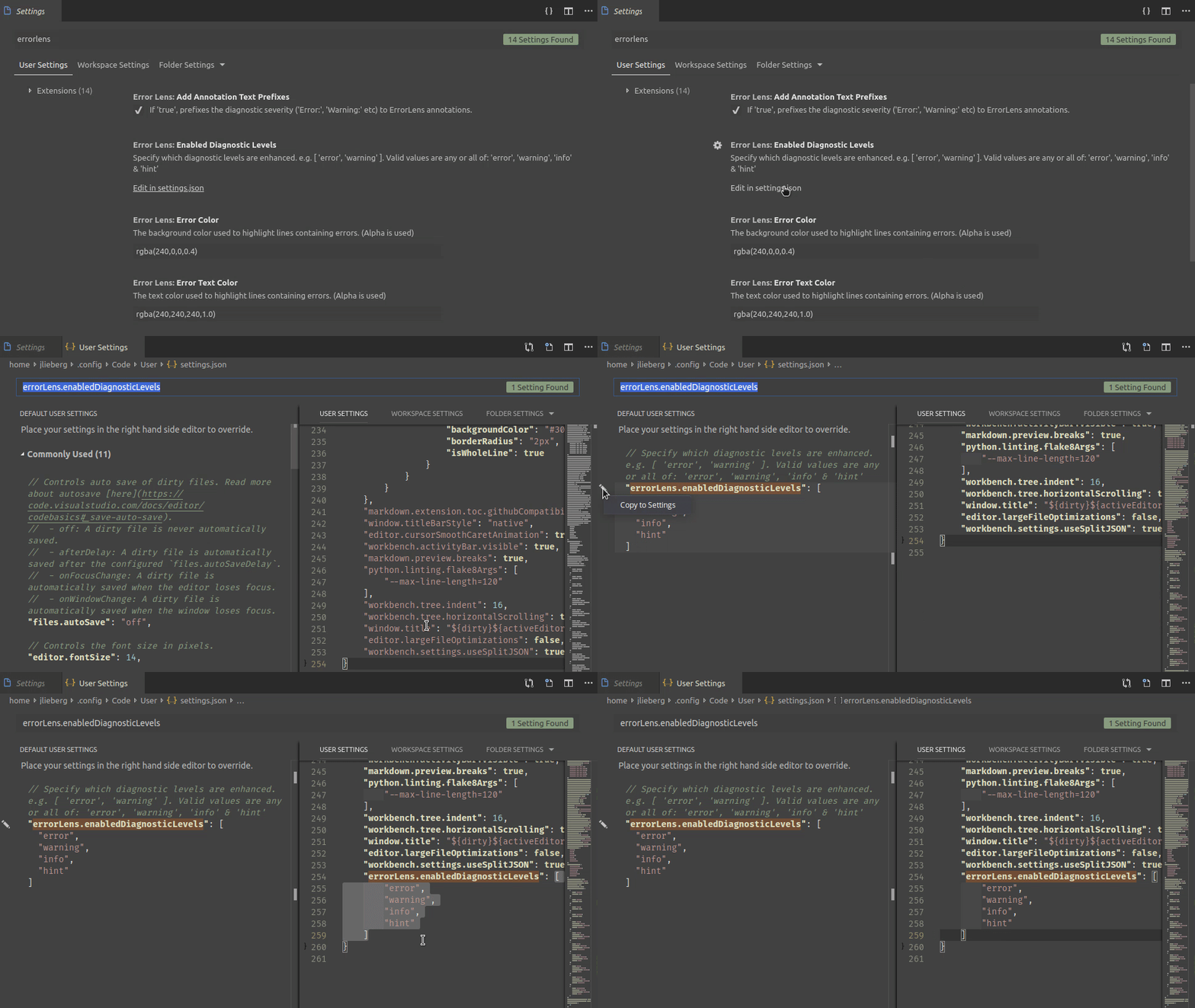
I think copying the default settings when there are none would be the best, but at least showing the base settings by default would be better than what it is now.
 GammaGames
on 14 Feb 2019
GammaGames
on 14 Feb 2019
@GammaGames - isn't that exactly what the workbench.settings.useSplitJSON setting lets you revert to?
gjsjohnmurray
on 14 Feb 2019
@gjsjohnmurray Yup, but right now (with fully default settings) you have to go and change useSplitJSON or use Open Raw Default Settings so you can find out what format the default for the setting you want to change is.
I understand why they changed it, it does simplify editing existing json settings overall. But when you're trying to edit a new setting using the link the UI gives you it adds another step that the editor doesn't help you get around by default.
GammaGames
on 14 Feb 2019
Is the VSCode team committed to providing long term support for the split JSON explorer? With it's ability to quickly switch between Global and Workspace settings.
Because with all of the recent updates I've had to troubleshoot and/or change my workflows over these "Improvements". Like with the panel location.
 OiYouYeahYou
on 18 Feb 2019
OiYouYeahYou
on 18 Feb 2019
Duplicate of #68301 and several others.
Intentional change, described in the 1.31 "What's New?" at https://code.visualstudio.com/updates/v1_31#_use-simple-text-editor-for-editing-settings-as-json which also describes how to reinstate old behaviour.
This new feature is very very unintelligible. It just makes things more complicated. The stupidest thing is that it changes the default behavior instead of just gives users a switch. Could you tell me why you think this new feature is better?
 ladyrick
on 23 Feb 2019
ladyrick
on 23 Feb 2019
useSplitJSON should be definitely true by default
 regs01
on 25 Mar 2019
regs01
on 25 Mar 2019
Quoting @roblourens from #73983 here as well:
I hope you do read what other users wrote in there.
Default settings can still be found in intellisense when typing in settings.json,
Are you serious? You're proposing the users to find the "API" for settings they want to change, by blindly typing in and reading autocomplete suggestions?
or in the settings GUI
Settings GUI is an issue of its own. Since I don't use it (I gave up after failing to figure out how to use it), I won't comment on that, but for me, it doesn't work. And I don't think I'm the issue here. There have been thousands of settings/preference panes. The one in VS Code is one of the worst ones I've ever used.
or there is a command to show the default settings.
...that I discovered by searching online. Or should I read the manual before starting to use VS Code? What's the first-time scenario? "User opens the app, presses CMD+SHIFT+P and runs Open Default Settings command"? 🤔
I agree in general about some of your feedback about the split json editor but that editor is considered deprecated now so I am not going to be changing it.
Which editor is not deprecated now? The "you only get to see blank {} JSON the first time you open VS Code settings? That's the non-deprecated one?
I simply can't understand it. I've seen some bad UI, but this is beyond my comprehension.
 vfonic
on 21 May 2019
vfonic
on 21 May 2019
I'm also posting the original message I wrote in another issue so that we have it all in one place (as this is the only open issue on the subject):
I'm trying to use Settings UI to change some settings. I believe this is one of the fundamental features/parts of this app. However, it's very hard to use the Settings UI easily.
Finding settings is hard
I noticed that recently you removed the split pane settings, where default settings were visible in the left pane, and user-defined settings in the right pane. I couldn't find default settings at all after this. I found them only after asking online. Is this how you intended this to be used? I doubt.
I re-enabled split-pane. However, the UI is unintuitive.
Starting search works differently
When working in split pane, and I want to search, after pressing CMD+F, a new, special "settings search" appears on top, searching the default settings in the left pane. The usual behavior (and for me expected behavior) is to search in the current pane, the pane where my cursor is. Whether it's default settings pane or user-settings pane is left for user to decide.
Fine, I'll have to remember how to use this specific search box.
Searching filters items
So I continue searching. I find the setting I'm looking for and now I want to select, copy and paste the setting into the user-defined settings so that I can modify its value. Normally, everywhere else in the editor, and in many other apps, the text I searched for gets selected and, after I press ESC, the focus goes to the text editor and selected text.
I press ESC, to stop searching and focus on the default settings pane. However, this changes the UI, since pressing ESC cleared the search input. This also loses the search result somewhere in the huuuuge default settings JSON file.
Ok, another thing to remember: don't press ESC like you usually do. You have to move your mouse and click and select the setting you want, while the search input is still open.
EDIT: The UI is there and there's no mention of it being deprecated. Please mention that it's deprecated and provide a feasible alternative within the app.
vfonic
on 21 May 2019
Related issues
 omidgolparvar
·
3Comments
omidgolparvar
·
3Comments
 ryan-wong
·
3Comments
ryan-wong
·
3Comments
 sijad
·
3Comments
sijad
·
3Comments
 mrkiley
·
3Comments
mrkiley
·
3Comments
 trstringer
·
3Comments
trstringer
·
3Comments
Most helpful comment
Thanks @gjsjohnmurray. Really miss the old behavior which show side-by-side and make searching settings faster. Wish it won't be removed in future. (Please give some thumbs up if you also like the old behavior)