Vscode: Using key chord when file tree is focused triggers file highlighting
Issue Type: Bug
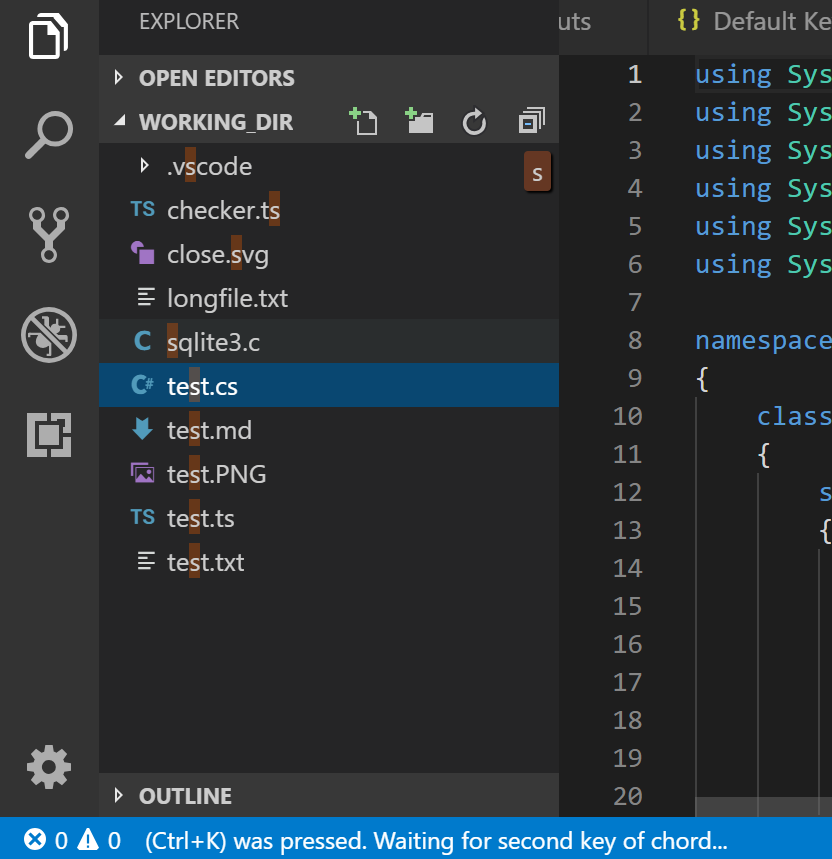
When focusing the file tree pane, hitting the "Save all" chord Ctrl+K-S triggers the file highlighting feature when the S key is pressed, making it impossible to use the chord.
VS Code version: Code 1.31.0 (7c66f58312b48ed8ca4e387ebd9ffe9605332caa, 2019-02-05T22:35:56.624Z)
OS version: Windows_NT x64 10.0.17134
System Info
|Item|Value|
|---|---|
|CPUs|Intel(R) Core(TM) i7-4700HQ CPU @ 2.40GHz (8 x 2394)|
|GPU Status|2d_canvas: enabled
checker_imaging: disabled_off
flash_3d: enabled
flash_stage3d: enabled
flash_stage3d_baseline: enabled
gpu_compositing: enabled
multiple_raster_threads: enabled_on
native_gpu_memory_buffers: disabled_software
rasterization: enabled
surface_synchronization: enabled_on
video_decode: enabled
webgl: enabled
webgl2: enabled|
|Memory (System)|7.89GB (1.75GB free)|
|Process Argv||
|Screen Reader|no|
|VM|50%|
Extensions (3)
Extension|Author (truncated)|Version
---|---|---
tslint|eg2|1.0.42
csharp|ms-|1.17.1
vscode-docker|Pet|0.5.2
 pedro-pedrosa
All 15 comments
(Experimental duplicate detection)
Thanks for submitting this issue. Please also check if it is already covered by an existing one, like:
![vscodebot[bot] picture](https://avatars2.githubusercontent.com/in/2406?v=4&s=40) vscodebot[bot]
on 7 Feb 2019
vscodebot[bot]
on 7 Feb 2019
As a temporary work-around you can disable highlight/filtering in the tree. Change the setting Workbench > List: Keyboard Navigation to simple or in json:
"workbench.list.keyboardNavigation": "simple"
 kieferrm
on 8 Feb 2019
kieferrm
on 8 Feb 2019
@pedro-pedrosa I can only reproduce if the workbench.list.keyboardNavigation is set to simple. Do you by any chance have that configuration?
 joaomoreno
on 8 Feb 2019
joaomoreno
on 8 Feb 2019
Currently set to highlight.
"workbench.list.keyboardNavigation": "highlight"
Anything else you'd like me to check?
pedro-pedrosa
on 8 Feb 2019
If I change it to simple it both triggers the chord and selects a file. If I change it to filter, it doesn't trigger the chord and starts filtering the file tree, same behaviour as highlight.
pedro-pedrosa
on 8 Feb 2019
I'm able to reproduce this issue in latest Insiders build.
- Click on any file in Explorer
- Press
Ctrl + K- status bar shows(Ctrl + K) was pressed waiting for second key of chord... - Press any key - it is added to highlight, status bar still shows
(Ctrl + K) was pressed waiting for second key of chord...
I have "workbench.list.keyboardNavigation": "highlight" in settings.
If I switch it to "simple" than I see next behavior:
- Press
Ctrl + K- status bar shows(Ctrl + K) was pressed waiting for second key of chord... - Press
s- all edited files saved, status bar is cleared and file/folder starting withsis focused
VS Code version: Code - Insiders 1.32.0-insider (1c50a87561055485d93a3961160902308497f1e3, 2019-02-08T06:16:17.233Z)
OS version: Windows_NT x64 10.0.17763
System Info
|Item|Value|
|---|---|
|CPUs|Intel(R) Core(TM) i7-6700 CPU @ 3.40GHz (8 x 3408)|
|GPU Status|2d_canvas: enabled
checker_imaging: disabled_off
flash_3d: enabled
flash_stage3d: enabled
flash_stage3d_baseline: enabled
gpu_compositing: enabled
multiple_raster_threads: enabled_on
native_gpu_memory_buffers: disabled_software
rasterization: enabled
surface_synchronization: enabled_on
video_decode: enabled
webgl: enabled
webgl2: enabled|
|Memory (System)|31.88GB (18.29GB free)|
|Process Argv||
|Screen Reader|no|
|VM|0%|
Extensions: none
 IllusionMH
on 8 Feb 2019
IllusionMH
on 8 Feb 2019
I've noticed one more thing:
- If i focus terminal window, and press ⌘K, ⌘S - nothing happens, even if i just press ⌘K i don't see the message
⌘K was pressed waiting for second key of chord..., but if i press ⌘R, then i see the message i mentioned above, but ⌘R, Shift+R doesn't work. - if i focus editor window itself, then all keybindings do work.
- if i focus explorer window, then ⌘K, ⌘S work, but ⌘R, Shift+R doesn't work, it instead highlighting the root folder:

 webcoderkz
on 11 Feb 2019
webcoderkz
on 11 Feb 2019
Just checked my keybindings:

As you can see, the When column is empty, so it means these keybindings should fire independent of focused area, e.g. text editor, terminal, explorer. Clearly a bug in 1.31 version.
webcoderkz
on 11 Feb 2019
I can confirm. Steps:
- define new keybinding, e.g.:
{
    "key": "ctrl+k s",
    "command": "actions.find"
}
- focus the explorer
- press
ctrl+k - the first part of the chord is entered
- press
s - the tree begins to highlight 's'.
The workaround provided by kieferrm works for me, which is to define in settings.json:
"workbench.list.keyboardNavigation": "simple"
As @pedro-pedrosa and @IllusionMH note, pressing s for example will trigger the chord and move the focus in the explorer to the first element with s.
@heihachi88 Please create a separate issue regarding the terminal. For the explorer, please try the workaround "workbench.list.keyboardNavigation": "simple"
 alexdima
on 11 Feb 2019
alexdima
on 11 Feb 2019
"workbench.list.keyboardNavigation": "simple - it's just a workaround? Things won't change in the future regards this setting?
webcoderkz
on 12 Feb 2019
Disabling features is not a workaround.
pedro-pedrosa
on 12 Feb 2019
I can repro this on Windows, but not on macOS and Linux.
joaomoreno
on 20 Feb 2019
@alexandrudima Check out what I get with Ctrl K.
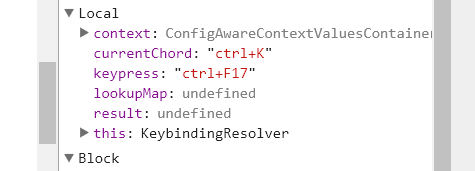
Ctrl-F17?! :thinking: Investigating...
joaomoreno
on 21 Feb 2019
@alexandrudima Found the issue. I was passing a raw KeyboardEvent to softDispatch which was resolving to that ctrl+F17 keypress. As soon as I wrapped it around StandardKeyboardEvent, I got the correct behavior:
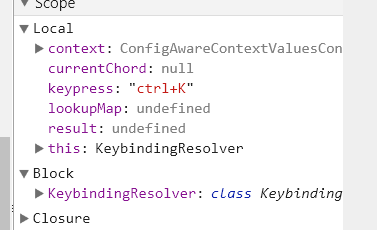
I'll close this with that fix... but you might want to look into it.
joaomoreno
on 21 Feb 2019
@joaomoreno That is crazy, I didn't realize TS would find those to be compatible... Thanks for the heads up. I've pushed 2ff5d6bec9c0406cf49359a0a92d8a382609b8ef which makes it more obvious and found another bad usage :/ https://github.com/Microsoft/vscode/commit/2ff5d6bec9c0406cf49359a0a92d8a382609b8ef#diff-2203e613237f08bd954dd0a758dfffb4R360
alexdima
on 21 Feb 2019
Related issues
 mrkiley
·
3Comments
mrkiley
·
3Comments
 VitorLuizC
·
3Comments
VitorLuizC
·
3Comments
 NikosEfthias
·
3Comments
NikosEfthias
·
3Comments
 ryan-wong
·
3Comments
ryan-wong
·
3Comments
 chrisdias
·
3Comments
chrisdias
·
3Comments
Most helpful comment
@joaomoreno That is crazy, I didn't realize TS would find those to be compatible... Thanks for the heads up. I've pushed 2ff5d6bec9c0406cf49359a0a92d8a382609b8ef which makes it more obvious and found another bad usage :/ https://github.com/Microsoft/vscode/commit/2ff5d6bec9c0406cf49359a0a92d8a382609b8ef#diff-2203e613237f08bd954dd0a758dfffb4R360