Vscode: SCM: Allow individual horizontal scrolling setting
Issue Type: Bug
- Save a change to a file with a decently long name in a git-enabled project.
- Open the source control side panel.
- Hover over "Changes" header and notice that buttons to stage or discard all changes are hidden unless the sidebar is expanded.
In previous version, buttons were visible no matter the sidebar width:

In version 1.31.0, the buttons are hidden when file name or path is long:

The buttons become visible again when the sidebar is expanded:

VS Code version: Code 1.31.0 (7c66f58312b48ed8ca4e387ebd9ffe9605332caa, 2019-02-05T22:32:14.164Z)
OS version: Darwin x64 16.7.0
System Info
|Item|Value|
|---|---|
|CPUs|Intel(R) Core(TM) i5-3210M CPU @ 2.50GHz (4 x 2500)|
|GPU Status|2d_canvas: enabled
checker_imaging: disabled_off
flash_3d: enabled
flash_stage3d: enabled
flash_stage3d_baseline: enabled
gpu_compositing: enabled
multiple_raster_threads: enabled_on
native_gpu_memory_buffers: enabled
rasterization: enabled
surface_synchronization: enabled_on
video_decode: enabled
webgl: enabled
webgl2: enabled|
|Load (avg)|2, 4, 4|
|Memory (System)|8.00GB (1.56GB free)|
|Process Argv|-psn_0_294984|
|Screen Reader|no|
|VM|0%|
Extensions: none
 jlave-dev
All 5 comments
@jameslave You have enabled workbench.tree.horizontalScrolling. As mentioned in the release notes, this now also works in SCM, so you should be able to scroll horizontally there as well.
 joaomoreno
on 7 Feb 2019
joaomoreno
on 7 Feb 2019
@joaomoreno OK, but now with having to scroll, I can't see the filenames to tell which files I'm actually adding. This is a terrible behavior:
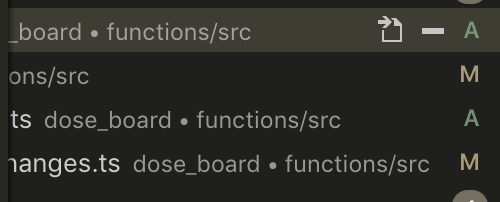
Why isn't there an option for whether to horizontally scroll the source control pane only? Horizontal scrolling is great for the main project tree; for source control... not so much.
jlave-dev
on 8 Feb 2019
@joaomoreno
I think we need something like workbench.tree.horizontalScrollingSCM with options inherit, true and false. inherit meaning respect value of workbench.tree.horizontalScrolling.
I'd be glad to help if I could get some pointers to code.
 njkevlani
on 11 Feb 2019
njkevlani
on 11 Feb 2019
Not sure if it is possible to map every list to its own setting, so horizontalScrollingSCM won't help with scrolling in Search panel etc. Basically horizontal scroll interferes with lists that have actions/labels on the right side and they better to be in view all the time.
Is it possible to bring back setting that controlled only project tree only (as it was before all lists had scroll support). May remove some (or _most_ in my case) problems with new scrolling behavior.
In my case it is deeply nested structure (that follows convention that we can't change) so horizontal scroll is must have for explorer, however it will great to have search results or path (in SCM view etc.) cropped to have easy access to actions without scroll.
 IllusionMH
on 26 Mar 2019
IllusionMH
on 26 Mar 2019
We closed this issue because we don't plan to address it in the foreseeable future. You can find more detailed information about our decision-making process here. If you disagree and feel that this issue is crucial: We are happy to listen and to reconsider.
If you wonder what we are up to, please see our roadmap and issue reporting guidelines.
Thanks for your understanding and happy coding!
 vscode-triage-bot
on 11 Nov 2020
vscode-triage-bot
on 11 Nov 2020
Related issues
 trstringer
·
3Comments
trstringer
·
3Comments
 VitorLuizC
·
3Comments
VitorLuizC
·
3Comments
 villiv
·
3Comments
villiv
·
3Comments
 vsccarl
·
3Comments
vsccarl
·
3Comments
 v-pavanp
·
3Comments
v-pavanp
·
3Comments
Most helpful comment
@joaomoreno
I think we need something like
workbench.tree.horizontalScrollingSCMwith optionsinherit,trueandfalse.inheritmeaning respect value ofworkbench.tree.horizontalScrolling.I'd be glad to help if I could get some pointers to code.