Vscode: New explorer: switching editors should clear focus
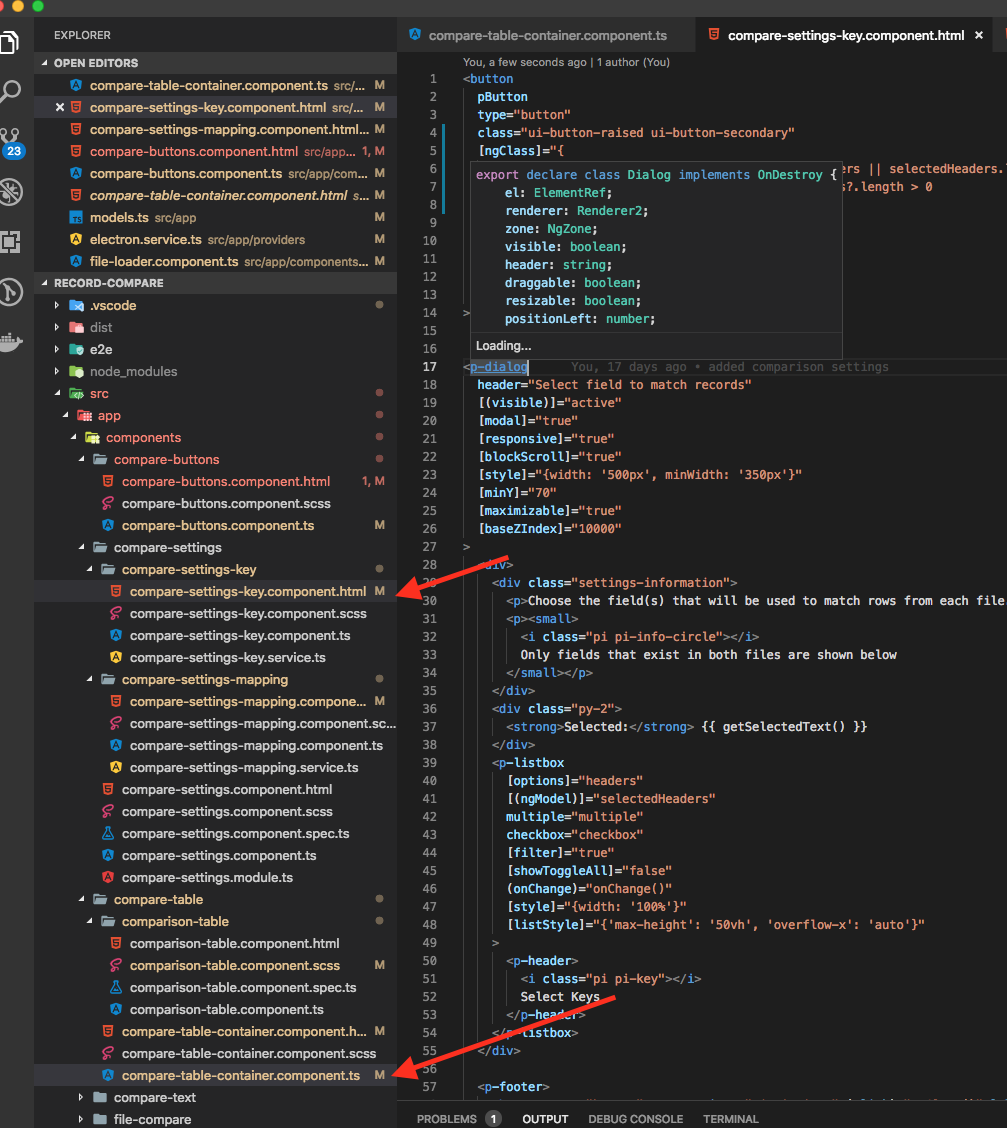
I find myself way more often in a situation where the explorer is not indicating to me what the currently active file is or it indicates 2 things as being selected and focused. Now that I think about it I think this is what happens:
- I click on a file to open it
- I click on a folder to expand it
- I jump to another editor
Now I can be in two states:
- either I get the currently active file not as selected
- or I see the folder and the file as being selected which imho is not very useful
I think in the old explorer we always cleared focus when we revealed the active file to ensure that only the file that is active shows selected/focused in the explorer and I very much liked that behavior.
Proof:

 bpasero
All 8 comments
@isidorn This is about having switched from using selection to focus when revealing the explorer files. Please re-evaluate whether you still want to keep pushing this.
 joaomoreno
on 6 Feb 2019
joaomoreno
on 6 Feb 2019
I have also noticed this problem. Also, I notice that when I use cmd+p to navigate to a file, the file chosen is not made active in the explorer. (e.x. all folders are collapsed, I choose a file using cmd+p, and the folders in the explorer remain collapsed and the open file is not given focus).
Also, when changing files using the active tabs, the old file remains highlighted along with the new one.
 paustint
on 9 Feb 2019
paustint
on 9 Feb 2019
Also: the command Cmd+P > File: Reveal Active File in Side Bar focuses the previous explorer selection instead of the active tab.
 alexkrolick
on 12 Feb 2019
alexkrolick
on 12 Feb 2019
I agree that this should be improved. If you select a file from the explorer, it should be highlighted until you stop using that file. If you select an open tab for another file, why is the original file highlighted in the sidebar? Why not give the option. The sidebar should have one file selected. There must be a reason that some people like having two files highlighted, but I think there should only be one file highlighted at a time. Whatever tab is open is the file that should be highlighted. If someone wants historical highlighting in the sidebar, please make that configurable. The default behavior should be one file highlighted based on what tab is open. Thank you!
 parlays
on 13 Feb 2019
parlays
on 13 Feb 2019
The current behavior really makes no sense and I really hope it is a bug and not intended behavior.
In addition, the highlighted file MIGHT update when switching focus on a tab or navigating to a different file, but it seems inconsistent. And if it does indeed update on file change, there are usually two files highlighted.
I really cannot think of a use-case where a developer would want that, which is why I am really hoping this is a bug.
paustint
on 14 Feb 2019
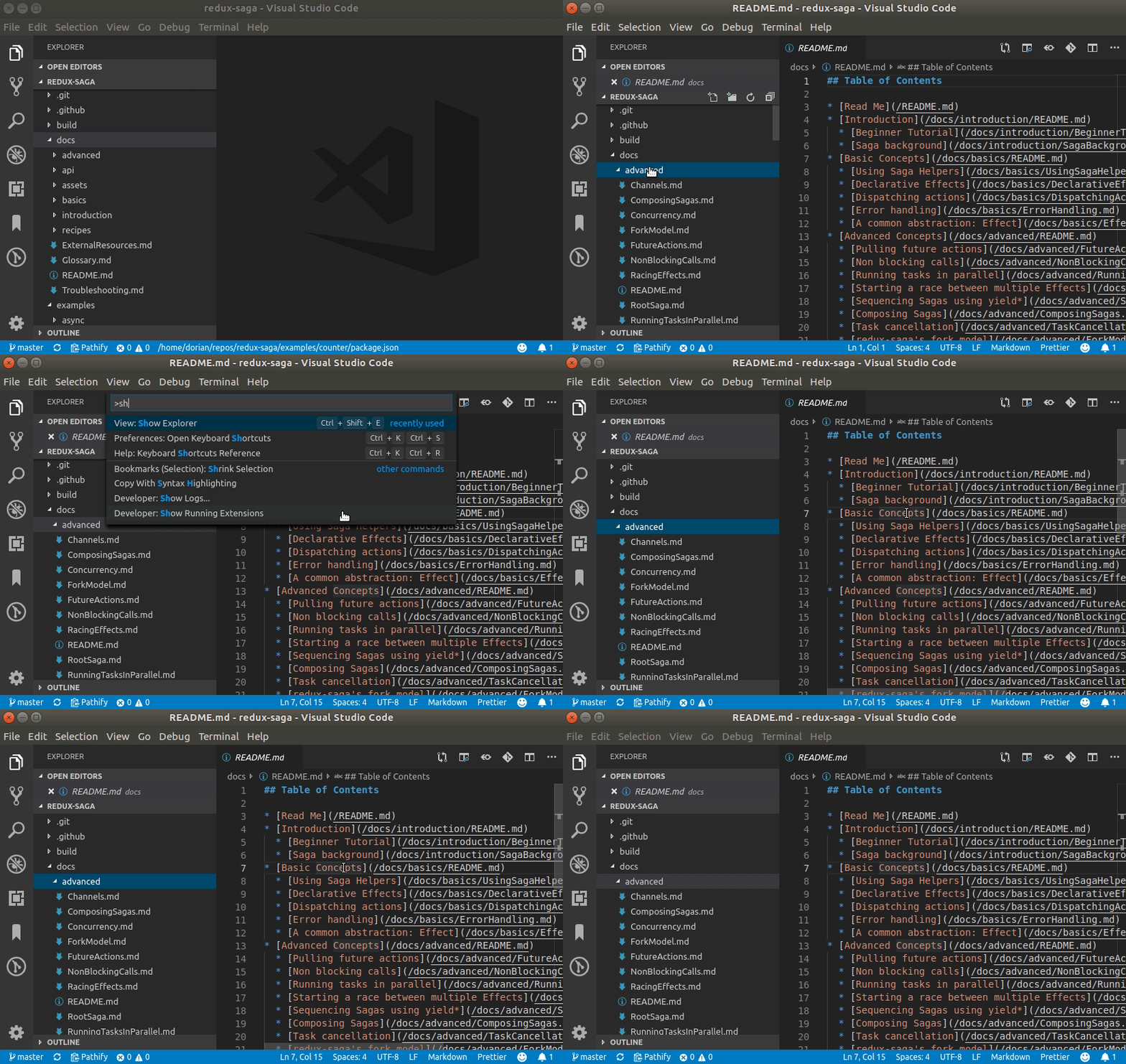
When this happens, using View > Show explorer (workbench.view.explorer, bound to Ctrl + shift + E) doesn't focus the current file, either:
 dorian-marchal
on 17 Feb 2019
dorian-marchal
on 17 Feb 2019
I have decided to go back to the old bheavior: that the selection and focus are more aligned.
Please try it out in wednesday's vscode insiders and let me know what you think of the behavior.
Fixed via 9ef682db65
 isidorn
on 19 Feb 2019
isidorn
on 19 Feb 2019
Thank you!! I look forward to checking out the revert! The new functionality really annoyed me and lowered my productivity as I had to hunt to find what file was actually focused.
paustint
on 20 Feb 2019
Related issues
 VitorLuizC
·
3Comments
VitorLuizC
·
3Comments
 NikosEfthias
·
3Comments
NikosEfthias
·
3Comments
 lukehoban
·
3Comments
lukehoban
·
3Comments
 biij5698
·
3Comments
biij5698
·
3Comments
 sirius1024
·
3Comments
sirius1024
·
3Comments
Most helpful comment
I have decided to go back to the old bheavior: that the selection and focus are more aligned.
Please try it out in wednesday's vscode insiders and let me know what you think of the behavior.
Fixed via 9ef682db65