Vscode: Insiders build - touchbar no longer shows debug actions
Issue Type: Bug
Steps to reproduce
- Download vscode insiders build
- Write a simple script to debug (I've tested it on both js and python)
- Set up a breakpoint
- Run it with whatever configuration is the default for the language you chose
- Let it hit the breakpoint
Expected Results
The touchbar shows the continue, step over, step into, restart and stop
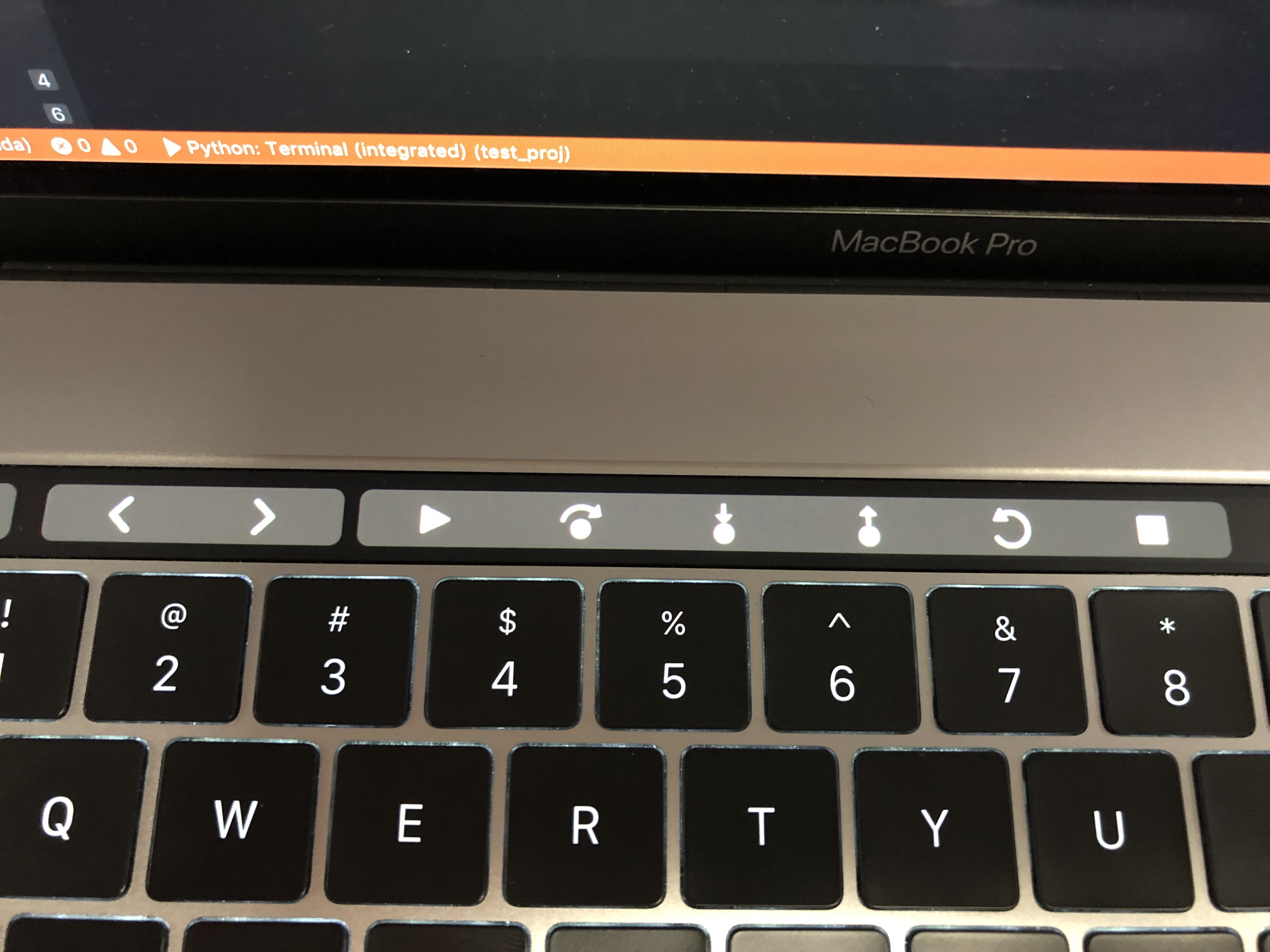
Image taken from the latest standard release
Actual results
That section of the touchbar shows empty
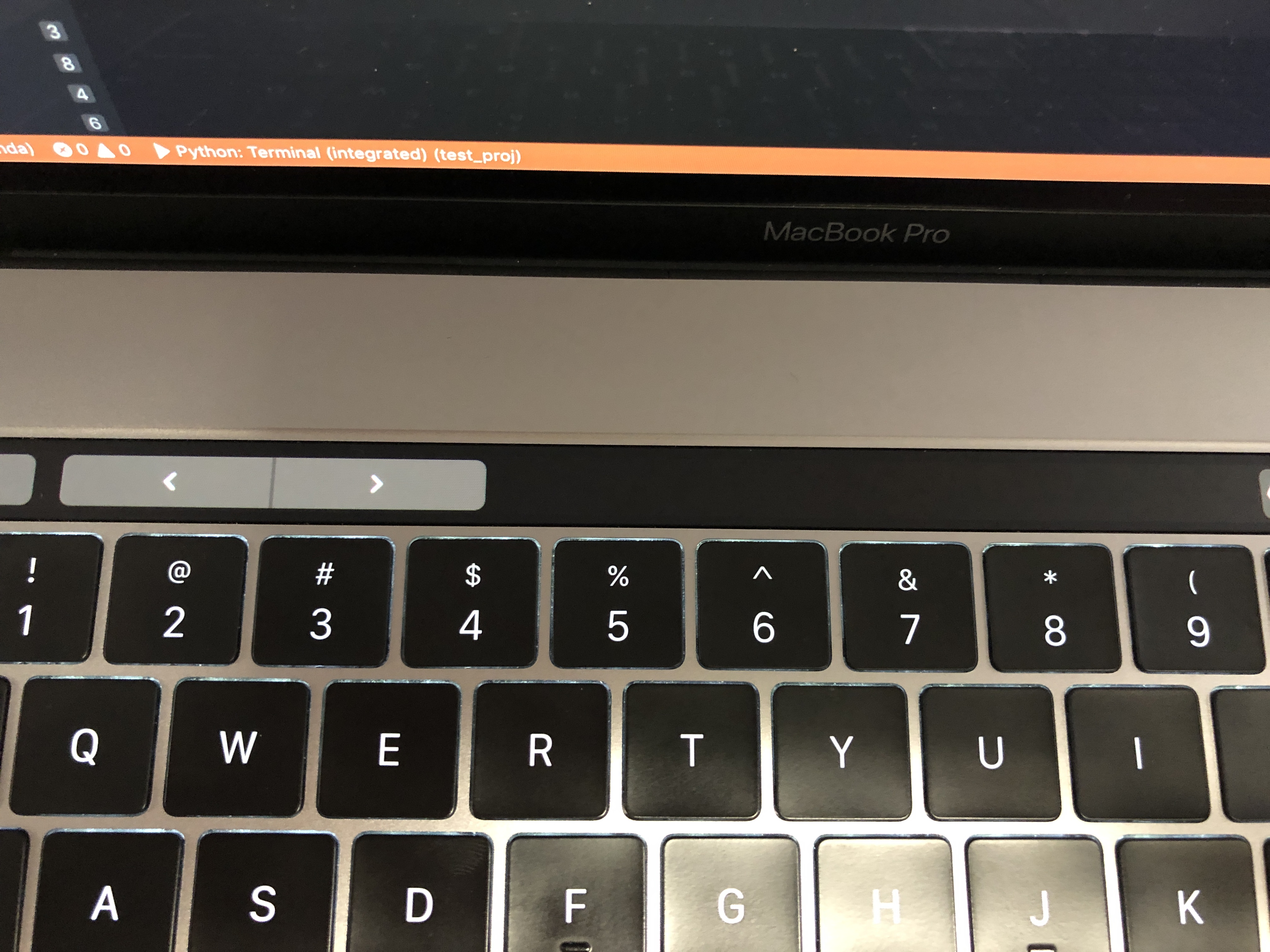
VS Code version: Code - Insiders 1.31.0-insider (926cfe1c4ac6a438f8fa3c4f164219c7c4bf17b5, 2019-01-17T06:14:05.649Z)
OS version: Darwin x64 18.2.0
System Info
|Item|Value|
|---|---|
|CPUs|Intel(R) Core(TM) i7-8750H CPU @ 2.20GHz (12 x 2200)|
|GPU Status|2d_canvas: enabled
checker_imaging: disabled_off
flash_3d: enabled
flash_stage3d: enabled
flash_stage3d_baseline: enabled
gpu_compositing: enabled
multiple_raster_threads: enabled_on
native_gpu_memory_buffers: enabled
rasterization: enabled
surface_synchronization: enabled_on
video_decode: enabled
webgl: enabled
webgl2: enabled|
|Load (avg)|2, 2, 2|
|Memory (System)|16.00GB (3.32GB free)|
|Process Argv||
|Screen Reader|no|
|VM|0%|
Extensions: none
 aLagoG
All 11 comments
(Experimental duplicate detection)
Thanks for submitting this issue. Please also check if it is already covered by an existing one, like:
![vscodebot[bot] picture](https://avatars2.githubusercontent.com/in/2406?v=4&s=40) vscodebot[bot]
on 18 Jan 2019
vscodebot[bot]
on 18 Jan 2019
@weinand you have a mac touchbar, can you reproduce with latest insiders?
If yes let's inspect on your machine in the afternoon
fyi @bpasero
 isidorn
on 18 Jan 2019
isidorn
on 18 Jan 2019
@isidorn Ok, let's do this.
BTW, there are lots of touchbar simulators for those poor souls that don't have one ;-)
E.g. https://sindresorhus.com/touch-bar-simulator/ or https://red-sweater.com/touche/.
 weinand
on 18 Jan 2019
weinand
on 18 Jan 2019
Hehe thanks
isidorn
on 18 Jan 2019
The simulator is perfect to test this. This could be an Electron 3 regression too.
 bpasero
on 18 Jan 2019
bpasero
on 18 Jan 2019
@bpasero yeah I just verified that everything is good on my end regarding context keys so this is must be a Electron 3 regression. Forwarding to you.
Note that the actions do appear in the touchbar correctly for a second and than disapear.
I verified and all the icons are there as before.
isidorn
on 18 Jan 2019
@weinand do you see this as well?
bpasero
on 21 Jan 2019
I have my touch bar configured to only show F keys for VS Code (and I don't know how to change this behavior...)
weinand
on 21 Jan 2019
bpasero
on 21 Jan 2019
@misolori can you help me out here, the issue seems to be that in newer versions of Electron, the size in touchbar buttons has changed. I noticed we use 100x100px versions for our touchbar icons (PNG) and this will now cause the buttons to appear very large, thus pushing the debug buttons out of the view:

All our touchbar icons end with tb.png:
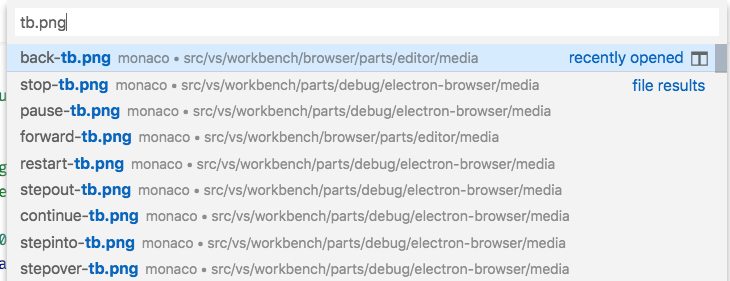
And if you make a change to any of them and run out of sources, you should see the touchbar reflect your changes. You can use the touchbar simulator in case you do not have a touchbar: https://github.com/sindresorhus/touch-bar-simulator.
When I remove all the transparent background around the back/forward icons, I get a better result compared to what we have now, but it is still not perfect. Maybe it would also be a good idea to revisit what Apple recommends in terms of icon sizes.
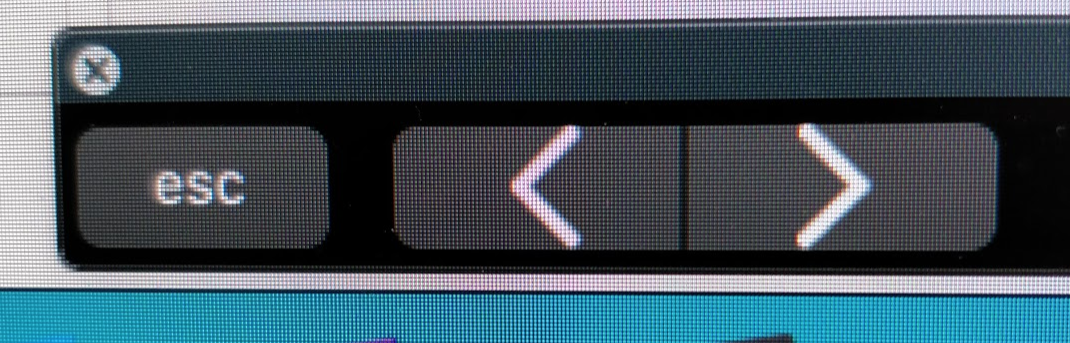
Due to the nature of the touchbar which seems to drop button-groups completely out of the touchbar once their size exceeds the visible size, I would suggest that we try to produce icons that result in a minimal width of touch buttons in the end.
Thanks!
bpasero
on 21 Jan 2019
@bpasero thanks for doing the investigative work (saved me a bunch of time). And you were totally right about the icon sizes, PR has been created to fix this issue.
 misolori
on 23 Jan 2019
misolori
on 23 Jan 2019
Related issues
 sirius1024
·
3Comments
sirius1024
·
3Comments
 DovydasNavickas
·
3Comments
DovydasNavickas
·
3Comments
 omidgolparvar
·
3Comments
omidgolparvar
·
3Comments
 chrisdias
·
3Comments
chrisdias
·
3Comments
 villiv
·
3Comments
villiv
·
3Comments
Most helpful comment
@bpasero thanks for doing the investigative work (saved me a bunch of time). And you were totally right about the icon sizes, PR has been created to fix this issue.