Vscode: Option to disable "Failed to save '...': The content on disk is newer." check
I would like an option to disable dirty write checking:
Failed to save 'xyz': The content on disk is newer. Please compare your version with the one on disk.
My workflow does include dirty writes and having to go through the merging is annoying.
Example: keeping dirty state in an open file then switching git branch to save and commit (that file only), then switching back to the previous branch.
 egonelbre
All 5 comments
I am too.
 MBurtsev
on 13 Apr 2019
MBurtsev
on 13 Apr 2019
I saw this for the first time today, there is no option to "Force save anyways, because I know better than my IDE"
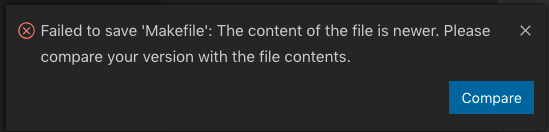
I know I can click on the [Compare] button and then click the checkmark in the diff view to save my file, but sometimes I just know I want to save without looking at a diff. The dialog should have a [Force Save] button too.
 brianonn
on 27 Sep 2019
brianonn
on 27 Sep 2019
I seem to recall that VSCode used to refresh the file contents more often.
Also, if I make another edit to the file in VSCode, I'd expect that I would now "win" the race and my save would occur, but instead I'm stuck with "failed to save" errors.
Even closing and reopening VSCode doesn't affect this. I have to close the file, say "don't save", then reopen the file to be able to make edits. Feels like a design change or regression?
 donnie-msft
on 6 Nov 2019
donnie-msft
on 6 Nov 2019
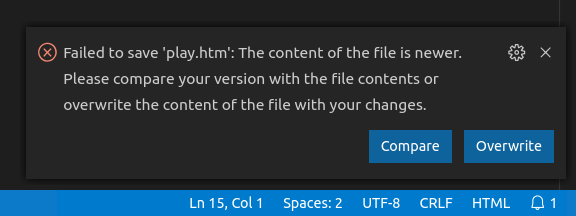
Pushed 2 changes to make this better:
- a new setting
files.saveConflictResolutionthat allows to turn off save conflict detection (this can be set on a folder level so that e.g. you can disable this selectively for network folders only) - a way to overwrite a file directly from the notification selectively
 bpasero
on 9 Dec 2019
bpasero
on 9 Dec 2019
Note: setting name changed to files.saveConflictResolution and needs to be configured as overwriteFileOnDisk to disable the confirmation prompt.
bpasero
on 29 Jan 2020
Related issues
 DovydasNavickas
·
3Comments
DovydasNavickas
·
3Comments
 biij5698
·
3Comments
biij5698
·
3Comments
 borekb
·
3Comments
borekb
·
3Comments
 mrkiley
·
3Comments
mrkiley
·
3Comments
 shanalikhan
·
3Comments
shanalikhan
·
3Comments
Most helpful comment
Pushed 2 changes to make this better:
files.saveConflictResolutionthat allows to turn off save conflict detection (this can be set on a folder level so that e.g. you can disable this selectively for network folders only)