Vscode: Unable to start Code on 32-bit Ubuntu 14
- VSCode Version: Latest Insiders. 1.31.0
- OS Version: Ubuntu 14, 32-bit.
Steps to Reproduce:
- Install and Launch VS Code Insiders.
Does this issue occur when all extensions are disabled?: Yes
Bug: When executed from the command line it shows "/lib/i386-linux-gnu/libdbus-1.so.3: no version information available (required by /usr/share/code-insiders/bin/../code-insiders". Is this a VS Code bug or do I need to somehow update my OS or dependencies? The non-Insiders VS Code works and so did the previous Insiders from December 17th.
This is how it looks:

 sean-mcmanus
All 9 comments
Oh, so this happens on linux as well,
@sean-mcmanus , please try connecting to the internet, and then try running VS Code.
Let me know if that works.
 kalpaj12
on 4 Jan 2019
kalpaj12
on 4 Jan 2019
I am connected to the internet -- that's how I downloaded the latest VS Code Insiders.
sean-mcmanus
on 4 Jan 2019
@Tyriar can you take this?
 bpasero
on 4 Jan 2019
bpasero
on 4 Jan 2019
I'm having trouble getting a VM running, does this fix it?
sudo apt-get install libdbus-1-3
 Tyriar
on 4 Jan 2019
Tyriar
on 4 Jan 2019
@Tyriar I ran that command, but it said "libdbus-1-3 is already the newest version" and the same failure occurs afterwards.
sean-mcmanus
on 4 Jan 2019
@Tyriar Strangely, VS Code is working now when I run "code-insiders" from the command line (I don't understand why it would be different), but whenever I launch the app from the left-side task launcher it fails. This is what it shows in the developer tools:
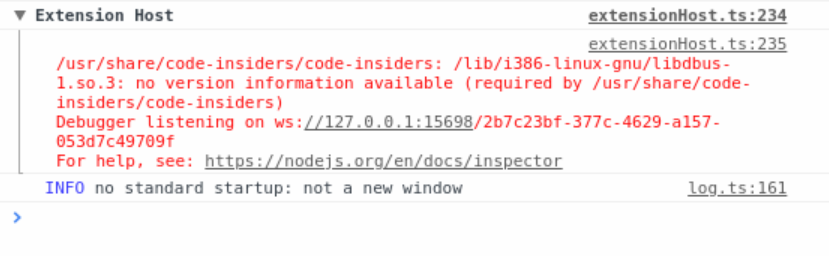
The same failure occurs with today's Insiders too.
sean-mcmanus
on 4 Jan 2019
I reported this as https://github.com/electron/electron/issues/16364 for the error output in the command line.
I can however not reproduce any crash or hang, even though I see the error message printed the application seems to work fine.
@sean-mcmanus do you still get the crash?
bpasero
on 11 Jan 2019
I upgraded to the today's insiders and the bug is fixed (or no longer repros)…my last update was a week ago, so I'm not sure of the exact update that fixed it. The command line message still occurs, but it seems unrelated.
sean-mcmanus
on 11 Jan 2019
Ok closing then.
bpasero
on 14 Jan 2019
Related issues
 chrisdias
·
3Comments
chrisdias
·
3Comments
 omidgolparvar
·
3Comments
omidgolparvar
·
3Comments
 vsccarl
·
3Comments
vsccarl
·
3Comments
 lukehoban
·
3Comments
lukehoban
·
3Comments
 trstringer
·
3Comments
trstringer
·
3Comments
Most helpful comment
@Tyriar Strangely, VS Code is working now when I run "code-insiders" from the command line (I don't understand why it would be different), but whenever I launch the app from the left-side task launcher it fails. This is what it shows in the developer tools:
The same failure occurs with today's Insiders too.