Vscode: Code scrolls when typing with markdown preview open
Issue Type: Bug
VS Code version: Code 1.30.1 (dea8705087adb1b5e5ae1d9123278e178656186a, 2018-12-18T18:12:07.165Z)
VS Code version: Code - Insiders 1.31.0-insider (2803a8655cf5e05066a4ee47cce303eefca6408c, 2018-12-20T09:10:39.545Z)
OS version: Windows_NT x64 10.0.17134
Steps to Reproduce:
- Open a markdown file longer than your screen height
- Move text cursor near the end of the file
- Type
Expected result: Markdown preview doesn't affect code scroll position unless I directly scroll the preview.
Actual result: Code scrolls around when typing.

Does this issue occur when all extensions are disabled?: Yes
System Info
|Item|Value|
|---|---|
|CPUs|Intel(R) Core(TM) i5-6300U CPU @ 2.40GHz (4 x 2496)|
|GPU Status|2d_canvas: enabled
checker_imaging: disabled_off
flash_3d: enabled
flash_stage3d: enabled
flash_stage3d_baseline: enabled
gpu_compositing: enabled
multiple_raster_threads: enabled_on
native_gpu_memory_buffers: disabled_software
rasterization: enabled
video_decode: enabled
video_encode: enabled
webgl: enabled
webgl2: enabled|
|Memory (System)|7.87GB (1.06GB free)|
|Process Argv||
|Screen Reader|no|
|VM|0%|
Extensions (63)
Extension|Author (truncated)|Version
---|---|---
livs|abh|1.0.6
html-snippets|abu|0.2.1
vscode-base64|ada|0.1.0
vscode-caniuse|aka|0.5.3
ts-loader-problem-matcher|alq|0.3.0
random-string-password-generator|bib|1.0.2
unique-lines|bib|1.0.0
cobol|bit|4.0.0
simple-react-snippets|bur|1.2.2
npm-intellisense|chr|1.3.0
path-intellisense|chr|1.4.2
gitignore|cod|0.6.0
indent4to2|Com|0.1.2
vscode-svgviewer|css|1.4.7
vscode-gist|dba|1.0.0
xml|Dot|2.4.0
vscode-generate-getter-setter|DSK|0.5.0
vscode-babel-coloring|dza|0.0.4
EditorConfig|Edi|0.12.5
tslint|eg2|1.0.42
vscode-npm-script|eg2|0.3.5
php-debug|fel|1.12.6
php-intellisense|fel|2.3.10
php-pack|fel|1.0.2
vscode-solution-explorer|fer|0.3.0
vscode-auto-open-markdown-preview|hnw|0.0.4
beautify|Hoo|1.4.7
Ionide-FAKE|Ion|1.2.3
Ionide-Paket|Ion|1.12.0
reg|ion|0.0.2
debugger-for-phantomjs|ira|0.1.1
csharpextensions|jch|1.3.0
jenkins-declarative-support|jmM|0.1.0
latte|Kas|0.1.1
refactorix|kri|0.3.6
tgit-cmds|mbi|1.2.0
sort-typescript-imports|mic|1.4.1
xml-format|mik|1.0.1
ecdc|mit|0.12.0
mssql|ms-|1.4.0
cpptools|ms-|0.20.1
csharp|ms-|1.17.1
mono-debug|ms-|0.15.8
node-debug2|ms-|1.31.1
PowerShell|ms-|1.10.2
team|ms-|1.144.1
debugger-for-chrome|msj|4.11.1
quicktype|qui|12.0.46
vscode-sort-json|ric|1.13.0
vscode-icons|rob|8.0.0
annotator|ryu|0.11.0
partial-diff|ryu|1.4.0
jenkinsfile-support|sec|0.1.0
code-settings-sync|Sha|3.2.4
trailing-spaces|sha|0.2.11
vscode-hexdump|sle|1.7.2
rewrap|stk|1.9.1
es-quotes|vil|0.2.6
vscode-react-native|vsm|0.7.0
change-case|wma|1.0.0
JavaScriptSnippets|xab|1.7.1
editorconfig-vscode-snippet|zgu|0.2.0
vscode-open-in-github|ziy|1.3.6
 the-ress
All 16 comments
(Experimental duplicate detection)
Thanks for submitting this issue. Please also check if it is already covered by an existing one, like:
- markdown files preview does not save scroll position (#63690)
- Can't scroll a markdown preview using touch (#39195)
- Scrolling markdown preview to top does not always reveal first line of editor (#61815)
- Drag markdown preview to New Window (#32818)
- Unable to DND over any
editor (markdown, html preview) (#25856)
![vscodebot[bot] picture](https://avatars2.githubusercontent.com/in/2406?v=4&s=40) vscodebot[bot]
on 20 Dec 2018
vscodebot[bot]
on 20 Dec 2018
This looks like a duplicate of #53545
 igor-krupenja
on 22 Dec 2018
igor-krupenja
on 22 Dec 2018
Please share the source of your markdown file
 mjbvz
on 28 Dec 2018
mjbvz
on 28 Dec 2018
@mjbvz Here's the source: https://gist.githubusercontent.com/the-ress/5f6c071c50db5caf82783e04a07d2a4e/raw/292549c1e46eed95fa336566edff950046f3cc99/sample.md
the-ress
on 2 Jan 2019
@mjbvz I'm seeing the same behavior as OP with provided file still
 sbatten
on 31 Jan 2019
sbatten
on 31 Jan 2019
I am seeing this on Version 1.35.1 for MacOS. Just did a google search after I experienced this issue and came across this thread. I also had a pending update to 1.36.0 that I installed, and still see the same behavior.
 glennbarrett
on 6 Jul 2019
glennbarrett
on 6 Jul 2019
I'm experiencing the same issue. It seems to be somehow caused by a lot of badges/shields in one line.
Here is my affected file: https://gist.github.com/BjoernPetersen/0510004e98161626741e31adc4400109
 BjoernPetersen
on 31 Aug 2019
BjoernPetersen
on 31 Aug 2019
Hi there also have this nasty bug with this file
https://gist.github.com/Kwaadpepper/a4568f1ed718cab1ec3b59d3d7ac3e76
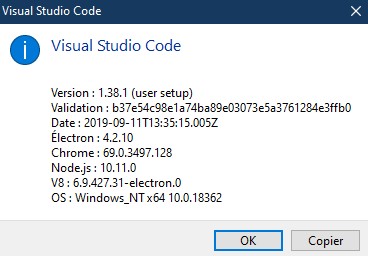
As for markdown related extension, I have
Nom : Markdown All in One
ID : yzhang.markdown-all-in-one
Description : All you need to write Markdown (keyboard shortcuts, table of contents, auto preview and more)
Version : 2.4.2
Serveur de publication : Yu Zhang
Lien de la Place de marché pour VS : https://marketplace.visualstudio.com/items?itemName=yzhang.markdown-all-in-one

Nom : markdownlint
ID : davidanson.vscode-markdownlint
Description : Markdown linting and style checking for Visual Studio Code
Version : 0.30.2
Serveur de publication : David Anson
Lien de la Place de marché pour VS : https://marketplace.visualstudio.com/items?itemName=DavidAnson.vscode-markdownlint
It looks like the file Windows scrolls when typing just a bit and preview windows have difficulties to follow and desynchronizes itself. Making a mouse quick scroll replaces things right.
EDIT: I can confirm removing badges solves this issue.
EDIT 2:

Broke image link in preview windows causes this erratic behaviour.
[](https://badge.fury.io/gh/kwaadpepper%2Flaravel-responsivefilemanager)
Here is HTTP headers for https://badge.fury.io/gh/kwaadpepper/laravel-responsivefilemanager.svg answer
It comes with no html content
HTTP/1.1 404 Not Found
Server: Cowboy
Date: Sun, 15 Sep 2019 06:53:29 GMT
Connection: keep-alive
Content-Type: application/octet-stream
X-Request-Id: 97612d01-06de-4259-9674-304cfdc56f55
X-Runtime: 0.008840
Access-Control-Allow-Origin: https://badge.fury.io
Access-Control-Allow-Methods: GET
Access-Control-Allow-Headers: x-requested-with
Access-Control-Max-Age: 3628800
Vary: Accept-Encoding
Content-Encoding: gzip
Transfer-Encoding: chunked
Via: 1.1 vegur
And for link anwser https://badge.fury.io/gh/kwaadpepper/laravel-responsivefilemanager
It comes with a small html 404 content
HTTP/1.1 404 Not Found
Server: Cowboy
Date: Sun, 15 Sep 2019 06:54:53 GMT
Connection: keep-alive
Content-Type: text/html; charset=utf-8
X-Request-Id: 1fbadc19-b7ea-4d74-b4b7-2261dc93b16d
X-Runtime: 0.006767
Vary: Accept-Encoding
Content-Encoding: gzip
Transfer-Encoding: chunked
Via: 1.1 vegur
If I put html content it works ok
<a href="https://badge.fury.io/gh/Kwaadpepper%2Flaravel-responsivefilemanager"><img src="https://badge.fury.io/gh/Kwaadpepper%2Flaravel-responsivefilemanager.svg" alt="GitHub version" height="18"></a>
 Kwaadpepper
on 15 Sep 2019
Kwaadpepper
on 15 Sep 2019
I see this behavior consistently if there is a scaled image in the preview pane. In my CSS I set the max-width of images to 100%. I _think_ this is what produces the issue.
 gmccullo
on 7 Oct 2019
gmccullo
on 7 Oct 2019
Another clue: turning off markdown.preview.scrollPreviewWithEditor prevents the problem (but also obviously stops the preview position from synching with the editor).
gmccullo
on 16 Dec 2019
I think the problem went away in the previous release. At least I didn't notice it. But now it's back again. Very frustrating bug.
gmccullo
on 19 Mar 2020
Face the same problem with this version
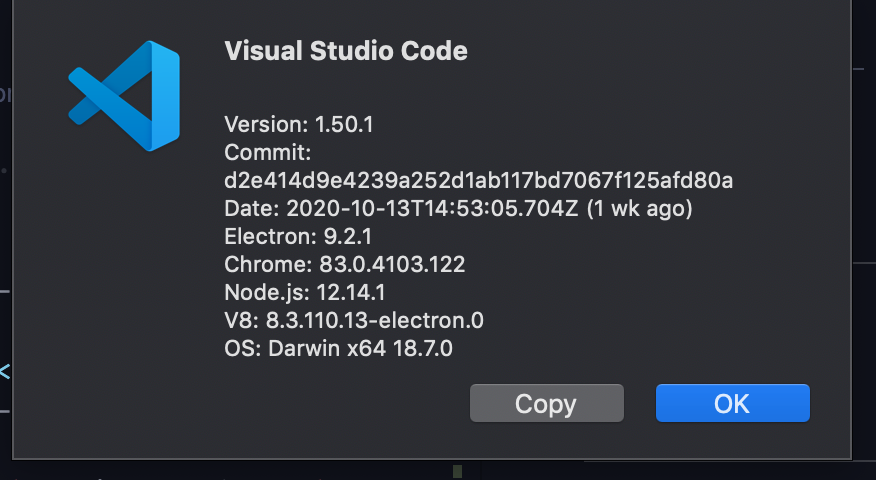
Have to use https://hackmd.io/ instead of it because of this annoying bug
 andy3520
on 26 Oct 2020
andy3520
on 26 Oct 2020
Same issue. for me it scrolls upwards.

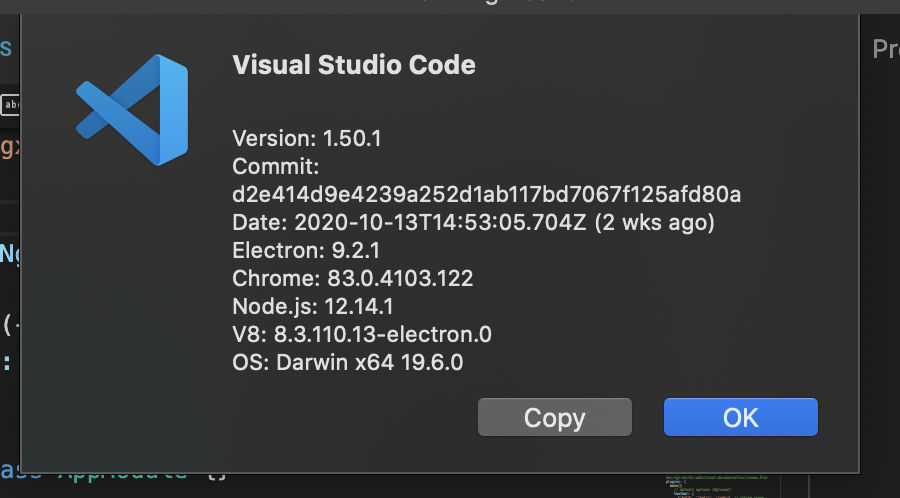
Related to #89930?
 sibiraj-sr
on 28 Oct 2020
sibiraj-sr
on 28 Oct 2020
I have the same issue, and I noticed that once I insert an image in it ,this will happen, but when I didn't have images in it, the preview works fine, it has been there for many versions and I nearly encounter it with every version I've used(from the mid of last year.).
 buzhangjiuzhou
on 16 Nov 2020
buzhangjiuzhou
on 16 Nov 2020
Also experiencing this issue, which seems to be new (I've previously edited the same document in Markdown Preview mode without having the page scrolling up one line every time I type a character)
It's been reported a number of times it seems. There's a closed issue here https://github.com/microsoft/vscode/issues/57216
 pacharanero
on 16 Nov 2020
pacharanero
on 16 Nov 2020
I have the same issue, and I noticed that once I insert an image in it ,this will happen, but when I didn't have images in it, the preview works fine, it has been there for many versions and I nearly encounter it with every version I've used(from the mid of last year.).
With the latest version, 1.51.1, this was fixed, thank you !
buzhangjiuzhou
on 18 Nov 2020
Related issues
 VitorLuizC
·
3Comments
VitorLuizC
·
3Comments
 shanalikhan
·
3Comments
shanalikhan
·
3Comments
 trstringer
·
3Comments
trstringer
·
3Comments
 vsccarl
·
3Comments
vsccarl
·
3Comments
 DovydasNavickas
·
3Comments
DovydasNavickas
·
3Comments
Most helpful comment
I think the problem went away in the previous release. At least I didn't notice it. But now it's back again. Very frustrating bug.