Vscode: Insider Edition: Explorer window shows wrong nodes when expanding/collapsing folders
- VSCode Version: Version 1.3.1.0-Insider (d2b050911cbf3b6e77584f61b0cf088058a20fe5)
- OS Version: macOS high sierra (10.13.6)
This is what happens
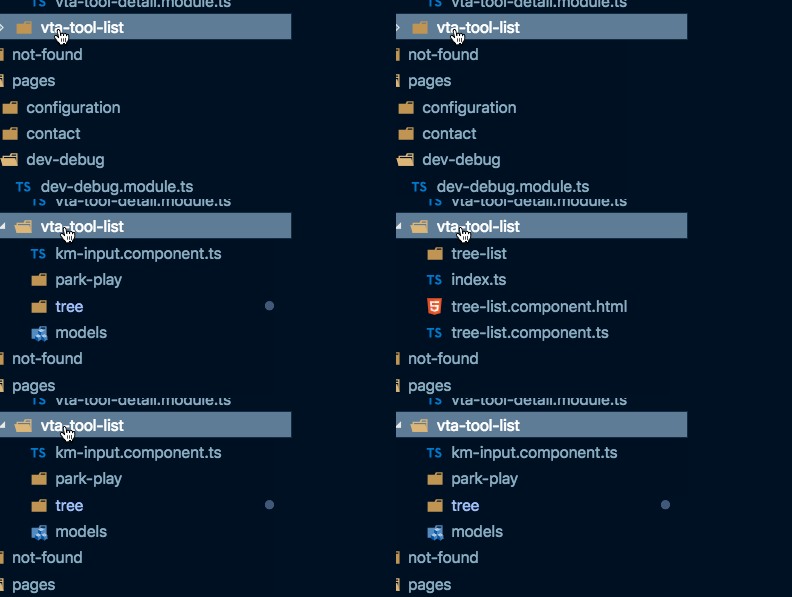
Unfortunately reproducing is kinda' hard. Starts happening after a while of using VSCode
Does this issue occur when all extensions are disabled?: Yes
 juristr
All 5 comments
This is weird. Let me know if you can reproduce.
 joaomoreno
on 20 Dec 2018
joaomoreno
on 20 Dec 2018
@joaomoreno well that's exactly the problem 🤔. Any way I can give you some debug info when it happens? Because it starts happening quite immediately when I start VSCode and it started with today morning's update of the insiders edition.
Also for instance, if I tell Code to select the open item in the Explorer, it fails
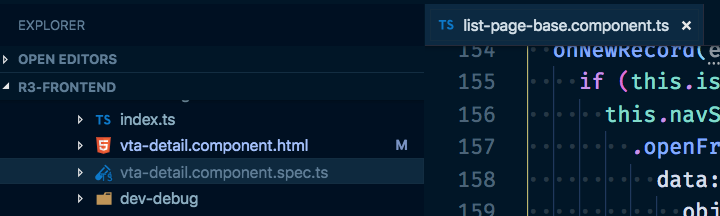
In the screenshot you see the list-page-base.component.ts being active, but vta-detail.component.spec.ts being selected.
juristr
on 20 Dec 2018
I got this https://github.com/Microsoft/vscode/commit/2803a8655cf5e05066a4ee47cce303eefca6408c
Update to latest insiders to fix.
 bpasero
on 20 Dec 2018
bpasero
on 20 Dec 2018
fixed!! 🎉 🎉 🎉 🎉 🙇 🙇
YOU. GUYS. SIMPLY. ROCK
keep it up 💪
juristr
on 20 Dec 2018
marking as verified due to OP response and erratic repro
 sbatten
on 31 Jan 2019
sbatten
on 31 Jan 2019
Related issues
 omidgolparvar
·
3Comments
omidgolparvar
·
3Comments
 trstringer
·
3Comments
trstringer
·
3Comments
 NikosEfthias
·
3Comments
NikosEfthias
·
3Comments
 borekb
·
3Comments
borekb
·
3Comments
 mrkiley
·
3Comments
mrkiley
·
3Comments
Most helpful comment
fixed!! 🎉 🎉 🎉 🎉 🙇 🙇
YOU. GUYS. SIMPLY. ROCK
keep it up 💪