Vscode: macOS: some commands no longer work inside iframe inside webview
With https://github.com/Microsoft/vscode/commit/8a58c3e7a67a82f9ef2c0f318d67c411eaed6959 some commands no longer work when inside a webview, for example:
- Copy
- Paste
- Cut
- Undo
- Redo
 bpasero
All 29 comments
I ran into this problem and thought it was the reason for the plugin at first.
It’s too annoying to perform the undo operation.
 njzydark
on 20 Dec 2018
njzydark
on 20 Dec 2018
While this seems to work fine for e.g. markdown preview it does not seem to work for an extension that allows to live preview. Steps:
- install
negokaz.live-server-preview - preview a simple HTML file that has
<input>as content - try to Select All, Cut, Copy, Paste etc
- 🐛 does not seem to work anymore (works fine in stable)
bpasero
on 29 Jan 2019
Since we've unblocked the github pr extension and most other users of the webview api, I'm not going to try fixing this for iframe extensions in iteration
 mjbvz
on 29 Jan 2019
mjbvz
on 29 Jan 2019
You can try out nrlw.angular-console to reproduce the bug too. It might be helpful for whomever looks into this bug in the future
 mrmeku
on 12 Mar 2019
mrmeku
on 12 Mar 2019
Do we have any workarounds?
Similar issue with PlatformIO IDE => https://github.com/platformio/platformio-vscode-ide/issues/606
 ivankravets
on 19 Apr 2019
ivankravets
on 19 Apr 2019
@mjbvz Copy Paste for me (VS Code Insiders - latest version) doesn't work on any of the extension pages within the app. Example trying to copy configuration settings inside of a page that is describing the extension. The keybindings never even register.
 askhogan
on 20 May 2019
askhogan
on 20 May 2019
Fix it please!
 arduinotech
on 9 Jul 2019
arduinotech
on 9 Jul 2019
Can someone please fix this already
 zmunro
on 6 Nov 2019
zmunro
on 6 Nov 2019
Is there any update on this one? In my case, using the menu option, it works OK, but the problem is with the shortcuts for Cut/Copy/Paste. That is, shortcuts doesn't work, but menu options work.
 qadram
on 5 Dec 2019
qadram
on 5 Dec 2019
Interesting that copy works in the 'Contributors' tab, which I assume shares the same webview? It was fixed in https://github.com/microsoft/vscode/pull/42017
Open issue in Electron: https://github.com/electron/electron/issues/15219
81388 has been mentioned as a potential fix but that doesn't seem to be coming anytime soon.
 ricardobeat
on 6 Dec 2019
ricardobeat
on 6 Dec 2019
Workaround for Mac here https://github.com/microsoft/vscode/issues/69315#issuecomment-560408464
Can confirm for macOS the only option is using menu "Edit" -> "Copy".
No right click or cmd+c/ctrl+c available.
 szTheory
on 10 Dec 2019
szTheory
on 10 Dec 2019
+1
Same problem : vscode/issues/69315
Cannot copy text from the webview extension with CMD+C and right-click is disabled.
It's very annoying.
Can you fix this please ?
MacOS Mojave 10.14.1
VsCode 1.41
 snayam
on 19 Dec 2019
snayam
on 19 Dec 2019
Keyboard shortcuts for copy, paste, cut, undo, redo work for me in a textarea inside a webview using VS Code 1.43 insiders (which includes a new electron version)
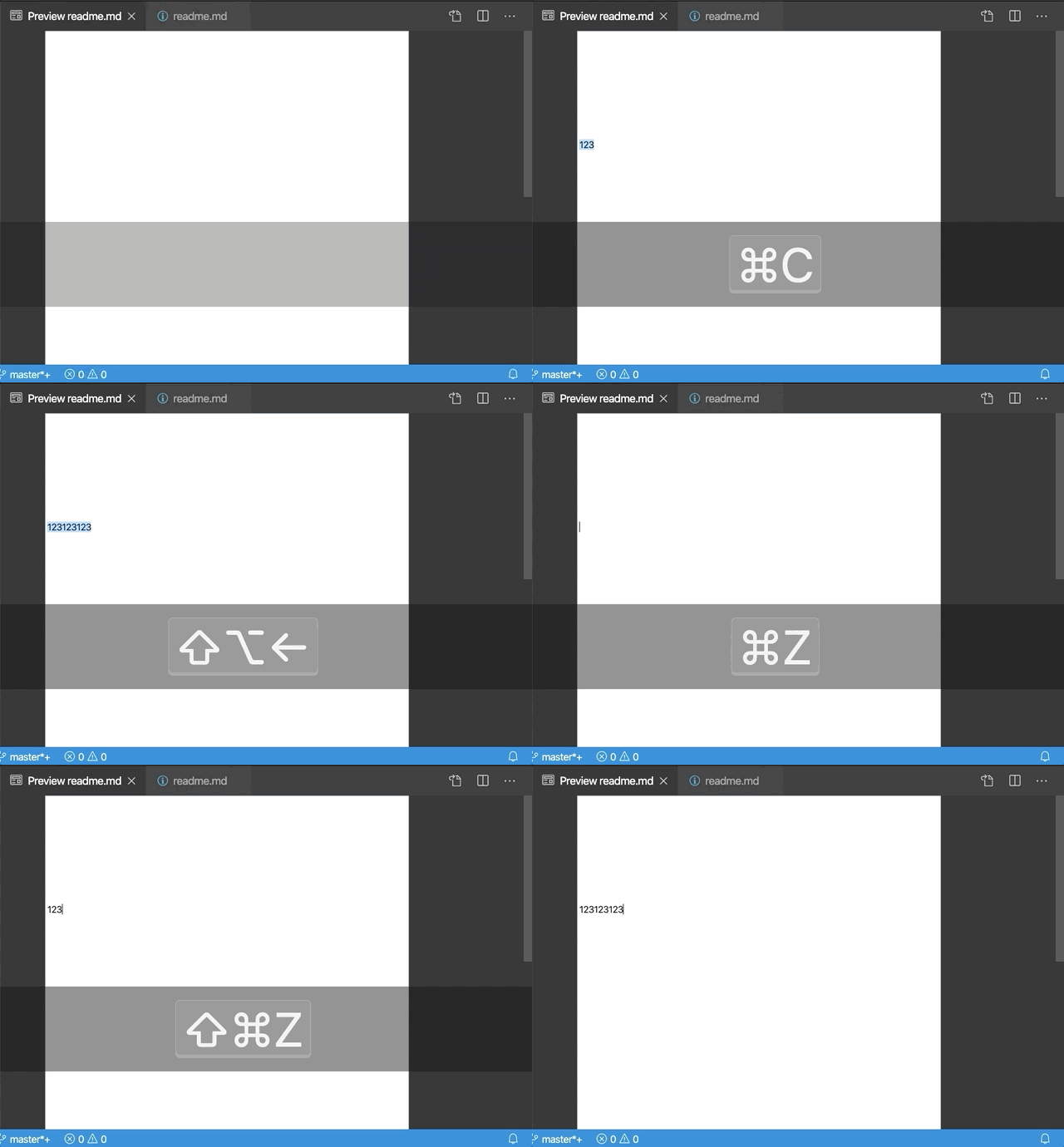
This is what the original bug was tracking. Copy/paste in the extensions view is a separate issue, as is getting undo/redo working from the Edit menu bar (which AFAIK has never worked in any os, see #90110)
Please test this in the first VS Code 1.43 insiders once it is out and let me know if there are any problems
mjbvz
on 6 Feb 2020
@mjbvz could you explain what should be done from the extension side to make it work? I've just downloaded the latest insiders build and it does not work for me:
Version: 1.43.0-insider
Commit: beaf391bc53136912e4f0bbdfb7844ad954247db
Date: 2020-02-07T05:30:08.850Z
Electron: 7.1.11
Chrome: 78.0.3904.130
Node.js: 12.8.1
V8: 7.8.279.23-electron.0
OS: Darwin x64 19.3.0
I opened PIO Home, selected some library example and pressed Cmd+C and a buffer is empty. What is more, the right-click context menu is empty too.
These source code of how do we initialize WebView => https://github.com/platformio/platformio-vscode-ide/blob/develop/src/home.js#L47
Thanks!

ivankravets
on 7 Feb 2020
Keyboard shortcuts for copy, paste, cut, undo, redo work for me in a textarea inside a webview
@mjbvz can you point me to the code change / commit that fixed the issue?
 vladimiry
on 7 Feb 2020
vladimiry
on 7 Feb 2020
@mjbvz could you reopen this issue?
ivankravets
on 13 Feb 2020
Is it not working?
mjbvz
on 13 Feb 2020
Yes, it does not work. Re-tested again with
Version: 1.43.0-insider
Commit: 1fbacccbc900bb59ba8a8f26a4128d48a1c97842
Date: 2020-02-13T05:38:41.855Z
Electron: 7.1.11
Chrome: 78.0.3904.130
Node.js: 12.8.1
V8: 7.8.279.23-electron.0
OS: Darwin x64 19.3.0
Please provide repo steps and an example extension that demonstrates this issue
mjbvz
on 13 Feb 2020
Could you install https://marketplace.visualstudio.com/items?itemName=platformio.platformio-ide ? It will open PIO Home, then try to copy something from it.
ivankravets
on 13 Feb 2020
Confirmed that platformIO still doesn't work
@ivankravets Your extension uses an iframe inside a webview to display all of its content. This is why the commands still don't work for PlatformIO but work fine in other webview based extensions. Since this scenario is important to you but not terribly common (or recommended) for webview extensions more broadly, please look into contributing a PR
I've update the issue title to make it more clear what is still blocked.
mjbvz
on 13 Feb 2020
Thanks that checked it. So, is this issue on our side? Do you have any hints on how to resolve this issue?
ivankravets
on 13 Feb 2020
@ivankravets The more I think the problem, the more it seems like something that individual extensions need to workaround.
To explain, here's how events such as copy are handled in webviews:
When a webview is focused, all keyboard events go to this webview. This means that the main VS Code window does not see these keypresses, so actions such as
copyoropen command palettewould normally not work when the user is focused on a webviewTo workaround this, we capture keyboard events inside the webview and rebroadcast them to the main VS Code process: https://github.com/microsoft/vscode/blob/8a2cae92c40dba648106ac7e6fef15b49adfac3c/src/vs/workbench/contrib/webview/browser/pre/main.js#L256
Then the main renderer process can handle these commands if needed
However, once you add an iframe inside of a webview, we run into the same problem all over again:
If the user is focused on the iframe in the webview, now all keypresses go to the iframe. The webview containing the iframe does not get any keyboard events
Which means we never can rebroadcast the keypresses back to the main VS Code renderer
To make matters worse, since the iframes used by most extension (including PlatformIO) are served up in a different origin from the webview itself, there is no way that I'm aware of for VS Code webview's to automatically add keypress listeners into these iframe. This is a dom security limitation and I'm not sure if there is any reasonable workaround.
Given that I tried and failed to fix keyboard events for PlatformIO with changes in VS Code itself, I think you should try adding a workaround in your extension itself.
Specifically, try adding code into your iframe that rebroadcasts keyboard events up to the webview so it can send then back to VS Code:
document.addEventListener('keydown', e => {
     window.parent.dispatchEvent(new KeyboardEvent('keydown', e));
})
I tested this and it works in a simple extension
mjbvz
on 14 Feb 2020
But for some reason, menu items work (edit -> paste). And since they work, it’s probably possible to somehow use the hotkey.
Or not and I don’t understand something?
arduinotech
on 14 Feb 2020
@arduinotech I don't see undo and redo working, even using the menus. And remember that we also want keyboard shortcuts for VS Code specific action to work when you are in a webview, such as opening the command palette. These work fine for normal webviews, but not when you are focused on an iframe inside a webview
If someone has any ideas of how to workaround this, please let me know (ideally the workaround should also work in browsers but that may be a stretch)
mjbvz
on 14 Feb 2020
I have tried rebroadcasting keyboard events on the pdf viewer of LaTeX Workshop. It works well.
Because the source of the iframe is http://localhost/... in LaTeX Workshop,
window.parent.dispatchEvent causes an error due to the same-origin policy. We have to use postMessage instead of dispatchEvent. The following are the snippets.
In the frame, we call:
document.addEventListener('keydown', e => {
    const obj = {
        altKey: e.altKey,
        code: e.code,
        ctrlKey: e.ctrlKey,
        isComposing: e.isComposing,
        key: e.key,
        location: e.location,
        metaKey: e.metaKey,
        repeat: e.repeat,
        shiftKey: e.shiftKey
    }
    window.parent.postMessage( JSON.stringify(obj), '*')
})
In the parent webview, we call:
window.addEventListener("message", (e) => {
    window.dispatchEvent(new KeyboardEvent('keydown', JSON.parse(e.data)));
}, false);
 tamuratak
on 14 Feb 2020
tamuratak
on 14 Feb 2020
@mjbvz is it possible to pass HTTP link to WebView via src instead of using IFRAME?
Will this resolve the issue without any hooks?
ivankravets
on 14 Feb 2020
@ivankravets Not currently. One reason is that we need to control aspects of the webview's content, such as setting the vscode css variables and the post message scripts
The ideal fix would be not to use an iframe inside the webview at all. Then other webview features, such as link handling, should also work as expected
mjbvz
on 15 Feb 2020
I'm closing this issue because, as I explained, I don't think we can workaround it on the VS Code side.
Using iframes in webviews is not ideal, but if your extension absolutely need to use them, make sure to rebroadcast the events as described above
mjbvz
on 15 Apr 2020
Related issues
 ryan-wong
·
3Comments
ryan-wong
·
3Comments
 borekb
·
3Comments
borekb
·
3Comments
 villiv
·
3Comments
villiv
·
3Comments
 sirius1024
·
3Comments
sirius1024
·
3Comments
 trstringer
·
3Comments
trstringer
·
3Comments