Vscode: Scrolling via mousewheel in the terminal scrolls by a lot on Windows (~25 lines)
VSCode Version: 1.30.1 (user setup)
Commit: dea8705087adb1b5e5ae1d9123278e178656186a
Date: 2018-12-18T18:12:07.165Z
Electron: 2.0.12
Chrome: 61.0.3163.100
Node.js: 8.9.3
V8: 6.1.534.41
OS: Windows_NT x64 10.0.17763
Steps to Reproduce:
- Open internal terminal (mine is Powershell)
- Enter some dummy content just for line counting
- Scroll the mouse wheel
I get ~25 lines jump in the terminal pane, while only ~6.5 lines in editor pane and 5 lines in native Powershell window.
This seems to be related to #35111 and #47376 . However I suppose bugs within those issues has already been solved.
Edit: I found the number of line jumps over related to Windows scaling ratio. Under 100% it goes 10 lines (which I think is still to many), 18 under 150% and 25 under 250%.
Does this issue occur when all extensions are disabled?: Yes
 runapp
All 22 comments
Tracked upstream https://github.com/xtermjs/xterm.js/issues/1805
 Tyriar
on 27 Dec 2018
Tyriar
on 27 Dec 2018
It might help to mention that the native command prompt (and WLS) scrolls exactly 3 lines. And that's totally correct.
Also the issue has persisted in version 1.31.1
 thany
on 7 Mar 2019
thany
on 7 Mar 2019
Just wanted to add to this. I'm still having the same issue, but it appears to be dependant on monitor scale in the windows settings. I think this might be how VSCode interprets a scroll. Today I had my external monitor plugged in, a 24" 1920 x 1080 screen with 100% scale in the display settings. On that monitor, the terminal works as I would expect and so does the scroll in the main editor window of VSCode. However, on my laptop monitor, a 4k 15" screen which I have at 250% scale, the terminal scrolls 14 lines and the main editor window about 6 / 7. So I'm not convinced this is an issue with xterm but possibly more an issue with VSCode
 DanJBower
on 4 Jul 2019
DanJBower
on 4 Jul 2019
Just wanted to add to this. I'm still having the same issue, but it appears to be dependant on monitor scale in the windows settings. I think this might be how VSCode interprets a scroll. Today I had my external monitor plugged in, a 24" 1920 x 1080 screen with 100% scale in the display settings. On that monitor, the terminal works as I would expect and so does the scroll in the main editor window of VSCode. However, on my laptop monitor, a 4k 15" screen which I have at 250% scale, the terminal scrolls 14 lines and the main editor window about 6 / 7. So I'm not convinced this is an issue with xterm but possibly more an issue with VSCode
Can confirm. On my 15'' 4K UHD screen, the terminal scrolls tooooo fast!
 ElectronicElephant
on 24 Sep 2019
ElectronicElephant
on 24 Sep 2019
I'd like to know why it's different for everybody.
It's supposed to scroll three lines. This is the default scrolwheel "speed" in every Windows version. So not only is it wrong, it is also inconsistenly wrong. How does that happen?
thany
on 25 Sep 2019
Lots of investigation around this happened this iteration, here are the outcomes:
- We're not going to try to respect the 3 lines Windows setting because browsers don't respect that but instead do their own thing (Chrome is 100px, Edge varies based on the height of the scroll area, etc).
- One of the causes for this is that OS scale and window scale affect
window.devicePixelRatioandWheelEvent.deltaYin different ways, we currently do the right thing for zooming the browser but not when the OS is scaled. There isn't a really good way to fix both ways without a bunch of browser-specific hacks. editor.fastScrollSensitivityandeditor.mouseWheelScrollSensitivitynow apply to the terminal as well, yes this is shared with the editor which has different scroll logic but I don't think the amount of people who see this problem warrant a new setting. Note that the reason the scroll logic is different is because monaco drives the text area and xterm.js is a separate project outside of this codebase, bloat is also a factor we considered here.
Tyriar
on 29 Oct 2019
To verify make sure editor.fastScrollSensitivity and editor.mouseWheelScrollSensitivity affect the terminal as expected.
Tyriar
on 29 Oct 2019
To be fair though, even though VScode is based on web tech, it is not a browser, and I don't believe it oughta behave like one.
thany
on 30 Oct 2019
I agree with @thany . Is there a chance to keep VSCode scrolls exactly 3 lines(or according to Windows mouse settings) on any DPI-related scales?
runapp
on 30 Oct 2019
@thany @runapp I don't think so, at least not for now since it seems to be impossible to make that happen reliably for all cases, would involve a bunch of browser-specific hacks and lots of code bloat for classifying events.
Tyriar
on 30 Oct 2019
@Tyriar Okay then. Anyway, as myself I always want a Terminal to stop at a complete line when scrolling or resizing client area.
runapp
on 30 Oct 2019
@runapp what do you mean by a complete line? Sounds a bit like you might like command tracking:
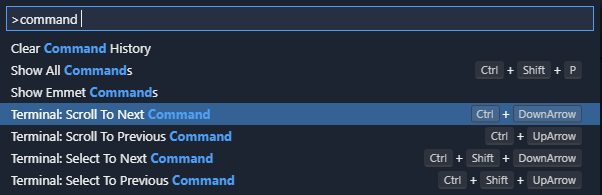
They only have default keybindings on mac but they let you jump between your commands.
Tyriar
on 30 Oct 2019
@Tyriar Uh I mean the default windows console window behaviour. The scroll goes as unit of per line height, and one won't get a half-shown line around the top border(although there can be one at the bottom)
runapp
on 31 Oct 2019
@runapp if there are any half lines in vscode then that's a bug, please create a new issue with some repro steps if you see this.
Tyriar
on 31 Oct 2019
This is still happening to me as well. In win10 i'm set to scroll 6 lines at a time, but VSCode terminal scrolls way more, seemingly 14+ lines.
 taoliu12
on 2 Dec 2019
taoliu12
on 2 Dec 2019
Seems to have been fixed for me in 1.40.x
thany
on 2 Dec 2019
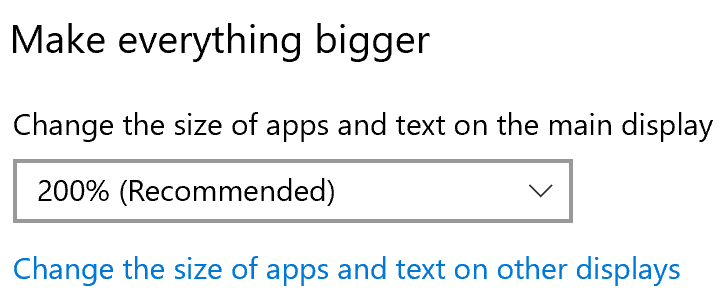
Still experiencing the issue - editor scrolls 5.5 lines at a time, however the terminal scrolls 11 lines. UHD, 200% screen scale. vscode 1.40.2 (f359dd69)
 MichaelXt
on 7 Dec 2019
MichaelXt
on 7 Dec 2019
Seems to have been fixed for me in 1.40.x
No, the problem is not fixed
ElectronicElephant
on 8 Dec 2019
Tyriar
on 8 Dec 2019
Okay, for me (250% @ UHD), setting editor.mouseWheelScrollSensitivity to 0.25 works well
ElectronicElephant
on 8 Dec 2019
Lots of investigation around this happened this iteration, here are the outcomes:
- We're not going to try to respect the 3 lines Windows setting because browsers don't respect that but instead do their own thing (Chrome is 100px, Edge varies based on the height of the scroll area, etc).
- One of the causes for this is that OS scale and window scale affect
window.devicePixelRatioandWheelEvent.deltaYin different ways, we currently do the right thing for zooming the browser but not when the OS is scaled. There isn't a really good way to fix both ways without a bunch of browser-specific hacks.editor.fastScrollSensitivityandeditor.mouseWheelScrollSensitivitynow apply to the terminal as well, yes this is shared with the editor which has different scroll logic but I don't think the amount of people who see this problem warrant a new setting. Note that the reason the scroll logic is different is because monaco drives the text area and xterm.js is a separate project outside of this codebase, bloat is also a factor we considered here.
Okay, for me (250% @ UHD), setting
editor.mouseWheelScrollSensitivityto0.25works well
However, this will make the scrolling in the editor toooo slow~
Could you please separate the option into two parts, one for the editor and the other for the terminal? i.e., adding an option like terminal.mouseWheelScrollSensitivity ?
ElectronicElephant
on 9 Dec 2019
Adding setting: https://github.com/microsoft/vscode/issues/87240
Tyriar
on 30 Dec 2019
Related issues
 mrkiley
·
3Comments
mrkiley
·
3Comments
 shanalikhan
·
3Comments
shanalikhan
·
3Comments
 chrisdias
·
3Comments
chrisdias
·
3Comments
 villiv
·
3Comments
villiv
·
3Comments
 vsccarl
·
3Comments
vsccarl
·
3Comments
Most helpful comment
I agree with @thany . Is there a chance to keep VSCode scrolls exactly 3 lines(or according to Windows mouse settings) on any DPI-related scales?