Vscode: Make it more obvious when "Use Exclude Settings and Ignore Files" is not applied
This keeps coming up, so I want to keep an issue open to think about it some more.
https://github.com/Microsoft/vscode/issues/46353
It took me 10 minutes just now to figure out why it was ignoring my exclude settings. The displayed message ("exclude settings and ignore files are disabled") didn't help at all in how to turn it back on, it made it sound like a setting needed to be set true or false. The "do not enter" badge is small and honestly looked like an ellipsis to my eyes. Perhaps instead of dimming the entire glyph, the badge could toggle between a check when exclude is in effect and the "do not enter" when it's disabled. I'm not sure the best solution here but the current implementation is certainly problematic.
Things we could do off the top of my head
- Change the message to make the action to fix it more obvious ("... are toggled off"?)
- Change the icon to a large "do not enter" with a small gear
- Change the icon as suggested above to toggle between two icons
 roblourens
All 14 comments
Related to #36439. Any discussions for the toggle state should happen there as that state needs to be consistent across the product.
 misolori
on 18 Dec 2018
misolori
on 18 Dec 2018
Let's close this and see whether #36439 helped...
roblourens
on 13 Aug 2019
When I read the tooltip on this option, I thought it would disable the "files to exclude" field and I didn't understand why some search results were not shown. I thought what was referred to as "exclude settings" was that field. I only understood the difference after googling and reading two issues like this one.
 Neptilo
on 17 Sep 2019
Neptilo
on 17 Sep 2019
The exclude settings and ignore files are disabled message was confusing to me; I assumed it meant that something in my settings was disabling them, not the gear. I also only understood the difference after googling.
 jlr7245
on 3 Oct 2019
jlr7245
on 3 Oct 2019
I second what @jlr7245 said. I too went looking for something in my settings preferences expecting a checkbox/bool of some kind and ultimately wound up discovering the selected gear cog subtlety I never managed to pick up on before.
This fella details the same stumbling upon that subtle activated UI state that governed the behavior.
https://www.stephencharlesweiss.com/2019-08-06/vscode-enable-settings-ignore-files-disabled/
Just to document in place here for those landing here searching for the literal displayed message...

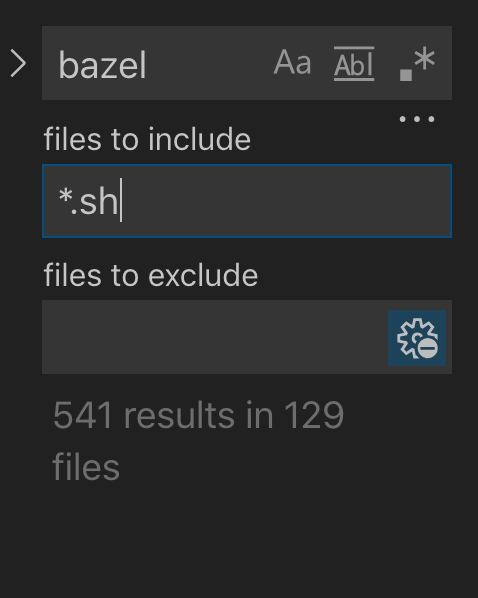
 jxramos
on 9 Oct 2019
jxramos
on 9 Oct 2019
how about "☑ some files are excluded, uncheck this to include all files" ?
 jcollum-autodesk
on 10 Oct 2019
jcollum-autodesk
on 10 Oct 2019
I'm not sure exactly how but it might help being more explicit too somehow in the tooltip...

Maybe
Use Exclude Settings (
files.exclude) and Ignore Files (??what does this actually map to??)
something that maps the language _Exclude Settings_ to something very specific. The language around _Use_ may be a bit ambiguous too, maybe something more evocative of the operation, like _take the union of XXX settings_, or _overlay XXX settings_, _incorporate XXX settings_, _intersect with XXX settings_, or whatever the appropriate operation that's taking place under the hood.
jxramos
on 11 Oct 2019
Here's an idea I've been thinking about:
- Add a link to toggle the setting in the message so people can quickly change it
- Swap between two different icons in the
files to excludefield:
- gear, when it's off
- gear + ⛔️ when it's on
Thoughts?
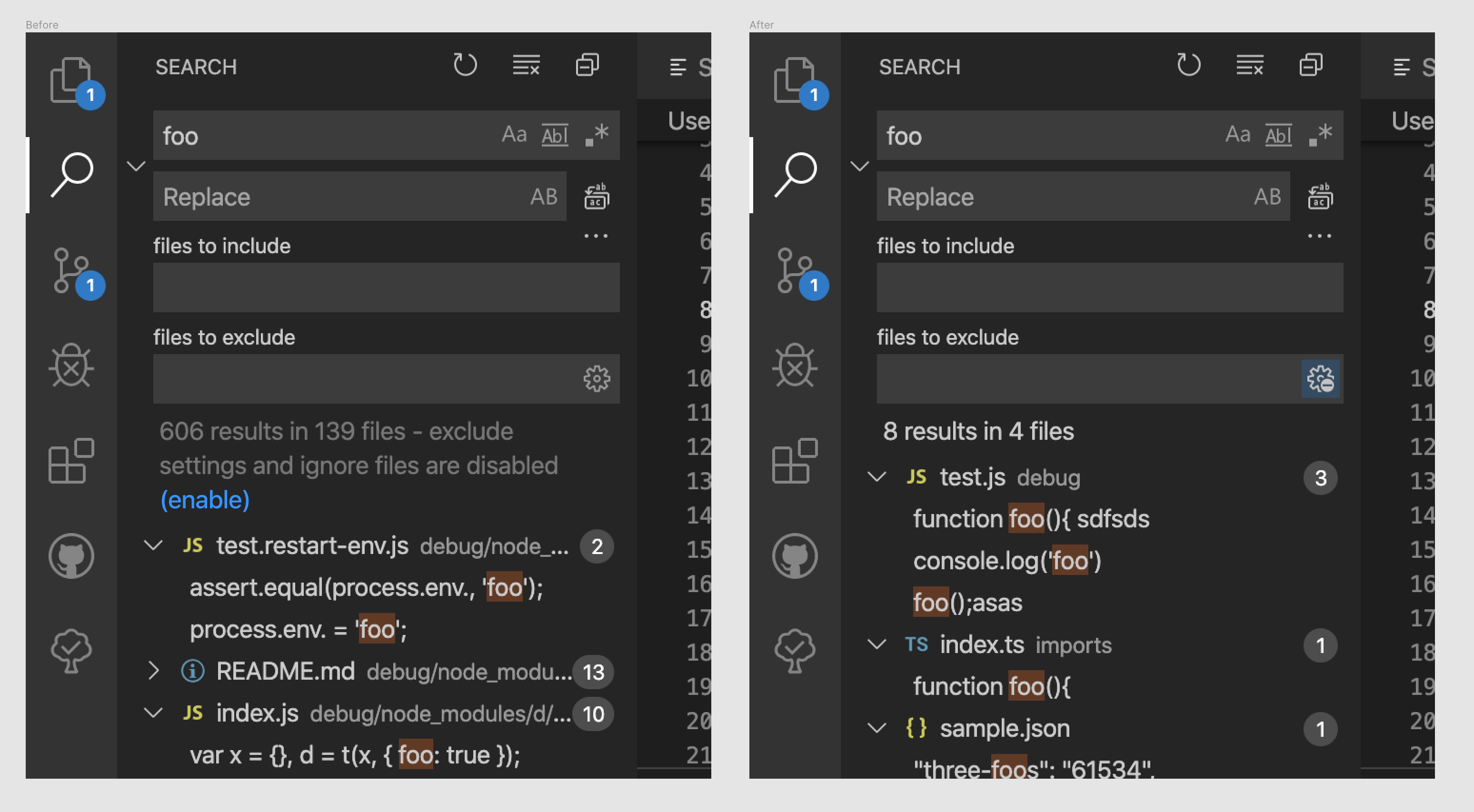
misolori
on 11 Oct 2019
@misolori , that's not bad, that is evocative of the idea of overlaid / overlapping settings. Something indicative of the intersection of exclusions idea is what we're trying to grasp at, which now that I think about it is a pretty gnarly concept to concisely communicate with an icon.
jxramos
on 11 Oct 2019
A checkbox icon with a message would be way easier to understand, as suggested previously:
how about "☑ some files are excluded, uncheck this to include all files" ?
(+ something like this for the other state: no files are excluded, check this to exclude folders and files from the excluded settings)
 heroes-coding
on 23 Oct 2019
heroes-coding
on 23 Oct 2019
We're coming up on a year that this ticket has been open btw...
jcollum-autodesk
on 23 Oct 2019
I thought the search.exclude wasn't working until I found this mystery little button. Please make more obvious
 globalhuman
on 9 Oct 2020
globalhuman
on 9 Oct 2020
Can you tell me what would have helped you @globalhuman?
roblourens
on 9 Oct 2020
It must seem like the users are wrong but in this case I just got used to whatever text was written in the exclude section that I ignored it completely upon first time using these settings.
If it's possible when someone adds search excludes in the settings.json then maybe toggle the "Use Exclude Settings and Ignore Files" to on. @roblourens
I like the look of @misolori 's prototype as well.
globalhuman
on 12 Oct 2020
Related issues
 mrkiley
·
3Comments
mrkiley
·
3Comments
 omidgolparvar
·
3Comments
omidgolparvar
·
3Comments
 DovydasNavickas
·
3Comments
DovydasNavickas
·
3Comments
 biij5698
·
3Comments
biij5698
·
3Comments
 trstringer
·
3Comments
trstringer
·
3Comments
Most helpful comment
I second what @jlr7245 said. I too went looking for something in my settings preferences expecting a checkbox/bool of some kind and ultimately wound up discovering the selected gear cog subtlety I never managed to pick up on before.
This fella details the same stumbling upon that subtle activated UI state that governed the behavior.
https://www.stephencharlesweiss.com/2019-08-06/vscode-enable-settings-ignore-files-disabled/
Just to document in place here for those landing here searching for the literal displayed message...

