Vscode: VScode adds random textto my file
- VSCode Version: 1.29.1
- OS Version:
Ubuntu 16.04
Steps to Reproduce:
1.Open up vs code
2.Try to edit some file.After some time while typing a specific word it will add this word or phrase to various places inside my code and will break my code
Does this issue occur when all extensions are disabled?: Yes/No
Yes
 kounelios13
All 41 comments
Hopefully the information you provided is adequate for them to understand the problem and fix it. My guess is that they won't understand the problem. They will probably need more information than "_a specific word_". If you can provide specific instructions that re-creates the problem then they will be able to determine the cause of any errors in their code.
 SimpleSamples
on 12 Dec 2018
SimpleSamples
on 12 Dec 2018
Hey thanks for the problem.I really don't know hot to reproduce this.Let's say I select part of my file and press ctr+x to cut it.Some time this text will appear multiple times in random positions in the same file without me having pasted that
kounelios13
on 12 Dec 2018
Something that came in my mind right now.I was writing in a typescript file(can also happen in html files too) and wanted to write the word name.After some time I noticed that in several places there was the word "Name" that was breaking my code something like this:
generatePhoneField(type) {
    if (type == 'representative') {
      this.phoneType = 'representative';
    } else {
      this.phoneType = 'user';
    }
    this.displayPhoneDialog = true;
  }Name
It appeared also after some other methods
kounelios13
on 12 Dec 2018
Does this reproduce in the latest VS Code insiders build with all extensions disabled?
 mjbvz
on 12 Dec 2018
mjbvz
on 12 Dec 2018
I will try it today
kounelios13
on 13 Dec 2018
Did you have a chance to try this?
mjbvz
on 17 Dec 2018
I couldn't reproduce it in vscode insiders
kounelios13
on 17 Dec 2018
Ok, closing this as not-reproducable. Let me know if you see this against in VS Code 1.31
mjbvz
on 17 Dec 2018
I reproduced that in the insiders version
kounelios13
on 18 Dec 2018
I was trying to import a primeng module in an angular project and after selecting then name of the module(ProgressBarModule) the word "Progress" appeared in a random position
kounelios13
on 18 Dec 2018

kounelios13
on 18 Dec 2018
Is the word Progress actually inserted in the file or is this just a visual glitch?
mjbvz
on 18 Dec 2018
The word is inserted in my file and breaking my code
kounelios13
on 19 Dec 2018
Sorry, I can't reproduce this issue. Can you please try to record a video of this happening or describe the exact keypresses that cause this to happen
mjbvz
on 19 Dec 2018
Problem is that it occurs randomly.Sometimes it might be an hour of typing without it occurring.I haven't found a specific keypress that triggers this behavior.
kounelios13
on 20 Dec 2018
Problem is that it occurs randomly.Sometimes it might be an hour of typing without it occurring.I haven't found a specific keypress that triggers this behavior.
kounelios13
on 20 Dec 2018
We need more information to investigate this issue. When the problem occurs, please try remembering what action you just performed that may have triggered it
Also, please make sure you are testing on the latest VS Code insiders build
mjbvz
on 3 Jan 2019
Can confirm that I have been having a simular issue lately, also happens randomly and can't seem to reproduce it.
It also sometimes decides that when I paste instead of pasting once it pastes like 20 times
 yannick1691
on 4 Jan 2019
yannick1691
on 4 Jan 2019
@yannick1691 Thank God .I thought I was gonna grazy
kounelios13
on 5 Jan 2019
I can confirm that this has sporadically happened to me as well. I have never had it happen with small copy/paste operations - only with large ones (such as shuffling the order of large DIV sections). I have not yet gotten it to happen reliably, but I have encountered this on multiple occasions. It is not a visual affectation it is a corruption of the file.
(Fedora 29, vscode 1.30.1)
I have just upgraded to 1.30.2, I will be checking.
 guyrish-waveinteractive
on 11 Jan 2019
guyrish-waveinteractive
on 11 Jan 2019
@guyrish-waveinteractive that's whats happening most of the time to me
kounelios13
on 11 Jan 2019
(Fedora 29, vscode 1.30.2)
Cut and paste just "spammed" two files. I remembered to preserve one and take some snapshots. Unfortunately this is the least of them; the inclusion of the word "name" on two different lines, overwriting text within the file it was barfed into. While this file was open, it was in a saved state and was _not_ one of the files being actively copied from nor pasted to. The other file (of the aforementioned two files), actually had two lines altered but without more content (as opposed to merely "name") and was the source of the cut and paste. The destination of the cut and paste successful received the content without incident.
Most confounding: "name" is not a word that was found on _any_ line that was shuffling about. Nor, despite my previous statement, this was _not_ a large cut and paste operation, it was two lines that were consecutive (as opposed to two lines separated as seen in the snapshot (line 216 and 218 in the snap of the editor).
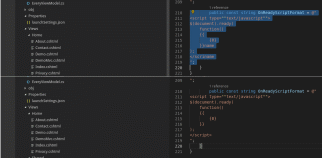
No, a third site of contamination has been found. Note the four lines containing the word "more"; 199 contains a "morestylized" that should have been (and once was) merely "stylized", while lines 200-202 each end with the word "more". This third site is the source file of the cut and paste operation, but no where near where the operation took place (the cut operation was sourced near the end/bottom of the file).

guyrish-waveinteractive
on 12 Jan 2019
@guyrish-waveinteractive could you post some larger images?I cannot see the content of your file from these
kounelios13
on 12 Jan 2019
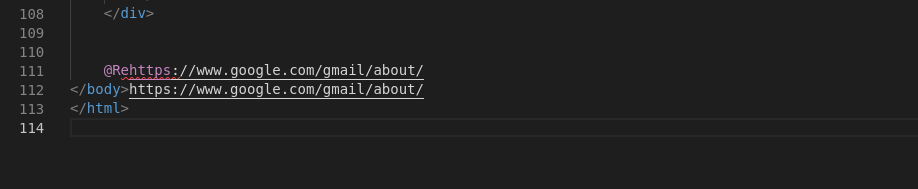
Additional content while copying and pasting from and into a single file.
guyrish-waveinteractive
on 14 Jan 2019
@guyrish-waveinteractive and @yannick1691 Can you try disabling all extensions as well to make sure one of them is not causing this issue
mjbvz
on 15 Jan 2019
@mjbvz I can... Are there any "blessed" plugins that we can leave enabled or at least slowly dial out? As this is intermittent and I'm essentially waiting for it happen while working, my ability to use the product is pretty inhibited if I turn off things like basic dotnet / C# integration.
guyrish-waveinteractive
on 15 Jan 2019
When the problem happens, run the Developer: show running extensions command. This will list all active extensions that could have cause this issue.
It's probably easier though to disable all but your essential extensions and seeing the problems still happens. Can you also share the output of code --list-extensions so we know what extensions you have installed
mjbvz
on 15 Jan 2019
Hi, I'm experiencing this problem (the appearing of words randomly in my code) in some time with and without enabled extensions.
VSCode Version: 1.31.1
OS Version: Ubuntu 18.04
Extentions:
- alefragnani.project-manager
- eamodio.gitlens
- Gruntfuggly.todo-tree
- ms-python.python
- ms-vscode.cpptools
- streetsidesoftware.code-spell-checker
May I found the source of the problem: scrolling while the wheel mouse button is pushed down
It making multiple cursors like on Windows, but on the event of mouse up insert the content of the clipboard, so broke the code. (There is no pasting with middle mouse button on Windows)
 smallSwed
on 12 Mar 2019
smallSwed
on 12 Mar 2019
I don't now how can I be a contributor, but I forked and tried some fix:
https://github.com/smallSwed/vscode/commit/6df743599dc9bee3a83001467fdbe735d5d4a3ec
what I did: on scroll I prevented defaults of the mouseUp event
If you think it's good: feel free to use it or I can create a pull request (If I'm allowed)
smallSwed
on 18 Mar 2019
I'm having similar problems.. It seems that multiple cursors get spawned either randomly or in conjunction with some other common command and when I go to paste it pastes to all places the cursors are at.
I am running VsCode 1.33.0 on CentOS 7
And I just read all of smallWed's post.. yep thats it.. gotta be.. good catch!
 usmcamp0811
on 24 Jul 2019
usmcamp0811
on 24 Jul 2019
Ok, what I think is going on is:
- you create multiple cursors
- you type and what you type is typed at all the cursors
Multiple cursors is an editor feature that is quite popular. Multiple cursors can be introduced through many many gestures, like:
- alt+click or ctrl+click depending on (
editor.multiCursorModifier) - middle mouse button
- ctrl+D
- ctrl+shift+L
- ctrl+F2
- alt+enter while in the find widget
I am not sure what you would want the outcome of this issue to be? The fact that there are multiple cursors is presented in the status bar and all of the above are quite useful features once you get used to them...
 alexdima
on 2 Oct 2019
alexdima
on 2 Oct 2019
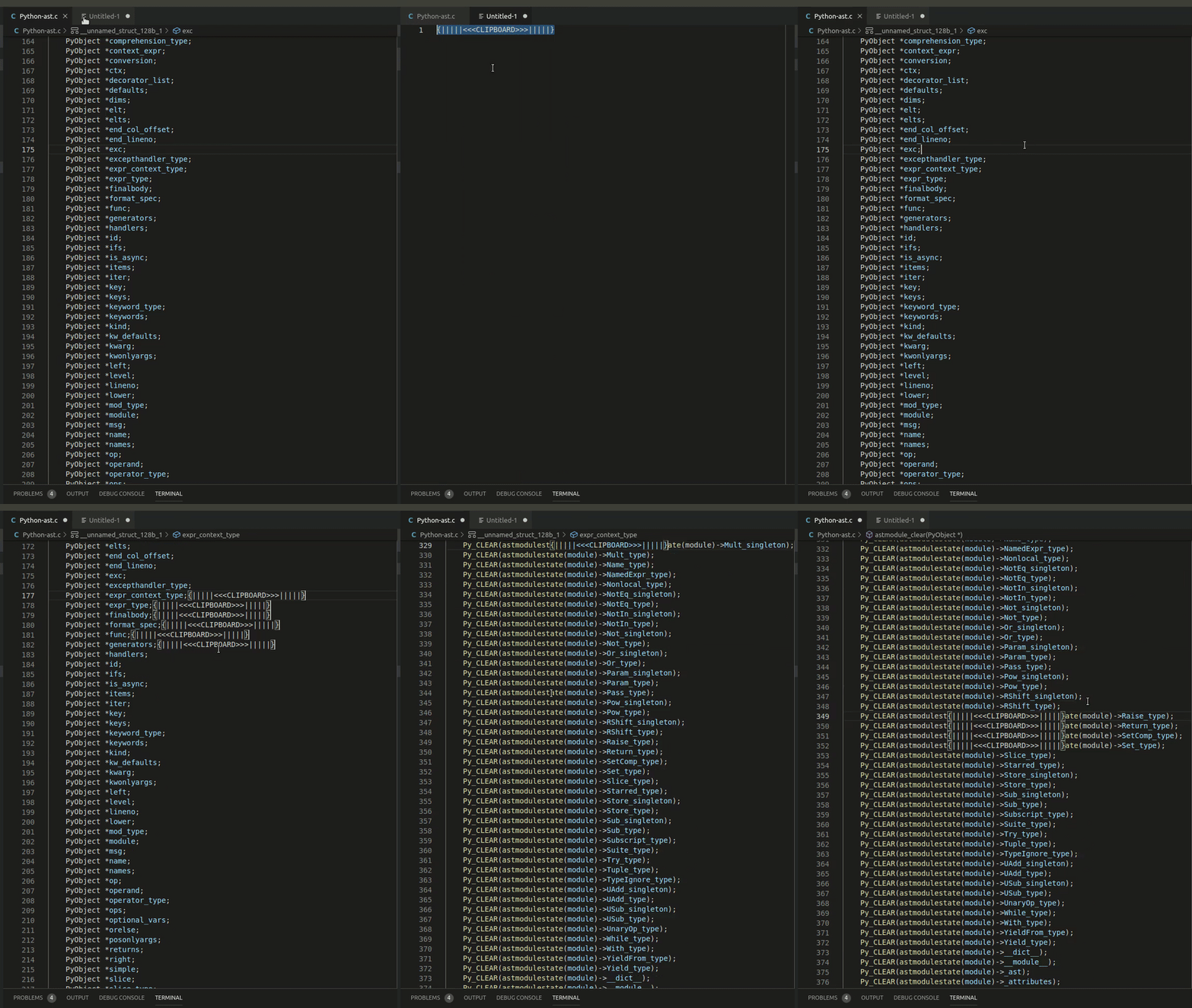
What actually going on:
- you create multiple cursors by sensitive middle mouse button
- you scroll and what saved to clipboard is typed at all the cursors
- on linux if the scroll wheel is pressed it will place the content of the clipboard
I would like to not paste the clipboard content while scrolling. So the code would not be broken.
see capture:
smallSwed
on 4 Oct 2019
@smallSwed So I think you would need an option to disable that middle click adds cursors or otherwise you need a new mouse :).
alexdima
on 4 Oct 2019
@alexandrudima I would like the option to disable that middle click adds cursors. Maybe would be better if I can disable that middle button release paste from clipboard, but that is not a vscode feature as I know.
smallSwed
on 4 Oct 2019
@smallSwed @kounelios13 does it solve your issue, if you disable "Selection Clipboard"? See https://github.com/Microsoft/vscode/issues/14610 and the screenshot:

I have the same issue with my trackpad and its configuration of doing a middle-click on three touchpoints. When scrolling with my two thumbs, the upper part of the thumb often causes a middle-click. The above mentioned option should probably solve my problem, but in my case https://github.com/microsoft/vscode/issues/80804 prevents me from using it.
 adabru
on 17 Oct 2019
adabru
on 17 Oct 2019
@adabru Are you on macOS or on Linux?
Have you tried our insiders build, I have recently pushed a fix where disabling selection clipboard was not actually working on Linux (#49305)
alexdima
on 17 Oct 2019
@alexandrudima I'm on Linux. Just tried the insiders version (1.40.0-insiders) and the setting works now, thanks a lot!
adabru
on 17 Oct 2019
I tried the insiders version of vscode (1.40.0) and everything works as expected with that settings. Thank you @alexandrudima.
smallSwed
on 18 Oct 2019
Unless there are other objectsion, I will close this issue for now...
alexdima
on 18 Oct 2019
Updated to insider build;
The middle mouse button paste is disabled which is awesome.
BUT; If you move the mouse, while holding middle mouse, any were outside the document you will instantly paste were your line cursor is located.
This include; top document path and tabs, left tab panel, integrated terminal. and outside the document.
 AndBroPLAYipp
on 24 Oct 2019
AndBroPLAYipp
on 24 Oct 2019
@AndBroPLAYipp Thank you for trying it out. I've extracted your comment into a separate issue at #83282
alexdima
on 25 Oct 2019
Related issues
 VitorLuizC
·
3Comments
VitorLuizC
·
3Comments
 villiv
·
3Comments
villiv
·
3Comments
 sijad
·
3Comments
sijad
·
3Comments
 mrkiley
·
3Comments
mrkiley
·
3Comments
 NikosEfthias
·
3Comments
NikosEfthias
·
3Comments
Most helpful comment
@alexandrudima I'm on Linux. Just tried the insiders version (1.40.0-insiders) and the setting works now, thanks a lot!