Vscode: Python extension doesn't obey locale settings
Issue Type: Bug
My OS language is Brazillian Portuguese. Although my locale is set as english in my VSCode configuration, the Python extension commands are displayed in Portuguese. All other commands are in English.
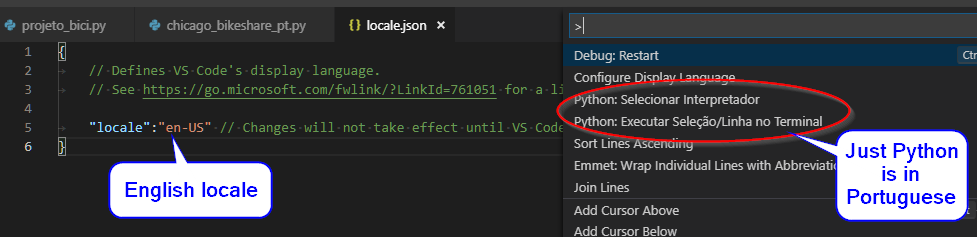
VS Code version: Code 1.28.2 (7f3ce96ff4729c91352ae6def877e59c561f4850, 2018-10-17T00:23:51.859Z)
OS version: Windows_NT x64 10.0.17134
System Info
|Item|Value|
|---|---|
|CPUs|Intel(R) Core(TM) i7-4770S CPU @ 3.10GHz (8 x 3093)|
|GPU Status|2d_canvas: enabled
checker_imaging: disabled_off
flash_3d: enabled
flash_stage3d: enabled
flash_stage3d_baseline: enabled
gpu_compositing: enabled
multiple_raster_threads: enabled_on
native_gpu_memory_buffers: disabled_software
rasterization: enabled
video_decode: enabled
video_encode: enabled
webgl: enabled
webgl2: enabled|
|Memory (System)|15.95GB (5.90GB free)|
|Process Argv||
|Screen Reader|no|
|VM|0%|
Extensions (23)
Extension|Author (truncated)|Version
---|---|---
vscode-icalendar|af4|1.0.1
vscode-standardjs|che|1.2.3
gitignore|cod|0.5.0
vscode-markdownlint|Dav|0.21.0
githistory|don|0.4.3
jupyter|don|1.1.4
xml|Dot|2.3.2
gitlens|eam|8.5.6
tslint|eg2|1.0.40
json-tools|eri|1.0.2
gc-excelviewer|Gra|2.1.26
vscode-firefox-debug|hbe|1.7.1
Python-autopep8|him|1.0.2
beautify|Hoo|1.4.7
autofilename|Jer|0.1.3
nbpreviewer|jit|1.0.0
python|ms-|2018.9.2
debugger-for-chrome|msj|4.11.0
vscode-run-git-difftool|nar|0.0.5
markdown-checkbox|PKi|1.4.0
autolinting-for-javascript|t-s|1.3.0
markdown-pdf|yza|1.2.0
intelligence-change-case|zhe|1.1.0
(1 theme extensions excluded)
 pauloneves
All 57 comments
@pauloneves Can you please report this to the owner of the Python extension. We don't ship that extension inside VS Code and all other extensions seem to honor the language setting correctly.
 dbaeumer
on 6 Nov 2018
dbaeumer
on 6 Nov 2018
Please ping if you think this otherwise.
dbaeumer
on 6 Nov 2018
@dbaeumer
Not sure how this is a Python extension issue. We just ship the localized package.nls.json files. and its my understanding that VSC uses these based on the locale. I.e. we don't control what localized package.nls.*.json is picked by VSC.
Or am I missing something?
 DonJayamanne
on 12 Nov 2018
DonJayamanne
on 12 Nov 2018
@DonJayamanne yes, that is true. The reason why I asked him to start with the extension is that it seems to work for all the other extensions (see his screen shot). So there seems to be something special with Python here. So in these cases we usually start with the extension that shows the problem. I am not saying that this is not a bug in VS Code. Are you able to reproduce this?
dbaeumer
on 13 Nov 2018
Nope, not my end
DonJayamanne
on 13 Nov 2018
I think what is special with his setup is that is OS locale is already Brazillian Portuguese. Could that have an impact for the Python extensions?
dbaeumer
on 13 Nov 2018
Nope, there's nothing special about the localizations in our extension, we jsut create the localized files (package.nls.*.json) and that's it.
DonJayamanne
on 13 Nov 2018
If we can't reproduce this and there is nothing with Python extension I have no idea how to track this down.
@pauloneves does this persist if you uninstall and reinstall the Python extension?
dbaeumer
on 15 Nov 2018
I had the same issue (see https://github.com/Microsoft/vscode-python/issues/3307), only with german as second language. After uninstalling, reloading, installing the python extension again, everything is good. No German artifacts in the command palette. Also, with this I can not tell if I can reproduce the state where the extension was switched to german.
But: I did not change languages/locales in any way, it happened within the first day of using vscode and installing vs-code-python. Other extension I installed are:
- redhat.vscode-yaml
- ryanluker.vscode-coverage-gutters
- mermade.openapi-lint
 berend
on 15 Nov 2018
berend
on 15 Nov 2018
If we can't reproduce this and there is nothing with Python extension I have no idea how to track this down.
We're in the same position, besides as mentioned earlier, we don't control what locale is picked by VSC, to my knowledge there's no such API in VSC.
DonJayamanne
on 15 Nov 2018
@berend have you experienced this with any other extension?
dbaeumer
on 16 Nov 2018
No, I have not experienced this with other extensions. But - to be fair - I used command palette probably for python commands only.
Also if other extensions don't have german locales, the error would not have appeared (like for me the python jupyter settings were still english, because there was no german translation yet).
berend
on 16 Nov 2018
I think I have a little more info. I never installed the localization of VSCode in my own language. I doubt any other extension already come localized to Brazilian Portuguese. Maybe VSCode isn't obeying my locale configuration. Since I don't have its localization installed, it defaults to English, but the Python extension has Portuguese and uses the translated strings.
pauloneves
on 18 Nov 2018
@DonJayamanne how do you translate the python extension ?
dbaeumer
on 19 Nov 2018
The messages you see in the screen shot are commands in the command pallete.
The translation is done by creating separate package.nls.*.json files and vsc picks the right one.
DonJayamanne
on 19 Nov 2018
@pauloneves I have the same Issue, with Spanish as you can see in the image

Just for testing purposes I make a backup copy of the file package.nls.es.json (spanish version) and I replace it with a copy of package.nls.json and VSCode now shows the python command in English

 nmacosta
on 20 Nov 2018
nmacosta
on 20 Nov 2018
What is really strange is the fact that this only happens with the Python extension. I will check what makes it so special.
@DonJayamanne is Python part of any language pack.
dbaeumer
on 20 Nov 2018
I can not reproduce this on a German Windows. See attached screen shot:
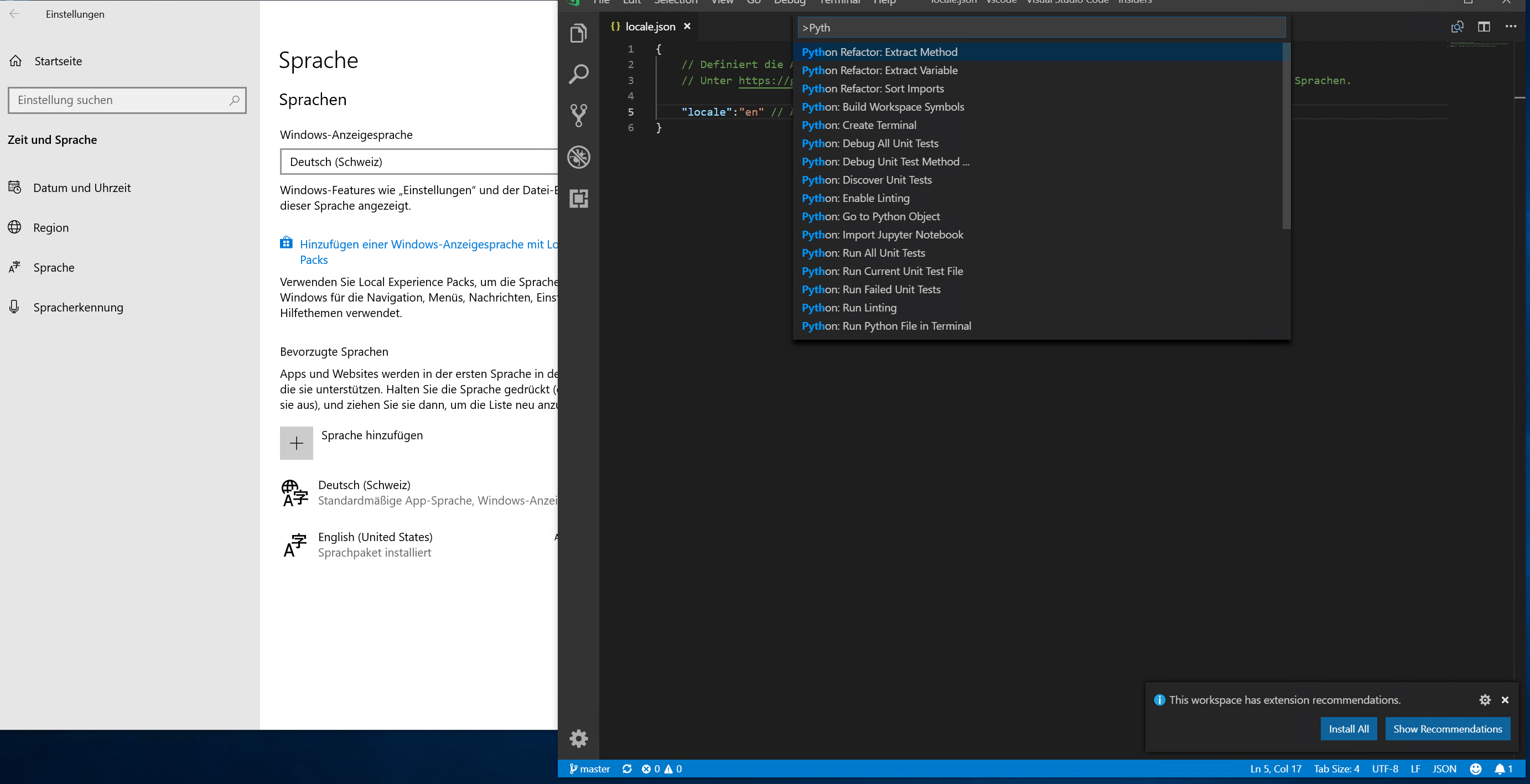
There is one thing to note: since the Python extension ships the translations pre-packaged (not with a language pack) the following can happen on a German machine:
- no locale.json file. Which means the default OS locale is considered
- no German language pack installed.
- then the Python UI will be in German but the rest not.
However when setting in the locale.json 'en' for me both VS Code and the python extension is on English (see screen shot).
@DonJayamanne you might want to consider shipping your translations inside the language pack
So the question is why this is not working for @nmacosta @pauloneves as it does for me :-( Is there anything you can detect that is different than what I tried?
dbaeumer
on 20 Nov 2018
@berend what is your default OS locale?
dbaeumer
on 20 Nov 2018
German, I guess. This is a picture of my settings:
https://user-images.githubusercontent.com/673681/48338628-704dce00-e666-11e8-92dc-a8c81ee65dc1.png
If you need any other info, let me know.
Also, this is the output from locale
▶ locale
LANG="de_DE.UTF-8"
LC_COLLATE="de_DE.UTF-8"
LC_CTYPE="de_DE.UTF-8"
LC_MESSAGES="de_DE.UTF-8"
LC_MONETARY="de_DE.UTF-8"
LC_NUMERIC="de_DE.UTF-8"
LC_TIME="de_DE.UTF-8"
LC_ALL=
you might want to consider shipping your translations inside the language pack
What do you mean by language pack?
DonJayamanne
on 20 Nov 2018
@berend this explains why you see the Python in German unless you configure the local for VS Code to be English in all cases. Can you still repro this even if you configure the display language to be English?
@DonJayamanne MS extensions are usually getting their strings through the language pack. VS Code itself only ships with English since a while. See https://marketplace.visualstudio.com/search?target=VSCode&category=Language%20Packs&sortBy=Downloads
dbaeumer
on 20 Nov 2018
Visual studio code locale is English.
Am Di., 20. Nov. 2018, 17:41 hat Dirk Bäumer notifications@github.com
geschrieben:
@berend https://github.com/berend this explains why you see the Python
in German unless you configure the local for VS Code to be English in all
cases.@DonJayamanne https://github.com/DonJayamanne MS extensions are usually
getting their strings through the language pack. VS Code itself only ships
with English since a while. See
https://marketplace.visualstudio.com/search?target=VSCode&category=Language%20Packs&sortBy=Downloads—
You are receiving this because you were mentioned.
Reply to this email directly, view it on GitHub
https://github.com/Microsoft/vscode/issues/62623#issuecomment-440340640,
or mute the thread
https://github.com/notifications/unsubscribe-auth/AApHkfzG3P4uE51awJ870Dh287VcU5ZRks5uxDCpgaJpZM4YPgMH
.
berend
on 20 Nov 2018
you might want to consider shipping your translations inside the language pack
@dbaeumer
Is this what other extension do? I don't think so.
E.g. if I created a brand new (personal) extension tomorrow, should I be submitting PRs for all the language packs in the marketplace or should i just add localization support for the extension & ship those files with my extension.
DonJayamanne
on 20 Nov 2018
I don't know if you changed anything, but now all my python commands are in
English.
On Tue, Nov 20, 2018 at 6:43 PM Don Jayamanne notifications@github.com
wrote:
you might want to consider shipping your translations inside the language
pack@dbaeumer https://github.com/dbaeumer
Is this what other extension do? I don't think so.
E.g. if I created a brand new (personal) extension tomorrow, should I be
submitting PRs for all the language packs in the marketplace or should i
just add localization support for the extension & ship those files with my
extension.—
You are receiving this because you were mentioned.
Reply to this email directly, view it on GitHub
https://github.com/Microsoft/vscode/issues/62623#issuecomment-440422250,
or mute the thread
https://github.com/notifications/unsubscribe-auth/AANfnM7RYfa-FvZqbigCnBZVLrHD6lJmks5uxGligaJpZM4YPgMH
.
--
Paulo Eduardo Neves
pauloneves
on 21 Nov 2018
@pauloneves I didn't change anything :-).
@DonJayamanne some do, some don't. For example debugging which lives in a separate repository ships in the language pack. How do you translate these strings? Via Transifex?
The thing is that there are language packs for more than the 9 languages and the only way Python will every receive those is through a LP.
dbaeumer
on 21 Nov 2018
@berend I assume you are on a Linux machine. Which version of VS Code are you on?
@pauloneves you originally reported this on 1.28.2 and I guess you got updated to 1.29. I didn't change any of the localization code but may be there was a glitch in the package.json processing.
dbaeumer
on 21 Nov 2018
example debugging which lives in a separate repository ships in the language pack
That's a built in extension, extension that ships with VSC.
the only way Python will every receive those is through a LP.
Are other external extensions doing the same. I couldn't find any.
The general recommendation is completely different, or so I thought and still believe.
Python extension is an external extension, hence I don't see why it needs to be part of the language pack, else this should apply to all other extensions in the market place.
Again, I think this lp pack only applies to VSC and their built in extensions.
DonJayamanne
on 21 Nov 2018
@DonJayamanne it is fine to not be part of it. I only recommended it because you would gain something you don't get without being part.
And Debug although it ships built in is developed as a full standalone extension. We even publish it to the marketplace. All we do it to pre-bundle it in the VS Code release.
But as said don't feel forced to change this.
dbaeumer
on 21 Nov 2018
Hello
I'm American I only speak English very little spanish
On Tue, Nov 20, 2018, 1:43 PM Don Jayamanne <[email protected] wrote:
you might want to consider shipping your translations inside the language
pack@dbaeumer https://github.com/dbaeumer
Is this what other extension do? I don't think so.
E.g. if I created a brand new (personal) extension tomorrow, should I be
submitting PRs for all the language packs in the marketplace or should i
just add localization support for the extension & ship those files with my
extension.—
You are receiving this because you are subscribed to this thread.
Reply to this email directly, view it on GitHub
https://github.com/Microsoft/vscode/issues/62623#issuecomment-440422250,
or mute the thread
https://github.com/notifications/unsubscribe-auth/ArAd7fn-1Dgsn2AEIFpjsOvr2HkoDU-Xks5uxGligaJpZM4YPgMH
.
 Novakeys
on 21 Nov 2018
Novakeys
on 21 Nov 2018
@dbaeumer My machine is a mac, when I reported the issue I was on 1.28.2, now I am on 1.29.1.
see also https://github.com/Microsoft/vscode-python/issues/3307, where I reported that issue initially to the vs-code-python extension.
I am also editing all information that I gave here over there as well, so it is on that issue right at the top.
berend
on 22 Nov 2018
@berend thanks. I still have no good idea what has caused this. If I understand you correctly everything works now after uninstalling and reinstalling the extension. Right?
dbaeumer
on 23 Nov 2018
@dbaeumer Yes, uninstalling, reloading, installing reloading again fixed the issue for me at least. Currently I am no table to reproduce this.
But I think over in the linked thread there is a user, where this did not work.
berend
on 23 Nov 2018
@berend yes, saw it thanks for pointing out. I still have no idea why a hand full of users ended up in this :-(
dbaeumer
on 23 Nov 2018
This issue has been closed automatically because it needs more information and has not had recent activity. See also our issue reporting guidelines.
Happy Coding!
![vscodebot[bot] picture](https://avatars2.githubusercontent.com/in/2406?v=4&s=40) vscodebot[bot]
on 30 Nov 2018
vscodebot[bot]
on 30 Nov 2018
Reopening to see if the comes back with the next stable version
dbaeumer
on 3 Dec 2018
Version 1.29.1: instead of uninstalling-installing, simply clearing the locale in locale.json, changing it back to English, saving and restarting vscode solves the issue.
 marcosmesser
on 10 Dec 2018
marcosmesser
on 10 Dec 2018
@marcosmesser in which locale did the Python extension start. Your OS locale ?
dbaeumer
on 10 Dec 2018
@dbaeumer exactly, "pt-br"; locale.json was/is "en".
marcosmesser
on 10 Dec 2018
I tried again to reproduce this but I constantly fail. Did you have the Python extension installed before, then upgraded or did you install the Python extension with a correct locale.json file and it came up in the wrong language?
dbaeumer
on 11 Dec 2018
Installed vscode in English, locale.json had "en". Installed Python extension, got it in my system locale "pt-br".
Changed locale to "", saved, changed it back to "en", saved. Restarted vscode, got the Python extension in English.
marcosmesser
on 11 Dec 2018
@marcosmesser this is partly expected if you didn't restart VS Code after locale.json was generated. After installing VS Code we detect that the wanted locale is "pt-br" but since no language pack is installed we show English. Since the Python extension ships with inline translations it will use pt-br as requested by the system.
I need to think if this can be improved without breaking other scenarios. However it is different than the other reports which could never change the language again for Python without uninstalling.
dbaeumer
on 12 Dec 2018
@dbaeumer I'm sorry if I misled you into thinking it was a fresh vscode install, it wasn't; and never had its locale as 'pt-br'.
marcosmesser
on 12 Dec 2018
@marcosmesser the interesting question is if you had a locale.json file denoting 'en' before you installed Python.
dbaeumer
on 14 Dec 2018
This issue has been closed automatically because it needs more information and has not had recent activity. See also our issue reporting guidelines.
Happy Coding!
vscodebot[bot]
on 21 Dec 2018
Reopening since users still see this.
dbaeumer
on 21 Dec 2018
This issue has been closed automatically because it needs more information and has not had recent activity. See also our issue reporting guidelines.
Happy Coding!
vscodebot[bot]
on 28 Dec 2018
Lets see if we find something out in January.
dbaeumer
on 7 Jan 2019
@dbaeumer Sorry, I don't have a Windows / pt-br environment anymore, and won't be able to test it. But, regarding your last question; I do believe there was a locale.json set to English, as I had been using that installation for a few months (always in English), with several extensions (all in English; although, I don't how many had localization).
marcosmesser
on 7 Jan 2019
Moving to February. Still no idea to reproduce :-(
dbaeumer
on 30 Jan 2019
I was able to reproduce this issue on Mac whose locale is set to Spanish:
- macOS 10.14.2
- VS Code 1.30.2
- Python Extension 2019.1.0
- System 'locale' output:
LANG="es_ES.UTF-8"
LC_COLLATE="es_ES.UTF-8"
LC_CTYPE="es_ES.UTF-8"
LC_MESSAGES="es_ES.UTF-8"
LC_MONETARY="es_ES.UTF-8"
LC_NUMERIC="es_ES.UTF-8"
LC_TIME="es_ES.UTF-8"
LC_ALL=
All my VS Code UI is in English (as I want), but Python Extension is showing commands in the Command Palette in Spanish. Somehow, the Python Extension locale is being adopted from system locale and not from VS Code locale.
To solve this issue:
1) Unistall Python Extension
2) Reboot VS Code
3) Reinstall Python Extension
4) Reboot VS Code
5) Now Python Commands are shown in English
 gzurl
on 4 Feb 2019
gzurl
on 4 Feb 2019
@gzurl thanks. Anything special how you got into the state. I tried to get into it but without any luck. Do you know when you installed the Python extension did you already have switch the UI to English using the locale.json
dbaeumer
on 4 Feb 2019
@dbaeumer nothing special: I just installed VS Code and the UI was already in English (which is great for me). So I didn't have to change any single line in mylocale.json file. Here is its content anyway:
{
    // Defines VS Code's display language.
    // See https://go.microsoft.com/fwlink/?LinkId=761051 for a list of supported languages.

    "locale":"en" // Changes will not take effect until VS Code has been restarted.
}
I really think that for whatever reason the Python extension is not using this file to match its UI.
Hope this helps!
gzurl
on 4 Feb 2019
This is not really a bug. Just a weird behavior of VS Code. What happens is if you never configure the display language, the locale.json file in AppData\Roaming\Code\User (on windows) is not created. If you do not have any language pack, the OS locale will be used, but VS Code will display in english. If your locale is in the Python extension (for me, it was French), then the commands of the extension appear in the locale.
What is confusing is if you open the Configure Display Language, the locale.json file appears, with english locale. Then the locale.json file is created, but you still have to restart VS Code to initialize the Python extension language.
For me at least, I can only reproduce if locale.json does not exist.
 emonette123
on 14 Feb 2019
emonette123
on 14 Feb 2019
I found a code path were we ask the extension to use the OS locale even if the UI is not rendered in that locale. I will fix this. However this doesn't explain the behavior were a English locale is used in the locale.json file and not honored for the extension.
dbaeumer
on 26 Feb 2019
I was seeing this today (VS Code in English, except for Python extension in French). emonette123's solution worked for me, so thanks. However, it is also a bug. All parts of the application should always be getting their locale setting from the same source.
 chrish42
on 11 Mar 2019
chrish42
on 11 Mar 2019
Steps to reproduce:
- OS locale in one of the VS Code core languages but not English (e.g. German)
- make sure the corresponding VS Code language pack is NOT installed
- install Python extension
- Reload
Ensure that the Python commands in the command palette are shown in English.
dbaeumer
on 18 Mar 2019
Related issues
 sirius1024
·
3Comments
sirius1024
·
3Comments
 sijad
·
3Comments
sijad
·
3Comments
 NikosEfthias
·
3Comments
NikosEfthias
·
3Comments
 VitorLuizC
·
3Comments
VitorLuizC
·
3Comments
 vsccarl
·
3Comments
vsccarl
·
3Comments
Most helpful comment
Version 1.29.1: instead of uninstalling-installing, simply clearing the locale in locale.json, changing it back to English, saving and restarting vscode solves the issue.