Vscode: Native menu labels are invisible in Linux
This is a fresh Ubuntu 18.10 install, just downloaded Code Insiders and ran it. Toolbar menu is gone.

 joaomoreno
All 34 comments
Btw, we should switch to custom menus in Linux too.
joaomoreno
on 5 Nov 2018
Actually, this is latest stable 1.28.2:

So, setting this as a candidate.
joaomoreno
on 5 Nov 2018
Could be related to new dark mode cc @isidorn
joaomoreno
on 5 Nov 2018
@sbatten can you please investigate and I can continue investigating tomorrow our time - going home now.
Dark mode should only affect OS X, not linux afaik.
 isidorn
on 5 Nov 2018
isidorn
on 5 Nov 2018
It seems this is an issue with electron and only comes up in specific GTK themes. Electron changed the way menubars are themed pulling the background correctly from the themes menubar background color. However, they still pull the menubar foreground color from the theme context menu foreground color. Since the Yaru theme use light context menus with a dark menubar, we are left with dark text on a dark background. You can workaround this issue by using Yaru-dark or Adwaita theme on Ubuntu 18.10 using the Gnome Tweaks app.
 sbatten
on 5 Nov 2018
sbatten
on 5 Nov 2018
I've added notes in the release notes and faq about the workaround
sbatten
on 6 Nov 2018
@sbatten great investigation. This sounds fair to me, I would remove the candidate label and October since we have a workaround in the release notes.
@joaomoreno is that ok for you?
isidorn
on 6 Nov 2018
You can workaround this issue by using Yaru-dark or Adwaita theme on Ubuntu 18.10 using the Gnome Tweaks app.
This is not great. Notice the issue happens with brand new installations of VS Code and latest Ubuntu.
If there is a low-risk change to fix this, even if temporarily, I'd still take it for October.
joaomoreno
on 6 Nov 2018
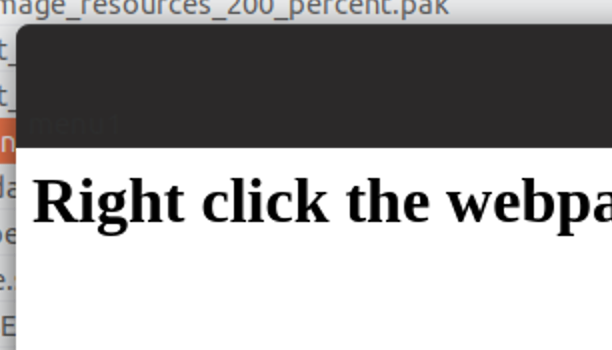
Confirmed that this happens too on vanilla Electron:
joaomoreno
on 6 Nov 2018
This is https://github.com/electron/electron/issues/15194, https://github.com/electron/electron/issues/13381
joaomoreno
on 6 Nov 2018
We've seen it early in the milestone https://github.com/Microsoft/vscode/issues/60600
joaomoreno
on 6 Nov 2018
I misunderstood and thought that this only happens for a custom theme, however this happens for the default ubuntu theme. Agree this should still be a candidate, let's discuss more in standup...
isidorn
on 6 Nov 2018
After discussions in Zurich we think this should be fixed. Reason being it happens on the out of the box Linux experience and is quite bad.
@sbatten is there some workaround we could do for the release? What would it take for us to fix this?
isidorn
on 6 Nov 2018
I can reproduce this in Electron 2.0.12, 2.0.13, 3.0.7 and 4.0.0 nightly 20181010
joaomoreno
on 6 Nov 2018
This doesn't reproduce with Electron 2.0.9, so this was caused by the Electron update. cc @bpasero @Tyriar
Given that there is no easy fix (@sbatten can confirm whether there is one), there are three possibilities:
- Ship it and get a big disclaimer in the release notes that you should switch themes
- Revert to Electron 2.0.9
- Enable custom menus in Linux, as it is already in Windows
joaomoreno
on 6 Nov 2018
@sbatten @joaomoreno
Rolling back to 2.0.9 has a bunch of other side effects and we need something that works for new and existing users. For new users we don't show the release notes.
Proposal:
- test custom menus on Linux to be sure we can recommend them
- create an FAQ entry that talks about the issue
- we test for the issue on startup, when we detect it we show an alert that recommends enabling custom menus and provides the link to the FAQ for more details
 kieferrm
on 6 Nov 2018
kieferrm
on 6 Nov 2018
A new update: this doesn't repro on the default theme of 18.04, so it could just affect 18.10 users as well as people who use that specific theme and similar ones. So, it might not hit as many people as we think.

FYI, I'm self hosting on custom menus since 2 months. One thing we should do in master already today: set them to be the default experience in Linux.
joaomoreno
on 6 Nov 2018
@joaomoreno AFAIK there is no easy fix for this, hence, the custom menus. It will repro for any theme that context menu text is low contrast with the menubar background as I understand. Luckily, 18.10 is the first ubuntu edition with this theme as default.
@kieferrm I agree with this proposal, but detecting the issue will probably not be an exact science. We can detect OS versions to guess, but I don't think we have a way to inspect GTK theme colors. Anyone else?
sbatten
on 6 Nov 2018
Not sure how it will help you but in Gtk colours are managed but GtkStyleContext, You should be able to set a dummy widget path to get the right colour for a menubar. I'd also like to point out that from Gtk's perspective anything other than Adwaita is a custom, unsupported, theme even if it's the default of a major distribution.
To do this in C would be something like so:
GtkWidgetPath   *path;
GtkStyleContext *ctx;
GdkRGBA          rgba;

path = gtk_widget_path_new ();
gtk_widget_path_append_type (path, GTK_TYPE_WINDOW);
gtk_widget_path_append_type (path, GTK_TYPE_MENU_BAR);
gtk_widget_path_append_type (path, GTK_TYPE_MENU_ITEM);
gtk_widget_path_append_type (path, GTK_TYPE_ACCEL_LABEL);

ctx = gtk_style_context_new ();
gtk_style_context_set_path (ctx, path);
gtk_style_context_set_screen (ctx, gdk_screen_get_default ());

gtk_style_context_get_color (ctx, 0, &rgba);
 ZanderBrown
on 7 Nov 2018
ZanderBrown
on 7 Nov 2018
I'm affected, using stock Ubuntu 18.04 desktop, since downloading the 1.29 update this morning (wasn't a problem in 1.28)
The bar only disappears when vscode has focus.
Let me know what kind of info I can provide. For now I've just disabled the menu bar.
 jflambert
on 13 Nov 2018
jflambert
on 13 Nov 2018
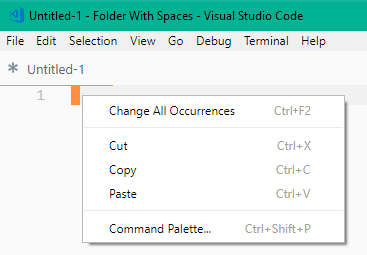
@jflambert do you know what theme is currently enabled on your Ubuntu machine? Could you provide a screenshot of vs code open with the menu enabled and a context menu open like so?
sbatten
on 13 Nov 2018
Add this to your settings
"window.titleBarStyle" :"custom"
 razikallayi
on 14 Nov 2018
razikallayi
on 14 Nov 2018
I wasn't affected by this bug, but tried out custom title bar just as an experiment. Turns out you render the menu using fuzzy grayscale antialiasing (made worse by gray-on-gray text), instead of respecting the OS choice to enable subpixel antialiasing. I will not be enabling the custom title bar feature, since it is harder to read than the default menus.
 nyanpasu64
on 15 Nov 2018
nyanpasu64
on 15 Nov 2018
@jimbo1qaz Are you saying that the custom menu is blurrier and harder to read than the rest of the VS Code UI? Would you be able to provide a screenshot?
sbatten
on 15 Nov 2018
So what's the fix?
 LinuxJon92
on 15 Nov 2018
LinuxJon92
on 15 Nov 2018
@LinuxJon92 Please see https://code.visualstudio.com/docs/setup/linux#_low-contrast-menu-bar for current fix workaround
sbatten
on 15 Nov 2018
This happens on solus 3.999 too.
 lallenfrancisl
on 16 Nov 2018
lallenfrancisl
on 16 Nov 2018
@sbatten the theme is "Communitheme". I'm not sure how I can take a screenshot like this since my menu only appears in "custom" mode.
jflambert
on 16 Nov 2018
@jflambert ah, yes, I believe communitheme is the other name for the yaru theme. it also experiences this issue. See https://code.visualstudio.com/docs/setup/linux#_low-contrast-menu-bar for current workaround
sbatten
on 16 Nov 2018
please, fix this problem in ubuntu 18.10
 victorgmp
on 17 Nov 2018
victorgmp
on 17 Nov 2018
Just making sure -- this issue is closed, but this workaround is definitely less than ideal. Is a real fix being pursued? If so can we either reopen this issue or be directed to the issue tracking this bug?
Thank you for all your work.
 e3b0c442
on 17 Nov 2018
e3b0c442
on 17 Nov 2018
Hi @e3b0c442,
The issue is tracked upstream here: electron/electron#15194
 GloverDonovan
on 18 Nov 2018
GloverDonovan
on 18 Nov 2018
In case it helps, the menu bar displays perfectly with Adwaita-dark on Pop!_OS 18.10 running GNOME Shell 3.30.1 under Wayland.

 aral
on 23 Nov 2018
aral
on 23 Nov 2018
I've been struggling with menus not highlighting on select/mouseover, and can confirm that switching to custom menu bar has fixed that for me.
Looks great with yaru-dark theme, Ubuntu 18.10.
 mdsharpe
on 2 Dec 2018
mdsharpe
on 2 Dec 2018
Related issues
 curtw
·
3Comments
curtw
·
3Comments
 ryan-wong
·
3Comments
ryan-wong
·
3Comments
 borekb
·
3Comments
borekb
·
3Comments
 chrisdias
·
3Comments
chrisdias
·
3Comments
 VitorLuizC
·
3Comments
VitorLuizC
·
3Comments
Most helpful comment
Add this to your settings
"window.titleBarStyle" :"custom"