Vscode: Support negative filters on text
It seems like attempting to filter out certain text from errors or warnings does not work. Take the following for example:
Filtering to include a warning:

Filtering to exclude the warning:

I have also tried using quotes. It seems like the exclude ! flag does not apply to text.
 braunsonm
All 23 comments
(Experimental duplicate detection)
Thanks for submitting this issue. Please also check if it is already covered by an existing one, like:
![vscodebot[bot] picture](https://avatars2.githubusercontent.com/in/2406?v=4&s=40) vscodebot[bot]
on 4 Nov 2018
vscodebot[bot]
on 4 Nov 2018
There are a couple of issues here:
1) '!' only works with glob patters
2) 1) is currently broken
 kieferrm
on 4 Nov 2018
kieferrm
on 4 Nov 2018
Is this going to be addressed ever? Look at this:
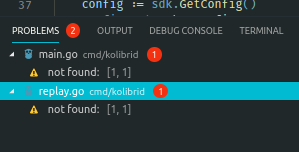
Can't filter these faulty linter false idkwtf's they are, they look like it's being fed some garbage text from the linter (golangci-lint) and it contains no information, and it only shows up when I have a main package open, and I can't hide them using the filter.
 l0k18
on 3 Jun 2019
l0k18
on 3 Jun 2019
@4avka Not sure how your issue is related to this. I think you should file an issue against golangci linter extension if the problems they generate do not makes sense.
 sandy081
on 4 Jun 2019
sandy081
on 4 Jun 2019
Where is this issue in the backlog?
It would be really helpful to clear out types of errors and warnings I don't care about with the filter so I can concentrate on ones I do care about.
Thanks,
Ryan
 StewartRyanSony
on 11 Jul 2019
StewartRyanSony
on 11 Jul 2019
@StewartRyanSony https://github.com/microsoft/vscode/issues/47354
sandy081
on 12 Jul 2019
@sandy081, the referenced issue has nothing to do with this one (still an issue as of this date). This ticket correctly reports that the Filter's ! not operator does not work with text. Examples have been provided. This is not related to specific linters, extensions or languages. It is not dependent on whether the list is filtered by category via a dropdown or by buttons. Negative filtering Does work with filenames and paths, not with text.
Examples where error is "bad statement, code BADSTMT"
Filtering to see any of that text works correctly: 'state', 'BADST', ' "state" ', etc
That only works when file filtering is not also applied. Example: "state" , **foo**. You can only have text inclusion, or file inclusion/exclusion, you cannot have both.
Filtering to NOT see any of that text always fails: '!state', !BADST', !"state"
It's not globbing, these do not work either: '!*bad*' , '(!bad)' , '!(bad)', !"*state*", etc
If it were globbing, there's no documented syntax to clarify whether we're filtering on text or filtering on files/folders.
EDIT: Fixed formatting on wildcards
 TonyGravagno
on 18 Jan 2020
TonyGravagno
on 18 Jan 2020
@TonyGravagno #47354 is not releated to this. This is related to the comment here by @StewartRyanSony
sandy081
on 21 Jan 2020
@sandy081
@TonyGravagno is right. The referenced issue has nothing to do with this or the situation I was talking about. Perhaps I could have been more clear in my statement, but I would like the ability to filter out types of errors or warnings, not all errors or all warnings.
for example I might want to filter out all warnings about using a cmdlet Alias. It might not be best practice to use an alias, but my script will still run just fine. While testing and debugging I'm going to want to concentrate on warnings that are more likely to cause the script to fail. Maybe later once the script is working I'll want to clean up the code and use proper cmdlet names so at that time, once they are helpful, I'll unfilter those warnings.
StewartRyanSony
on 21 Jan 2020
We need to be clear and careful about exactly what we're requesting. These should probably be separate tickets:
- ! NOT operator on text is not working. << singular focus of this ticket
- Comma-separated text and path expressions ignores the text component.
- Cannot refine a filter with multiple text specs.
- No definition for And/Or logic. Syntax in this contrived example is only a suggestion:
!**foo** AND ( "unknown" OR "missing" )
The AND and OR operators are explicit, where right now it seems the comma delimiter is ambiguous about whether it means AND or OR. - Not sure how to filter multi-word text. Examples :
"public class",!"private func".
I separate those, because while I agree with @StewartRyanSony about the request, I believe he is looking for multi-condition filtering, in addition to getting the NOT operator working. If that's a concept for separate ticket, we should create it.
BTW, this is not a complaint fest about filtering. The filters are greatly appreciated and this is intended as a contribution. Again, I'll look at the code to see if I can help there, but at this time I haven't looked to even see where filtering is happening.
TonyGravagno
on 21 Jan 2020
I don't mean to confuse the issue, so I'll try to be clear as well. My request is basically a use-case example of why the ability to use a Not operator in the filters is necessary.
Filtering for specific conditions or types or errors and warnings is working great and is very useful. It's just the opposite case where trying to filter out specific issues is a problem.
StewartRyanSony
on 21 Jan 2020
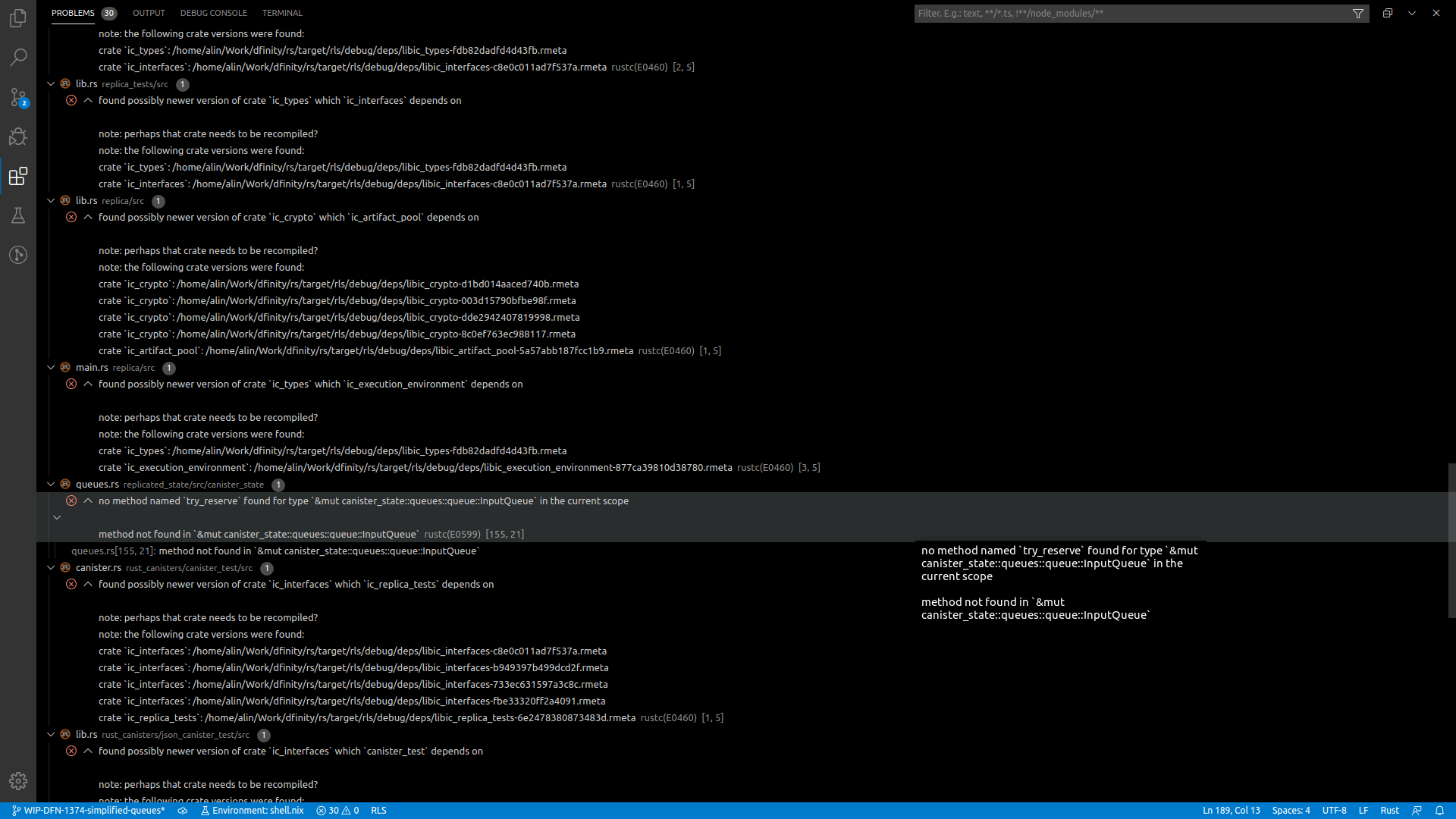
One very good use case is Rust (and the Rust Language Server). I am regularly getting 30-50 "found possibly newer version of crate x which y depends on" every time I make a typo anywhere. See https://github.com/rust-lang/rls/issues/1520 for context.
What's worse, Rust/RLS tries to be as specific as it can with errors, so each one of these errors is 6-10 lines long. I.e. I have to find the one actual error among 300+ lines of output every single time I make a typo. To make matters worse, RLS takes at least 30 seconds to produce this dump. That's 30 seconds waiting for RLS and 30 seconds folding errors one by one. For every typo.
If I were able to filter out all the useless "found possibly newer version" errors, it would save me 30 seconds per typo.
Below is an example of an actual error in a sea of noise. Notice the scrollbar on the right.
 alin-at-dfinity
on 16 Feb 2020
alin-at-dfinity
on 16 Feb 2020
@Dfinity-Alin not sure how the problems view can be helpful here. Please contact the rust extension to avoid such noise.
sandy081
on 20 Feb 2020
I did contact them. There are a handful of related bugs filed against RLS (the link in my previous post is one). And there are currently 273 Google search exact matches for "found possibly newer version of crate", with 7 of the first 10 being GitHub issues raised against various rust-lang projects, going all the way back to 2014. So this does not look like something that will be fixed any time soon.
All I'm saying is that a (comparatively) simple negative filter in VSCode would "solve" this issue and (I assume) many others like it.
Also, I find the verbosity of Rust error message actually nice to have, when it's an actual error. So I wouldn't want the errors to be single line errors, just so I can more easily eyeball the one error out of a sea of copycats. Although it wouldn't be all that bad if VSCode allowed collapsing errors into a single line.
alin-at-dfinity
on 20 Feb 2020
@Dfinity-Alin This is not an umbrella item for problems filter features. I would suggest to open a new issue for your requirements so that this item will not get side tracked.
sandy081
on 23 Feb 2020
@sandy081 All I was asking for was a negative filter for the Problems panel (e.g. filter out all problems containing some arbitrary substring). And providing a solid use case, as requested by @StewartRyanSony.
And I thought this is exactly what this issue was about. Am I missing something?
alin-at-dfinity
on 24 Feb 2020
@Dfinity-Alin You are completely right. I am really sorry, I got carried away with the title. Updated the title to reflect the request correctly.
sandy081
on 25 Feb 2020
@sandy081 No worries, thanks for taking the time.
alin-at-dfinity
on 25 Feb 2020
Any updates on this?
 Xunnamius
on 27 May 2020
Xunnamius
on 27 May 2020
How about now? Still !working.
 changeling
on 17 Jul 2020
changeling
on 17 Jul 2020
Back-Link for the SO question leading here since Dec 2019, just because.
Note: I did not found the issue here with some minutes searching, it seems reasonable to add "problem pane" to the question's title, at least that would have shown this issue in my (and possible others') search.
 GitMensch
on 29 Sep 2020
GitMensch
on 29 Sep 2020
Just kinda bumping this issue. It would be nice.
changeling
on 11 Oct 2020
I need this feature. I can't use VSCode because of this.
My screen is constantly littered with a million irrelevant style warnings. They are distracting, unnecessary, and ugly. I cannot work with this.
For the most part, VSCode with its Intellisense, code actions, problem highlighting, and its integration with language extensions is incredible. I need these features to help me code—it's why I want to use this platform. So simply switching off all error highlighting for me is not a solution.
I need filtering. Extension designers add new warnings, corrections and code actions on a whim, and why wouldn't they? They want to add features and create tools that have as much functionality as possible. But because of the lack of customization on the client end, it can be incredibly annoying when this happens. You see, we as coders and (in my case, former) VSCode users also need simplicity. We want to have control over our tools. We want to code with peace of mind.
I have spent a day trying to fix this just for myself and it felt like banging my head against a wall again and again. I am done. This is the first, and last time I attempt to use VSCode for quite a while. But please listen to us—this request had been made time and time again and been ignored or shut down time and time again. It shouldn't even be hard. You have a great tool—please make it usable.
 Nagyhal
on 1 Nov 2020
Nagyhal
on 1 Nov 2020
Related issues
 NikosEfthias
·
3Comments
NikosEfthias
·
3Comments
 philipgiuliani
·
3Comments
philipgiuliani
·
3Comments
 lukehoban
·
3Comments
lukehoban
·
3Comments
 trstringer
·
3Comments
trstringer
·
3Comments
 shanalikhan
·
3Comments
shanalikhan
·
3Comments
Most helpful comment
Any updates on this?