Vscode: "Split Terminal" in workspace is opening incorrect directory
Issue Type: Bug
- Be in a workspace with 2+ directories.
- Open terminal.
- Click "Split Terminal".
- Choose a directory.
Expected: Directory I chose is opened in a split terminal.
Actual: Directory I didn't choose is opened in a split terminal.
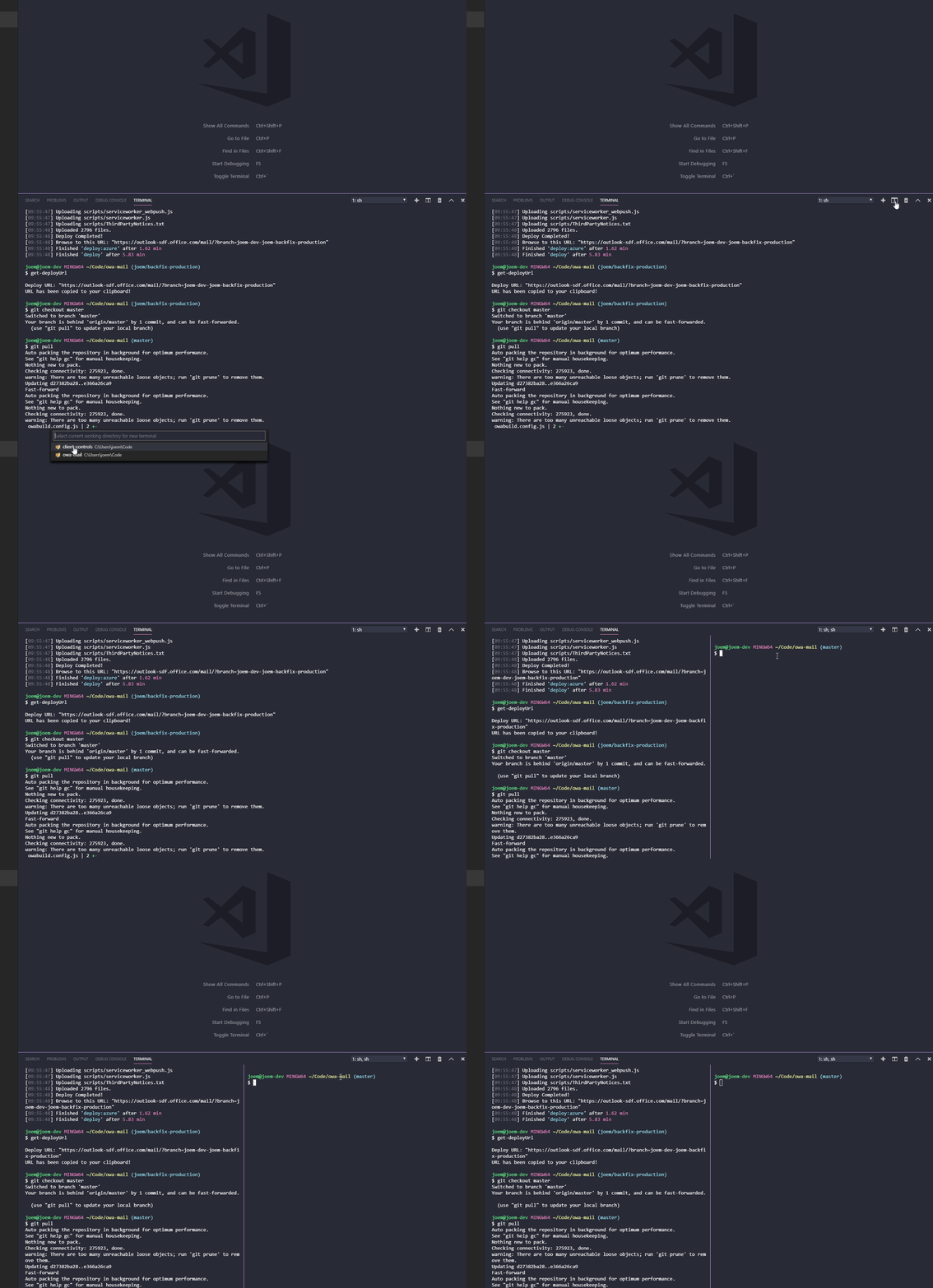
VS Code version: Code - Insiders 1.29.0-insider (4d9f1d23a556dccd2c0fd5203923a24b21e41209, 2018-10-22T05:18:34.128Z)
OS version: Windows_NT x64 10.0.17763
System Info
|Item|Value|
|---|---|
|CPUs|Intel(R) Core(TM) i7-7700 CPU @ 3.60GHz (8 x 3600)|
|GPU Status|2d_canvas: enabled
checker_imaging: disabled_off
flash_3d: enabled
flash_stage3d: enabled
flash_stage3d_baseline: enabled
gpu_compositing: enabled
multiple_raster_threads: enabled_on
native_gpu_memory_buffers: disabled_software
rasterization: enabled
video_decode: enabled
video_encode: enabled
webgl: enabled
webgl2: enabled|
|Memory (System)|31.79GB (16.96GB free)|
|Process Argv||
|Screen Reader|no|
|VM|0%|
Extensions (12)
Extension|Author (truncated)|Version
---|---|---
snapshot-tools|asv|0.2.2
bracket-pair-colorizer|Coe|1.0.60
gitlens|eam|8.5.6
tslint|eg2|1.0.40
prettier-vscode|esb|1.6.1
sort-typescript-imports|mic|1.4.1
csharp|ms-|1.16.2
debugger-for-chrome|msj|4.10.2
polacode|pnp|0.2.2
vscode-icons|rob|7.27.0
partial-diff|ryu|1.4.0
vscode-todo-highlight|way|1.0.4
(2 theme extensions excluded)
 martellaj
All 6 comments
@alexr00 do we not suppress the multi-root choose dialog based on the new setting?
 Tyriar
on 22 Oct 2018
Tyriar
on 22 Oct 2018
(Experimental duplicate detection)
Thanks for submitting this issue. Please also check if it is already covered by an existing one, like:
![vscodebot[bot] picture](https://avatars2.githubusercontent.com/in/2406?v=4&s=40) vscodebot[bot]
on 22 Oct 2018
vscodebot[bot]
on 22 Oct 2018
Thank you for catching!
 alexr00
on 23 Oct 2018
alexr00
on 23 Oct 2018
Just for you to know.
The "new terminal" button works correctly now. That's fixed.
But if I try to open a new pane with the "Split terminal" command keeps happening what is reported in here.
 nahuelhds
on 29 Oct 2018
nahuelhds
on 29 Oct 2018
Yes, once @Tyriar has taken a look at #61584(which fixes this) I will merge it in.
alexr00
on 29 Oct 2018
@alexr00 @Tyriar This regressed even more now. Doing split terminal doesn't even give the option of what directory to open. It just opens a second terminal of the same project. Is this expected? Prior to the original change, clicking "split terminal" gave me an option - which seems like the best UX to me.
EDIT: Looks like this behavior is now a setting. Disregard.
martellaj
on 30 Oct 2018
Related issues
 philipgiuliani
·
3Comments
philipgiuliani
·
3Comments
 curtw
·
3Comments
curtw
·
3Comments
 NikosEfthias
·
3Comments
NikosEfthias
·
3Comments
 ryan-wong
·
3Comments
ryan-wong
·
3Comments
 trstringer
·
3Comments
trstringer
·
3Comments
Most helpful comment
@alexr00 @Tyriar This regressed even more now. Doing split terminal doesn't even give the option of what directory to open. It just opens a second terminal of the same project. Is this expected? Prior to the original change, clicking "split terminal" gave me an option - which seems like the best UX to me.
EDIT: Looks like this behavior is now a setting. Disregard.