Vscode: Disable Auto Cursor Reveal while typing in Find Widget
Is there a way to disable automatic searching? I work in a 40k+ line document daily and searching through it constantly while typing (going up, down and all around) is a mess. I want Visual Studio Code to start searching only when I press enter/return on the keyboard and quit searching while I am typing what I want to search for! Where is this feature? Thanks in advance.
 KeyC0de
All 41 comments
Seconded. Just started us VS Code and this is super annoying, especially when you find what you're looking for and start backspacing.
 LlamaLasagna
on 24 Jul 2019
LlamaLasagna
on 24 Jul 2019
Just mentioning the term "incremental search" here so this issue is searchable by that term.
 dwelle
on 7 Aug 2019
dwelle
on 7 Aug 2019
I hope the developers notice this. I don't believe this feature to be too hard to implement, yet I don't quite see how it hasn't gotten more support from people.
KeyC0de
on 7 Aug 2019
I'd be glad to make a PR if there was will to merge it.
dwelle
on 7 Aug 2019
@darekf77 search.searchOnType was introduced in 1.41 and relates to find-in-files (project search), not to the find-in-file (find widget), which this issue is about.
dwelle
on 16 Dec 2019
Few remarks that could possibly help OP before this issue is resolved:
1) Incremental Search extension by siegebell has such UX where you can peek anything but until you confirm your search with Enter nothing is lost, not even selection you had before you started searching. It is kinda native search should work.
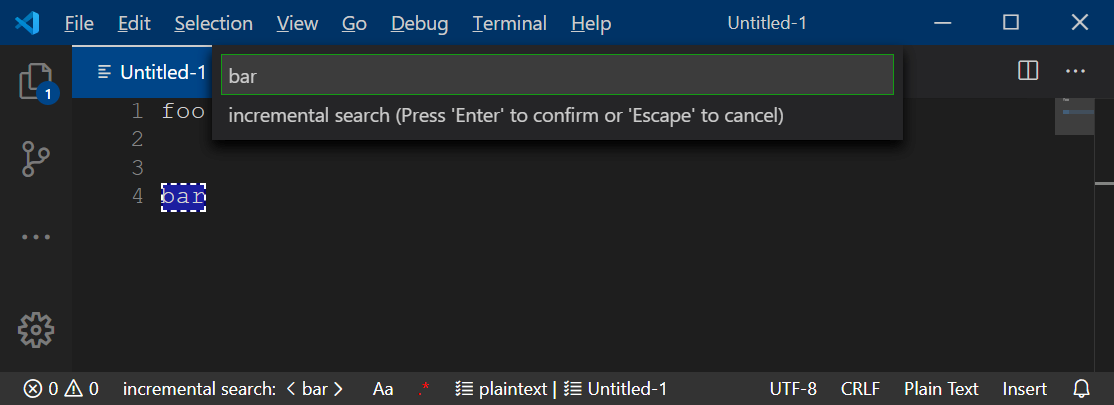
2) Using native search and ending up with nasty unwanted selection, you can restore cursor either with
2.1) "Go Back" (workbench.action.navigateBack, Alt+←),
2.2) or repetitively invoke "Cursor Undo" (cursorUndo, Ctrl+U, since v1.40) - this will take you through all selections that were made while searching but it will restore selection you had before searching, that would be completely lost otherwise.
(Remarks as of 2019-12-21, VSC 1.41.1.)
 myfonj
on 21 Dec 2019
myfonj
on 21 Dec 2019
This feature request is now a candidate for our backlog. The community has 60 days to upvote the issue. If it receives 20 upvotes we will move it to our backlog. If not, we will close it. To learn more about how we handle feature requests, please see our documentation.
Happy Coding!
![vscodebot[bot] picture](https://avatars2.githubusercontent.com/in/2406?v=4&s=40) vscodebot[bot]
on 28 Jan 2020
vscodebot[bot]
on 28 Jan 2020
I'm linking to #85303 because I opened that before I knew this one existed, and it overlaps with this.
This issue has more traction, so I'll make a note there that upvoting should happen here.
I'm copying the most relevant part of that discussion here, but for anyone who wants more detail, I broke the Find Widget behavior into 3 cases based on the position of the cursor and the find-match. The GIFs explain it better, and I'll leave those there.
-- Copied from #85303 --
Expected behavior is that
on
inputto the Find Widget, the matching strings are (1) highlighted on screen, and (2) decorated in the in the scroll bar, but (3) the position of the screen should not change, no matter where the cursor happens to be, or whether the first match happens to be on the current screen.only on
enterorclick ↑|↓should the editor jump to the next match.
The Find Widget serves two useful functions
(A) It lets you see where matches are (on-screen highlights and scrollbar decorations)
(B) It lets you go to a match.
Right now, (B) is getting in the way of (A) in cases (1) and (3) from my example [EDIT: example cases now illustrated in my post below]
 ultraGentle
on 30 Jan 2020
ultraGentle
on 30 Jan 2020
I wanted to add that I believe this to be an accessibility issue, since having the screen move unexpectedly is disorienting -- and I imagine its effect on screen readers is even worse.
To illustrate that, and in the interest of having all the relevant information in one thread, I've copied the GIFs from the other, related thread here.
--
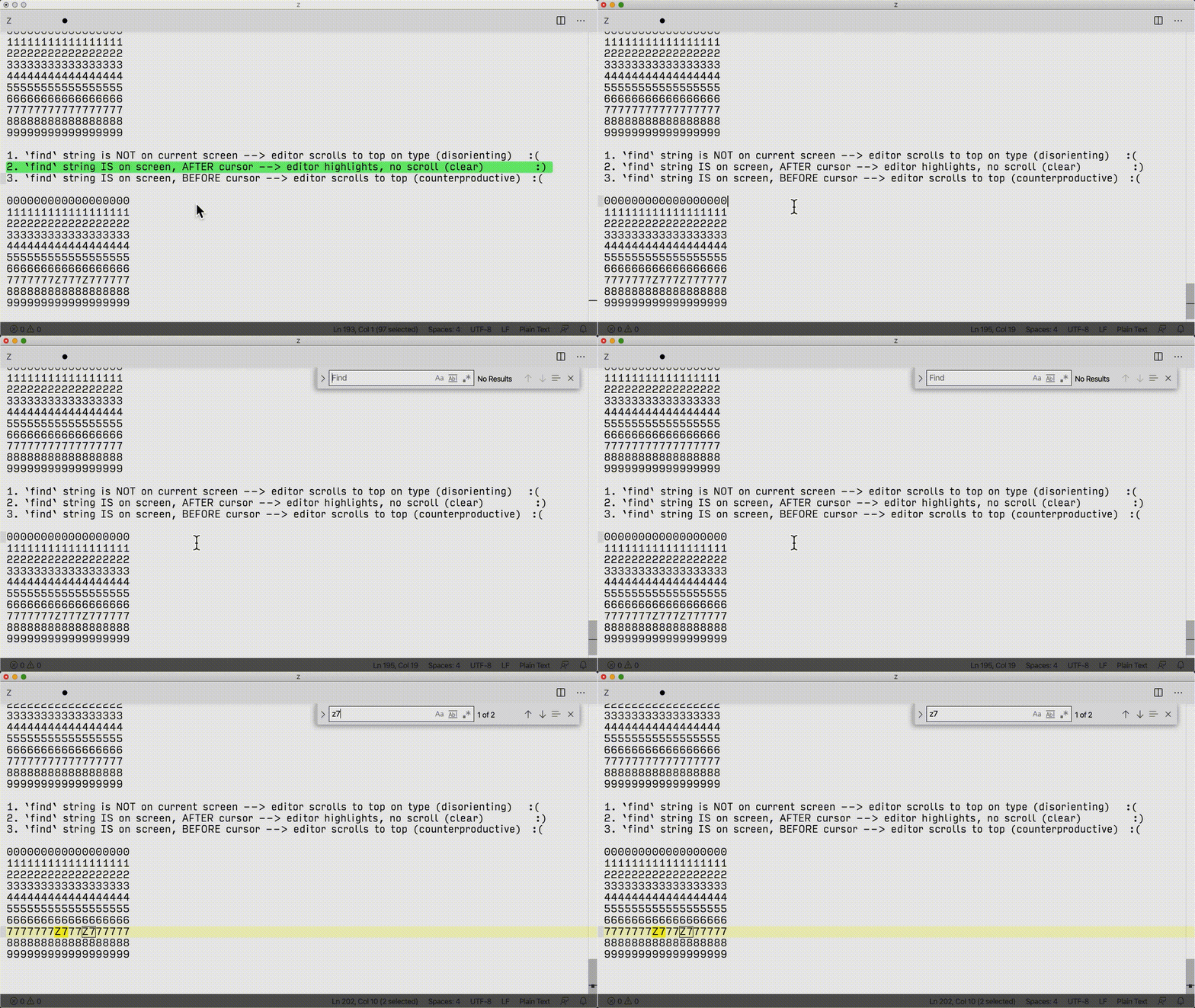
Scenario: using Find to look for Z7 in code block at bottom of screen
Case 1: 1. find string is not on current screen --> editor scrolls to top on type (disorienting)
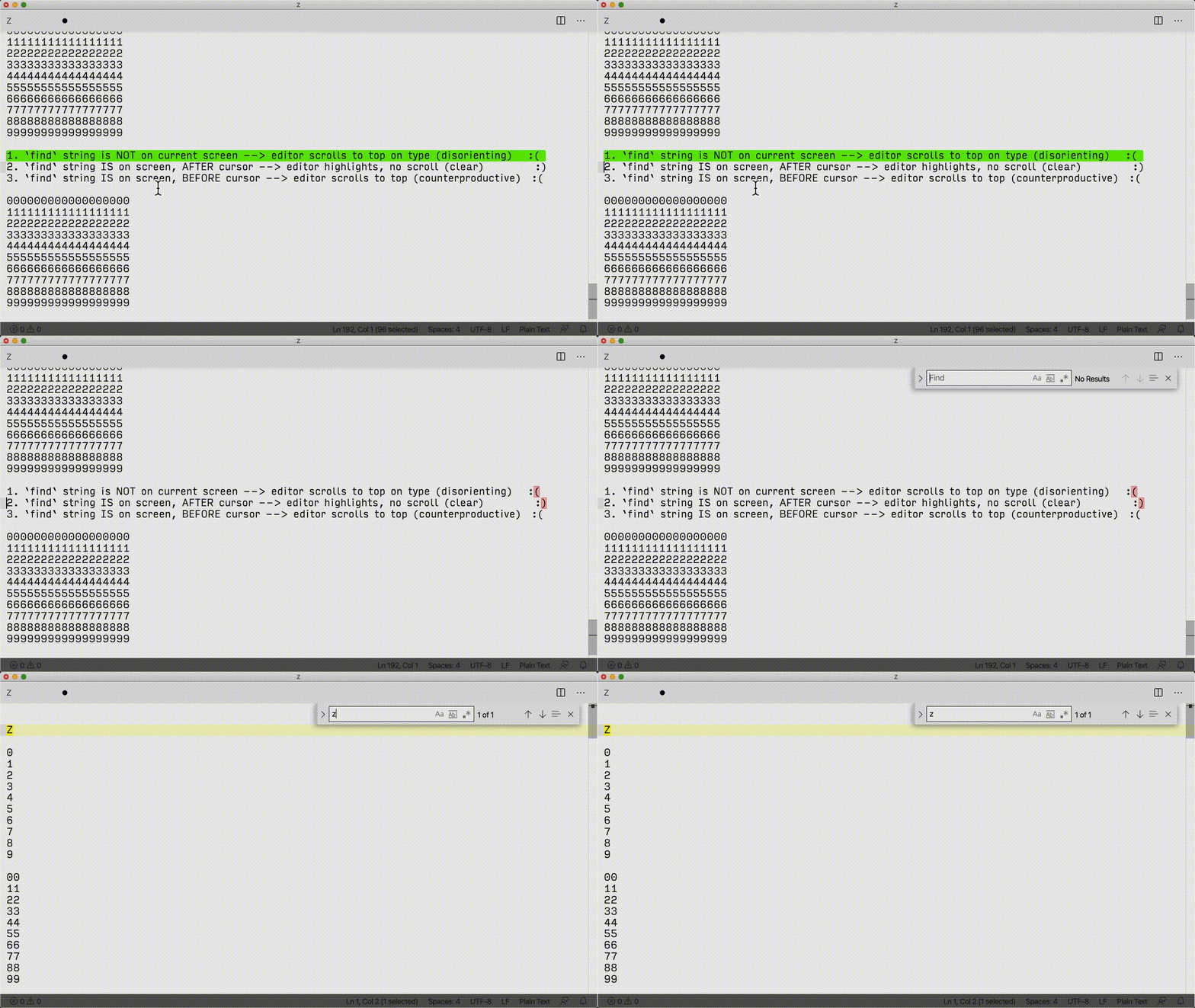
Case 2: find string is on screen, after cursor --> editor highlights, no scroll (clear)
Case 3: find string is on screen, before cursor --> editor scrolls to top (disorienting)
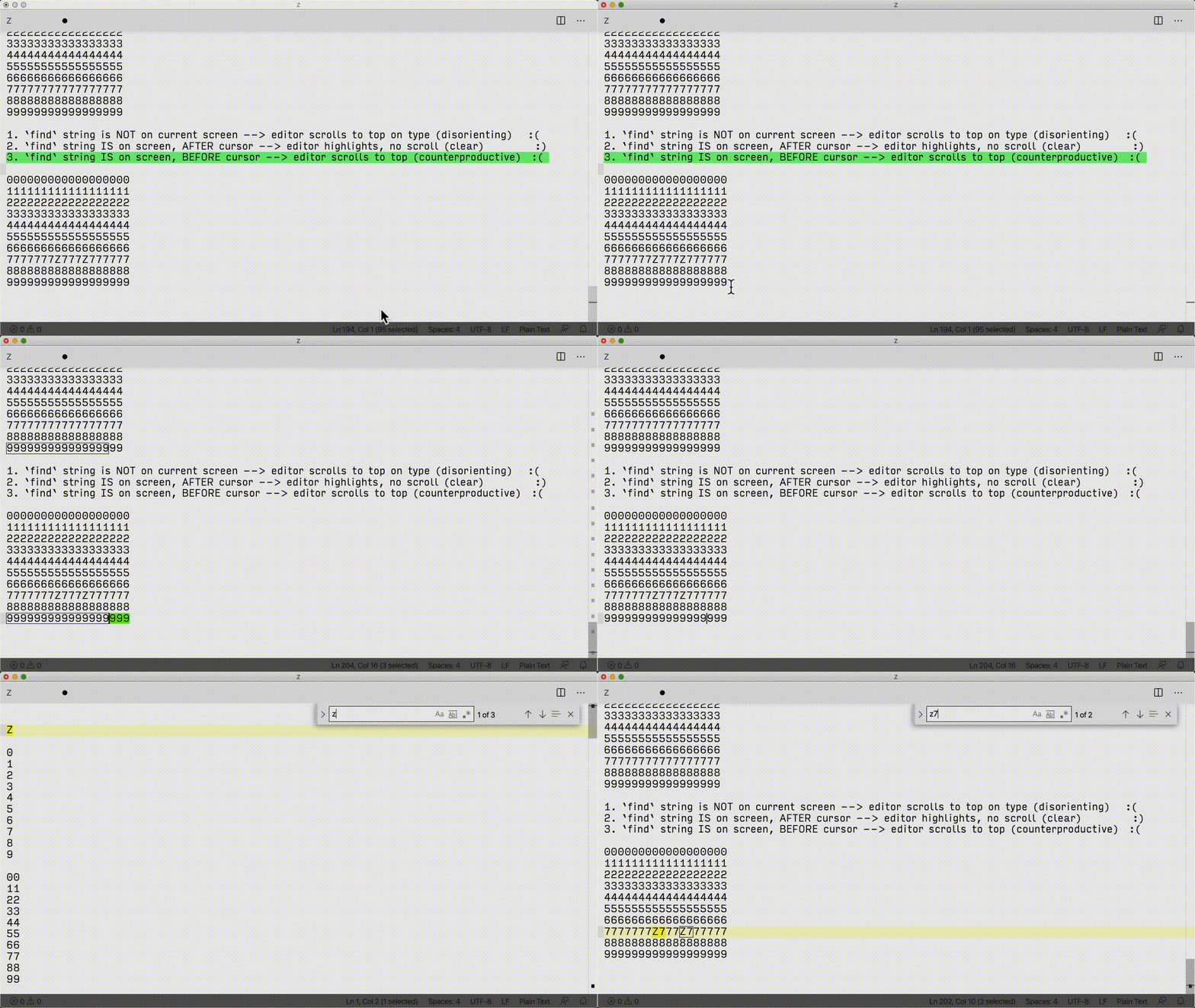
In general, we do not wish to scroll to the first _letter_ of our find term; we want to only go to the whole match. And even then, we may not wish to move at all, but rather just check to see whether what we are looking for is on-screen.
Solution highlight on input into the widget, but scroll _only_ upon enter press (or clicking on the widget up/down arrows.
--
Finally, for reproducibility, here's the "code" from the cases above. As is, it represents Case 1. To reproduce Cases 2 and 3, simply change one of the 7s in the bottom block to a Z.
Z

0
1
2
3
4
5
6
7
8
9

00
11
22
33
44
55
66
77
88
99

000
111
222
333
444
555
666
777
888
999

0000
1111
2222
3333
4444
5555
6666
7777
8888
9999

00000
11111
22222
33333
44444
55555
66666
77777
88888
99999

000000
111111
222222
333333
444444
555555
666666
777777
888888
999999

0000000
1111111
2222222
3333333
4444444
5555555
6666666
7777777
8888888
9999999

00000000
11111111
22222222
33333333
44444444
55555555
66666666
77777777
88888888
99999999


000000000
111111111
222222222
333333333
444444444
555555555
666666666
777777777
888888888
999999999

0000000000
1111111111
2222222222
3333333333
4444444444
5555555555
6666666666
7777777777
8888888888
9999999999

00000000000
11111111111
22222222222
33333333333
44444444444
55555555555
66666666666
77777777777
88888888888
99999999999

000000000000
111111111111
222222222222
333333333333
444444444444
555555555555
666666666666
777777777777
888888888888
999999999999

0000000000000
1111111111111
2222222222222
3333333333333
4444444444444
5555555555555
6666666666666
7777777777777
8888888888888
9999999999999

00000000000000
11111111111111
22222222222222
33333333333333
44444444444444
55555555555555
66666666666666
77777777777777
88888888888888
99999999999999

000000000000000
111111111111111
222222222222222
333333333333333
444444444444444
555555555555555
666666666666666
777777777777777
888888888888888
999999999999999

0000000000000000
1111111111111111
2222222222222222
3333333333333333
4444444444444444
5555555555555555
6666666666666666
7777777777777777
8888888888888888
9999999999999999

00000000000000000
11111111111111111
22222222222222222
33333333333333333
44444444444444444
55555555555555555
66666666666666666
77777777777777777
88888888888888888
99999999999999999

1. `find` string is NOT on current screen --> editor scrolls to top on type (disorienting)   :(
2. `find` string IS on screen, AFTER cursor --> editor highlights, no scroll (clear)          :)
3. `find` string IS on screen, BEFORE cursor --> editor scrolls to top (counterproductive)  :(

000000000000000000
111111111111111111
222222222222222222
333333333333333333
444444444444444444
555555555555555555
666666666666666666
777777777777777777
888888888888888888
999999999999999999
OT: you can use
<details>(content)</details> in GFM to fold content…
…like this.
See MDN docs for details, GFM.
myfonj
on 2 Feb 2020
This issue is close to critical mass (20 votes) for adoption. I wonder if there's an above-board way to increase its visibility so that folks it affects can decide if they want to vote.
Relatedly, I've opened an issue #89652 about making issues easier to find and vote on from within the editor; just linking as the issue we have here is a prime example of an issue that's not "sexy", so people probably don't search for it much, but if it were implemented, would positively impact almost everyone.
ultraGentle
on 5 Feb 2020
In case this issue gets accepted, I'll just mention that the "unexpected scroll" bug reported in #85308 and #70306 should potentially be looked at as part of this, since @rebornix* observed that it is also due to the Auto Search behavior.
Two birds, one stone, and whatnot.
*Apologies for the double mention -- not sure what the etiquette is, there, but wanted to err on the side of collecting related issues.
ultraGentle
on 11 Feb 2020
Keen to see this fixed too, especially due to #70306 👍
 adamreisnz
on 11 Feb 2020
adamreisnz
on 11 Feb 2020
I'm also following this because of #70306. I constantly -- constantly -- lose my place when I switch editors and it suddenly jumps to the next instance of whatever's in the search box due to auto searching. It's very annoying!
And it's compounded by another unrelated issue (#45233) where history navigation is not limited to a single editor group. So if I lose my place while searching and then hit the keystroke to go back, VS Code often switches me back to the editor group I just left, changes the active file in that editor group to whatever's in the editor group I just switched to, and now I've lost my place in two editor groups instead of just one. If this bug (and that other one) gets fixed, nearly all of my daily frustration using VS Code will disappear, and I'll be a much happier coder.
 briankendall
on 13 Feb 2020
briankendall
on 13 Feb 2020
:slightly_smiling_face: This feature request received a sufficient number of community upvotes and we moved it to our backlog. To learn more about how we handle feature requests, please see our documentation.
Happy Coding!
vscodebot[bot]
on 14 Feb 2020
I think this would be a good candidate for a PR, if anyone wants to work on it. @rebornix suggested a setting editor.find.searchOnType with values
- "search" - current behavior
- "highlight" - highlight matches on type but don't move the cursor
- "off" - don't highlight matches or move the cursor automatically on keypress
I think something like that would be useful
 roblourens
on 14 Feb 2020
roblourens
on 14 Feb 2020
In the interest of naming the setting clearly, I don't think "search" is conveying the behavior here.
I would propose the setting be called something like editor.find.behaviorOnType with values of
- "highlight and move to match" (alternatively "jump" or "scroll")
- "highlight without moving"
- "off"
When I initially looked for this issue, keywords I used were "jump" and "move" and "scroll" on type, but "search" doesn't inherently imply any of those, as highlighting is a form of searching, too.
ultraGentle
on 14 Feb 2020
@ultraGentle thanks for the suggestion. We can put the detailed description for each setting and mention jump/scroll in the description for this setting then when users search for these keywords, they can find it. The enum value doesn't have to be complex.
For someone interested in helping out, here is the place where we should check the setting to see if you should automatically research
https://github.com/microsoft/vscode/blob/20f4cbf4b6e585a15751effe59ab40e180d11b43/src/vs/editor/contrib/find/findModel.ts#L130-L139
 rebornix
on 14 Feb 2020
rebornix
on 14 Feb 2020
@rebornix "good first issue?" Happy to help, but would have a question or two. Prefer continued communication here or email?
ultraGentle
on 16 Feb 2020
Just wanted to update folks on this thread: I opened up a PR a while back that seems to have fixed this (and a sister issue) for me. At least one other user has also reported that it works for them.
I haven't heard back from the VSC team as to whether I need to take further action to move the PR along, so I thought I'd mention that it's a small fix, so you can easily build your own copy of VSC and cut out 3 lines to solve the issue.
So, just in case this is still driving you crazy, you can see either
91013 was the original PR, which included minor refactoring;
94622 is functionally the same, but is the 3-lines-only version.
ultraGentle
on 7 Apr 2020
@ultraGentle thanks for your continuous contribution on this. The PR does it claims to do, great. IMHO this feature should be behind a setting as we don't want to change the behavior for everyone who is already familiar with the experience.
rebornix
on 8 Apr 2020
Familiar with the experience of the screen randomly moving to different
places? Haha, sorry, lockdown is making me a bit crazy.
On Thu, 9 Apr 2020, 06:06 Peng Lyu, notifications@github.com wrote:
@ultraGentle https://github.com/ultraGentle thanks for your continuous
contribution on this. The PR does it claims to do, great. IMHO this feature
should be behind a setting as we don't want to change the behavior for
everyone who is already familiar with the experience.—
You are receiving this because you commented.
Reply to this email directly, view it on GitHub
https://github.com/microsoft/vscode/issues/60977#issuecomment-611107740,
or unsubscribe
https://github.com/notifications/unsubscribe-auth/AADXYQQKOCGIYDPAKLRW2Q3RLS4JPANCNFSM4F3SHCNA
.
adamreisnz
on 8 Apr 2020
@rebornix Ok, no problem.
Would you want the current behavior enabled by default?
Personally I would suggest enabling the new behavior, with a note about it in the "what's new" section indicating that it can be switched back via the setting.
Either way!
ultraGentle
on 8 Apr 2020
@rebornix Okay, closed the other PR and opened #94825 , where the don't-move-cursor behavior is behind a setting. The default leaves the behavior as-is.
ultraGentle
on 9 Apr 2020
Just chiming in that I think the default behavior should be to leave the cursor at the first iteration of the variable on the screen, and have nothing to do with the cursor. Currently search will always jump to the next variable location.
Atom is a great reference point to how this should be handled
 blainemuri
on 14 Apr 2020
blainemuri
on 14 Apr 2020
@blainemuri I have never used Atom. My original inspiration for the way this should work is the Notepad++ editor; which I find most intuitive.
KeyC0de
on 15 Apr 2020
@blainemuri FYI, If you want that functionality by default right now, you can build my PR #91013 which does exactly that. Instructions on how to build VSC from source are here: https://github.com/microsoft/vscode/wiki/How-to-Contribute.
Otherwise, I have PR #94825 open, which will hopefully have a good chance of being merged, and when it is, you'll be able to turn off "find > move cursor on type."
For what it's worth, I agree with you completely on a personal level: finding matches and moving the cursor should be separate actions by default. But I (sort of) understand that if you make a program with millions of users, you can't change the default behavior without annoying many, even if it's a sensible change.
ultraGentle
on 16 Apr 2020
How's development on this coming along? Will the fix be merged to a future vscode release version? When this happens will this issue be marked as resolved? Anything I can do? Thanks.
KeyC0de
on 7 Aug 2020
PR author here: I think we need to request a 2nd reviewer -- @rebornix was initially quite responsive but it's possible he got pulled away on another project and this got lost in the mix. (Not complaining, just speculating!)
I don't know how to request another review, so if anyone knows how to flag this or get someone's attention to it, by all means take the ball and run.
Finally, if a 2nd reviewer sees this, note that it's the commit that's 1 before the latest that does exactly what the PR says, and that corrected the formatting issue pointed out by rebornix, which was the only problem brought to my attention.
ultraGentle
on 7 Aug 2020
@ultraGentle is kind, it's simply me lost in my tasks and forgot about this issue. Thanks for @ultraGentle 's contribution, the PR is great and merged into master. Later this week it will be shipped in Insiders, and you can set editor.find.cursorMoveOnType to false to turn it off.
rebornix
on 11 Aug 2020
Ok I downloaded latest vscode version set editor.find.cursorMoveOnType to false (which is not recognized) on settings and I don't see anything different. Possibly because this isn't merged into the release version yet.
KeyC0de
on 8 Sep 2020
@KeyC0de it's only present in Insiders edition at the moment. According to the iteration/endgame plan, August release should come out tomorrow or shortly thereafter.
ultraGentle
on 8 Sep 2020
I downloaded the new version today, but it seems editor.find.cursorMoveOnType is not recognised. Has the setting been renamed since?
adamreisnz
on 10 Sep 2020
@adamreisnz today's version of what edition? As @ultraGentle replied to @KeyC0de, Insiders edition is the key word here, and it really seems to work there. (https://code.visualstudio.com/insiders/)
myfonj
on 10 Sep 2020
The regular version. I tried it already in insiders a month ago and that worked yes, but I was under the impression it would have landed in yesterday's version of the common build.
adamreisnz
on 10 Sep 2020
We're finally there!
1.49.0 stable was released today with the setting
find > moveCursorOnType > set to false
which activates the desired behavior
Edit: Note that if you previously had global find clipboard set to false to avoid unexpected cursor jumping/highlighting when switching panes, you can now re-enable that setting, as moveCursorOnType > false fixes that bug.
ultraGentle
on 11 Sep 2020
@ultraGentle Indeed. Took a little less than 2 years but it's done.
KeyC0de
on 11 Sep 2020
So I have this set:
"editor.find.cursorMoveOnType": false
But when I do CTRL+F in the 1.49.0 release notes page, for example, the caret still jumps to result as I type. It doesn't wait for me to press ENTER. Is this not universal? Is it language-specific?
 rcdailey
on 15 Sep 2020
rcdailey
on 15 Sep 2020
@rcdailey It is universal. Try again.
KeyC0de
on 15 Sep 2020
I can confirm that it doesn't apply to release notes (meaning the cursor jumps)_.
dwelle
on 15 Sep 2020
What does "try again" mean? This is pretty brain dead to test. I closed & reopened the tab, it still doesn't change the behavior in the release notes tab. It also doesn't function in the Extension pages as well.
rcdailey
on 15 Sep 2020
Related issues
 borekb
·
3Comments
borekb
·
3Comments
 curtw
·
3Comments
curtw
·
3Comments
 VitorLuizC
·
3Comments
VitorLuizC
·
3Comments
 v-pavanp
·
3Comments
v-pavanp
·
3Comments
 philipgiuliani
·
3Comments
philipgiuliani
·
3Comments
Most helpful comment
We're finally there!
1.49.0 stable was released today with the setting
find>moveCursorOnType> set tofalsewhich activates the desired behavior
Edit: Note that if you previously had
global find clipboardset to false to avoid unexpected cursor jumping/highlighting when switching panes, you can now re-enable that setting, asmoveCursorOnType>falsefixes that bug.