Vscode: Request to make older versions (zip, no-admin) install available
I posted my question at Stackoverflow, but, there are already other question exactly like this over there since Feb 20, 2017 with no answer! So, it is definitely a BUG if you see by an user point view!
Please see it here and mine here.
I just cant see why MS dont use coherency in somethings. If a new VSCode is launched, it is made available in Source Code, Portable and Exe formats. But if we need an older version, only Source Code and Exe is available? Is there any logic on it?
Just to make it clear: I love VSCode. I just dont love MS. But I need it for Win64 because I have to use it in my work where I dont have admin privileges. (Linux at home).
Thank you.
 sdlins
All 15 comments
Previous versions are available from the release notes, but these pages do not include the zip/archive versions, see below.

 egamma
on 15 Oct 2018
egamma
on 15 Oct 2018
Is there a workaround? I even tried Wayback Machine without success: links expire, redirect to latest version or are not archived at all.
 kAlvaro
on 15 Oct 2018
kAlvaro
on 15 Oct 2018
As @egamma mentioned, you can go to the release notes page to download old release. One additional trick, you can find a link to download your platform's build, and replace the version number
https://vscode-update.azurewebsites.net/1.27.2/win32-x64-user/stablehttps://vscode-update.azurewebsites.net/<your-version-here>/win32-x64-user/stable
 octref
on 15 Oct 2018
octref
on 15 Oct 2018
I agree that this is a BUG. I have spent hours trying to install a version of VS Code that works when I'm offline because 1.28.1 does not. This offline BUG is known, e.g. see _Code fails to start/open when offline_ #7570. I installed the Insiders version 1.29 but that also does not work offline. Now I'm spending a bunch of time trying to figure out how to install an older version of VS Code. Please update the documentation and FAQ so that they include explicit directions for how to get:
- Older versions of VS Code
- "VS Code Exploration" which is mentioned in Issue #7570, but I have no idea what web page to go to to learn about and download the latest
Thank you.
 nancym
on 15 Oct 2018
nancym
on 15 Oct 2018
@sdlins Why do you have to use an old version of VS Code though?
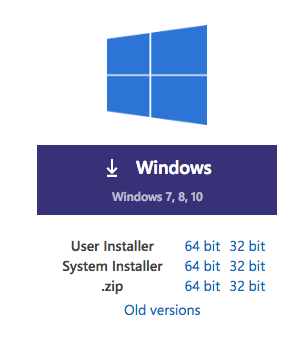
@egamma Should I add zip installer link to each release note? IMO it makes the listing a bit cluttered. I would prefer to have a old download listing page and make the download widget point to there, like so:
octref
on 16 Oct 2018
As @egamma mentioned, you can go to the release notes page to download old release. One additional trick, you can find a link to download your platform's build, and replace the version number
@octref Unless I missed where exactly to look at, all those links point to installer versions. This ticket is about ZIP/Portable versions.
kAlvaro
on 16 Oct 2018
@egamma Should I add zip installer link to each release note? IMO it makes the listing a bit cluttered. I would prefer to have a old download listing page and make the download widget point to there, like so:
@octref I agree this makes it cluttered and I like your proposal of a separate old download listing page.
egamma
on 16 Oct 2018
Hi guys, is there any way (even a complex one) or workaround to get the v1.25.1 (win10 64 zip) right now? I am really needing it. Thank you so much!
sdlins
on 17 Oct 2018
 flamott
on 17 Oct 2018
flamott
on 17 Oct 2018
@Joelism thank you so much! :+1: You helped me a lot! (This issue can already be closed!)
Just kidding! lol
sdlins
on 17 Oct 2018
@flamott i'm looking for the zip package download link for Windows 64 bit 1.10.2 version. Following your way, I tried https://vscode-update.azurewebsites.net/1.10.2/win32-x64-archive/stable, it returned Not Found. What i found is your way works up to 1.13.0. Is there a way to find zip packages of Win 64 bit versions older than 1.13.0?
 cateyes99
on 2 Jan 2020
cateyes99
on 2 Jan 2020
@cateyes99 Windows 64 bit hit stable in 1.15, maybe no 64 bit was built before 1.13?
flamott
on 2 Jan 2020
@flamott interesting even the 1.15's update note said so, but 1.13.0's 64 bit installer is also available. Anyway i found 1.10.2's 32 bit zip package for Windows. Thanks,
cateyes99
on 2 Jan 2020
The artifacts are all there. It would be handy to just add the zip links on the release page. When I want to reinstall an old version of Code to verify a regression (i.e. it worked in the old version but not in the new version), it is really handy to use the Portable install option.
For example this page contains no link to the zipfiles: https://code.visualstudio.com/updates/v1_44
But the zipfile for 1.44.0 is right here: https://vscode-update.azurewebsites.net/1.44.0/win32-x64-archive/stable
 RikkiGibson
on 18 Apr 2020
RikkiGibson
on 18 Apr 2020
Related issues
 villiv
·
3Comments
villiv
·
3Comments
 vsccarl
·
3Comments
vsccarl
·
3Comments
 philipgiuliani
·
3Comments
philipgiuliani
·
3Comments
 sijad
·
3Comments
sijad
·
3Comments
 omidgolparvar
·
3Comments
omidgolparvar
·
3Comments
Most helpful comment
The artifacts are all there. It would be handy to just add the zip links on the release page. When I want to reinstall an old version of Code to verify a regression (i.e. it worked in the old version but not in the new version), it is really handy to use the Portable install option.
For example this page contains no link to the zipfiles: https://code.visualstudio.com/updates/v1_44
But the zipfile for 1.44.0 is right here: https://vscode-update.azurewebsites.net/1.44.0/win32-x64-archive/stable