Vscode: Centered layout should be per workbench, not per editor area
With centered editor layout enabled (with or without zen mode), toggling the side bar on/off will resize the sashes. Even though there is enough real-estate for the side bar to show without doing so. To illustrate this behavior, look at the left sash in both these screenshots.
1.
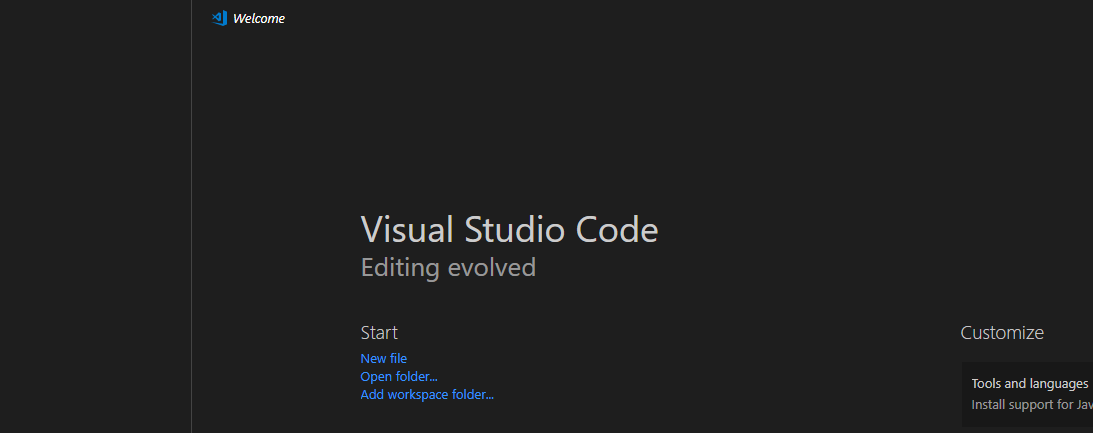
2.
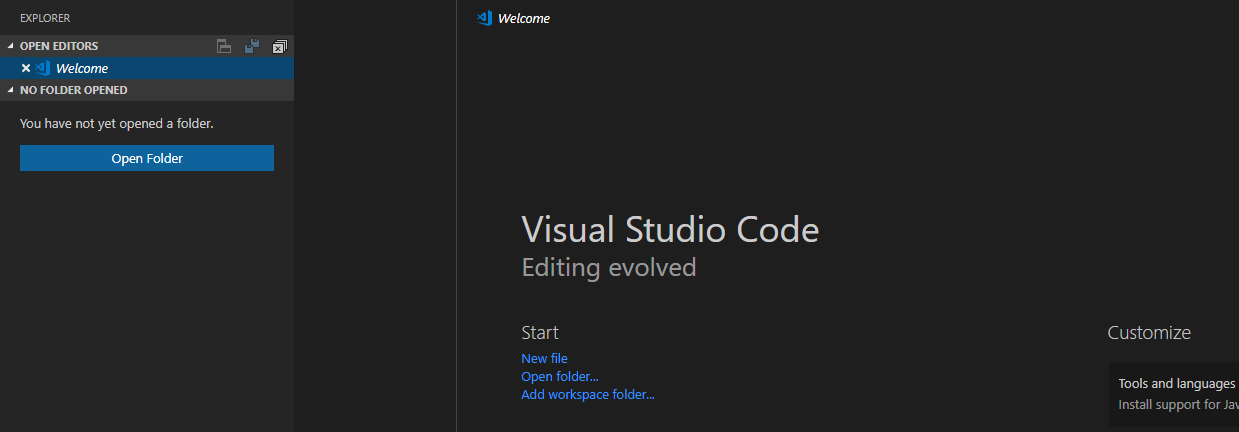
This illustrates the "jumpiness" when opening the side bar in this scenario. It would be preferable that the sashes were not moved unless needed.
 thernstig
All 18 comments
(Experimental duplicate detection)
Thanks for submitting this issue. Please also check if it is already covered by an existing one, like:
![vscodebot[bot] picture](https://avatars2.githubusercontent.com/in/2406?v=4&s=40) vscodebot[bot]
on 14 Oct 2018
vscodebot[bot]
on 14 Oct 2018
If we were to do that than the layout would no longer be centered looking at the editor area.
Basically your fetaure reuqest is that the centered editor layout is centered per the whole workbench area, not per the editor area. This is a fair feature request, thus leaving open
 isidorn
on 15 Oct 2018
isidorn
on 15 Oct 2018
@isidorn Ah yes you are correct. For me it makes more sense to center at workbench area than the editor area, but maybe that is just me. It would feel more natural, especially when opening/hiding parts on the sides. If there is free room, the sashes would not move at all which would be pleasant I think.
thernstig
on 15 Oct 2018
@isidorn
I have been frustrated by this. For now the only think one can do is take a sheet of paper, split the editor to the left, and mark the minimum size of the left split and adjust the right area to center it manually, to fix a software problem I had to do papercraft.
Possible Fixes.
Make it so u can edit the layout origin.
Be allowed to fix the position of one of the sides by using ctrl/alt + click
Use ctrl/alt + click to edito free without editing the other side.
Thx for your hard work.
 Sourgin
on 27 Oct 2018
Sourgin
on 27 Oct 2018
@Sourgin you should be possible to change the sash border by draging. Also alt + drag only one side also works.
If it does not pleas file a new issue with reproducable steps

isidorn
on 29 Oct 2018
Is this feature on the roadmap at all? Sure, I can use alt+drag to resize the left edge so I get the editor view centred, but the moment I close the sidebar, the editor is now too far to the left, so I need to adjust the view again, and who knows whether I can even get it properly centred by eye.
I'm not sure if this is difficult to implement, but this behaviour was (inexplicably) changed about a year ago, and basically nobody has acknowledged that this is an issue, and from what I can gather you can't make an extension to change this behaviour.
 zhiayang
on 16 Jul 2019
zhiayang
on 16 Jul 2019
This feature request is now a candidate for our backlog. The community has 60 days to upvote the issue. If it receives 20 upvotes we will move it to our backlog. If not, we will close it. To learn more about how we handle feature requests, please see our documentation.
Happy Coding!
vscodebot[bot]
on 16 Jan 2020
@Sourgin @isidorn Please upvote the issue so it does not get closed :) I think this should be a simple change and I think it's a legit concern that makes the centered editor layout less than ideal (I stopped using it) due to this reason. It is just too jumpy when opening/closing the side-bar. The major problem is that often I leave about 120 char width for both left/right side in a split editor mode and when I open the sidebar text might only get <100 char width which hides code.
thernstig
on 16 Jan 2020
Actually the problem is even worse. Basically, centered layout is completely useless as it is right now. Let me explain.
Problem 1 and 2: the editor is centered in the editor area, not the workbench (this is what is explained in https://github.com/microsoft/vscode/issues/60900#issue-369924671). So, if I toggle any side panel, the editor shows 2 problems: it is not centered and it shrinks. None of these should happen. If it is not centered, it can hurt your neck if you use it for a long time. If it shrinks, your code may be hidden/wrapped and you're incomfortable. See, I configured here a text editor of about 130 chars width. Look at line 51:

Solution:
- vscode shouldn't store the % of margin I'm choosing, but the editor width I'm choosing.
- when the area goes below the chosen width, just let the editor use 100% of its area.
- center the editor in the window, not the area.
- if there's a panel in the left or right side whose width is bigger than the margin needed to center the editor, just respect the editor width and slide it a little bit to the other side as long as there's room for it.
Problem 3: the centered layout setting is stored per project, which doesn't make any sense. Do you use different necks for each project? It's like storing the editor theme per project... Example: you change to dark theme when it's dark, and to light theme during the day; depends on ambient. Here also: you center layout when your screen is too big, and you may disable it when it's narrower (although if applied the fixes above, you could just enable centered always). This is a view setting, and it should be globally enabled until globally disabled, no more. Look, when I switch projects:

Solution:
- treat this setting as a view option, just like the theme.
 Yajo
on 17 Jan 2020
Yajo
on 17 Jan 2020
@yajo Yes, your problem 1 and 2 is what this is about. Regarding problem 3, I am not sure what you mean. Just save the setting as user settings instead of work space settings.
thernstig
on 17 Jan 2020
exactly, i'm glad i'm not the only one that can't use centred layout because of this. With a monitor larger than say 24", it really starts to get noticeable that I have to move my neck every time i open/close the sidebar.
zhiayang
on 18 Jan 2020
Just save the setting as user settings instead of work space settings
That's not possible, the setting is not stored anywhere, not in user nor workspace settings. Vscode saves it somewhere hidden, but per workspace always and that cannot be changed.
If all other problems are fixed, adding the setting to user settings.json file would be a good fix for problem 3.
Yajo
on 20 Jan 2020
This feature request has not yet received the 20 community upvotes it takes to make to our backlog. 10 days to go. To learn more about how we handle feature requests, please see our documentation.
Happy Coding
vscodebot[bot]
on 6 Mar 2020
@Yajo @zhiayang @Sourgin @kutyel @pedrobaeza @yenthe666 @alexhafner @nufflee et. al. since they have such a tough requirement of 20! upvotes I request you all bring some friends in to upvote this if they agree :)
thernstig
on 6 Mar 2020
@isidorn Isn't 20 upvotes a little harsh for this, as the feature request makes perfect sense?
thernstig
on 6 Mar 2020
I will move it to the backlog.
isidorn
on 6 Mar 2020
We are 20 now :sunglasses:
Yajo
on 12 Mar 2020
Any update on this issue ?
It hasn't even moved to On Deck yet.
Interestingly, I think this was how Centered Layout used to work initially, i.e. use the available space for the sidebars and not squeeze the editor; but was later updated to have this undesired behaviour.
 vishwa-raj
on 11 Sep 2020
vishwa-raj
on 11 Sep 2020
Related issues
 trstringer
·
3Comments
trstringer
·
3Comments
 shanalikhan
·
3Comments
shanalikhan
·
3Comments
 omidgolparvar
·
3Comments
omidgolparvar
·
3Comments
 lukehoban
·
3Comments
lukehoban
·
3Comments
 borekb
·
3Comments
borekb
·
3Comments
Most helpful comment
I will move it to the backlog.