- VSCode Version: 1.28.0 (1.28.0)
- OS Version: macOS Mojave
Steps to Reproduce:
- Open React Native App
- Have Auto Import Configuration Enabled
- Try to use Auto Import feature
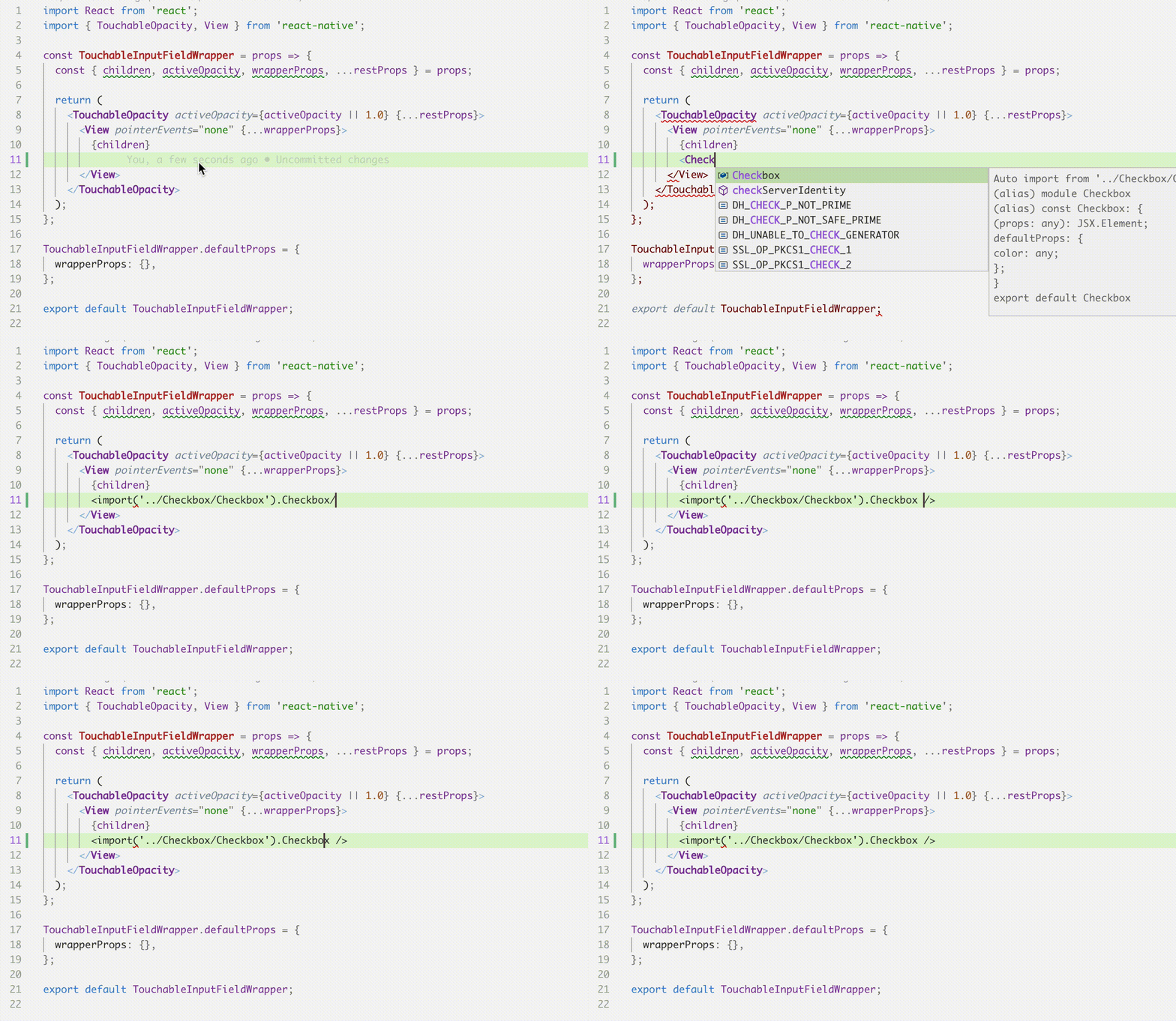
I am expecting the import statement to be appended on top of files, but instead it got inline.
I try to find some configuration that might related to this but didn't found any.
 billydarmawan
All 4 comments
(Experimental duplicate detection)
Thanks for submitting this issue. Please also check if it is already covered by an existing one, like:
![vscodebot[bot] picture](https://avatars2.githubusercontent.com/in/2406?v=4&s=40) vscodebot[bot]
on 12 Oct 2018
vscodebot[bot]
on 12 Oct 2018
All duplicate issues are closed but this bug is still there. Catching it on every component import in every JSX file (using JS).
 zzzorgo
on 12 Oct 2018
zzzorgo
on 12 Oct 2018
Have same issue. It's also here https://github.com/Microsoft/vscode/issues/60786
 n-sviridenko
on 12 Oct 2018
n-sviridenko
on 12 Oct 2018
This is a duplicate of the issues the bot identified. Root cause is https://github.com/Microsoft/TypeScript/issues/27317. #60216 on our side tracks brining this fix in for 1.28.2 which will go out next week
This should already be fixed in the insiders builds too
 mjbvz
on 12 Oct 2018
mjbvz
on 12 Oct 2018
Related issues
 shanalikhan
·
3Comments
shanalikhan
·
3Comments
 omidgolparvar
·
3Comments
omidgolparvar
·
3Comments
 sirius1024
·
3Comments
sirius1024
·
3Comments
 borekb
·
3Comments
borekb
·
3Comments
 DovydasNavickas
·
3Comments
DovydasNavickas
·
3Comments
Most helpful comment
This is a duplicate of the issues the bot identified. Root cause is https://github.com/Microsoft/TypeScript/issues/27317. #60216 on our side tracks brining this fix in for 1.28.2 which will go out next week
This should already be fixed in the insiders builds too