Vscode: UTF-8 not working in Terminal under Windows/Git Bash
Issue Type: Bug
I use terminal with git bash , when I type backspace to delete utf8 word, but I get weird character

VS Code version: Code 1.28.1 (3368db6750222d319c851f6d90eb619d886e08f5, 2018-10-11T18:13:53.910Z)
OS version: Windows_NT x64 6.1.7601
System Info
|Item|Value|
|---|---|
|CPUs|Intel(R) Core(TM) i5-4460 CPU @ 3.20GHz (4 x 3192)|
|GPU Status|2d_canvas: enabled
checker_imaging: disabled_off
flash_3d: enabled
flash_stage3d: enabled
flash_stage3d_baseline: enabled
gpu_compositing: enabled
multiple_raster_threads: enabled_on
native_gpu_memory_buffers: disabled_software
rasterization: enabled
video_decode: enabled
video_encode: enabled
webgl: enabled
webgl2: enabled|
|Memory (System)|27.94GB (13.49GB free)|
|Process Argv||
|Screen Reader|no|
|VM|0%|
Extensions (15)
Extension|Author (truncated)|Version
---|---|---
rtf|ale|1.3.0
GBKtoUTF8|buk|0.0.2
better-toml|bun|0.3.2
gitignore|cod|0.5.0
smali|cra|1.0.1
githistory|don|0.4.3
vscode-pull-request-github|Git|0.2.0
solidity|Jua|0.0.46
language-julia|jul|0.10.3
vscode-language-pack-zh-hans|MS-|1.28.2
mssql|ms-|1.4.0
csharp|ms-|1.16.2
Go|ms-|0.6.91
vscode-icons|rob|7.27.0
vscode-toggleproxy|sat|0.4.6
 tonny-zhang
All 10 comments
@tonny-zhang what happens when you copy the text and paste it into the editor? Also does either resizing the terminal panel or zooming in and out fix it? (ctrl++,ctrl+-)
 Tyriar
on 12 Oct 2018
Tyriar
on 12 Oct 2018
@Tyriar
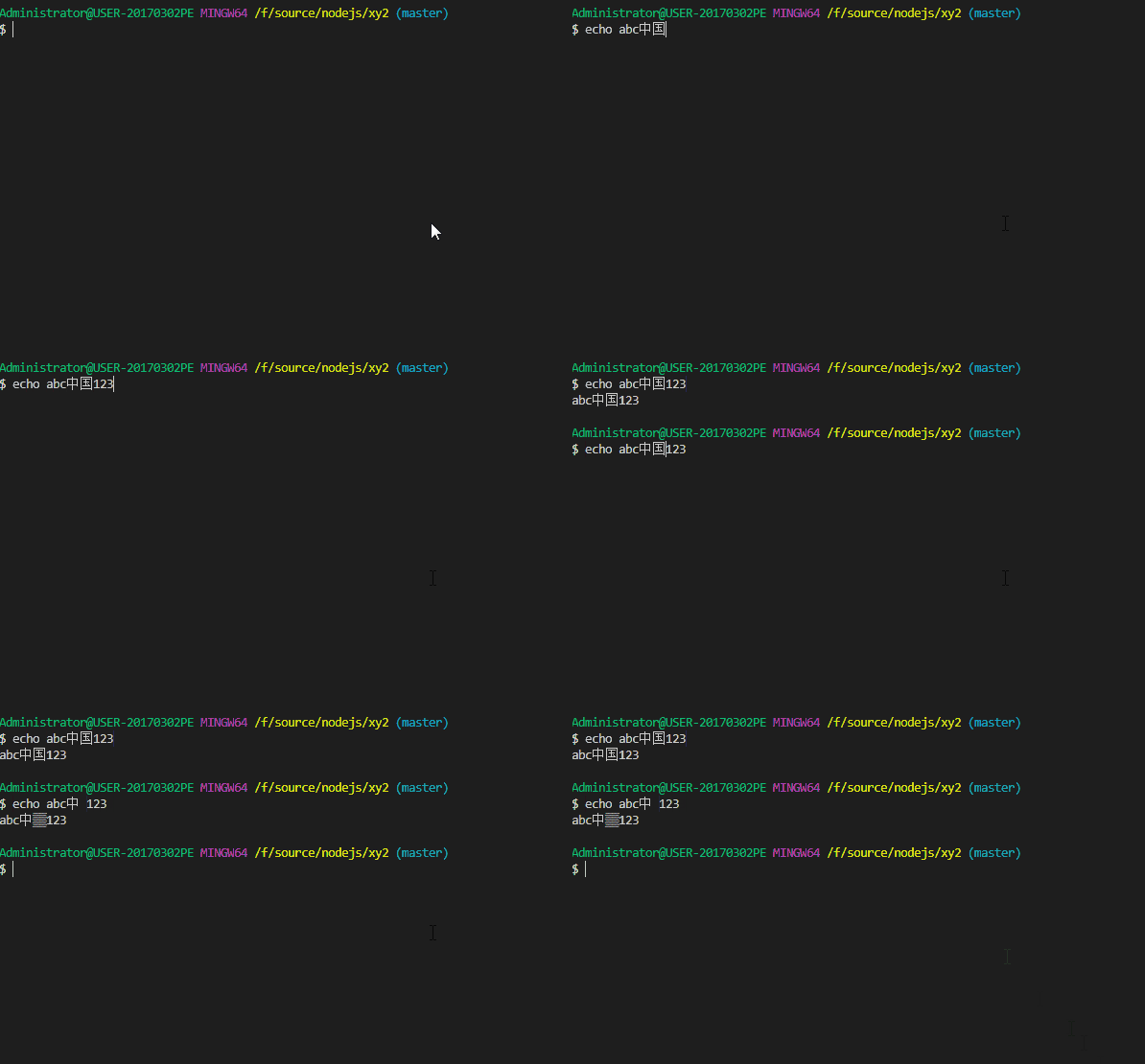
echo abc中国123- use backspack to delete char
国when point move to after char国
Only one byte of UTF8 was deleted?
Here's a gif for the review:
tonny-zhang
on 13 Oct 2018
@Tyriar
I have resolved this problem by setting terminal.integrated.env.windows
Here is the setting:
"terminal.integrated.shell.windows": "C:\\Program Files\\Git\\bin\\bash.exe",
"terminal.integrated.env.windows": {
    "LANG": "C.UTF-8"
}
@tonny-zhang @Tyriar But, I think this problem is introduced in 1.28.0, what's the consideration of doing this change ?
 liwangqian
on 16 Oct 2018
liwangqian
on 16 Oct 2018
I ran into this same issue as I updated my VS Code to version@1.28.1. Besides what Tony described above, within VS Code, the git-log is "sick" on my end, it output messy code instead of normal Chinese, see below for reference, it is working well out of VS Code.
- OS: Windows 10
- VS Code: 1.28.1
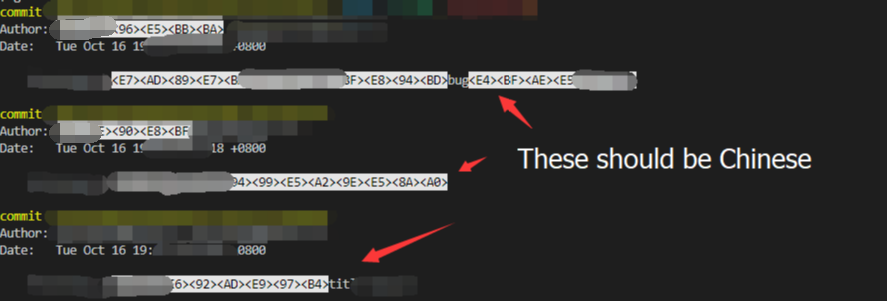
Above all, Tony's solution saved me, thank all you guys!
 shotforsky
on 16 Oct 2018
shotforsky
on 16 Oct 2018
You're right I can repro this in v1.29 and not in 1.27.
@jerch any idea what could have caused this? Some parser/unicode change?
Tyriar
on 16 Oct 2018
Report in macOS too https://github.com/Microsoft/vscode/issues/61029
Tyriar
on 16 Oct 2018
This looks like plain UTF-8 byte sequences end up in the terminal, kinda missing the UTF-8 --> UTF-16 conversion somewhere before?
 jerch
on 16 Oct 2018
jerch
on 16 Oct 2018
Thanks for the help everyone, this was introduced in https://github.com/Microsoft/vscode/issues/58015 so I'll revert that. In the meantime you can use @tonny-zhang's workaround:
"terminal.integrated.env.windows": {
    "LANG": "C.UTF-8"
}
Or use Insiders (from tomorrow).
Tyriar
on 17 Oct 2018
楼上方法是有效的。

 jianhao
on 18 Oct 2018
jianhao
on 18 Oct 2018
Related issues
 borekb
·
3Comments
borekb
·
3Comments
 chrisdias
·
3Comments
chrisdias
·
3Comments
 ryan-wong
·
3Comments
ryan-wong
·
3Comments
 villiv
·
3Comments
villiv
·
3Comments
 v-pavanp
·
3Comments
v-pavanp
·
3Comments
Most helpful comment
@Tyriar
I have resolved this problem by setting
terminal.integrated.env.windowsHere is the setting: