Vscode: Keep spawning powershell.exe and conhost.exe
- VSCode Version:
Version: 1.28.0 (user setup)
Commit: 431ef9da3cf88a7e164f9d33bf62695e07c6c2a9
Date: 2018-10-05T14:58:53.203Z
Electron: 2.0.9
Chrome: 61.0.3163.100
Node.js: 8.9.3
V8: 6.1.534.41
Architecture: x64
- OS Version:
Windows 7 Professional SP1
Steps to Reproduce:
- Open vscode.
It keeps spawning:
conhost.exe "xxxxxxx-xxxxxxx-xxxxxx-xxxxxx" (rand number)
powershell.exe -Command [System.Security.Principal.WindowsIdentity]::GetCurrent().Name
If I close vscode, the powershell.exe threads will disappear but conhost.exe threads remain.
This abnormal just happened after upgrade to 1.28.0 (from the previous release)
I've disabled all the extensions except ESLint 1.6.0 and Go 0.6.91.
This issue occurs when all extensions are disabled
Does this issue occur when all extensions are disabled?: Yes/No
Yes.
 ffcactus
All 44 comments
Updates:
the conhost.exe threads also disappear after I close vscode, I'm not sure if this is because I startup it by extensions disabled.
ffcactus
on 11 Oct 2018
Same here! Windows 7 Enterprise x64, so many instances fill up my RAM and I have to close VS Code every 15 minutes or so, I'm regressing to 1.27
 DannyTalent
on 11 Oct 2018
DannyTalent
on 11 Oct 2018
It is not clear who spawns these processes. Therefore can you please include the process tree when this happens. You can open the Process Explorer with Help>Open Process Explorer.
 egamma
on 11 Oct 2018
egamma
on 11 Oct 2018
It is not clear who spawns these processes. Therefore can you please include the process tree when this happens. You can open the Process Explorer with Help>Open Process Explorer.
CPU % Memory (MB) pid Name
1 149 5052 code main
0 83 9940 shared-process
0 60 2596 C:/windows/system32/windowspowershell/v1.0/powershell.exe -Command [System.Security.Principal.WindowsIdentity]::GetCurrent().Name
0 60 4884 C:/windows/system32/windowspowershell/v1.0/powershell.exe -Command [System.Security.Principal.WindowsIdentity]::GetCurrent().Name
0 60 5524 C:/windows/system32/windowspowershell/v1.0/powershell.exe -Command [System.Security.Principal.WindowsIdentity]::GetCurrent().Name
0 60 9212 C:/windows/system32/windowspowershell/v1.0/powershell.exe -Command [System.Security.Principal.WindowsIdentity]::GetCurrent().Name
0 60 10380 C:/windows/system32/windowspowershell/v1.0/powershell.exe -Command [System.Security.Principal.WindowsIdentity]::GetCurrent().Name
0 60 10568 C:/windows/system32/windowspowershell/v1.0/powershell.exe -Command [System.Security.Principal.WindowsIdentity]::GetCurrent().Name
0 60 10796 C:/windows/system32/windowspowershell/v1.0/powershell.exe -Command [System.Security.Principal.WindowsIdentity]::GetCurrent().Name
0 60 11100 C:/windows/system32/windowspowershell/v1.0/powershell.exe -Command [System.Security.Principal.WindowsIdentity]::GetCurrent().Name
0 60 11112 C:/windows/system32/windowspowershell/v1.0/powershell.exe -Command [System.Security.Principal.WindowsIdentity]::GetCurrent().Name
0 60 11188 C:/windows/system32/windowspowershell/v1.0/powershell.exe -Command [System.Security.Principal.WindowsIdentity]::GetCurrent().Name
0 60 11628 C:/windows/system32/windowspowershell/v1.0/powershell.exe -Command [System.Security.Principal.WindowsIdentity]::GetCurrent().Name
0 60 12328 C:/windows/system32/windowspowershell/v1.0/powershell.exe -Command [System.Security.Principal.WindowsIdentity]::GetCurrent().Name
0 60 13164 C:/windows/system32/windowspowershell/v1.0/powershell.exe -Command [System.Security.Principal.WindowsIdentity]::GetCurrent().Name
0 60 14400 C:/windows/system32/windowspowershell/v1.0/powershell.exe -Command [System.Security.Principal.WindowsIdentity]::GetCurrent().Name
0 60 14604 C:/windows/system32/windowspowershell/v1.0/powershell.exe -Command [System.Security.Principal.WindowsIdentity]::GetCurrent().Name
0 60 14796 C:/windows/system32/windowspowershell/v1.0/powershell.exe -Command [System.Security.Principal.WindowsIdentity]::GetCurrent().Name
0 60 14884 C:/windows/system32/windowspowershell/v1.0/powershell.exe -Command [System.Security.Principal.WindowsIdentity]::GetCurrent().Name
0 60 14976 C:/windows/system32/windowspowershell/v1.0/powershell.exe -Command [System.Security.Principal.WindowsIdentity]::GetCurrent().Name
0 60 15252 C:/windows/system32/windowspowershell/v1.0/powershell.exe -Command [System.Security.Principal.WindowsIdentity]::GetCurrent().Name
0 60 16344 C:/windows/system32/windowspowershell/v1.0/powershell.exe -Command [System.Security.Principal.WindowsIdentity]::GetCurrent().Name
0 60 17148 C:/windows/system32/windowspowershell/v1.0/powershell.exe -Command [System.Security.Principal.WindowsIdentity]::GetCurrent().Name
0 60 17280 C:/windows/system32/windowspowershell/v1.0/powershell.exe -Command [System.Security.Principal.WindowsIdentity]::GetCurrent().Name
0 60 17488 C:/windows/system32/windowspowershell/v1.0/powershell.exe -Command [System.Security.Principal.WindowsIdentity]::GetCurrent().Name
0 60 18600 C:/windows/system32/windowspowershell/v1.0/powershell.exe -Command [System.Security.Principal.WindowsIdentity]::GetCurrent().Name
0 60 18676 C:/windows/system32/windowspowershell/v1.0/powershell.exe -Command [System.Security.Principal.WindowsIdentity]::GetCurrent().Name
0 60 18988 C:/windows/system32/windowspowershell/v1.0/powershell.exe -Command [System.Security.Principal.WindowsIdentity]::GetCurrent().Name
0 60 19188 C:/windows/system32/windowspowershell/v1.0/powershell.exe -Command [System.Security.Principal.WindowsIdentity]::GetCurrent().Name
0 60 19336 C:/windows/system32/windowspowershell/v1.0/powershell.exe -Command [System.Security.Principal.WindowsIdentity]::GetCurrent().Name
0 60 19520 C:/windows/system32/windowspowershell/v1.0/powershell.exe -Command [System.Security.Principal.WindowsIdentity]::GetCurrent().Name
0 60 19544 C:/windows/system32/windowspowershell/v1.0/powershell.exe -Command [System.Security.Principal.WindowsIdentity]::GetCurrent().Name
0 60 20284 C:/windows/system32/windowspowershell/v1.0/powershell.exe -Command [System.Security.Principal.WindowsIdentity]::GetCurrent().Name
0 331 10488 window (Process Explorer)
0 15 13652 C:\Users\B00392~1\AppData\Local\Tempvscode-update-user-x64\CodeSetup-stable-3368db6750222d319c851f6d90eb619d886e08f5.exe /verysilent /update="C:\Users\B00392~1\AppData\Local\Tempvscode-update-user-x64\CodeSetup-stable-3368db6750222d319c851f6d90eb619d886e08f5.flag" /nocloseapplications /mergetasks=runcode,!desktopicon,!quicklaunchicon
0 34 5112 "C:\Users\B00392~1\AppData\Local\Temp\is-T0U5P.tmp\CodeSetup-stable-3368db6750222d319c851f6d90eb619d886e08f5.tmp" /SL5="$220846,43534879,159232,C:\Users\B00392~1\AppData\Local\Tempvscode-update-user-x64\CodeSetup-stable-3368db6750222d319c851f6d90eb619d886e08f5.exe" /verysilent /update="C:\Users\B00392~1\AppData\Local\Tempvscode-update-user-x64\CodeSetup-stable-3368db6750222d319c851f6d90eb619d886e08f5.flag" /nocloseapplications /mergetasks=runcode,!desktopicon,!quicklaunchicon
0 279 18764 window (Reducer.js - promise - Visual Studio Code [Administrator])
0 80 13540 extensionHost
0 73 15644 electron_node eslintServer.js
0 109 18572 electron_node tsserver.js
0 62 10924 electron_node typingsInstaller.js typesMap.js
0 19 18284 watcherService
ffcactus
on 12 Oct 2018
The problem persistent in this version below, I'm rolling back now.
Version: 1.28.1 (user setup)
Commit: 3368db6750222d319c851f6d90eb619d886e08f5
Date: 2018-10-11T18:13:53.910Z
Electron: 2.0.9
Chrome: 61.0.3163.100
Node.js: 8.9.3
V8: 6.1.534.41
Architecture: x64
ffcactus
on 12 Oct 2018
@ffcactus apologies, I was assuming it is possible to get a tree presentation of the process explorer output.
Here is a simple way to get a better presention. When VS Code is running, type code --status at a command prompt and then please attach this output.
egamma
on 12 Oct 2018
@ffcactus apologies, I was assuming it is possible to get a tree presentation of the process explorer output.
Here is a simple way to get a better presention. When VS Code is running, typecode --statusat a command prompt and then please attach this output.
All of them comes from shared-process
0 83 9940 shared-process
ffcactus
on 12 Oct 2018
Version:          Code 1.28.1 (3368db6750222d319c851f6d90eb619d886e08f5, 2018-10-11T18:13:53.910Z)
OS Version:       Windows_NT x64 6.1.7601
CPUs:             Intel(R) Core(TM) i7-4790 CPU @ 3.60GHz (8 x 3591)
Memory (System):  15.93GB (8.60GB free)
VM:               0%
Screen Reader:    no
Process Argv:
GPU Status:       2d_canvas:                    enabled
                  checker_imaging:              disabled_off
                  flash_3d:                     enabled
                  flash_stage3d:                enabled
                  flash_stage3d_baseline:       enabled
                  gpu_compositing:              enabled
                  multiple_raster_threads:      enabled_on
                  native_gpu_memory_buffers:    disabled_software
                  rasterization:                enabled
                  video_decode:                 enabled
                  video_encode:                 enabled
                  webgl:                        enabled
                  webgl2:                       enabled
CPU %   Mem MB     PID  Process
    0      101   26064  code main
    0      116   21336     gpu-process
    0       71   22684     shared-process
    0       59    7408       C:/windows/system32/windowspowershell/v1.0/powershell.exe -Command [System.Security.Principal.WindowsIdentity]::GetCurrent().Name
    0       59   21980       C:/windows/system32/windowspowershell/v1.0/powershell.exe -Command [System.Security.Principal.WindowsIdentity]::GetCurrent().Name
    0       59   27744       C:/windows/system32/windowspowershell/v1.0/powershell.exe -Command [System.Security.Principal.WindowsIdentity]::GetCurrent().Name
    0       59   27760       C:/windows/system32/windowspowershell/v1.0/powershell.exe -Command [System.Security.Principal.WindowsIdentity]::GetCurrent().Name
    0      220   29396     window (apis.py - QCI - Visual Studio Code [管理员]
    0       13   22672       electron-crash-reporter
    0        5   28320       winpty-process
    0        4   24584         C:\windows\System32\cmd.exe
    0       36     420           electron_node cli.js
    0       56   18108             "D:\Program Files\Microsoft VS Code\Code.exe" -status
    1       15   35352               gpu-process
    0       11   30320       watcherService
    0       94   31900       extensionHost
    0       59    4120         C:/windows/system32/windowspowershell/v1.0/powershell.exe -Command [System.Security.Principal.WindowsIdentity]::GetCurrent().Name
    0       59   10596         C:/windows/system32/windowspowershell/v1.0/powershell.exe -Command [System.Security.Principal.WindowsIdentity]::GetCurrent().Name
    0       53   22804         "D:\Program Files\Microsoft VS Code\Code.exe" "d:\Program Files\Microsoft VS Code\resources\app\extensions\json-language-features\server\dist\jsonServerMain" --node-ipc --clientProcessId=31900
    0       59   23664         C:/windows/system32/windowspowershell/v1.0/powershell.exe -Command [System.Security.Principal.WindowsIdentity]::GetCurrent().Name
    0       66   26520         C:\Users\willionpan\AppData\Local\Programs\Python\Python36-32\python.exe completion.py
    0       15   30964           C:\Users\willionpan\AppData\Local\Programs\Python\Python36-32\python.exe c:\Users\willionpan\.vscode\extensions\ms-python.python-2018.9.0\pythonFiles\jedi\evaluate\compiled\subprocess\__main__.py c:\Users\willionpan\.vscode\extensions\ms-python.python-2018.9.0\pythonFiles
    0       59   28088         C:/windows/system32/windowspowershell/v1.0/powershell.exe -Command [System.Security.Principal.WindowsIdentity]::GetCurrent().Name
    0       59   29168         C:/windows/system32/windowspowershell/v1.0/powershell.exe -Command [System.Security.Principal.WindowsIdentity]::GetCurrent().Name
    0       25   33228     utility
    1      121   34512     window (进程管理器)

Workspace Stats:
|  Window (apis.py - QCI - Visual Studio Code [管理员]
|    Folder (QCI): 431 files
|      File types: py(123) js(96) md(46) png(31) css(26) svg(22) html(21)
|                  jpg(9) txt(7) woff(6)
|      Conf files: launch.json(1) settings.json(1) makefile(1)
|      Launch Configs: python(6)
Have the same issue and here's output of code -status . Urge to be fixed :p
Thx and Regards~
 willionpan
on 12 Oct 2018
willionpan
on 12 Oct 2018
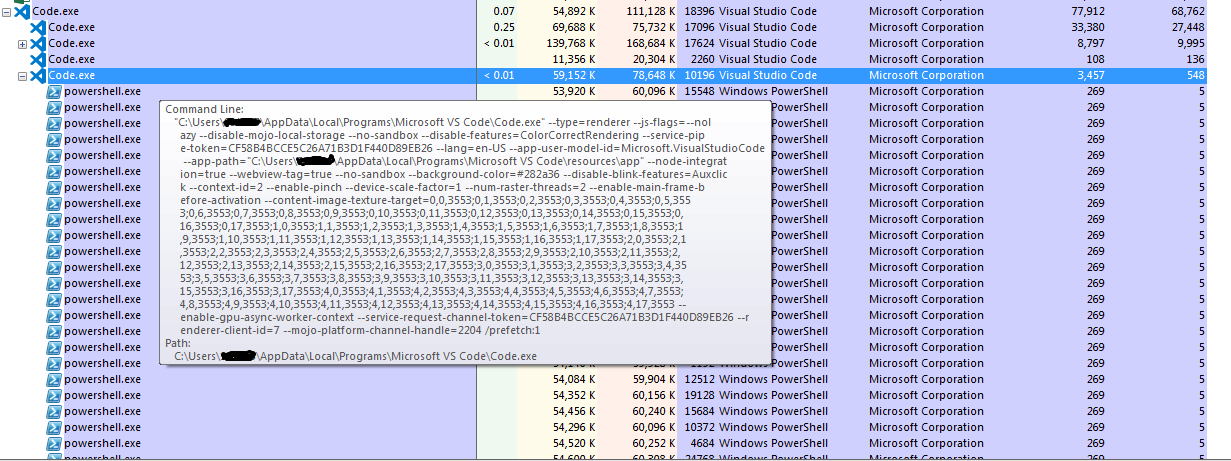
Hopefully this capture helps? Taken from Sysinternals' process explorer
DannyTalent
on 12 Oct 2018
I have the same problem. The following output is from code --status after disabling all extensions and restarting Visual Studio Code:
Version:          Code 1.28.1 (3368db6750222d319c851f6d90eb619d886e08f5, 2018-10-11T18:15:15.139Z)
OS Version:       Windows_NT ia32 6.1.7601
CPUs:             Intel(R) Core(TM) i5-3230M CPU @ 2.60GHz (4 x 2594)
Memory (System):  2.88GB (0.63GB free)
VM:               0%
Screen Reader:    no
Process Argv:
GPU Status:       2d_canvas:                    enabled
                  checker_imaging:              disabled_off
                  flash_3d:                     enabled
                  flash_stage3d:                enabled
                  flash_stage3d_baseline:       enabled
                  gpu_compositing:              enabled
                  multiple_raster_threads:      enabled_on
                  native_gpu_memory_buffers:    disabled_software
                  rasterization:                unavailable_software
                  video_decode:                 enabled
                  video_encode:                 enabled
                  webgl:                        enabled
                  webgl2:                       unavailable_off
CPU %   Mem MB     PID  Process
    0       58   13912  code main
    0      123   10452     window (*****)
    0        9    7792       electron-crash-reporter
    0       10    9156       watcherService
    0       44   13292       extensionHost
    0       58   11100     shared-process
    0       41    6100       C:/windows/system32/windowspowershell/v1.0/powershell.exe -Command [System.Security.Principal.WindowsIdentity]::GetCurrent().Name
    0       42    7560       C:/windows/system32/windowspowershell/v1.0/powershell.exe -Command [System.Security.Principal.WindowsIdentity]::GetCurrent().Name
    0       42   11484       C:/windows/system32/windowspowershell/v1.0/powershell.exe -Command [System.Security.Principal.WindowsIdentity]::GetCurrent().Name
    0       17   12420     utility
    0       54   12740     gpu-process
Workspace Stats:
    *****
This is just a few seconds after starting VS Code.
Let me know if I should provide any further information.
 binste
on 15 Oct 2018
binste
on 15 Oct 2018
Pretty sure this is from the app-insights module we are using. It happens in the shared process and it has this line: var psProc = child_process.spawn(Sender.POWERSHELL_PATH, ["-Command", "[System.Security.Principal.WindowsIdentity]::GetCurrent().Name"], <any>{windowsHide: true});
Some ACL identity is being fetched and cached but in case of failure this we be repeated forever. @OsvaldoRosado might know more about this.
 jrieken
on 15 Oct 2018
jrieken
on 15 Oct 2018
The applicationinsights module will spawn PowerShell when running on Windows to get the current identity. This is needed to protect (via ACL) the offline cache folder used to store telemetry from being read by other users on the box. It should not be happening infinitely however!
The check at https://github.com/Microsoft/ApplicationInsights-node.js/blob/develop/Library/Sender.ts#L272 should enforce all ACL related logic is done only once per storage directory (effectively once per instrumentation key). Are many instrumentation keys being used here?
It would be great to find RCA here - but a mitigation in the meantime is to initialize application insights with .setUseDiskRetryCaching(false) to disable persisting of failed telemetry to disk.
 OsvaldoRosado
on 15 Oct 2018
OsvaldoRosado
on 15 Oct 2018
Are many instrumentation keys being used here?
@ramya-rao-a Is the go-to-person here but I am pretty sure it's only one key
jrieken
on 15 Oct 2018
Thanks for looking into this so quickly!! Really appreciate it.
Telemetry fails due to the proxy settings of my company anyway. Disabling it seems to have fixed the problem and no more powershell processes are launched.
binste
on 15 Oct 2018
@binste Thats for getting back to use. Everyone: To workaround this, add this setting: "telemetry.enableTelemetry": false
jrieken
on 15 Oct 2018
@jrieken This workaround works for me, tks.
 fengguoqing
on 15 Oct 2018
fengguoqing
on 15 Oct 2018
Version:          Code 1.28.1 (3368db6750222d319c851f6d90eb619d886e08f5, 2018-10-11T18:15:15.139Z)
OS Version:       Windows_NT ia32 6.1.7601
CPUs:             Intel(R) Core(TM) i7-4790 CPU @ 3.60GHz (8 x 3600)
Memory (System):  3.08GB (0.82GB free)
VM:               0%
Screen Reader:    no
Process Argv:
GPU Status:       2d_canvas:                    enabled
                  checker_imaging:              disabled_off
                  flash_3d:                     enabled
                  flash_stage3d:                enabled
                  flash_stage3d_baseline:       enabled
                  gpu_compositing:              enabled
                  multiple_raster_threads:      enabled_on
                  native_gpu_memory_buffers:    disabled_software
                  rasterization:                unavailable_software
                  video_decode:                 enabled
                  video_encode:                 enabled
                  webgl:                        enabled
                  webgl2:                       enabled
CPU %   Mem MB     PID  Process
    0       70   11884  code main
    0      137    7156     window (Outline.md - Training (Workspace) - Visual Studio Code [Administrator])
    0       32    1816       watcherService
    0       28    2808       searchService
    6        0   10348         electron_node package.js
    0        3    8300       winpty-process
    0        3    6312         C:\Windows\system32\cmd.exe
    0       27    2324           electron_node cli.js
    0       42    9360             "C:\Users\Carter_Chu\AppData\Local\Programs\Microsoft VS Code\Code.exe" --status
    0       11    9936               gpu-process
    0       69   11176       extensionHost
    0       38   12028     gpu-process
    0       39   12256     shared-process
    0       13     760       C:/windows/system32/windowspowershell/v1.0/powershell.exe -Command [System.Security.Principal.WindowsIdentity]::GetCurrent().Name
    0       26     900       C:/windows/system32/windowspowershell/v1.0/powershell.exe -Command [System.Security.Principal.WindowsIdentity]::GetCurrent().Name
    0       13    1060       C:/windows/system32/windowspowershell/v1.0/powershell.exe -Command [System.Security.Principal.WindowsIdentity]::GetCurrent().Name
    0       13    2272       C:/windows/system32/windowspowershell/v1.0/powershell.exe -Command [System.Security.Principal.WindowsIdentity]::GetCurrent().Name
    0       28    4468       C:/windows/system32/windowspowershell/v1.0/powershell.exe -Command [System.Security.Principal.WindowsIdentity]::GetCurrent().Name
    0       33    4584       C:/windows/system32/windowspowershell/v1.0/powershell.exe -Command [System.Security.Principal.WindowsIdentity]::GetCurrent().Name
    0       33    5424       C:/windows/system32/windowspowershell/v1.0/powershell.exe -Command [System.Security.Principal.WindowsIdentity]::GetCurrent().Name
    0       12    5612       C:/windows/system32/windowspowershell/v1.0/powershell.exe -Command [System.Security.Principal.WindowsIdentity]::GetCurrent().Name
    0       13    5688       C:/windows/system32/windowspowershell/v1.0/powershell.exe -Command [System.Security.Principal.WindowsIdentity]::GetCurrent().Name
    0       33    6460       C:/windows/system32/windowspowershell/v1.0/powershell.exe -Command [System.Security.Principal.WindowsIdentity]::GetCurrent().Name
    0       33    6464       C:/windows/system32/windowspowershell/v1.0/powershell.exe -Command [System.Security.Principal.WindowsIdentity]::GetCurrent().Name
    0       28    6528       C:/windows/system32/windowspowershell/v1.0/powershell.exe -Command [System.Security.Principal.WindowsIdentity]::GetCurrent().Name
    0       33    6676       C:/windows/system32/windowspowershell/v1.0/powershell.exe -Command [System.Security.Principal.WindowsIdentity]::GetCurrent().Name
    0       33    6752       C:/windows/system32/windowspowershell/v1.0/powershell.exe -Command [System.Security.Principal.WindowsIdentity]::GetCurrent().Name
    0       33    6804       C:/windows/system32/windowspowershell/v1.0/powershell.exe -Command [System.Security.Principal.WindowsIdentity]::GetCurrent().Name
    0       13    7200       C:/windows/system32/windowspowershell/v1.0/powershell.exe -Command [System.Security.Principal.WindowsIdentity]::GetCurrent().Name
    0       13    7676       C:/windows/system32/windowspowershell/v1.0/powershell.exe -Command [System.Security.Principal.WindowsIdentity]::GetCurrent().Name
    0       31    7684       C:/windows/system32/windowspowershell/v1.0/powershell.exe -Command [System.Security.Principal.WindowsIdentity]::GetCurrent().Name
    0       14    7908       C:/windows/system32/windowspowershell/v1.0/powershell.exe -Command [System.Security.Principal.WindowsIdentity]::GetCurrent().Name
    0       33    7940       C:/windows/system32/windowspowershell/v1.0/powershell.exe -Command [System.Security.Principal.WindowsIdentity]::GetCurrent().Name
    0       27    8120       C:/windows/system32/windowspowershell/v1.0/powershell.exe -Command [System.Security.Principal.WindowsIdentity]::GetCurrent().Name
    0       13    8268       C:/windows/system32/windowspowershell/v1.0/powershell.exe -Command [System.Security.Principal.WindowsIdentity]::GetCurrent().Name
    0       31    8540       C:/windows/system32/windowspowershell/v1.0/powershell.exe -Command [System.Security.Principal.WindowsIdentity]::GetCurrent().Name
    0       33    8588       C:/windows/system32/windowspowershell/v1.0/powershell.exe -Command [System.Security.Principal.WindowsIdentity]::GetCurrent().Name
    0       33    8748       C:/windows/system32/windowspowershell/v1.0/powershell.exe -Command [System.Security.Principal.WindowsIdentity]::GetCurrent().Name
    0       12    9000       C:/windows/system32/windowspowershell/v1.0/powershell.exe -Command [System.Security.Principal.WindowsIdentity]::GetCurrent().Name
    0       33    9076       C:/windows/system32/windowspowershell/v1.0/powershell.exe -Command [System.Security.Principal.WindowsIdentity]::GetCurrent().Name
    0       33    9108       C:/windows/system32/windowspowershell/v1.0/powershell.exe -Command [System.Security.Principal.WindowsIdentity]::GetCurrent().Name
    0       13    9116       C:/windows/system32/windowspowershell/v1.0/powershell.exe -Command [System.Security.Principal.WindowsIdentity]::GetCurrent().Name
    0       33    9368       C:/windows/system32/windowspowershell/v1.0/powershell.exe -Command [System.Security.Principal.WindowsIdentity]::GetCurrent().Name
    0       13   10080       C:/windows/system32/windowspowershell/v1.0/powershell.exe -Command [System.Security.Principal.WindowsIdentity]::GetCurrent().Name
    0       13   10192       C:/windows/system32/windowspowershell/v1.0/powershell.exe -Command [System.Security.Principal.WindowsIdentity]::GetCurrent().Name
    0       33   10580       C:/windows/system32/windowspowershell/v1.0/powershell.exe -Command [System.Security.Principal.WindowsIdentity]::GetCurrent().Name
    0       33   10712       C:/windows/system32/windowspowershell/v1.0/powershell.exe -Command [System.Security.Principal.WindowsIdentity]::GetCurrent().Name
    0       33   10728       C:/windows/system32/windowspowershell/v1.0/powershell.exe -Command [System.Security.Principal.WindowsIdentity]::GetCurrent().Name
    0       33   11284       C:/windows/system32/windowspowershell/v1.0/powershell.exe -Command [System.Security.Principal.WindowsIdentity]::GetCurrent().Name
    0       31   11488       C:/windows/system32/windowspowershell/v1.0/powershell.exe -Command [System.Security.Principal.WindowsIdentity]::GetCurrent().Name
    0       33   11628       C:/windows/system32/windowspowershell/v1.0/powershell.exe -Command [System.Security.Principal.WindowsIdentity]::GetCurrent().Name
    0       33   11760       C:/windows/system32/windowspowershell/v1.0/powershell.exe -Command [System.Security.Principal.WindowsIdentity]::GetCurrent().Name
    0       12   12140       C:/windows/system32/windowspowershell/v1.0/powershell.exe -Command [System.Security.Principal.WindowsIdentity]::GetCurrent().Name
Workspace Stats:
|  Window (Outline.md - Training (Workspace) - Visual Studio Code [Administrator])
|    Folder (Training): 7 files
|      File types: jpg(4) md(2) txt(1)
|      Conf files:

[9360:1015/171717.930:ERROR:browser_gpu_channel_host_factory.cc(103)] Failed to launch GPU process.
I have same problem on Win7 32bit
 papa12804
on 15 Oct 2018
papa12804
on 15 Oct 2018
Are many instrumentation keys being used here?
No, only 1 key is used for VS Code core. The shared process is the one that initializes and uses appInsights.
Each of the built-in extensions initialize app insights separately (but they all use the same key which is different from what VS Code core uses). But the extensions run in a separate process altogether.
Since we see the powershell spawning happening in the shared process, I don't think the built-in extensions have anything to do here.
We do initialize app insights with .setUseDiskRetryCaching(true) though.
@OsvaldoRosado,
Going by the current reports, this seems to be affecting only Windows 7 and Windows NT. Any idea why only the older Windows versions would be affected?
It would be great to find RCA here
What can we do to help with RCA here?
 ramya-rao-a
on 15 Oct 2018
ramya-rao-a
on 15 Oct 2018
I don't have a great guess as to why older versions would be affected, other than the command ([System.Security.Principal.WindowsIdentity]::GetCurrent().Name) might not be available on all versions of powershell?
The quickest way to get to RCA would be to run vscode under a debugger with the problem reproducing. The interesting bit would be seeing why the if statement at https://github.com/Microsoft/ApplicationInsights-node.js/blob/develop/Library/Sender.ts#L272 seems to return true more than once. Enabling the verbose output of the SDK while the problem is reproducing may be helpful as well.
The expected behavior is that Sender.ACLED_DIRECTORIES[directory] will be set to true upon successful ACL, or false upon failure, and then ACL is never attempted again (since it's no longer undefined). Perhaps the callbacks in the function linked above are never getting called for some reason? That would cause the code that sets this to true or false to never run.
I'll spend some time today seeing if I can reproduce this myself outside of vscode.
OsvaldoRosado
on 15 Oct 2018
I am not able to repro this on my Windows machine or a VM for Windows 7.
Also, as per @willionpan's logs in https://github.com/Microsoft/vscode/issues/60585#issuecomment-429344942, this happens in the extension host as well. Which means the built-in extensions that intialize App Insights on their own are also causing the same problem.
@binste @fengguoqing @DannyTalent @willionpan @ffcactus,
Can you run the command [System.Security.Principal.WindowsIdentity]::GetCurrent().Name in powershell and see if that succeeds?
ramya-rao-a
on 16 Oct 2018
@OsvaldoRosado
From the logs, it is clear that the process spawned to run the powershell command is hung which means that the call back for either success or failure is never executed which means Sender.ACLED_DIRECTORIES[directory] is forever undefined
ramya-rao-a
on 16 Oct 2018
Thanks @ramya-rao-a! I've added a bug to track the issue on the Application Insights side for spawning infinite processes when hung.
I'm still not sure what might cause the process to hang however. Hopefully the result of running that PS command as you asked above will give some insight!
OsvaldoRosado
on 16 Oct 2018
Quick update that I can reliably reproduce this. I'll continue the investigation from the AI SDK side, it looks completely isolated to within it.
Essentially if you run this code in node:
const child_process = require("child_process");

const proc = child_process.spawn("powershell.exe", ["-Command", "[System.Security.Principal.WindowsIdentity]::GetCurrent().Name"]);

proc.stdout.on("data", (d) => console.log("data", ""+d));
proc.on("error", (e) => console.log("error", e));
proc.on("close", (x,y) => console.log("close", x, y));
You'll get the user's identity in the data event on both Win 10 and Win 7, but the close event only comes on Win 10 with the process hung on Win 7.
Strangely, repeating the same manually in cmd, eg powershell.exe -Command [System.Security.Principal.WindowsIdentity]::GetCurrent().Name doesn't reproduce this, but instead terminates the process normally.
OsvaldoRosado
on 16 Oct 2018
@OsvaldoRosado Thats great that we now have the root cause. Can we expect a fix to Application Insights anytime soon?
This issue affects is probably affecting most VS Code users on Windows 7 and Windows NT. We would like to have a fix out in the next recovery build for VS Code if possible.
The alternative for us is to rollback the app insights upgrade we did.
ramya-rao-a
on 16 Oct 2018
Working on it :smile:
Just found a fix for the root cause, will try to get it pushed out within the next day.
OsvaldoRosado
on 16 Oct 2018
@ramya-rao-a Sorry for not relpy in time, run the command [System.Security.Principal.WindowsIdentity]::GetCurrent().Name in powershell always return the domain and the user, and i can't find any exception after several tries。
@jrieken add this setting: "telemetry.enableTelemetry": false works for me too, thanks all of you very much
willionpan
on 16 Oct 2018
The upstream fix should be available now in [email protected]
https://github.com/Microsoft/ApplicationInsights-node.js/releases/tag/1.0.6
OsvaldoRosado
on 16 Oct 2018
@binste @fengguoqing @DannyTalent @willionpan @ffcactus,
We need your help verifying the fix to this issue as we are not able to repro it. Can you please remove the setting "telemetry.enableTelemetry": false, close all instances of VS Code, and download VS Code 1.28.2 from one of the below links to see if the problem is now fixed?
ramya-rao-a
on 17 Oct 2018
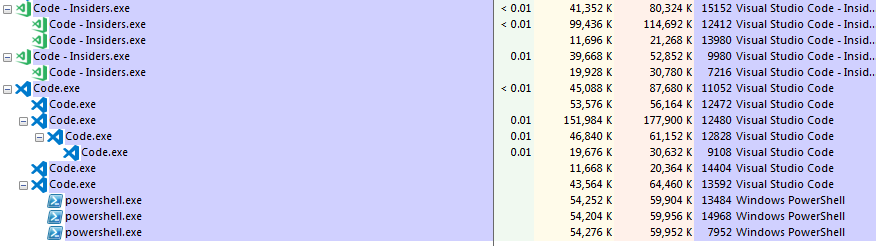
Seems to be working great on insiders!
code.exe still shows the issue on the pic because it's version 1.28.1
1.28.2 doesn't appear to have the issue anymore
DannyTalent
on 17 Oct 2018
The fix has been verified by @DannyTalent (in this issue) and @JosepMaJAZ (from #61014). Marking this issue as verified
ramya-rao-a
on 17 Oct 2018
This issue seems still exist at 1.28.2 for me.
Version: 1.28.2 (user setup)
Commit: 7f3ce96ff4729c91352ae6def877e59c561f4850
Date: 2018-10-17T00:23:51.859Z
Electron: 2.0.9
Chrome: 61.0.3163.100
Node.js: 8.9.3
V8: 6.1.534.41
Arch: x64
OS
Windows7 SP1
 lavaner
on 19 Oct 2018
lavaner
on 19 Oct 2018
For me the problem is fixed after a full day of working with the new build. (Letting VSCode autoupdate itself).
x64 W7 SP1 too.
 JosepMaJAZ
on 19 Oct 2018
JosepMaJAZ
on 19 Oct 2018
@lavaner Can you try closing all instances of VS Code, killing all instances of the powershell/conhost that were started and try again?
Run you run code --status when you have this issue and share the output just like https://github.com/Microsoft/vscode/issues/60585#issuecomment-429715483?
ramya-rao-a
on 19 Oct 2018
@lavaner It is also possible that you may have extensions that use ApplicaitonInsights. Can you disable them and see if you still have the issue?
ramya-rao-a
on 19 Oct 2018
Yup, can confirm, it only helped temporarily for some reason, powershell is still being spawned over multiple instances.
Disabled all extensions except for the official Python ext, still had the issue
DannyTalent
on 24 Oct 2018
This issue is occurring for me, I also tried the latest insider (1.29.0-insider) and it is happening there too.
I think the more I build using the build tools with a build using the shell build type the more powershell windows get spawned.
Version: 1.28.2 (system setup)
Commit: 7f3ce96
Date: 2018-10-17T00:23:51.859Z
Electron: 2.0.9
Chrome: 61.0.3163.100
Node.js: 8.9.3
V8: 6.1.534.41
Arch: x64
Version:          Code 1.28.2 (7f3ce96ff4729c91352ae6def877e59c561f4850, 2018-10-17T00:23:51.859Z)
OS Version:       Windows_NT x64 6.1.7601
CPUs:             Intel(R) Core(TM) i7-6700 CPU @ 3.40GHz (8 x 3408)
Memory (System):  15.90GB (5.56GB free)
VM:               0%
Screen Reader:    no
Process Argv:     E:\monaco
GPU Status:       2d_canvas:                    enabled
                  checker_imaging:              disabled_off
                  flash_3d:                     enabled
                  flash_stage3d:                enabled
                  flash_stage3d_baseline:       enabled
                  gpu_compositing:              enabled
                  multiple_raster_threads:      enabled_on
                  native_gpu_memory_buffers:    disabled_software
                  rasterization:                unavailable_software
                  video_decode:                 enabled
                  video_encode:                 enabled
                  webgl:                        enabled
                  webgl2:                       enabled
CPU %   Mem MB     PID  Process
    0       78   35248  code main
    0      102   10028     shared-process
    0      317   23100     window (main.c - main - Visual Studio Code [Administrator])
    1       16   26596       watcherService
    0       93   29184       extensionHost
    0       58    4140         C:/windows/system32/windowspowershell/v1.0/powershell.exe -Command [System.Security.Principal.WindowsIdentity]::GetCurrent().Name
    0       58    7584         C:/windows/system32/windowspowershell/v1.0/powershell.exe -Command [System.Security.Principal.WindowsIdentity]::GetCurrent().Name
    0       58    9256         C:/windows/system32/windowspowershell/v1.0/powershell.exe -Command [System.Security.Principal.WindowsIdentity]::GetCurrent().Name
    0       58   11236         C:/windows/system32/windowspowershell/v1.0/powershell.exe -Command [System.Security.Principal.WindowsIdentity]::GetCurrent().Name
    0       58   11600         C:/windows/system32/windowspowershell/v1.0/powershell.exe -Command [System.Security.Principal.WindowsIdentity]::GetCurrent().Name
    0       58   11624         C:/windows/system32/windowspowershell/v1.0/powershell.exe -Command [System.Security.Principal.WindowsIdentity]::GetCurrent().Name
    0       58   11816         C:/windows/system32/windowspowershell/v1.0/powershell.exe -Command [System.Security.Principal.WindowsIdentity]::GetCurrent().Name
    0       58   12140         C:/windows/system32/windowspowershell/v1.0/powershell.exe -Command [System.Security.Principal.WindowsIdentity]::GetCurrent().Name
    0       58   12328         C:/windows/system32/windowspowershell/v1.0/powershell.exe -Command [System.Security.Principal.WindowsIdentity]::GetCurrent().Name
    0       58   12912         C:/windows/system32/windowspowershell/v1.0/powershell.exe -Command [System.Security.Principal.WindowsIdentity]::GetCurrent().Name
    0       58   13404         C:/windows/system32/windowspowershell/v1.0/powershell.exe -Command [System.Security.Principal.WindowsIdentity]::GetCurrent().Name
    0       58   13704         C:/windows/system32/windowspowershell/v1.0/powershell.exe -Command [System.Security.Principal.WindowsIdentity]::GetCurrent().Name
    0       58   14152         C:/windows/system32/windowspowershell/v1.0/powershell.exe -Command [System.Security.Principal.WindowsIdentity]::GetCurrent().Name
    0       58   14156         C:/windows/system32/windowspowershell/v1.0/powershell.exe -Command [System.Security.Principal.WindowsIdentity]::GetCurrent().Name
    0       58   15284         C:/windows/system32/windowspowershell/v1.0/powershell.exe -Command [System.Security.Principal.WindowsIdentity]::GetCurrent().Name
    0       58   15980         C:/windows/system32/windowspowershell/v1.0/powershell.exe -Command [System.Security.Principal.WindowsIdentity]::GetCurrent().Name
    0       40   15992         "C:\Program Files\Microsoft VS Code\Code.exe" "c:\Program Files\Microsoft VS Code\resources\app\extensions\json-language-features\server\dist\jsonServerMain" --node-ipc --clientProcessId=29184
    0       58   16184         C:/windows/system32/windowspowershell/v1.0/powershell.exe -Command [System.Security.Principal.WindowsIdentity]::GetCurrent().Name
    0       58   16620         C:/windows/system32/windowspowershell/v1.0/powershell.exe -Command [System.Security.Principal.WindowsIdentity]::GetCurrent().Name
    0       58   16636         C:/windows/system32/windowspowershell/v1.0/powershell.exe -Command [System.Security.Principal.WindowsIdentity]::GetCurrent().Name
    0       58   16968         C:/windows/system32/windowspowershell/v1.0/powershell.exe -Command [System.Security.Principal.WindowsIdentity]::GetCurrent().Name
    0       58   17668         C:/windows/system32/windowspowershell/v1.0/powershell.exe -Command [System.Security.Principal.WindowsIdentity]::GetCurrent().Name
    0       58   18828         C:/windows/system32/windowspowershell/v1.0/powershell.exe -Command [System.Security.Principal.WindowsIdentity]::GetCurrent().Name
    0       58   19236         C:/windows/system32/windowspowershell/v1.0/powershell.exe -Command [System.Security.Principal.WindowsIdentity]::GetCurrent().Name
    0       58   19948         C:/windows/system32/windowspowershell/v1.0/powershell.exe -Command [System.Security.Principal.WindowsIdentity]::GetCurrent().Name
    0       58   26132         C:/windows/system32/windowspowershell/v1.0/powershell.exe -Command [System.Security.Principal.WindowsIdentity]::GetCurrent().Name
    0       58   26436         C:/windows/system32/windowspowershell/v1.0/powershell.exe -Command [System.Security.Principal.WindowsIdentity]::GetCurrent().Name
    0       58   27016         C:/windows/system32/windowspowershell/v1.0/powershell.exe -Command [System.Security.Principal.WindowsIdentity]::GetCurrent().Name
    0       58   27092         C:/windows/system32/windowspowershell/v1.0/powershell.exe -Command [System.Security.Principal.WindowsIdentity]::GetCurrent().Name
    0       58   27512         C:/windows/system32/windowspowershell/v1.0/powershell.exe -Command [System.Security.Principal.WindowsIdentity]::GetCurrent().Name
    0       58   27764         C:/windows/system32/windowspowershell/v1.0/powershell.exe -Command [System.Security.Principal.WindowsIdentity]::GetCurrent().Name
    0       58   28432         C:/windows/system32/windowspowershell/v1.0/powershell.exe -Command [System.Security.Principal.WindowsIdentity]::GetCurrent().Name
    0       58   29268         C:/windows/system32/windowspowershell/v1.0/powershell.exe -Command [System.Security.Principal.WindowsIdentity]::GetCurrent().Name
    0       58   29600         C:/windows/system32/windowspowershell/v1.0/powershell.exe -Command [System.Security.Principal.WindowsIdentity]::GetCurrent().Name
    0       58   29752         C:/windows/system32/windowspowershell/v1.0/powershell.exe -Command [System.Security.Principal.WindowsIdentity]::GetCurrent().Name
    0       58   32152         C:/windows/system32/windowspowershell/v1.0/powershell.exe -Command [System.Security.Principal.WindowsIdentity]::GetCurrent().Name
    0       58   35204         C:/windows/system32/windowspowershell/v1.0/powershell.exe -Command [System.Security.Principal.WindowsIdentity]::GetCurrent().Name
    0       47   35528         c:\Users\lean\.vscode\extensions\ms-vscode.cpptools-0.20.1\bin\Microsoft.VSCode.CPP.Extension.exe
    0      127   29292           c:\Users\lean\.vscode\extensions\ms-vscode.cpptools-0.20.1/bin/Microsoft.VSCode.CPP.IntelliSense.Msvc.exe 35528 0
    0       58   35696         C:/windows/system32/windowspowershell/v1.0/powershell.exe -Command [System.Security.Principal.WindowsIdentity]::GetCurrent().Name
    0       58   35708         C:/windows/system32/windowspowershell/v1.0/powershell.exe -Command [System.Security.Principal.WindowsIdentity]::GetCurrent().Name
    0       58   36768         C:/windows/system32/windowspowershell/v1.0/powershell.exe -Command [System.Security.Principal.WindowsIdentity]::GetCurrent().Name
    0       58   36784         C:/windows/system32/windowspowershell/v1.0/powershell.exe -Command [System.Security.Principal.WindowsIdentity]::GetCurrent().Name
    0        4   37296         "C:\Program Files\Git\cmd\git.exe" status -z -u
    1        8   27032           git.exe status -z -u
    0        5    5332             git status --porcelain
    0       11   29968       electron-crash-reporter
    0      126   33804       searchService
    0        5   33920       winpty-process
    0        4   14816         "C:\Program Files\Git\bin\bash.exe"
    0       10   11172           "C:\Program Files\Git\bin\..\usr\bin\bash.exe"
    0       75   37324     gpu-process
 nathanlea
on 7 Nov 2018
nathanlea
on 7 Nov 2018
@nathanlea all those are spawn from the extension host process, not the vs code process that sends telemetry. while it's the same problem it is likely another extension is still using an old version of app insight. so please share the list of installed extensions with use (code --list-extension) so that we can get in touch with the authors
jrieken
on 7 Nov 2018
Here is the list, I marked the ones I currently have disabled as so.
alefragnani.Bookmarks - disabled
austin.code-gnu-global - disabled
CoenraadS.bracket-pair-colorizer
DotJoshJohnson.xml
esbenp.prettier-vscode
ghisguth.monkey-c
mitaki28.vscode-clang - disabled
ms-python.python
ms-vscode.cpptools
robertohuertasm.vscode-icons - disabled
zhuangtongfa.Material-theme - disabled
zxh404.vscode-proto3
@nathanlea What version of the Python extension are you using?
ramya-rao-a
on 7 Nov 2018
@ramya-rao-a 2018.9.2
@jrieken One at a time I disabled the extensions and I think the problem lies with the ms-vscode.cpptools extension. With that extension disabled I do not have any powershell processes spawning.
nathanlea
on 7 Nov 2018
@nathanlea The problem is with the Python extension. Please use the beta version in https://github.com/Microsoft/vscode-python/issues/2996#issuecomment-432742330
ramya-rao-a
on 7 Nov 2018
@ramya-rao-a That did not resolve the issue, I believe the issue is with the ms-vscode.cpptools extension.
Does this describe the same issue as with the Python extension? https://github.com/Microsoft/vscode-cpptools/issues/2587
nathanlea
on 7 Nov 2018
@nathanlea That is possible too. Can you use the vsix file at https://github.com/Microsoft/vscode-cpptools/releases/download/0.20.0/cpptools-win32.vsix which points to an older version of the C++ extension until a newer version with the fix is released? You will have to disable extensions.autoUpdate setting to ensure that the current version of the extension doesnt automatically gets installed
ramya-rao-a
on 8 Nov 2018
@ramya-rao-a That seems to have resolved the issue! Thanks for your help!
nathanlea
on 8 Nov 2018
Related issues
 DovydasNavickas
·
3Comments
DovydasNavickas
·
3Comments
 curtw
·
3Comments
curtw
·
3Comments
 sirius1024
·
3Comments
sirius1024
·
3Comments
 omidgolparvar
·
3Comments
omidgolparvar
·
3Comments
 mrkiley
·
3Comments
mrkiley
·
3Comments
Most helpful comment
Working on it :smile:
Just found a fix for the root cause, will try to get it pushed out within the next day.