Vscode: React / JSX lost autocomplete
- VSCode Version:
- OS Version: Linux mint 18
Version: 1.28.0
Commit: 431ef9da3cf88a7e164f9d33bf62695e07c6c2a9
Date: 2018-10-05T14:52:58.945Z
Electron: 2.0.9
Chrome: 61.0.3163.100
Node.js: 8.9.3
V8: 6.1.534.41
Architecture: x64
Steps to Reproduce:
- Inside a JSX file (react render) create a button component and try ctrl space inside it. Not showing the onClick, onLeave, etc
- Inside a react class component, when Ctrl space, Is not showing the lifecycle methods, and another options that appears on 1.28
I've tried with Javascript, Rectjavascript and JSX syntax, same problem
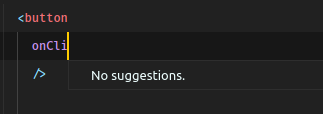
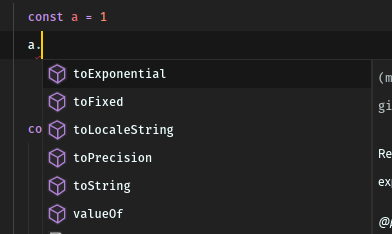
But for vanillaJS, the intelisense still works
Does this issue occur when all extensions are disabled?: Yes/No
YES :/
 yuritoledo
All 10 comments
I have the same problem. After the last update it stopped working.
 studiojms
on 10 Oct 2018
studiojms
on 10 Oct 2018
Same here. Language is set to Javascript React and still not autocompleting/listing JSX attributes as it was before.
 danfsd
on 10 Oct 2018
danfsd
on 10 Oct 2018
Please check the TypeScript Server trace:
- Set
"typescript.tsserver.trace": "verbose" - Reproduce the problem
- Open the output panel and view the
TypeScriptsection
Are there any errors or stack traces printed near the end?
 mjbvz
on 10 Oct 2018
mjbvz
on 10 Oct 2018
Unfortunately I did saw a stack trace printed, but decided to clear it in order to see if it was still happening, but it turns out that it isn't.
No stack traces or errors are being logged on Typescript, however the issues still remains.
Let's hope that the OP is getting something in the logs.
danfsd
on 10 Oct 2018
For me, it automagically back to normal
Sorry for dont help @danfsd
yuritoledo
on 15 Oct 2018
No problem @yuritoledo, it's back to normal for me as well. I think it went back after the 1.28.1 update. Try updating to that version @jmsstudio.
I think the issue can be closed @mjbvz
danfsd
on 15 Oct 2018
The problem still occurs on my VS Code...
I updated my version but it didn't change anything regarding this issue
studiojms
on 15 Oct 2018
@jmsstudio it works with normal JSX button / input too?
yuritoledo
on 15 Oct 2018
I disabled all the extensions and tried again, it worked now
Sorry for the inconvenient, it was some extension trouble here
Now the only problem that is still occurring is related to import not being placed in the file header with the imports, but it is another issue...
studiojms
on 15 Oct 2018
@jmsstudio great!
yuritoledo
on 15 Oct 2018
Related issues
 biij5698
·
3Comments
biij5698
·
3Comments
 trstringer
·
3Comments
trstringer
·
3Comments
 v-pavanp
·
3Comments
v-pavanp
·
3Comments
 omidgolparvar
·
3Comments
omidgolparvar
·
3Comments
 NikosEfthias
·
3Comments
NikosEfthias
·
3Comments
Most helpful comment
I have the same problem. After the last update it stopped working.