vscode should indicate when an extension is being activated (view and command palette) - currently it looks like the extension is at fault
Please see https://github.com/Microsoft/vscode-azurestorage/issues/233. We got a bad marketplace review because they said the expected nodes were not showing up in the view (see https://marketplace.visualstudio.com/items?itemName=ms-azuretools.vscode-azurestorage&tracking_data=eyJTb3VyY2UiOiJFbWFpbCIsIlR5cGUiOiJOb3RpZmljYXRpb24iLCJTSUQiOiJtcy5HYWxsZXJ5Tm90aWZpY2F0aW9ucy5yZXZpZXctdXBkYXRlZC1zdWJzY3JpcHRpb24iLCJTVHlwZSI6IkNPTiIsIlJlY2lwIjoyNSwiX3hjaSI6eyJOSUQiOjIzNjEwOCwiTVJlY2lwIjoibTA9MjUgIiwiQWN0IjoiODk5ZmZjNTktOGMwMC00ZTg3LTg4OTgtMGNkYzQxODRlYjdiIn0sIkVsZW1lbnQiOiJoZXJvL2N0YSJ9#review-details).
Most likely this is one of two things:
1) Extension being slow to activate - I've seen this a lot myself. On my current (fast) machine, it's common for my extension to take 10-20 seconds to activate. On a slower machine, I've seen this be up to a minute or so.
2) The extension somehow didn't activate at all.
Either way, it's unacceptable that during this time the view for the extension remains blank, making it look like the extension is misbehaving.
Further, if a command palette command from the extension is activated, vscode gives absolutely no indication that it's activating the extension - it appears as if nothing is happening at all until the extension activates.
Visual Studio Code - Insiders
Version: 1.28.0-insider (user setup)
Commit: 5ba5f14c954682df46f04a541f0b272166605366
Date: 2018-09-26T07:32:21.753Z
Electron: 2.0.9
Chrome: 61.0.3163.100
Node.js: 8.9.3
V8: 6.1.534.41
Architecture: x64
Steps to Reproduce:
- Install the Azure Storage extension (https://marketplace.visualstudio.com/items?itemName=ms-azuretools.vscode-azurestorage&tracking_data=eyJTb3VyY2UiOiJFbWFpbCIsIlR5cGUiOiJOb3RpZmljYXRpb24iLCJTSUQiOiJtcy5HYWxsZXJ5Tm90aWZpY2F0aW9ucy5yZXZpZXctdXBkYXRlZC1zdWJzY3JpcHRpb24iLCJTVHlwZSI6IkNPTiIsIlJlY2lwIjoyNSwiX3hjaSI6eyJOSUQiOjIzNjEwOCwiTVJlY2lwIjoibTA9MjUgIiwiQWN0IjoiODk5ZmZjNTktOGMwMC00ZTg3LTg4OTgtMGNkYzQxODRlYjdiIn0sIkVsZW1lbnQiOiJoZXJvL2N0YSJ9#overview)
Activate the Azure view and make sure the storage extension view is visible
!) Notice how the storage view is completely blank until it's activated (which can be up to a minute on some machines)Close the Azure view and restart vscode
- Command Palette -> Deploy to Static Website...
!) It appears that the command does absolutely nothing while waiting for the extension to activate
 StephenWeatherford
All 19 comments
I'm on the latest insiders and now I see this message while any Azure extension is loading:
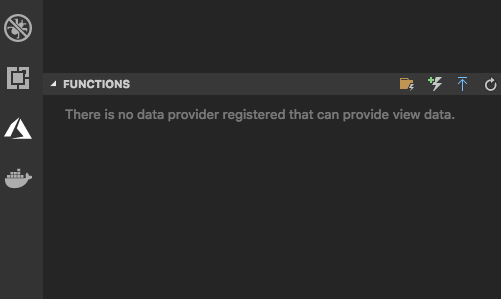
IMO this is even _worse_ than a blank view.
VS Code version: Code - Insiders 1.29.0-insider (9e83209ed59a22df3d593735d04cc963396bb89e, 2018-10-18T05:11:43.632Z)
OS version: Darwin x64 17.7.0
cc @fiveisprime @JingLouMSFT @chrisdias
 EricJizbaMSFT
on 18 Oct 2018
EricJizbaMSFT
on 18 Oct 2018
This is the common pattern

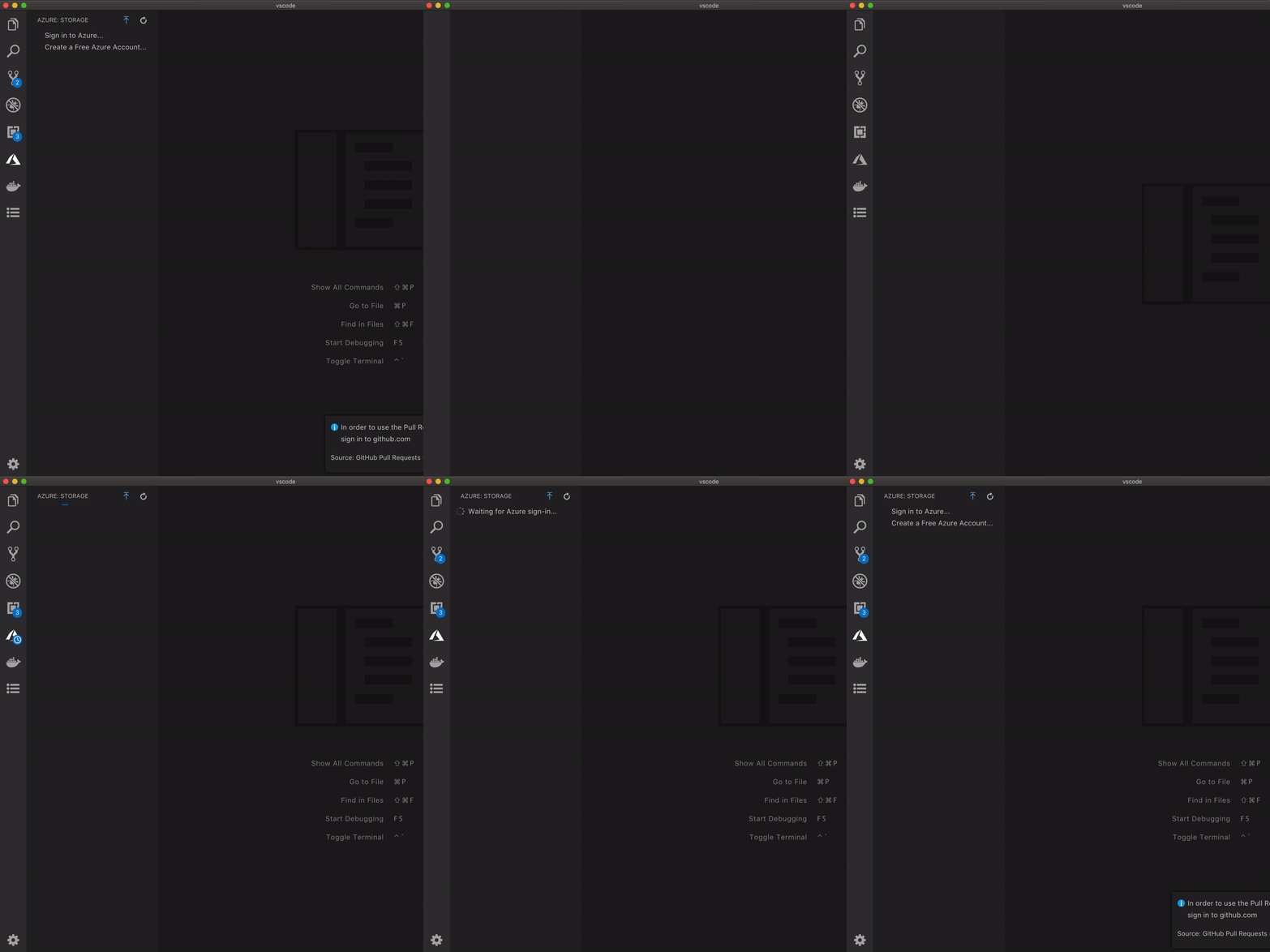
But, I see I can improve this for custom views. Now, I will show the progress until the extension is loaded and activated. If extension is slow enough (takes more than 2 seconds) to register the data provider I would show the message that data provider is not yet registered. If it takes more than 2 seconds to register then the extension should be fixed.
 sandy081
on 19 Oct 2018
sandy081
on 19 Oct 2018
ping @jrieken for command pallette
Further, if a command palette command from the extension is activated, vscode gives absolutely no indication that it's activating the extension - it appears as if nothing is happening at all until the extension activates.
sandy081
on 19 Oct 2018
it appears as if nothing is happening at all until the extension activates.
Yeah, we could have a progress message that shows (after _x_ ms) that extension activation is currently happening. We always assumed (hoped) that is fast...
On my current (fast) machine, it's common for my extension to take 10-20 seconds to activate.
@StephenWeatherford We have started to use web pack for extension that are built into vscode itself (like TS, json, etc). The next step would be to support external extensions doing this and I can offer some consulting here. Generally, we have seen times to load extensions being cut in half.
We also have a small sample extension that uses webpack: https://github.com/Microsoft/vscode-extension-samples/tree/master/webpack-sample.
 jrieken
on 19 Oct 2018
jrieken
on 19 Oct 2018
We will definitely look into using webpack, thanks.
I will point out that we started noticing much longer delays in extension activation around the time the user-install of VS Code was released for Windows. Similar to this issue: https://github.com/Microsoft/vscode/issues/56644 During offline discussions @fiveisprime made it sound like @chrisdias and you guys were aware of those problems and working on it.
In the meantime it feels wrong to limit the loading time to an arbitrary amount (like 2 seconds) when the delay in loading might not even be the extension's fault. Why can't you just display the loading until the extension is finished activating?
EricJizbaMSFT
on 19 Oct 2018
Here's another reason I don't think it's the extension that is the cause of the delay. Repro steps:
- Install several azure extensions (I installed all 5 that have views - Storage, App Service, Functions, Cosmos DB, and Event Grid)
- Activate the account extension by calling 'Select Subscriptions' from the command palette (to ensure the account extension is not causing the delay)
- Open Azure View and this is what I see:
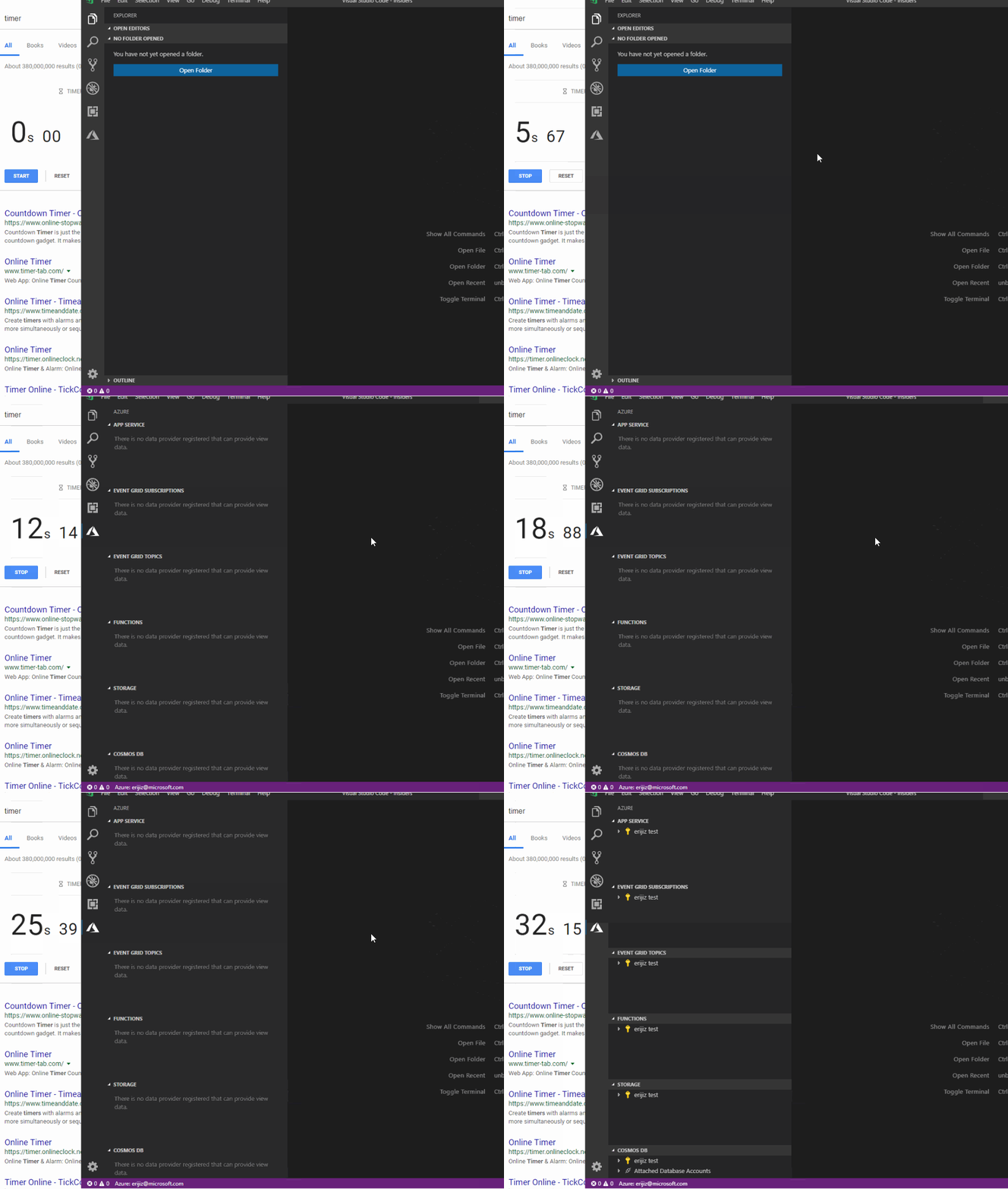
I have a _really_ hard time believing that all 5 extensions coincidentally have the same load time of ~20 seconds. If it was each extension's fault - I would expect the views to show up in a staggered way. It's also possible that one extension is delaying all other extensions, but I firmly believe that the extension host should prevent one extension from negatively affecting other extensions (probably easier said than done, but still haha 😂)
VS Code version: Code - Insiders 1.29.0-insider (45d5d153bbebed743b77e426615aade34971eb46, 2018-10-19T06:58:45.940Z)
OS version: Windows_NT x64 10.0.17134
System Info
|Item|Value|
|---|---|
|CPUs|Intel(R) Xeon(R) CPU E5-2673 v4 @ 2.30GHz (4 x 2295)|
|GPU Status|2d_canvas: unavailable_software
checker_imaging: disabled_off
flash_3d: unavailable_software
flash_stage3d: unavailable_software
flash_stage3d_baseline: unavailable_software
gpu_compositing: unavailable_software
multiple_raster_threads: enabled_on
native_gpu_memory_buffers: disabled_software
rasterization: unavailable_software
video_decode: unavailable_software
video_encode: unavailable_software
webgl: enabled_readback
webgl2: unavailable_off|
|Memory (System)|16.00GB (12.02GB free)|
|Process Argv||
|Screen Reader|no|
|VM|0%|
Extensions (10)
Extension|Author (truncated)|Version
---|---|---
tslint|eg2|1.0.40
vscode-npm-script|eg2|0.3.5
vscode-azureappservice|ms-|0.9.1
vscode-azureeventgrid|ms-|0.1.0
vscode-azurefunctions|ms-|0.11.0
vscode-azurestorage|ms-|0.4.2
vscode-cosmosdb|ms-|0.8.0
python|ms-|2018.9.1
azure-account|ms-|0.4.3
csharp|ms-|1.16.2
EricJizbaMSFT
on 19 Oct 2018
You can hit "F1 > Show Running Extensions" once that's over and it will show you how long code loading and activation took per extension
jrieken
on 22 Oct 2018
if a command palette command from the extension is activated, vscode gives absolutely no indication that it's activating the extension
@sandy081 With https://github.com/Microsoft/vscode/commit/41729b45f2796b09c9f4b03d7cc52533939af6e0 you have moved the IProgressService2 so that this now isn't really doable anymore. Please reconsider the interface move.
jrieken
on 22 Oct 2018
@jrieken Yeah, ProgressService needed access to ViewContainer hence moved to workbench. I think I mentioned it.
Anyway, I can move both progress service and view container to platform. Please suggest if there is better alternative.
sandy081
on 22 Oct 2018
Maybe we refer to the progress container simply by string id (in addition to the enum). Then we don't have to move so much stuff ...
jrieken
on 22 Oct 2018
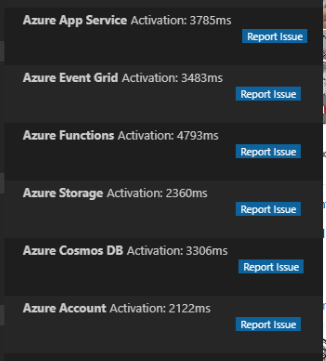
@jrieken viewing the activation times seems to confirm my suspicions. It took about 20 seconds for the views to show up, but each extension only took ~2-4 seconds to activate according to "Show running extensions". It seems wrong that it would wait for all extensions to activate, rather than showing each one as it's ready.
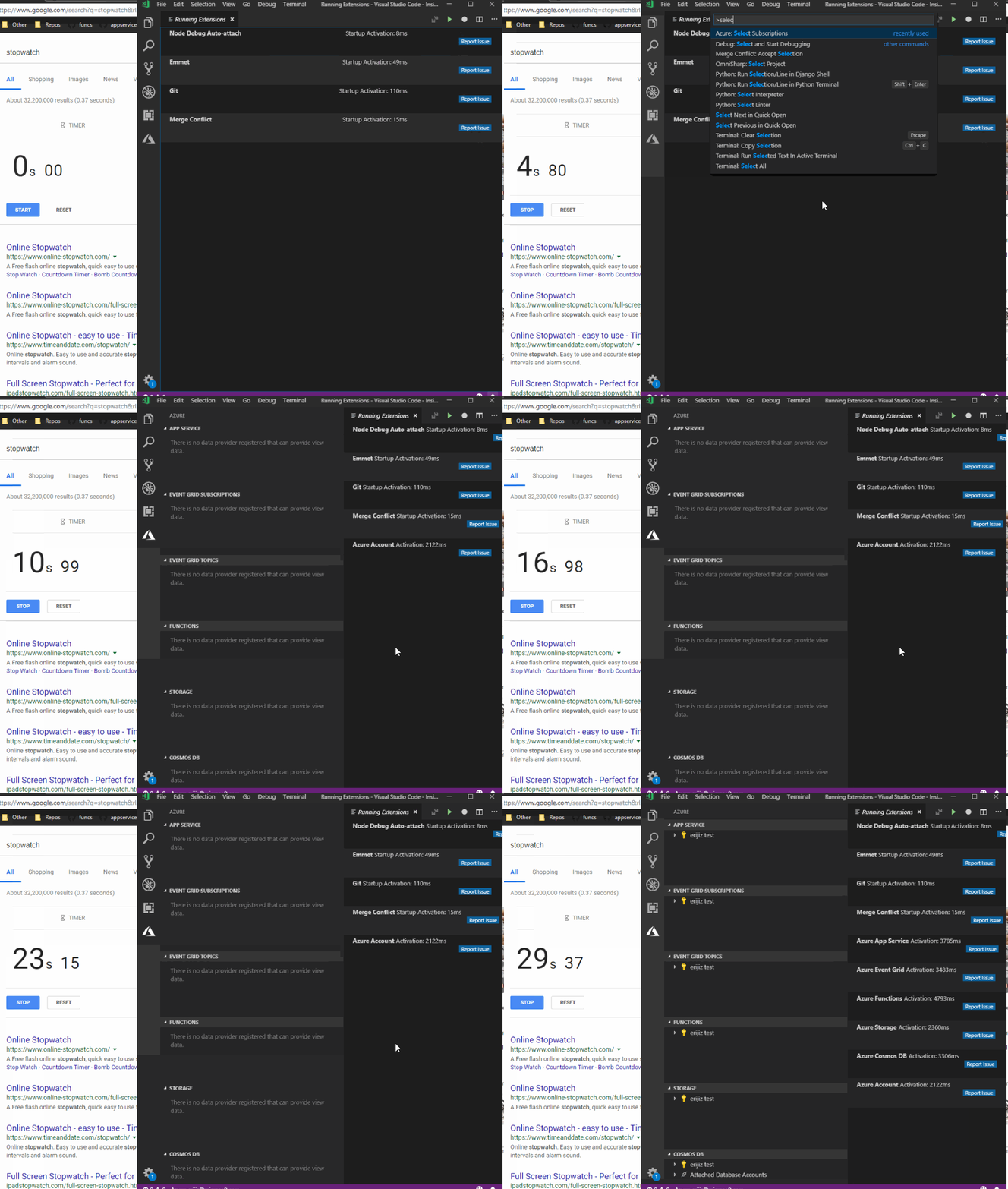
Final activation times:
Also can you confirm whether or not you guys are looking into performance issues on user install for windows?
EricJizbaMSFT
on 22 Oct 2018
Also can you confirm whether or not you guys are looking into performance issues on user install for windows?
No, cannot confirm. It's the first I hear about perf differences between user install. cc @joaomoreno
Can you run "F1 > Startup Performance" and copy&paste what it prints (re-run it in case it doesn't print two tables with a lot of other numbers)
jrieken
on 22 Oct 2018
First time I hear too. I find it hard to believe unless there is some anti-virus software (or similar) doing different checks for executables outside the standard C:\Programs. That's the only thing I can think of.
 joaomoreno
on 22 Oct 2018
joaomoreno
on 22 Oct 2018
@jrieken I'm confused when you say this is the first you're hearing about the perf issues because it seems like you've already been pretty active on the original issue I referenced above: https://github.com/Microsoft/vscode/issues/56644
EricJizbaMSFT
on 22 Oct 2018
perf issues because it seems like you've already been pretty active on the original issue I referenced above: #56644
That's unrelated to this issue but an issue with the renderer being late (likely due to some networking issues). If it would that then you wouldn't see a window for 20 seconds. You don't see extensions -that's something different.
Can you run "F1 > Startup Performance" and copy&paste what it prints (re-run it in case it doesn't print two tables with a lot of other numbers)
jrieken
on 23 Oct 2018
@jrieken Moved IProgressService2 to platform
sandy081
on 23 Oct 2018
I don't have a consistent repro for the slow performance on user-install. I mostly develop on a mac anyways and just heard about these delays from @fiveisprime. I'll open a separate issue if/when I see that happen again
EricJizbaMSFT
on 24 Oct 2018
Ok - closing this now because we shown a progress message when activating now
jrieken
on 24 Oct 2018
Thank you so much! The initial loading behavior seems to have a large impact on user's impression of our extensions so we definitely appreciate your help with this. I'm also excited for us to try webpack as you suggested.
Finally I created a separate issue to track the behavior I mentioned above (how it loads all extensions before displaying a single extension) https://github.com/Microsoft/vscode/issues/61732
EricJizbaMSFT
on 24 Oct 2018
Related issues
 VitorLuizC
·
3Comments
VitorLuizC
·
3Comments
 vsccarl
·
3Comments
vsccarl
·
3Comments
 ryan-wong
·
3Comments
ryan-wong
·
3Comments
 v-pavanp
·
3Comments
v-pavanp
·
3Comments
 chrisdias
·
3Comments
chrisdias
·
3Comments
Most helpful comment
I'm on the latest insiders and now I see this message while any Azure extension is loading:

IMO this is even _worse_ than a blank view.
VS Code version: Code - Insiders 1.29.0-insider (9e83209ed59a22df3d593735d04cc963396bb89e, 2018-10-18T05:11:43.632Z)
OS version: Darwin x64 17.7.0
cc @fiveisprime @JingLouMSFT @chrisdias