Vscode: Extension Host is unresponsive
Issue Type: Bug
It currently seems to be the case that the extension host is unresponsive frequently.

When you open up the Running Extensions window it turns to

And after a while this process starts over
VS Code version: Code - Insiders 1.28.0-insider (a542a0afb5ff12a878dcf4b6a914f10d1318cb2e, 2018-09-14T05:12:35.372Z)
OS version: Darwin x64 17.7.0
System Info
|Item|Value|
|---|---|
|CPUs|Intel(R) Core(TM) i7-4980HQ CPU @ 2.80GHz (8 x 2800)|
|GPU Status|2d_canvas: enabled
checker_imaging: disabled_off
flash_3d: enabled
flash_stage3d: enabled
flash_stage3d_baseline: enabled
gpu_compositing: enabled
multiple_raster_threads: enabled_on
native_gpu_memory_buffers: enabled
rasterization: enabled
video_decode: enabled
video_encode: enabled
webgl: enabled
webgl2: enabled|
|Load (avg)|3, 2, 2|
|Memory (System)|16.00GB (0.43GB free)|
|Process Argv|/Applications/Visual Studio Code - Insiders.app/Contents/MacOS/Electron -psn_0_4351014|
|Screen Reader|no|
|VM|0%|
Extensions (38)
Extension|Author (truncated)|Version
---|---|---
EditorConfig|Edi|0.12.4
npm-intellisense|chr|1.3.0
path-intellisense|chr|1.4.2
bracket-pair-colorizer|Coe|1.0.59
vscode-svgviewer|css|1.4.6
vscode-eslint|dba|1.6.0
gitlens|eam|8.5.6
tslint|eg2|1.0.39
vscode-npm-script|eg2|0.3.5
vsc-material-theme|Equ|2.4.2
prettier-vscode|esb|1.6.1
comment-anchors|Exo|1.2.0
vscode-pull-request-github|Git|0.1.5
beautify|Hoo|1.4.3
smarty|imp|0.3.0
docthis|joe|0.7.1
php-cs-fixer|jun|0.1.85
php-symbols|lin|2.1.0
VS-code-vagrantfile|mar|0.0.7
twig-language-2|mbl|0.3.1
php-namespace-resolver|Meh|1.1.0
vscode-scss|mrm|0.6.2
debugger-for-chrome|msj|4.10.1
color-highlight|nau|2.3.0
vetur|oct|0.12.6
vscode-docker|Pet|0.2.0
vscode-versionlens|pfl|0.21.1
material-icon-theme|PKi|3.6.0
ruby|reb|0.20.0
vscode-yaml|red|0.0.16
code-settings-sync|Sha|3.1.2
autoimport|ste|1.5.3
easy-snippet-maker|tar|0.0.6
Snippet|vsc|0.2.4
vim|vsc|0.16.4
quokka-vscode|Wal|1.0.148
vscode-import-cost|wix|2.9.0
sort-js-object-keys|zen|1.0.1
(1 theme extensions excluded)
 st-schneider
All 50 comments
As a per session workaround, what works for me is to go to extensions, select the ... menu and Disable All Installed Extentions, reload (on any one of the disabled extensions), once reloaded, Enable All Extensions then Show Disabled Extensions and hit reload on any of the extensions.
 clintwood
on 14 Sep 2018
clintwood
on 14 Sep 2018
Duplicate of #58672
Please update, a new build with a fix is available. Sorry about that!
 alexdima
on 14 Sep 2018
alexdima
on 14 Sep 2018
@alexandrudima ~I still have the same issue even after the new build.~
Version: 1.28.0-insider (user setup)
Commit: 29e6dce4352db76d8956035990b8630580226588
Date: 2018-09-14T08:23:30.210Z
Electron: 2.0.9
Chrome: 61.0.3163.100
Node.js: 8.9.3
V8: 6.1.534.41
Architecture: x64
Update: Seems after doing what @clintwood suggested after the build fixed it for me.
 Eventyret
on 14 Sep 2018
Eventyret
on 14 Sep 2018
Please keep an eye out and let us know if you still see this false positive after you have updated and if you have some good steps.
If you see the popup you can also take a peek at Task Manager and check, perhaps the extension host is indeed busy and it wasn't a false positive after all.
In any case, if you see it please reach out. Thank you!
alexdima
on 14 Sep 2018
The update works for me - thank you!
clintwood
on 14 Sep 2018
@alexandrudima so i found out if you have the extentions window open. You install or uninstall reload extentions etc it will fire. and keep looping.
What data did you want me to get you ?
Eventyret
on 14 Sep 2018
@Eventyret Sorry for not being clear. After updating to the latest Insiders (kill all running processes of VSCode), do you still see the following popup:
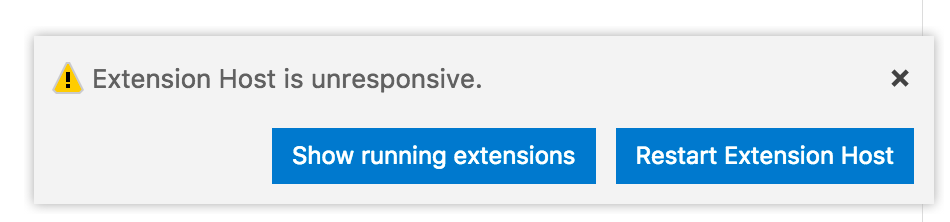
If you do, can you please open a new issue with your environment, installed extensions, and perhaps some steps if any steps are required to reproduce.
alexdima
on 14 Sep 2018
@alexandrudima i feel this can be closed. I will open a new issue and refer to this if it happends again (have a computer without the update so will update and test it straight off there in a few hours)
Thanks again.
Eventyret
on 14 Sep 2018
The last update fixed the issue. 👍
 lyndonjohn
on 15 Sep 2018
lyndonjohn
on 15 Sep 2018
I still see this issue constantly. I have upgraded to the latest build and it did not help. I am on Version 1.28.0-insider (1.28.0-insider) at af3614909b837c46a260666cb7baab7a8468a9c8.
Any suggestions? This is making it difficult to use VSCode because all my save on format, etc is all messed up and it's really slowing me down ... :-(
I am on macOS by the way. Looked like the screenshots above might be from Windows.
 joelgetaction
on 20 Sep 2018
joelgetaction
on 20 Sep 2018
@joelgetaction Here is how you can profile extensions -- https://github.com/Microsoft/vscode/wiki/Performance-Issues#profile-the-running-extensions -- use those steps to identify which extensions consume a lot of CPU.
alexdima
on 21 Sep 2018
This seems to be happening more, updated this morning to latest insiders version, and get message popping up every 15 / 20 minutes or so. not installed any new extensions recently. would be nice for the pop up to mention which extension was having an issue.
Version: 1.28.0-insider
Commit: 2291080075f17a27a8cd709def0a2c9298a4155c
Date: 2018-09-27T05:18:27.312Z
Electron: 2.0.9
Chrome: 61.0.3163.100
Node.js: 8.9.3
V8: 6.1.534.41
Architecture: x64
 DuncanFaulkner
on 27 Sep 2018
DuncanFaulkner
on 27 Sep 2018
I am seeing this way more often as well lately. It got so bad that I had to switch back to the regular non-insiders build and that build had no issues. Note that with the same exact setttings and installed extensions, the insiders build had serious issues with the extension host while the regular build did not. So the issue definitely seems to be with the insiders build ...
On Sep 27, 2018 at 4:30 AM,
This seems to be happening more, updated this morning to latest insiders version, and get message popping up every 15 / 20 minutes or so. not installed any new extensions recently. would be nice for the pop up to mention which extension was having an issue.
Version: 1.28.0-insider
Commit: 2291080 (https://github.com/Microsoft/vscode/commit/2291080075f17a27a8cd709def0a2c9298a4155c)
Date: 2018-09-27T05:18:27.312Z
Electron: 2.0.9
Chrome: 61.0.3163.100
Node.js: 8.9.3
V8: 6.1.534.41
Architecture: x64—
You are receiving this because you were mentioned.
Reply to this email directly, view it on GitHub (https://github.com/Microsoft/vscode/issues/58661#issuecomment-425055932), or mute the thread (https://github.com/notifications/unsubscribe-auth/AmWxt_YnEWJFIhmlHnY_5HG2FB9tKXxoks5ufLbxgaJpZM4WosrW).
joelgetaction
on 27 Sep 2018
Still happening here. Also search and quick open seems to be buggy :(
 mtxr
on 29 Sep 2018
mtxr
on 29 Sep 2018
I've got the same problem now too. In the two computers I own, both with the insiders build. It seems that killing the process fixes it temporarily.
 icyJoseph
on 3 Oct 2018
icyJoseph
on 3 Oct 2018
Same here!

$ code --list-extensions | xargs -L 1 echo code --install-extension
code --install-extension christian-kohler.npm-intellisense
code --install-extension CoenraadS.bracket-pair-colorizer
code --install-extension dbaeumer.vscode-eslint
code --install-extension eg2.vscode-npm-script
code --install-extension esbenp.prettier-vscode
code --install-extension formulahendry.auto-close-tag
code --install-extension formulahendry.auto-rename-tag
code --install-extension joelday.docthis
code --install-extension kamikillerto.vscode-colorize
code --install-extension robertohuertasm.vscode-icons
code --install-extension salesforce.salesforcedx-vscode
code --install-extension salesforce.salesforcedx-vscode-apex
code --install-extension salesforce.salesforcedx-vscode-apex-debugger
code --install-extension salesforce.salesforcedx-vscode-apex-replay-debugger
code --install-extension salesforce.salesforcedx-vscode-core
code --install-extension salesforce.salesforcedx-vscode-lightning
code --install-extension salesforce.salesforcedx-vscode-visualforce
code --install-extension TimonVS.ReactSnippetsStandard
code --install-extension Tobermory.es6-string-html
code --install-extension Tyriar.shell-launcher
code --install-extension vincaslt.highlight-matching-tag
code --install-extension xabikos.JavaScriptSnippets
code --install-extension zhuangtongfa.Material-theme
 monirkohi2006
on 4 Oct 2018
monirkohi2006
on 4 Oct 2018
version : 1.28 stable , the bug still exist!
 toplinuxsir
on 10 Oct 2018
toplinuxsir
on 10 Oct 2018
i have the same trouble.
 MoisesJR2016
on 10 Oct 2018
MoisesJR2016
on 10 Oct 2018
Ma OSX 10.13.6. VSCode: 1.28 stable. The bug still exist.
 technoiswatchingyou
on 10 Oct 2018
technoiswatchingyou
on 10 Oct 2018
It's driving me nuts! the bug still exists.
Version: 1.28.0 (user setup)
Commit: 431ef9da3cf88a7e164f9d33bf62695e07c6c2a9
Date: 2018-10-05T14:58:53.203Z
Electron: 2.0.9
Chrome: 61.0.3163.100
Node.js: 8.9.3
V8: 6.1.534.41
Architecture: x64
 AreyXo
on 10 Oct 2018
AreyXo
on 10 Oct 2018
This is annoying as hell, every few minutes the notification pops up. Started seeing the problem after upgrading to 1.28. Had to roll back to 1.27.2. The problem went away.
 wechuli
on 10 Oct 2018
wechuli
on 10 Oct 2018
Same here. Almost unusable since v1.28.
Extensions installed:
code --install-extension Sophisticode.php-formatter
code --install-extension Zignd.html-css-class-completion
code --install-extension christian-kohler.path-intellisense
code --install-extension CoenraadS.bracket-pair-colorizer
code --install-extension cssho.vscode-svgviewer
code --install-extension dbaeumer.vscode-eslint
code --install-extension ecmel.vscode-html-css
code --install-extension eg2.vscode-npm-script
code --install-extension esbenp.prettier-vscode
code --install-extension formulahendry.auto-close-tag
code --install-extension formulahendry.auto-complete-tag
code --install-extension formulahendry.auto-rename-tag
code --install-extension formulahendry.terminal
code --install-extension HookyQR.beautify
code --install-extension humao.rest-client
code --install-extension lafe.contextualduplicate
code --install-extension letrieu.expand-region
code --install-extension mechatroner.rainbow-csv
code --install-extension mikestead.dotenv
code --install-extension mrmlnc.vscode-apache
code --install-extension octref.vetur
code --install-extension PKief.material-icon-theme
code --install-extension ritwickdey.LiveServer
code --install-extension robertohuertasm.vscode-icons
code --install-extension Shan.code-settings-sync
code --install-extension sysoev.language-stylus
code --install-extension techer.open-in-browser
code --install-extension vincaslt.highlight-matching-tag
code --install-extension wesbos.theme-cobalt2
code --install-extension wmaurer.change-case
code --install-extension YoshinoriN.current-file-path
code --install-extension ziyasal.vscode-open-in-github
 NicolasReibnitz
on 10 Oct 2018
NicolasReibnitz
on 10 Oct 2018
Same here Version 1.28.0
 nicubarbaros
on 10 Oct 2018
nicubarbaros
on 10 Oct 2018
Same, have to restart a couple times. v1.28.0
 shermendev
on 10 Oct 2018
shermendev
on 10 Oct 2018
Same here, also v1.28.0
 jsharer2
on 10 Oct 2018
jsharer2
on 10 Oct 2018
Same here, v1.28.0 (user setup). Very annoying!!!!
 simioluwatomi
on 10 Oct 2018
simioluwatomi
on 10 Oct 2018
Same here, again, for the n-th time, latest vs code insiders and regular. You managed to bloat VS Code out of proportion.
icyJoseph
on 10 Oct 2018
same here, also 1.28.0
 ionling
on 10 Oct 2018
ionling
on 10 Oct 2018
same here, also 1.28.0
It may take several minutes to get normal after I click Restart Extension Host button.
ionling
on 10 Oct 2018
I'm also seeing this (1.28.0 user setup) every time I start up. If it's actually related to the extensions, these ones are common between mine and the two sets listed above by @NicolasReibnitz and @monirkohi2006.
CoenraadS.bracket-pair-colorizer
eg2.vscode-npm-script
esbenp.prettier-vscode
robertohuertasm.vscode-icons
 Da13Harris
on 10 Oct 2018
Da13Harris
on 10 Oct 2018
I also have this problem with 1.28.0 (windows 64 bits).
I'm also seeing this (1.28.0 user setup) every time I start up. If it's actually related to the extensions, these ones are common between mine and the two sets listed above by @NicolasReibnitz and @monirkohi2006.
CoenraadS.bracket-pair-colorizer
eg2.vscode-npm-script
esbenp.prettier-vscode
robertohuertasm.vscode-icons
From that list I have just CoenraadS.bracket-pair-colorizer
 distante
on 10 Oct 2018
distante
on 10 Oct 2018
@alexandrudima This issue has completely killed my editor/workflow. I tried downgrading, but 1.27.2 also had a similar issue where the Extension Host was terminated. From the list above, I have bracket-pair-colorizer, but I noticed an issue where the project-manager extension seemed to bug out as well. So I tried disabling that as well and I'm still getting the unresponsive issue. Restarting the extension host just reproduces the popup again 30-60 seconds later.
VS Code is unusable in this state, please fix this asap! :(
 ryanaltvater
on 10 Oct 2018
ryanaltvater
on 10 Oct 2018
Same issue here as well :(
 MAQ7
on 10 Oct 2018
MAQ7
on 10 Oct 2018
No matter what I do unresponsive issue continues popping up :(
 elmergomez
on 10 Oct 2018
elmergomez
on 10 Oct 2018
The same issue, if it keeps happening I will have to try and uninstall and reinstall vs code entirely.
vs code infor:
Version: 1.28.0 (user setup)
Commit: 431ef9da3cf88a7e164f9d33bf62695e07c6c2a9
Date: 2018-10-05T14:58:53.203Z
Electron: 2.0.9
Chrome: 61.0.3163.100
Node.js: 8.9.3
V8: 6.1.534.41
Architecture: x64
I don't even know what causes it. seems random for me, and on startup.
 mikelnorth
on 10 Oct 2018
mikelnorth
on 10 Oct 2018
The same issue, It affected my job.
system info
- Version: 1.28.0 (user setup)
- Commit: 431ef9da3cf88a7e164f9d33bf62695e07c6c2a9
- Date: 2018-10-05T14:58:53.203Z
- Electron: 2.0.9
- Chrome: 61.0.3163.100
- Node.js: 8.9.3
- V8: 6.1.534.41
- Architecture: x64
Extension plug-in
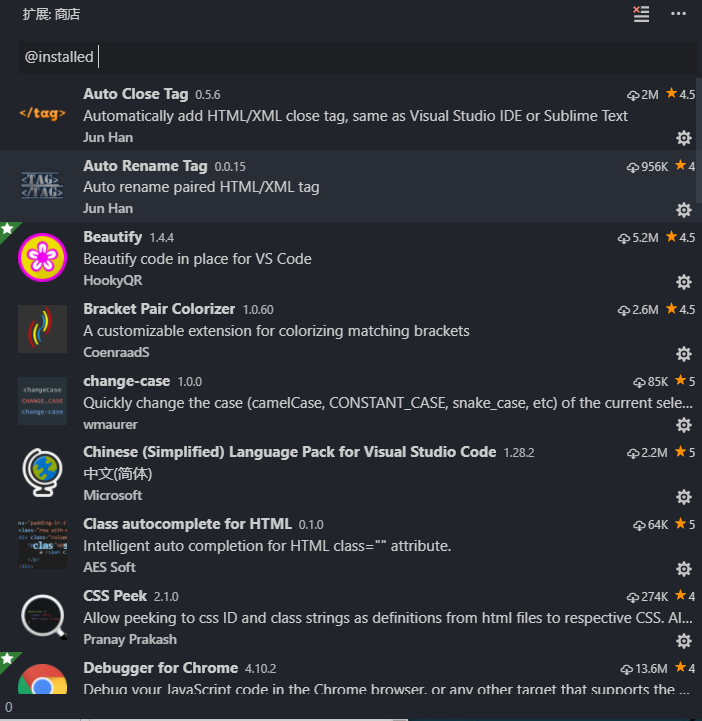
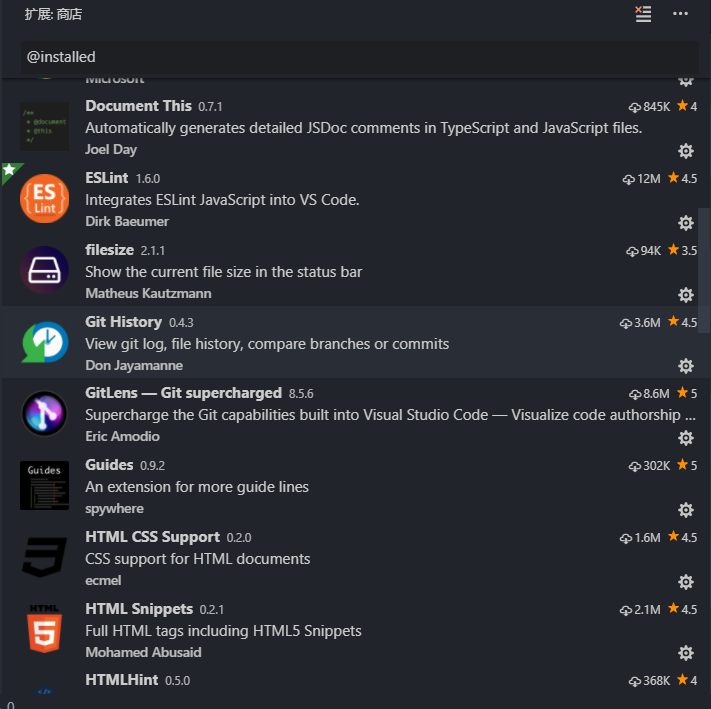
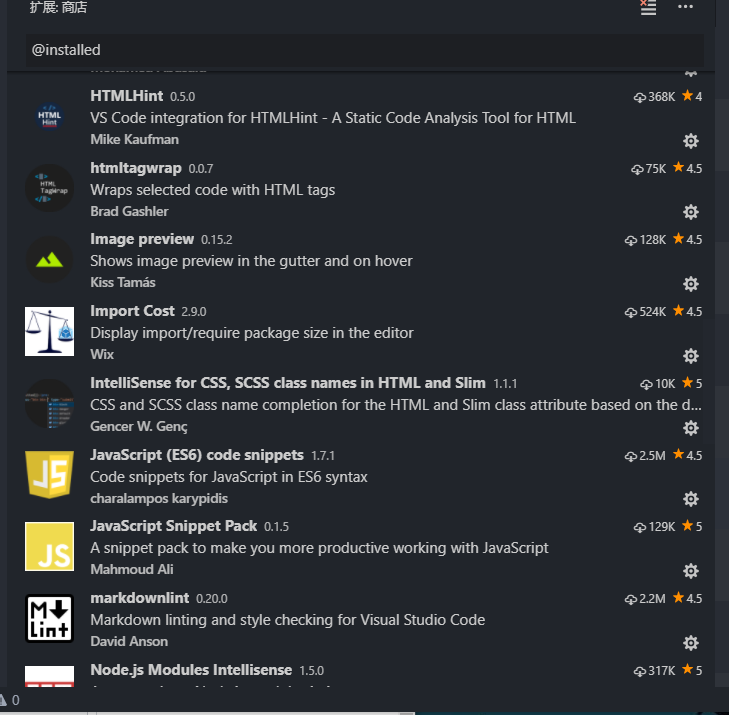
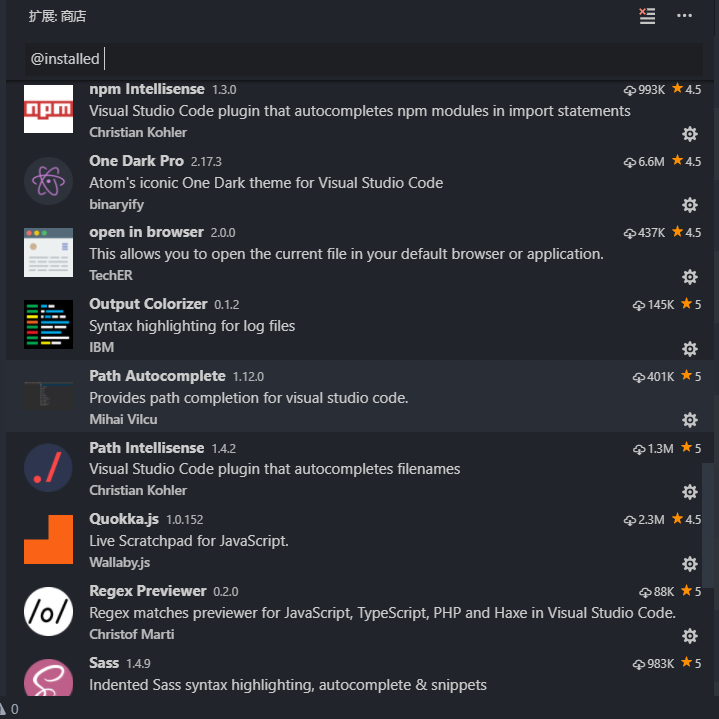
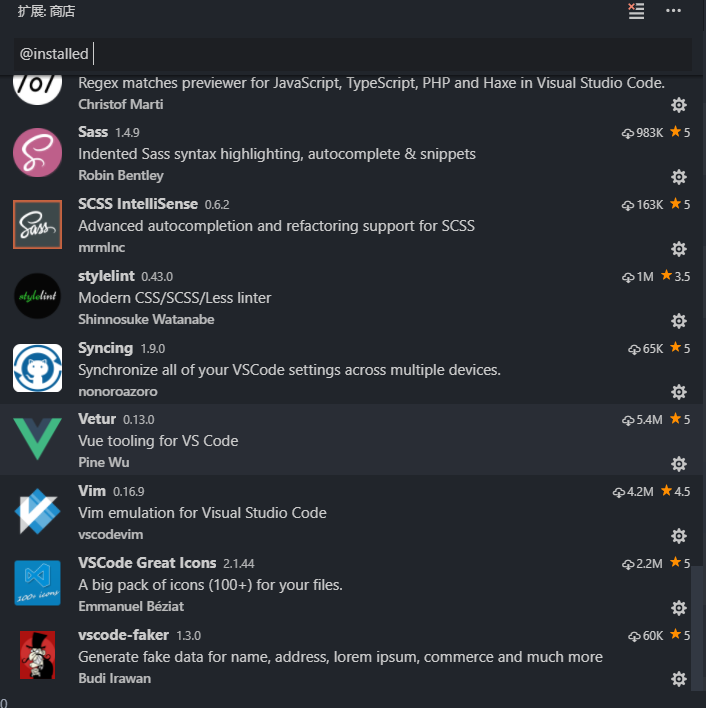
 liby
on 11 Oct 2018
liby
on 11 Oct 2018
Just updated to 1.28 stable and having this issue. (was fine in 1.27)
Version: 1.28.0 (user setup)
Commit: 431ef9da3cf88a7e164f9d33bf62695e07c6c2a9
Date: 2018-10-05T14:58:53.203Z
Electron: 2.0.9
Chrome: 61.0.3163.100
Node.js: 8.9.3
V8: 6.1.534.41
Architecture: x64
 howar31
on 11 Oct 2018
howar31
on 11 Oct 2018
The same problem to me after upgrading to Version: 1.28.0 (system setup) today.
Version: 1.28.0 (system setup)
Commit: 431ef9da3cf88a7e164f9d33bf62695e07c6c2a9
Date: 2018-10-05T14:58:53.203Z
Electron: 2.0.9
Chrome: 61.0.3163.100
Node.js: 8.9.3
V8: 6.1.534.41
Architecture: x64
 dasani08
on 11 Oct 2018
dasani08
on 11 Oct 2018
Is there a way to go back to the previous version of VS Code?
nicubarbaros
on 11 Oct 2018
@nicubarbaros , Not sure if this functionality is inside vs code itself but you can download a previous version and reinstall vs code- it will retain all your settings and extensions. Here is a link to previous versions, the August release should be okay. https://code.visualstudio.com/updates/v1_26
wechuli
on 11 Oct 2018
As a per session workaround, what works for me is to go to extensions, select the
...menu and Disable All Installed Extentions, reload (on any one of the disabled extensions), once reloaded, Enable All Extensions then Show Disabled Extensions and hit reload on any of the extensions.
Thank you! Your solution is quite useful!
 lolimay
on 11 Oct 2018
lolimay
on 11 Oct 2018
Strangely enough it stopped bugging around since yesterday evening. The message that came up every ten minutes or so didn't come up since.
I keep my fingers crossed.
NicolasReibnitz
on 11 Oct 2018
This is the exact problem my friend and I are having when collaborating with VS live share.
As soon as he minimises the project it throws the error and I can no longer do anything or view the localhost. Baffles me that this is even a topic of discussion and wasn't sorted with the update.
 t0mpy
on 11 Oct 2018
t0mpy
on 11 Oct 2018
It is still the same for me, extremely frustrating it has been since last couple of days.
 shakeelosmani
on 11 Oct 2018
shakeelosmani
on 11 Oct 2018
same for me
 jony4
on 11 Oct 2018
jony4
on 11 Oct 2018
I am seeing some extensions taking a while to activate (~14 seconds) which correlates to the Unresponsive popup. Is the extension loading blocking?
 mikecarr
on 11 Oct 2018
mikecarr
on 11 Oct 2018
I have noticed the extension host going unresponsive consistently when having a typescript file open, then opening an html file in a second window pane. It seems that the process Initializing JS/TS Features may be causing this as that process is running for a long time in the bottom status bar.
 hessnd
on 11 Oct 2018
hessnd
on 11 Oct 2018
We have pushed a fix today to reduce the confusion about the unresponsive notification. See https://github.com/Microsoft/vscode/issues/60318
 auchenberg
on 12 Oct 2018
auchenberg
on 12 Oct 2018
For me it's more annoying than anything because you can't stop them from appearing. My laptop is slow so it takes some time to load all extensions. I always get the 2 msgs (extension host is unresponsive, is now responsive).
I already knew code takes time to load on my machine and I know when it's ready and working. I don't need the constant notifications. They also don't go away by themselves so I have to click them away every single time I load code.
Need an option to disable these extension host notifications
 Greyze
on 12 Oct 2018
Greyze
on 12 Oct 2018
For me it's more annoying than anything because you can't stop them from appearing. My laptop is slow so it takes some time to load all extensions. I always get the 2 msgs (extension host is unresponsive, is now responsive).
I already knew code takes time to load on my machine and I know when it's ready and working. I don't need the constant notifications. They also don't go away by themselves so I have to click them away every single time I load code.
Need an option to disable these extension host notifications
We have pushed a fix today to reduce the confusion about the unresponsive notification. See #60318
distante
on 12 Oct 2018
Related issues
 trstringer
·
3Comments
trstringer
·
3Comments
 lukehoban
·
3Comments
lukehoban
·
3Comments
 sirius1024
·
3Comments
sirius1024
·
3Comments
 shanalikhan
·
3Comments
shanalikhan
·
3Comments
 villiv
·
3Comments
villiv
·
3Comments
Most helpful comment
version : 1.28 stable , the bug still exist!