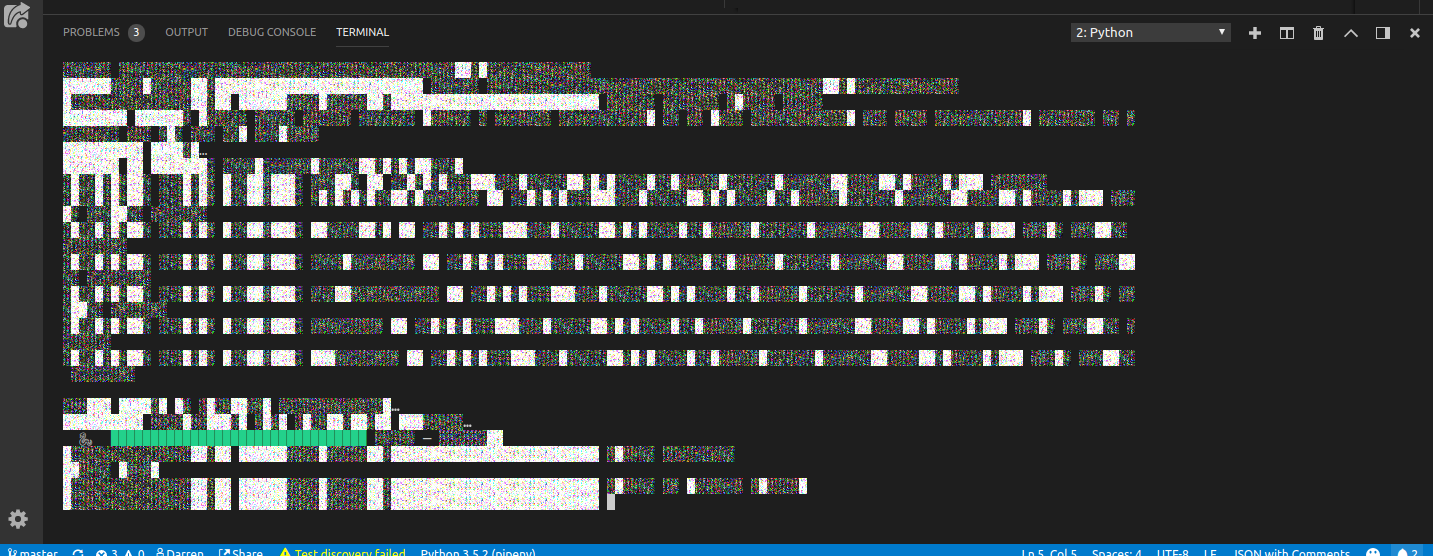
Vscode: Corrupted terminal and minimap textures after sleep
- VSCode Version: 1.27.1
- OS Version: ubuntu 16.04
Steps to Reproduce:
- Open terminal
- Sleep laptop
- When reopened text in terminal is garbage.
 dazzag24
All 13 comments
This is a bug in Chromium.
 Tyriar
on 10 Sep 2018
Tyriar
on 10 Sep 2018
@Tyriar reference to that chromium bug?
 gocarlos
on 31 Oct 2018
gocarlos
on 31 Oct 2018
I don't have a link, I believe the first report for this was https://github.com/Microsoft/vscode/issues/30292
Tyriar
on 31 Oct 2018
Same here (I would have left a comment on #30292, but it is locked)
I've been assuming it is something to do with the nvidia driver; though it only happens in vscode. It is not just the terminal, also the minimap, and sometimes other bits of the UI, such as the search box.
Typing reset in the terminal did not reset it. Resizing the pane also did not.
What does work (both for terminal and the minimap) is altering the zoom. E.g. ctrl + then ctrl - and it is back. So, as long as vscode has a way to recognize when a suspend/restart has happened, it should be able to force the screen rewrite? I.e. what function is triggered by changing the font size, that doesn't get triggered by just changing the pane size?
 DarrenCook
on 27 Dec 2018
DarrenCook
on 27 Dec 2018
@DarrenCook while there aren't any web APIs that I'm aware of to track suspend, I just found an Electron one https://electronjs.org/docs/api/power-monitor
@bpasero do you have a recommendation for which electron-main service electron.powerMonitor calls should go into? It's needed to redraw the terminal and minimap on 'resume'.
Tyriar
on 27 Dec 2018
@Tyriar maybe here and then send a IPC message to all windows. Alternatively we could expose an event on IWindowService everyone in the renderer could register to.
 bpasero
on 28 Dec 2018
bpasero
on 28 Dec 2018
This is now fixed for the terminal.
@alexandrudima you can fix the minimap issue by forcing a redraw when this event fires:
I would have done it, but I don't know enough about using electron APIs in monaco components.
Tyriar
on 29 Dec 2018
I think to be able to use this in the standalone editor it has to be wrapped around some service, unless we want to move this into the codeEditor contrib of the workbench.
bpasero
on 29 Dec 2018
I've adopted the event in the editor too.
 alexdima
on 7 Jan 2019
alexdima
on 7 Jan 2019
@alexandrudima does fb4f36c fix apply to terminal also?
I am running 1.31.0 on Ubuntu. My vscode integrated terminal still has this issue. The minimap is working though.
 supirman
on 11 Feb 2019
supirman
on 11 Feb 2019
@supirman https://github.com/Microsoft/vscode/commit/1c7194ad5d3b07faddf1297a8e332bf406213c96 fixed it for the terminal, you might be seeing this issue? https://github.com/Microsoft/vscode/issues/68346
Tyriar
on 12 Feb 2019
I don't know if this is the right place to post this, but I was getting similar issues in Chrome and VS Code, so I posted a bug report on their website. Link if anyone has anything to add to it: https://bugs.chromium.org/p/chromium/issues/detail?id=932219
 aibtcare
on 14 Feb 2019
aibtcare
on 14 Feb 2019
@Tyriar probably that is more accurate, since it no longer corrupted, morelike invisible.
Thanks.
supirman
on 15 Feb 2019
Related issues
 trstringer
·
3Comments
trstringer
·
3Comments
trstringer
·
3Comments
trstringer
·
3Comments
 villiv
·
3Comments
villiv
·
3Comments
 sijad
·
3Comments
sijad
·
3Comments
 chrisdias
·
3Comments
chrisdias
·
3Comments
Most helpful comment
@Tyriar reference to that chromium bug?