Vscode: Terminal search results paths not clickable
Running Visual Studio Code 1.27.1 over Windows 10, using Git bash as terminal and with ACK installed.
Up until the last update, after performing a term search in the terminal, Ctrl+click over paths in results opened the related file in a new tab. AFter the last update, that shortcut no longer works.
Tested also with PowerShell and the native Windows command line.
 decodekult
All 5 comments
Can you share a screenshot? Also what folder was the terminal opened at initially?
 Tyriar
on 6 Sep 2018
Tyriar
on 6 Sep 2018
1.27 over OSX, project links of e.g.
test/foo/file.go:12:12: some error here
used to be cmd+click able, now they don't show up as valid urls to click.
test/foo/file.go is relative to the project workpath root directory.
Absolute paths however are working
 xackery
on 6 Sep 2018
xackery
on 6 Sep 2018
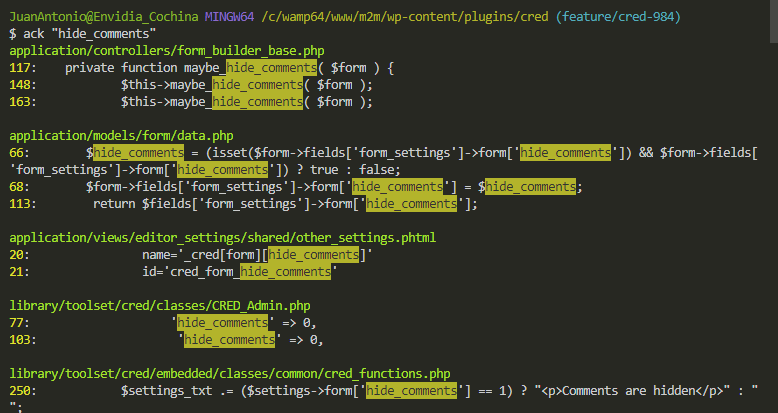
Attaching a screenshot, with the path where the terminal opened, and the unclickable relative paths. No space in any of them.
decodekult
on 7 Sep 2018
Confirmed on Mac, Windows, and Linux. This is a huge usability regression, unless you always write code that compiles the first time.
Note that this affects tsc/tsc --watch build terminals as well.
To reproduce, clone any typescript project and open it in vscode (like exiftool-vendored), ctrl-shift-b, pick tsc --watch, edit a file and create a syntax error. In all prior builds < 1.27 you've been able to click the filename in the tsc output terminal to jump to that file (and line) in your workspace where the error was found. In this build, the filenames are not clickable.
I'm running vscode 1.27.1 on windows 10, mac OS X 10.11, and Ubuntu 18.04.01.
 mceachen
on 8 Sep 2018
mceachen
on 8 Sep 2018
this is a duplicate of #58256 i believe and #58232
xackery
on 9 Sep 2018
Related issues
 NikosEfthias
·
3Comments
NikosEfthias
·
3Comments
 lukehoban
·
3Comments
lukehoban
·
3Comments
 biij5698
·
3Comments
biij5698
·
3Comments
 sirius1024
·
3Comments
sirius1024
·
3Comments
 ryan-wong
·
3Comments
ryan-wong
·
3Comments
Most helpful comment
this is a duplicate of #58256 i believe and #58232