Vscode: Incorrect new settings (UI) behavior after nothing was found
Issue Type: Bug
- Open new settings UI
- Type something like "nwkml" in Search setting field
- Press backspace button one time to remove "l" symbol
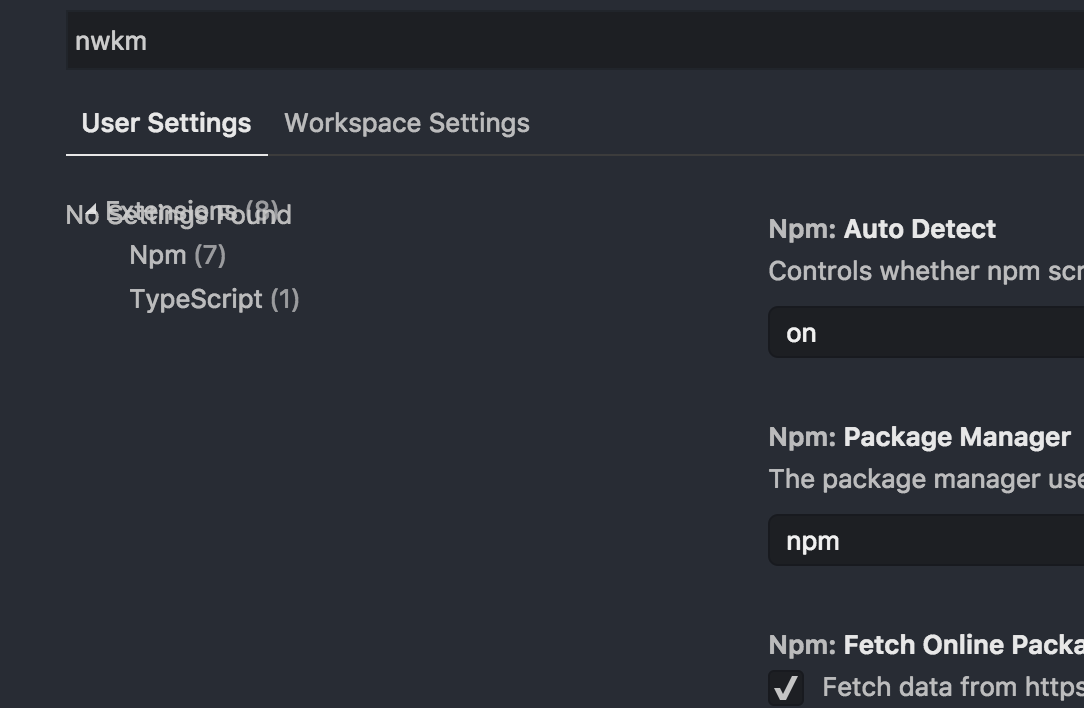
Here is result:
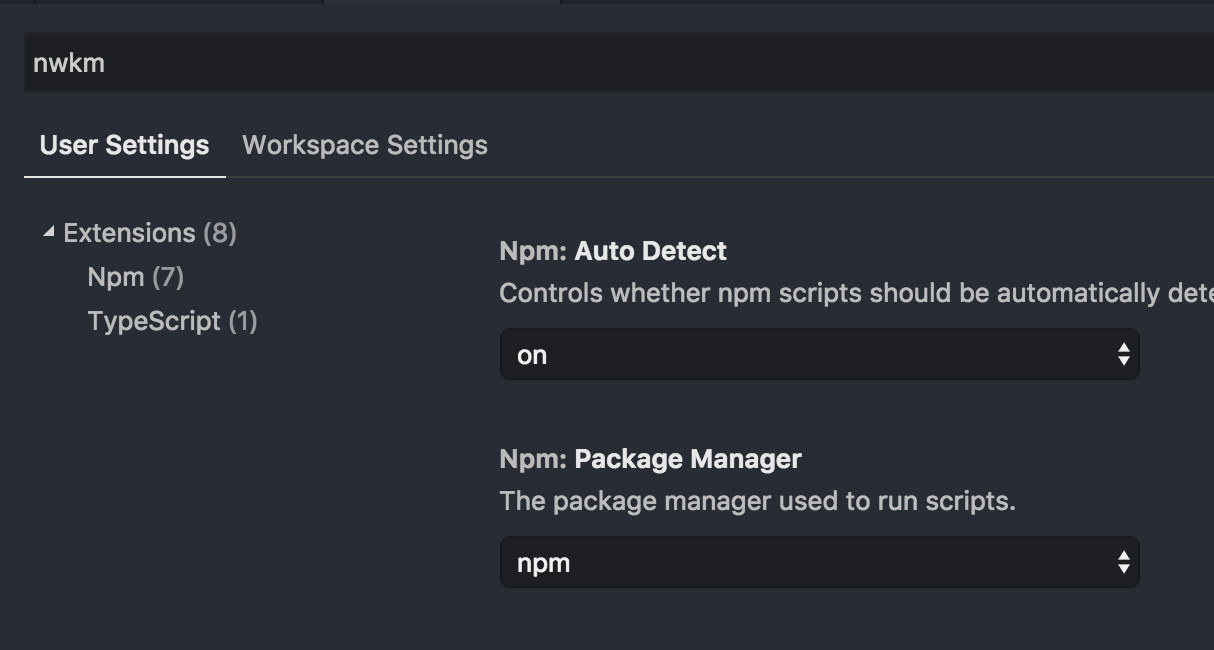
Expected result:
VS Code version: Code 1.27.0 (7b9afc4196bda60b0facdf62cfc02815509b23d6, 2018-09-05T05:22:06.672Z)
OS version: Darwin x64 17.7.0
System Info
|Item|Value|
|---|---|
|CPUs|Intel(R) Core(TM) i7-6700HQ CPU @ 2.60GHz (8 x 2600)|
|GPU Status|2d_canvas: enabled
checker_imaging: disabled_off
flash_3d: enabled
flash_stage3d: enabled
flash_stage3d_baseline: enabled
gpu_compositing: enabled
multiple_raster_threads: enabled_on
native_gpu_memory_buffers: enabled
rasterization: enabled
video_decode: enabled
video_encode: enabled
webgl: enabled
webgl2: enabled|
|Load (avg)|2, 2, 2|
|Memory (System)|16.00GB (8.14GB free)|
|Process Argv|/Applications/Visual Studio Code.app/Contents/MacOS/Electron -psn_0_2564722|
|Screen Reader|no|
|VM|0%|
Extensions (14)
Extension|Author (truncated)|Version
---|---|---
EditorConfig|Edi|0.12.4
project-manager|ale|8.0.0
gitignore|cod|0.5.0
vscode-eslint|dba|1.5.0
vscode-quick-select|dba|0.2.6
vscode-great-icons|emm|2.1.41
easy-icons|jam|0.3.1
vscode-gist|ken|1.2.1
python|ms-|2018.7.1
vscode-docker|Pet|0.1.0
code-settings-sync|Sha|3.1.2
shellcheck|tim|0.5.1
JavaScriptSnippets|xab|1.7.0
markdown-all-in-one|yzh|1.6.0
(1 theme extensions excluded)
 pythoninja
All 8 comments
This is unfortunate, I'll call it a candidate since it's easy to repro and doesn't look good...
 roblourens
on 5 Sep 2018
roblourens
on 5 Sep 2018
@roblourens
For my case, I was searching for a setting relating to "scaling" or "scale" which is how I stumbled onto this. A couple of questions. 1) When I was searching just for "scal" it showed the following:
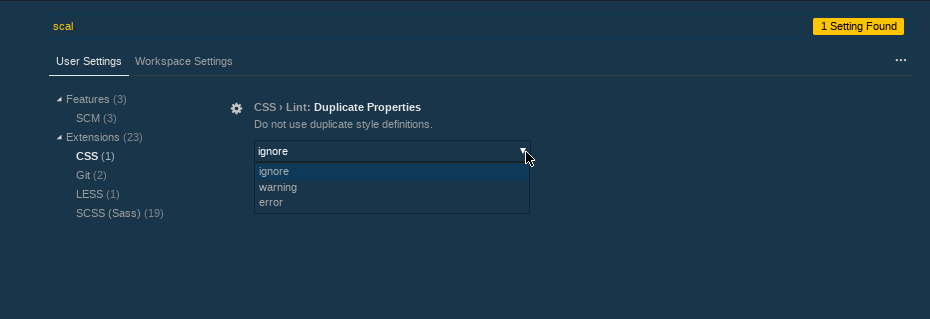
In this one case under Extensions|CSS one was found though the search criteria of "scal" is not listed anywhere I can see. The overlay of "No Settings found" is not present, but this found item doesn't seem to have anything related to "scale" or "scaling" as I might expect it to have. Is the underlying search that produces results and the "No Setting found" overlay related?
2) Would it be possible for VSC to highlight the search criteria for the matches found/how it matched it? I think it would be easier to spot.
Thanks and regards,
Mark
 LordHog
on 6 Sep 2018
LordHog
on 6 Sep 2018
It might not have that substring, but settings searches also go out to a fuzzy search service powered by Bing, so if there are some letters in common with words in the setting, it might call it a match.
roblourens
on 6 Sep 2018
Filed a related issue for September: https://github.com/Microsoft/vscode/issues/58035
roblourens
on 6 Sep 2018
Already fixed in master
roblourens
on 6 Sep 2018
Hi, I'm sorry if this is not the best place to ask this, but why are you using an external search service for the settings? Couldn't that just be handled within the application itself? How is Bing aware of the settings? Is it just a library included?
 venatiodecorus
on 7 Sep 2018
venatiodecorus
on 7 Sep 2018
This blog post will answer all your questions and more! https://code.visualstudio.com/blogs/2018/04/25/bing-settings-search
roblourens
on 7 Sep 2018
Thank you, Rob!
venatiodecorus
on 7 Sep 2018
Related issues
 villiv
·
3Comments
villiv
·
3Comments
 trstringer
·
3Comments
trstringer
·
3Comments
 philipgiuliani
·
3Comments
philipgiuliani
·
3Comments
 v-pavanp
·
3Comments
v-pavanp
·
3Comments
 NikosEfthias
·
3Comments
NikosEfthias
·
3Comments
Most helpful comment
Already fixed in master