Vscode: Terminal not in a good state initially on Windows Insider builds
Issue Type: Bug
Initial header of any terminal(powershell, exe) appears transparent, only after execution an command the terminal header starts to appear again.
Steps to reproduce:
open terminal on vscode in a latest insider build 1809
VS Code version: Code 1.26.1 (493869ee8e8a846b0855873886fc79d480d342de, 2018-08-16T18:38:57.434Z)
OS version: Windows_NT x64 10.0.17751
 ricardosantos9521
All 23 comments
@ricardosantos9521 haven't seen this one before, does it show again when you resize the terminal panel? That will force a redraw.
Could you also try changing the value of terminal.integrated.rendererType to see if it shows up then?
 Tyriar
on 4 Sep 2018
Tyriar
on 4 Sep 2018
@Tyriar Nop the problem still ocurres.
PS: This only happens in windows insider builds (redstone 5).
ricardosantos9521
on 4 Sep 2018
Just a "me too" here. This is what I see:
- Open new terminal instance: Looks good - but no blinking cursor:

- As soon as you start to type, terminal goes blank and resets somewhere near the top:

- Pressing enter on the command all seems to be good again:

 GordonSmith
on 6 Sep 2018
GordonSmith
on 6 Sep 2018
@Tyriar, got the same issue. Same OS background. Using RS5 Insider Builds
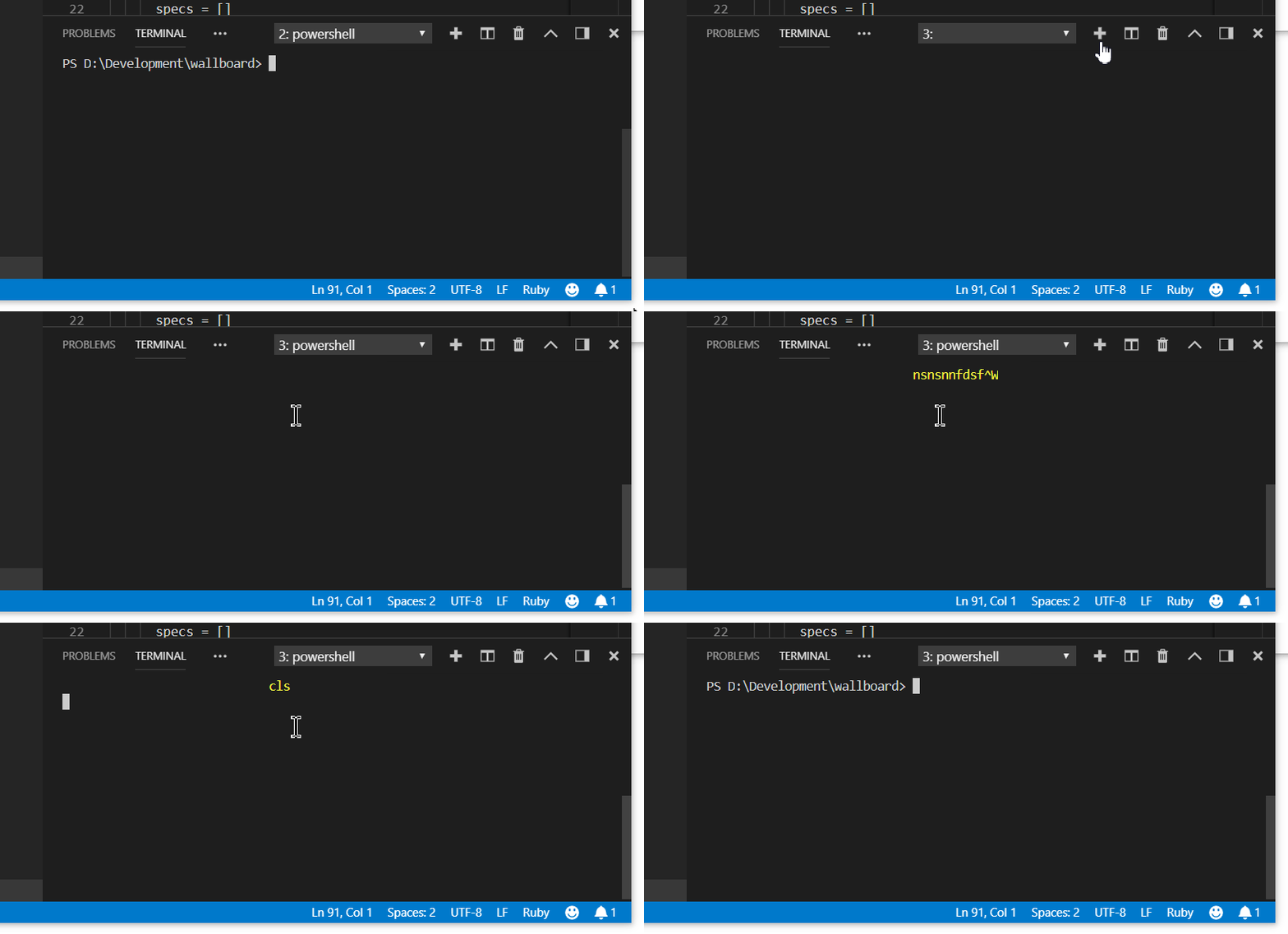
The whole terminal experience in VSCode on Windows Insiders is pretty rough right now. Output Buffers overwriting and regular terminal inputs like CTRL+Backspace printing command characters... issues like that have been increasingly visible to me since RS5.
Specs for reference:
VS Code version: Code - Insiders 1.28.0-insider (a3f9f2e7240106aeec2f1d4bc03d7876bd42e2e4, 2018-09-07T05:20:29.346Z)
OS version: Windows_NT x64 10.0.17755
System Info
|Item|Value|
|---|---|
|CPUs|Intel(R) Core(TM) i7-6700K CPU @ 4.00GHz (8 x 4008)|
|GPU Status|2d_canvas: enabled
checker_imaging: disabled_off
flash_3d: enabled
flash_stage3d: enabled
flash_stage3d_baseline: enabled
gpu_compositing: enabled
multiple_raster_threads: enabled_on
native_gpu_memory_buffers: disabled_software
rasterization: enabled
video_decode: enabled
video_encode: enabled
webgl: enabled
webgl2: enabled|
|Memory (System)|31.94GB (23.59GB free)|
|Process Argv|C:Program FilesMicrosoft VS Code InsidersCode - Insiders.exe D:Developmentwallboard|
|Screen Reader|no|
|VM|0%|
Extensions (33)
Extension|Author (truncated)|Version
---|---|---
yaml|ada|0.0.9
cake-vscode|cak|0.11.4
path-intellisense|chr|1.4.2
vscode-markdownlint|Dav|0.20.0
vscode-eslint|dba|1.5.0
docs-article-templates|doc|0.1.2
docs-authoring-pack|doc|0.1.1
docs-markdown|doc|0.1.4
docs-preview|doc|0.3.12
xml|Dot|2.3.2
gitlens|eam|8.5.6
tslint|eg2|1.0.38
vscode-solution-explorer|fer|0.2.33
dotnet-test-explorer|for|0.5.2
beautify|Hoo|1.4.2
rest-client|hum|0.19.1
theme-monokai-pro-vscode|mon|1.1.8
DocFX|ms-|0.1.3
csharp|ms-|1.15.2
PowerShell|ms-|1.8.4
debugger-for-chrome|msj|4.10.0
gradle-language|nac|0.2.3
chef|Pen|0.7.0
vscode-docker|Pet|0.2.0
java|red|0.30.0
vscode-icons|rob|7.25.0
vscode-coverage-gutters|rya|2.1.1
code-spell-checker|str|1.6.10
msbuild-project-tools|tin|0.2.39
vscode-java-debug|vsc|0.12.2
vscode-java-pack|vsc|0.3.0
vscode-java-test|vsc|0.8.0
vscode-maven|vsc|0.10.0
 MeikTranel
on 8 Sep 2018
MeikTranel
on 8 Sep 2018
@bitcrazed FYI, not sure if there have been any changes in this area on your side that could be causing this?
Tyriar
on 10 Sep 2018
Not that I know of. @zadjii-msft Are you aware of anything that could cause this issue?
 bitcrazed
on 12 Sep 2018
bitcrazed
on 12 Sep 2018
Honestly I have no idea. I'm not really sure how winpty gets at the console to get that text.
I'd certainly have a better idea if it were conpty 😝
 zadjii-msft
on 12 Sep 2018
zadjii-msft
on 12 Sep 2018
@bitcrazed @zadjii-msft I've also noticed some weirdness on Windows Insiders where the shell is blank at the start, hitting enter will then show the prompt.
Tyriar
on 12 Sep 2018
This is what I see:
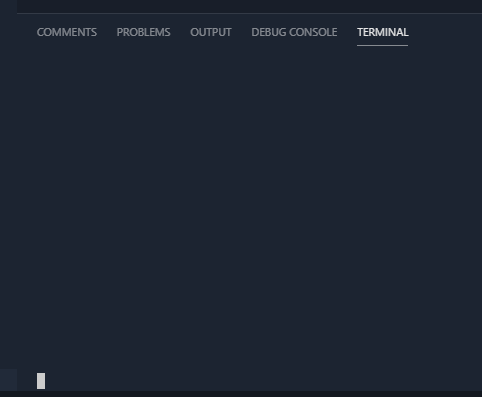
Resizing panel reveals:

Pressing enter:
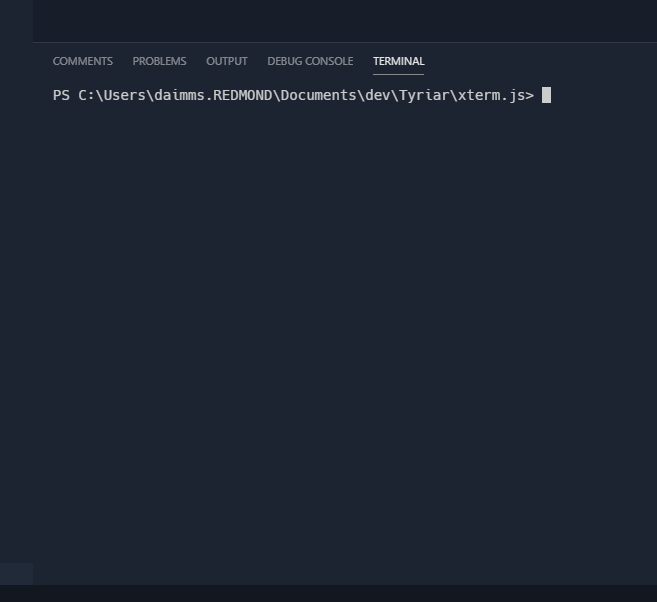
Tyriar
on 12 Sep 2018
Yikes, that's certainly pretty bad. No idea why that might be, and we're too close to the final signoff on this Windows version to be able to fix that for this release :(
Presumably this'll go away when node-pty picks up conpty, so for RS4 and below they'll still work fine, and RS5+ will get fixed by conpty. There'll just be this awkward middle phase where RS5 is broken.
I still don't know why this might be happening in the first place - maybe @rprichard might know more?
zadjii-msft
on 12 Sep 2018
I can reproduce it, but I don't know what's going wrong yet. When I debug it by setting the WINPTY_SHOW_CONSOLE=1 environment variable, I see the same sort of broken output in the console window that I see in the terminal window. If there's a HKCU\Console entry for the path to the winpty-agent.exe binary, then the problem doesn't reproduce. Somehow the lack of that entry, combined with winpty's startup code, is leaving the console in a bad state when the cmd/powershell process starts.
FWIW: I'm thinking of having winpty itself use conpty when it can: https://github.com/rprichard/winpty/issues/152. I'm happy with node-pty using conpty directly, though.
 rprichard
on 13 Sep 2018
rprichard
on 13 Sep 2018
If there's a HKCUConsole entry for the path to the winpty-agent.exe binary, then the problem doesn't reproduce.
winpty uses SetConsoleWindowInfo during startup, and if that call reduces the height of the console window, then starting cmd/powershell later breaks. I have a non-winpty test case that I'll attach to a console bug report. (It sounds like it's too late to fix in Windows, though.)
I also opened https://github.com/rprichard/winpty/issues/156 to track the problem.
rprichard
on 17 Sep 2018
Same issue here, persists in latest insider build 17760.1.
 GoaLitiuM
on 17 Sep 2018
GoaLitiuM
on 17 Sep 2018
Same here on 17763.1 with VS Code 1.27.2, but has been several earlier Windows Insider builds. I usually just press enter once to see the command prompt in terminal, or lately I've just ignored the fact that there is no prompt and just type in the command, as it works nicely.

 jpalo
on 21 Sep 2018
jpalo
on 21 Sep 2018
noting also occurs in ConsoleZ https://github.com/cbucher/console/issues/501
 ericblade
on 4 Oct 2018
ericblade
on 4 Oct 2018
Same goes for zeit/Hyper. After the active dev windows insider ring was lifted onto 19H1, i can also report that the issue persists with the 19H1 prerelease, too.
MeikTranel
on 4 Oct 2018
Upstream issue: https://github.com/Microsoft/console/issues/270
For people experiencing this issue, the way I work around it in the meantime is to just press enter which shows the prompt. You can also just type a command and it will run fine, it's just that the initial prompt doesn't display correctly.
Tyriar
on 4 Oct 2018
I have this issue too on my Windows 10 Pro 1809, Build 17764.1, when opening a new terminal window.
Actually it depends on the size resp. height of the terminal window, whether or how the issue shows up:
- Terminal window maximized: no issue with new terminals
- Terminal height below around 22 lines: no cursor, when typing jumps to top with a number of spaces before it
- Teminal height below around 12 lines: no text and no cursor at all (cursor shortly flashes before disappearing)
After pressing ENTER everything is ok.
 szerner
on 9 Oct 2018
szerner
on 9 Oct 2018
Guys, this may not be related to VS at all. I'm also a user of Android Studio and when I open the terminal tab in the lower panel I get the same issue.
edit:
ALSO, I think my preferences for CMD and PowerShell are a bit messed up
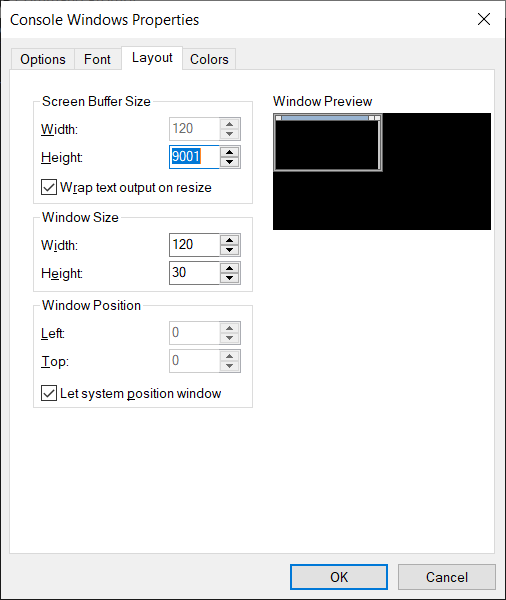
 aarcoraci
on 15 Oct 2018
aarcoraci
on 15 Oct 2018
It's related to XTerm.js, winpty and the windows console since 1809. We've got that far already.
MeikTranel
on 15 Oct 2018
Before I get 100 more pings on this thread: as stated in Microsoft/console#270, the issue is a bug in the console codebase. It's already fixed internally, and bubbling it's way out to Insiders. Should be fixed in 3-4 weeks.
zadjii-msft
on 15 Oct 2018
I'm locking this for now as we know about the problem and it's fixed upstream. It will just take some time to get to us.
Tyriar
on 15 Oct 2018
ConPTY support has landed in VS Code, this uses a new backend for the terminal on Windows 10 build number 18309+, this should fix many bugs in the terminal on Windows as we're adopting Microsoft's official pty API. For earlier versions winpty will still be used a many bugs will still remain (unless they're fixed in that project).
If you find any issues with ConPTY please report them to https://github.com/Microsoft/console (the team who own ConPTY) or this repo (if you think it's an integration issue). You can opt out of conpty by adding this setting:
"terminal.integrated.windowsEnableConpty": false
Note that this will hit stable Windows 10 in version 1903, the first release of 2019.
Tyriar
on 21 Dec 2018
Related issues
 curtw
·
3Comments
curtw
·
3Comments
 sijad
·
3Comments
sijad
·
3Comments
 trstringer
·
3Comments
trstringer
·
3Comments
 biij5698
·
3Comments
biij5698
·
3Comments
 NikosEfthias
·
3Comments
NikosEfthias
·
3Comments
Most helpful comment
This is what I see:
Resizing panel reveals:
Pressing enter: