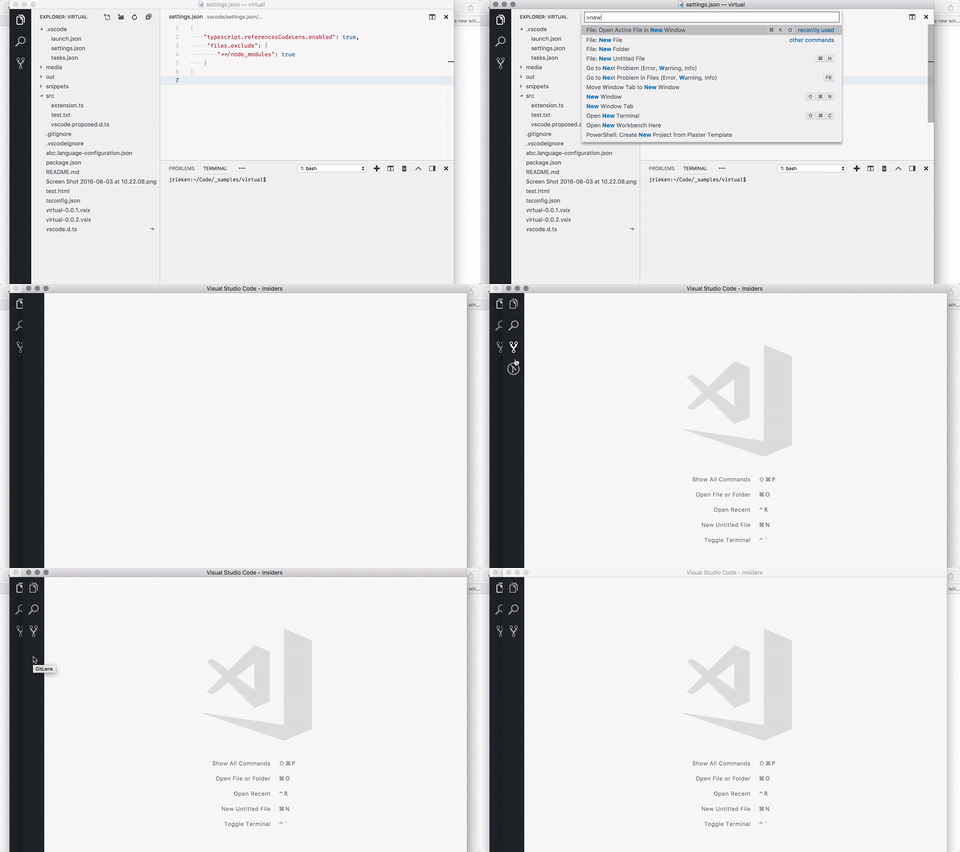
Vscode: GitLens viewlet icon shows during load
- use git lens
- have the viewlet disabled
- open a new window
- 🐛 while the windows loads the viewlet icon shows
 jrieken
All 34 comments
This is the compromise made for having nice display of activity bar icons without jumping. Since activity bar icons can come from extensions, waiting for extension host to show the icons will cause jumping of icons in the activity bar. Hence icons are stored and shown immediately after reload.
This is the edge case when an extension is disabled or uninstalled the icon appears and is removed as the extension does not exist. This happens only for once after extension is disabled or uninstalled.
 sandy081
on 28 Aug 2018
sandy081
on 28 Aug 2018
This happens only for once after extension is disabled or uninstalled.
No, this happens every time I open a new window.
jrieken
on 28 Aug 2018
cc @eamodio I run with "gitlens.gitExplorer.enabled": false and I wonder if git lens does something magic once being active and reading that setting?
jrieken
on 28 Aug 2018
@jrieken
No, this happens every time I open a new window.
So the extension is enabled all the time?
sandy081
on 28 Aug 2018
Yes. This is gitlens - I use it a lot but I have the explorer disabled
jrieken
on 28 Aug 2018
That explorer is a conditional view, so when I read that setting and its off, I set its when clause to false. The view config I have is a bit tricky to allow users to place the GitLens explorers in different activities, but it boils down to just conditional views.
Instead of always showing the activity bar icon on start (if the extension is enabled), could it save its last seen state? So if it was last hidden, it would not show on next start and vice versa. The state must already be saved for its position, so this (in theory) would just be adding in visibility.
 eamodio
on 28 Aug 2018
eamodio
on 28 Aug 2018
@jrieken Ah I see... I misunderstood that you are disabling the extension.
@eamodio I am already storing the visibility state. There are two parts to the visibility state. 1. When user toggles it and 2. Through enablement (from extension). I store these two separately as first is global and second is per window.
But looks like for the second one, I am writing into global but reading from window storage. And I also have to store visibility state on shutdown so that the reloading of window will not have jumpy behaviour.
sandy081
on 28 Aug 2018
I cannot store the visibility state on shutdown because it will override the latest state from other window. For example, if user toggles the visibility from one window and does refresh on another window, visibility should not be overridden by this window.
So, you will see the icon toggling if the current and new visibility states are different. For eg:
- Current state is gitlens icon is visible in current window
- Open a new window where gitlens icon will not be visible -> Icons toggles
- Open a new window again -> No toggling
- Go to first window and reload -> Icon toggles.
To properly store state without overriding, it needs support to listen to storage changes - https://github.com/Microsoft/vscode/issues/55834
Hence fixing only the part where I am reading and writing into different places.
sandy081
on 28 Aug 2018
@eamodio I do not think this jumpy behaviour can be avoided unless the extension (gitlens) smartly toggles the when context of the views. To explain in detail:
VS Code does not show a view container if it does not show any views. Gitlens view container has a view that is controlled by when context. Assume that VS Code window is opened with Gitlens view container showing a view and user reloads the window. VS Code remembers the current state and shows the Gitlens view container after reload (even before the Gitlens view container and views are registered). When Gitlens registers view container and views, by default no views are visible due to the when context defined on views. Hence VS Code hides the Gitlens view container. After a moment Gitlens updates the context of the views and makes them visible and now VS Code will show the Gitlens view container. As a result the Gitlens view container is shown, hidden and shown again.
Only way to fix this flickering from VS Code is to remove the behaviour of hiding view container when no views are visible.
sandy081
on 17 Oct 2018
@sandy081 In the latest alpha of GitLens I tried to move up the setting of the when context earlier in the activation, but I still see the flicker. I haven't tried setting some workspace state to remember the last state of the whens and just restore that asap in activate (and then let the code update it if it was no longer valid). Will that stop the flicker? Or will it still flicker, because activation isn't coupled with the when state?
eamodio
on 17 Oct 2018
Ideally context value has to be cached to last set value and you change it during activation. But I do not think it is supported. I think the problem here is that I do not know when to hide the viewlet and it is dependent on the state of the extension which I do not know when it is set.
Instead of trying to make some assumptions of the extension state in the core, better is not to have this behaviour in the core. Let users have the control to hide the view container when empty.
sandy081
on 19 Oct 2018
@eamodio Can't u use a when-clause that refers to the config? Like when == config.gitlens.gitExplorer.enabled?
jrieken
on 19 Oct 2018
@jrieken good point, since 1.28, I think I can because we now can compare against values other than bools correct?
eamodio
on 19 Oct 2018
@eamodio Is not the gitlens views are based on workspace has git or not? In that case contexts are workspace scoped right? If so, then the setting also has to be configured at workspace level.
sandy081
on 19 Oct 2018
I have this as a user setting "gitlens.codeLens.enabled": false so for at least me that trick should work ;-)
jrieken
on 19 Oct 2018
@sandy081 doh -- yeah you are right -- it is a combination of configuration as well as some runtime checks (finding git, finding repos, etc). And we can't look up workspace state in whens right? 😉
So to come back to the main issue -- are these steps basically right?
- vscode loads and restores the sidebar icon and view state based on the last state for the workspace
- vscode "recalcs" the activitybar state sometime before an extension is fully activated
- Extension activates and sets its contexts which causes another recalc of those effected
e.g.
- vscode loads for workspace X where the GitLens sidebar icon was visible so it becomes visible and at the correct position
- ??? some trigger causes a recalc and vscode evaluates the
whens of the GitLens views and since GitLens is not yet active, they are all off - GitLens activates and sets its contexts and the view comes back
If that is the rough idea of the flow can step 2 be delayed (i.e. hold their restored state values) until the extension contributing that view is activated?
eamodio
on 19 Oct 2018
The other option which @sandy081 you alluded is to have vscode save (per workspace) all the context values an extension sets and restore them for when evaluation. So that their last known state is restored and will be updated during extension activation
eamodio
on 19 Oct 2018
My problems is that I see the flicker for every workspace that I open for the first time...
jrieken
on 19 Oct 2018
@jrieken in your case, you have the GitLens views off so that the sidebar icon shouldn't be shown right? If so I don't understand why the icon would ever show up, unless if there is no previous state to restore for that workspace vscode assumes the view should be on?
Thinking about this more, I'm thinking the "right" solution is to save/restore an extension's context state (for the workspace). That way there really aren't any special cases.
Here are a couple of examples:
New workspace (no state to restore):
- All context state for an extension will be
undefinedso falsey - Sidebars/views dependent on that state will be hidden
- Sidebar/views dependent on that state can become visible when the extension loads and sets context
So no flicker, just off, and then when the extension loads the icon may come into view
Existing workspace (state to restore):
- All context will be restored
- Sidebars/views dependent on that state will be set based on the last known state
- Sidebar/views dependent on that state can become visible or hide when the extension loads and sets context
So no flicker when the last known state matches the existing state (which is most likely to be the case), but in the rare(ish) case when it doesn't there could be a flicker, but that will unlikely to happen next time for the workspace (since the new contexts will be saved)
eamodio
on 19 Oct 2018
@eamodio Your explanation is correct in comment.
If that is the rough idea of the flow can step 2 be delayed (i.e. hold their restored state values) until the extension contributing that view is activated?
Answer: Step 2 happens as soon as the extensions are registered. Delaying might be indeterministic and expecting extension to set the context it during activation is not good. It also complicates when an extension is disabled or uninstalled.
The other option which @sandy081 you alluded is to have vscode save (per workspace) all the context values an extension sets and restore them for when evaluation
Answer: I do not think I would like to go in that direction. It's complicated and risky. As said, I would rather let users take the decision to hide the view container when empty.
@jrieken in your case, you have the GitLens views off so that the sidebar icon shouldn't be shown right? If so I don't understand why the icon would ever show up, unless if there is no previous state to restore for that workspace vscode assumes the view should be on?
Answer: You are partially right that initial state is on because it is based on the user set visibility. Please see comment.
Solution
I think the root cause of this issue in any scenario (workspace) is that automatically hiding the view container when registered views are not visible. Delaying or storing workspace context is just adding a dirty patch. I would rather do following
- Provide OOB UI to move custom views.
- Either users hide the view container when they move all views or VS Code can do it automatically. It means VS Code shows View container if it has a view irrespective of visibility.
This user driven model is simple and easier for users to understand.
sandy081
on 22 Oct 2018
I wouldn't characterize persisting and reloading extension context as a "dirty patch" -- as imo that seems like a very valid solution to many context-based issues -- because until the extension loads fully it can't have any context set to anything other than undefined. So providing a way of reloading that last known state imo seems valuable (although maybe it isn't an all or nothing -- maybe a new api for extensions to set a context value, but also specify if it should be persisted or not).
Anyway -- with regards to the proposed solution, I would definitely be in favor of an OOB gesture to move views between sidebars -- although imo that doesn't sound like something that would happen soon. Also would the user driven model be per-workspace? I can see arguments for and against a per-workspace model -- which if it was per-workspace you end up with the same behavior where a new workspace has no settings so things follow defaults.
But back to @jrieken's https://github.com/Microsoft/vscode/issues/57422#issuecomment-431400029 -- I'm confused by what he is seeing. If he hasn't hidden the GitLens sidebar manually -- but he has them all disabled, I don't see why the GitLens sidebar icon would ever be shown because the when's of all the views would be falsey. I'm assuming this is because if the user hasn't hidden the sidebar icon, instead of considering the when's of the views the sidebar icon is just getting shown because there are registered views.
So assuming that is correct, and alternative would be to evaluate the when's even before the extensions load to determine if there are any visible views that would be in that container. Which would basically flip the problem around -- so instead of the sidebar icons being on by default and then possibly going away -- they would more likely be off (assuming they are based on any context vs config) and then could appear later based on updated context.
I honestly am not sure which is better, but I think I'd rather something be off and stay off over something being off and turning on later (once the extension loads -- as this happens with other UI, status bars, menus, etc). So switching that behavior would fix @jrieken's issue, and cause any one else with the GitLens views in the GitLens sidebar to see the icon missing at first, but would then appear (in the remembered location) when GitLens loaded and set the context's appropriately.
Does that make sense?
eamodio
on 22 Oct 2018
@eamodio I do not think implementing persisting context cache as a fix for this bug. It is a big fish and has impact overall.
I am planning to bring moving custom views to different locations in the next milestone given that there is urge. I see that there could be a need for workspace scoped user driven model but do not want to support it.
You are right about your assumptions about how view container is shown in side bar.
- When the window is loaded, view container is shown based on user set visibility.
- When the extensions are registered, view container visibility is computed based on its views visibilities. If when context are based on settings, then this is considered in this step.
- When the extensions are activated, they change the visibility of views. View container visibility is computed again.
Flipping the problem means not showing the view container until extension are registered will cause the flickering to appear in most often cases.. like reloading the window or opening the folder that was already open.
The solution I proposed will avoid flickering completely.
sandy081
on 23 Oct 2018
The big problem I have with a user based approach (that isn't per-workspace) is that the user opens up a folder where GitLens is disabled, or there isn't a git repo, or they have workspace settings that change the GitLens layout -- and then they hide the GitLens sidebar icon. Then they open another workspace where it should be enabled and visible, but they don't know that -- and they have no way of knowing that there is something that should be shown but isn't because they "chose" to make it go away when it really shouldn't have been shown or valuable.
Or the user hides the GitLens sidebar icon, and then decides to change the GitLens settings to move things back to the GitLens sidebar, now GitLens seems broken -- since the icon won't re-appear
eamodio
on 23 Oct 2018
Or the user hides the GitLens sidebar icon, and then decides to change the GitLens settings to move things back to the GitLens sidebar, now GitLens seems broken -- since the icon won't re-appear
Is not this the case already now? It's all because VS Code shows/hides view container automatically and is causing this confusion. If it is driven by the user then he/she is aware as they toggled it.
Ideally an extension should not provide way to customise the location of a view. User should be able to do it through some UI. If we take Gitlens as an example and user can choose to move Gitlens views to Explorer or SCM or Gitlens explorer also can choose to hide Giltens explorer.
I see your point that when a user opens non git workspace and see empty gitlens explorer and hides the gitlens explorer. But I think such users are few and advanced and I expect they also know how to get the view back.
sandy081
on 23 Oct 2018
Is not this the case already now? It's all because VS Code shows/hides view container automatically and is causing this confusion. If it is driven by the user then he/she is aware as they toggled it.
While it is the case now, imo the user just has far less reason to hide the icon, because other finer-grained controls exists.
And then what happens when the user has hidden a sidebar icon, e.g. the GitLens icon, and then triggers a commit search and opens it in the GitLens Results view -- because that sidebar icon was hidden by the user -- that new view (that maybe they didn't even know about before) will never be shown and GitLens again looks broken.
Or another scenario -- Extension A adds a view to Container A, the user doesn't want that, so they hide it. Then they install Extension B which also adds to Container A, but now Extension B's views will never be shown and again it makes Extension B look completely broken.
IMO the contextual nature of the views and the containers they are in are too varied and complex to be handled under a single user-gesture without some mechanism to notify the user that "hey something you hadn't seen before" is now under this same icon that you hid.
Or something where the extension/vscode will override the user setting in certain scenarios.
I see your point that when a user opens non git workspace and see empty gitlens explorer and hides the gitlens explorer. But I think such users are few and advanced and I expect they also know how to get the view back.
I think this is putting too much faith in the forethought of the user. IMO they see and icon right now, see a way to hide it and won't really think twice about the nuance implications of that action.
eamodio
on 23 Oct 2018
And then what happens when the user has hidden a sidebar icon, e.g. the GitLens icon, and then triggers a commit search and opens it in the GitLens Results view -- because that sidebar icon was hidden by the user -- that new view (that maybe they didn't even know about before) will never be shown and GitLens again looks broken.
I do not think so, because Open in GitLens Results view command should open the view container and the view even if the view container / view is hidden.
Or another scenario -- Extension A adds a view to Container A, the user doesn't want that, so they hide it. Then they install Extension B which also adds to Container A, but now Extension B's views will never be shown and again it makes Extension B look completely broken.
I understand your concern but when two extensions contribute views to same container it means those views should be related. For example azure or scm views. If User hides the azure view container and later install another azure related extension, is not the user knows that new azure view is in azure view container and he/she can enable it back?
Also, How about showing a nice message in Gitlens view just like how SCM view container does? I have not seen users hiding SCM view container when empty and complaining about it.
Anyway, I will also do some study and see what kind of view containers that exist and also discuss with our UX as I see this is mostly related to user experience.
sandy081
on 25 Oct 2018
I do not think so, because Open in GitLens Results view command should open the view container and the view even if the view container / view is hidden.
That is not the case today though is it? I didn't think there was any way for an extension to show a user-hidden view. If this worked, I'd have much less of an issue
Also, How about showing a nice message in Gitlens view just like how SCM view container does? I have not seen users hiding SCM view container when empty and complaining about it.
What message?
eamodio
on 25 Oct 2018
If you call reveal on an element, it will open the view and reveals it.
Message like - No git repository found
sandy081
on 26 Oct 2018
If you call reveal on an element, it will open the view and reveals it.
Wow -- never knew that, thanks. Although the user experience of that is a bit odd imo. It opens as you said, but then if you switch to another activity or just toggle the sidebar off it disappears again. I understand the reasoning as the user hid it, but I still find that as a jarring experience which could also leave the user confused as to where it went
Ah, I do provide an empty message today -- though I wish there was a better structure for that that didn't mean adding a clickable/selectable/focusable item in the tree (more like a background message), but I digress ;)
eamodio
on 26 Oct 2018
I understand the reasoning as the user hid it, but I still find that as a jarring experience which could also leave the user confused as to where it went
Agreed. When the view was hidden by the user, I am showing it and retaining it. I think view container should also have same experience.
more like a background message
I am planning to expose an API for showing empty message.
sandy081
on 29 Oct 2018
@jrieken I have released a new alpha of GitLens 9 that should resolve this issue for you (as I moved all the when calculations to be config-based when the views are in the GitLens sidebar) https://github.com/eamodio/vscode-gitlens/releases/tag/v9.0.0-alpha
eamodio
on 29 Oct 2018
This is fixed in the latest version of GitLens
eamodio
on 10 Dec 2018
🤞
jrieken
on 10 Dec 2018
I see latest Gitlens is always shown instead of controlled by context.
Closing this.
sandy081
on 11 Dec 2018
Related issues
 vsccarl
·
3Comments
vsccarl
·
3Comments
 DovydasNavickas
·
3Comments
DovydasNavickas
·
3Comments
 v-pavanp
·
3Comments
v-pavanp
·
3Comments
 curtw
·
3Comments
curtw
·
3Comments
 sijad
·
3Comments
sijad
·
3Comments
Most helpful comment
@jrieken I have released a new alpha of GitLens 9 that should resolve this issue for you (as I moved all the when calculations to be config-based when the views are in the GitLens sidebar) https://github.com/eamodio/vscode-gitlens/releases/tag/v9.0.0-alpha