Vscode: About the new User Setup recommendation...
Issue Type: Not an actual bug
The installer doesn't automatically want to install over my existing version, and wants me to uninstall it first.
Which raises the question of whether or not my plugins would be saved, especially if I install to a new directory. I assume not.
Of course, I could figure out how to port the settings, but there doesn't seem to be enough benefit to the reinstallation to justify spending much time making sure it works out correctly.
I'd suggest building the whole process of uninstalling and possible migration / setup of plugins, into the new installer... And maybe explain to new users that their settings will be maintained, and that there's no reason to not just run the installer.
VS Code version: Code 1.26.0 (4e9361845dc28659923a300945f84731393e210d, 2018-08-13T16:29:31.933Z)
OS version: Windows_NT x64 10.0.17134
 KhurrumMahmood
All 17 comments
I have the same issue. Are the user settings and extensions kept? Do i need to reconfigure everything?
 cristi-neagu
on 15 Aug 2018
cristi-neagu
on 15 Aug 2018
I would recommend another thing.
Executable files should never be in AppData folder. It's not intended for executable files at all. It's against the idea of main purpose of this folder. MS should completely disable ability to launch executable files from AppData, as 90%+ of them are malware hidden deep in tones of folders. At least it should be disallowed by default.
Another should be discussed with Windows team. There are two option for the perspective
- If user doesn't have a right to install apps, then it shouldn't install apps.
- Some other folder in user profile folder specifically for apps.
 regs01
on 16 Aug 2018
regs01
on 16 Aug 2018
I agree with @regs01.
Further, patch notes are very vague about this migration to _User Setup_. It only says _"It also provides a smoother background update experience"_. Personally I prefer to have it installed for all users, and so do our admins, I guess, when they setup computers for new employees, students, etc.
I'd like to know what exactly is _smoother background update experience_, but more importantly I'd like to know is there something I'm giving up with sticking to system setup.
 davormas
on 16 Aug 2018
davormas
on 16 Aug 2018
There's definitely a lack of documentation, will improve that.
 joaomoreno
on 16 Aug 2018
joaomoreno
on 16 Aug 2018
I uninstalled VSCode and reinstalled via the User Setup last night. My extensions were preserved.
 dougireton
on 17 Aug 2018
dougireton
on 17 Aug 2018
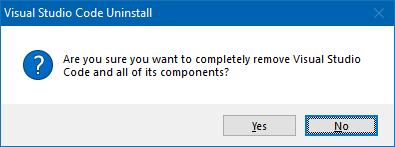
This was quite a leap of faith.
I suggest to update uninstaller too, in order to clarify what will be actually deleted and what will be kept.
 KillyMXI
on 18 Aug 2018
KillyMXI
on 18 Aug 2018
In addition to the concerns raised by @regs01 and @davormas, my PC uses separate drives for programs (C:) and user data (D:), and I'd rather have VS Code installed on the programs drive. Should I change the installation directory to something like C:\VSCode, or should I just continue to use the version I already have? If the latter, can anything be done about the constant nagging to switch to the User Setup distribution?
 castwide
on 19 Aug 2018
castwide
on 19 Aug 2018
Documentation has been improved to make it explicit that settings and extensions will be preserved.
This was quite a leap of faith.
Yeah those are indeed strong words... but it shouldn't hit too much people.
@castwide You can still install the User Setup wherever you'd like.
joaomoreno
on 20 Aug 2018
@joaomoreno
Documentation is still vague about why you recommend user setup from now on. As I mentioned it makes a lot more sense if you are admin to install system wide for all users.
davormas
on 20 Aug 2018
@davormas Absolutely. If you want Code available for all users, feel free to install it once as Admin. Installing it as user brings in a much smoother auto update experience: https://code.visualstudio.com/updates/v1_26#_user-setup-for-windows
joaomoreno
on 20 Aug 2018
@joaomoreno
Then I would argue that recommendation and prompt for installing via user setup is unnecessary. But it's a free software and I don't want to seem ungrateful. ;)
davormas
on 20 Aug 2018
I still do think that the vast majority of users are not interested in installing it for all users, if that means having a sub-par experience. Our default experience should definitely be the user setup, and it would be great if our current user base would give that a try. :+1: Thanks for the feedback though, it's very valuable!
joaomoreno
on 20 Aug 2018
It's not only about installation for all users. The company disallows running executables from AppData directory through a policy. It's always complicated to install software, today. There's a huge white list that needs to be maintained.
Back in the old days programs were writing ini files into the same folder where the exe resides. That was forbidden by Microsoft and everyone agreed and followed the rules. Now, Microsoft themself put exe files in user folder.
 bardware
on 20 Aug 2018
bardware
on 20 Aug 2018
@bardware We still officially distribute a ZIP archive of VS Code, for very restricted environments. True, it doesn't (yet) support auto update, but it gets the job done.
joaomoreno
on 20 Aug 2018
@joaomoreno
If you want Code available for all users, feel free to install it once as Admin.
You cannot install or update it into program files as it would not elevate when necessary.
What is much smoother in update process? Current update process look smooth enough.
regs01
on 20 Aug 2018
@regs01 Give it a try.
Currently, you get a notification that an update is available for installation. You click Install, an admin prompt comes up and the update starts unpacking. Eventually, you get another notification that the update is ready to be applied. You click Restart Now and wait shortly for the apply.
With the user setup you simply get a notification that an update is ready to be applied. You click Restart Now and wait shortly for the apply. Downloading and unpacking is all done in the background. There are no admin prompts. You can even ignore the notification and Code will be updated on next restart. This is not true for the admin setup.
joaomoreno
on 20 Aug 2018
@joaomoreno
It will not install into Program Files. Throws access denied 5. It will not elevate when necessary. And it will not offer default installation to Program Files garbaging AppData.
So it like this
Original: Check for update -> Throw notification -> Click to Install -> Elevate -> Throw notification -> Click to restart -> Apply update -> Restart
Newer: Check for update -> Throw notification -> Click to Install -> Apply update -> Restart
But this can be done with original version as well
Check for update -> Throw notification -> Click to Install -> Elevate (if necessary) -> Apply update -> Restart
regs01
on 22 Aug 2018
Related issues
 mrkiley
·
3Comments
mrkiley
·
3Comments
 vsccarl
·
3Comments
vsccarl
·
3Comments
 v-pavanp
·
3Comments
v-pavanp
·
3Comments
 curtw
·
3Comments
curtw
·
3Comments
 lukehoban
·
3Comments
lukehoban
·
3Comments
Most helpful comment
I would recommend another thing.
Executable files should never be in AppData folder. It's not intended for executable files at all. It's against the idea of main purpose of this folder. MS should completely disable ability to launch executable files from AppData, as 90%+ of them are malware hidden deep in tones of folders. At least it should be disallowed by default.
Another should be discussed with Windows team. There are two option for the perspective