Vscode: Making copy/paste filename incrementor switchable off
Issue Type: Feature Request
I use SQL schema patches where the file names start with the date to have them ordered and executed chronologically when automatically executing the migration on every release.
The file name auto-increment feature recognizes the first number of the file name (the year) and auto-increments it when I copy/paste an SQL patch to create a new one. This is unexpected an a bit dangerous as it can break the order of the migration. This screen shot shows the problem immediately:
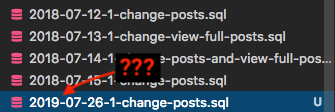
I would value it highly if the auto-increment feature for copy/pasted files could be turned off. (I assume some kind of 'smart' detection for dates or other patterns would be too error-prone to provide enough value.)
VS Code version: Code 1.25.1 (1dfc5e557209371715f655691b1235b6b26a06be, 2018-07-11T15:33:29.235Z)
OS version: Darwin x64 17.7.0
 sgruetter
All 33 comments
fyi @Krzysztof-Cieslak
 isidorn
on 27 Jul 2018
isidorn
on 27 Jul 2018
This is interesting. We always need to provide new name, however we could disable any increments other than .1 suffix for first new copy and then .n+1 for next copies... however in practice it would mean that the setting would turn only prefix increment checks.
The other option (that I don't really like) would be turning off all checks, and just always adding .1 suffix - it would mean .1.1 for a second copy.
@isidorn, any opinion about how do you want to have it fixed?
 Krzysztof-Cieslak
on 7 Aug 2018
Krzysztof-Cieslak
on 7 Aug 2018
What about taking the number before the file extension, and incrementing that? Only if it exists and is directly after a blank.
Like: file.jpg -> file 1.jpg -> file 2.jpg
Not matching: Screen Shot 2018-08-10 at 12.24.19.png, it became Sc[...]4.19 1.png -> Sc[...]4.19 2.png
This would also work with my SQL migration scrips:
2018-02-09-4-remove-tags.sql -> 2018-02-09-4-remove-tags 1.sql -> 2018-02-09-4-remove-tags 2.sql
The regex could be something like this / ([1-9][0-9]*)\.[^.]+$/g.
It might be problematic – because misleading – if you work with numbers, like: scene 5.mp4, scene 6.mp4, etc.. For such cases, a more expressive solution might be best, like scene 5 (copy 1).mp4. Or, for simplicity's sake, just scene 5 (1).mp4.
The latter – my favorite so far – matches to / \(([1-9][0-9]*)\)\.[^.]+$/g (playground: https://regexr.com/3tots).
Any opinions?
sgruetter
on 10 Aug 2018
Let's wait and see if more users complain before we do anything here.
Though I understand how it can be confusing.
isidorn
on 13 Aug 2018
This has been kind of a thorn in my side as well. I use VS code to write notes in markdown and prefix with a date.
Currently, copy/pasting my previous daily notes results in a 2019-mm-dd prefix.
 tbcaro
on 15 Aug 2018
tbcaro
on 15 Aug 2018
I'll add my two cents to say that this is a pain in my butt as well.
 dangerdespain
on 29 Sep 2018
dangerdespain
on 29 Sep 2018
I personally have found it handy (although the first time was surprising) - for example copying an Ansible inventory file qa01_inventory.yml and getting the correct name qa02_inventory.yml.
Can see why disabling it could be a good idea though.
 maxwell-clarke-intranel
on 26 Oct 2018
maxwell-clarke-intranel
on 26 Oct 2018
This is an issue for me as well.
Our files are named after policy numbers and so XYZ1234.xml becomes XYZ1235.xml. This is also true if there is extra text after the number. I.e. XYZ1234-policy.xml becomes XYZ1235-policy.xml when copy pasting. For the latter I would expect XYZ1234-policy-1.xml / XYZ1234-policy1.xml (Which would actually be fine).
 ewmanning
on 19 Dec 2018
ewmanning
on 19 Dec 2018
An issue for me as well, the behavior is very confusing since the numbers in my filenames often correspond to meaningful identifiers. Would prefer a more "standard" suffix like " copy 1", etc.
 mofahead
on 9 May 2019
mofahead
on 9 May 2019
Everyone's use cases are different, but I will say it's incredibly annoying to me when copying SQL migrations for some boilerplate. One of these got by me before and I had to undo changes, meaning an older migration that was auto-incremented by year to 2020 was the first be undone, leaving me scrambling for the backup. Ignoring dates or just having the option to turn it off would be great!
 steven-j-alexander
on 9 May 2019
steven-j-alexander
on 9 May 2019
Perhaps instead of something in the settings menu, it could be a separate option in the right click menu? "Paste" and "Paste and Increment Filename"?
 RossBrunton
on 10 May 2019
RossBrunton
on 10 May 2019
Let's just turn this off. I understand it is confusing.
I propose to behave like native finder and explorer
"hello.txt" -> "hello copy.txt" -> "hello copy 2.txt" -> "hello copy 3.txt"
Not that the windows explorer does the following
"hello.txt" -> "hello - Copy.txt" -> "hello - Copy (2).txt" -> "hello - Copy (3).txt"
This just cretes too many characters and thus I prefer the first option.
Please let me know what you think about this proposal.
isidorn
on 14 May 2019
I thought I could get around this by putting non-numbers at the start and end of the file, but no...
- get_resp_2019-05-14_1d18.ts
- get_resp_2020-05-14_1d18.ts
Please delete this feature.
 matthias-ccri
on 14 May 2019
matthias-ccri
on 14 May 2019
@isidorn Thank you for your efforts.
The short version you proposed looks good. With the other one it would IMO get overly complicated due to translations.
Some special case might be when there's already a number in the file name, where it should add a new number:
2019.png -> 2019 1.png -> 2019 2.png
For a software of ours we use this function here: https://gist.github.com/sgruetter/7dc190523629c5fb7e828ab4926e486c - this adds braces though:
file.jpg -> file (1).jpg
I find that a bit nicer as it's pretty clear that the number is an addition and not part of the _meaningful_ file name, but it doesn't really matter.
sgruetter
on 16 May 2019
@jeanp413 you are destroying it with PR's, are you maybe interested in this one?
We bascially just need a simpler function to incrementFileName and to update some tests
Code pointer https://github.com/Microsoft/vscode/blob/81d7885dc2e9dc617e1522697a2966bc4025a45d/src/vs/workbench/contrib/files/browser/fileActions.ts#L346
It should update file names like this
"hello.txt" -> "hello copy.txt" -> "hello copy 2.txt" -> "hello copy 3.txt"
isidorn
on 10 Jun 2019
Sure I'll take a look over this week.
 jeanp413
on 10 Jun 2019
jeanp413
on 10 Jun 2019
Thanks to @jeanp413 this behavior is now simplified!
Verifier: copy / paste an existing item in the explorer and make sure the name updates like
"hello.txt" -> "hello copy.txt" -> "hello copy 2.txt" -> "hello copy 3.txt"
Also try to take some corner cases (including folders). If you are not sure if vscode is behaving properly compare with native mac finder.
isidorn
on 17 Jun 2019
🍿 user reactions 🍿
 bpasero
on 25 Jun 2019
bpasero
on 25 Jun 2019
Hi,
I'm using the insiders edition and it really weirded me out that instead of .1/.2 i's now copy.
I really like the numbering system since i mainly use it for a/b testing
example: I'm working on Button.tsx and i want to create a test I just copy it and i have Button.1.tsx, let's say I want another variant i paste again and get Button.2.tsx
It's extremely convenient and I've always considered it a feature and not a bug.
WDYT, maybe this change should be configurable?
 id0Sch
on 26 Jun 2019
id0Sch
on 26 Jun 2019
I do not understand how the current solutino does not work well for your example. it is just personal preference.
If more people complain we might make it configurable. For now no setting.
isidorn
on 26 Jun 2019
well. adding " copy {num}" breaks almost every filename convention out there.
since its really a personal preference, I don't see why a change is needed - seems like just fixing the regex should be fine?
edit:
looking at the code changes, it seems that to deal with this issue, the simplest option is to remove the 1.filename -> 2.filename + 1.dirname -> 2.dirnameuse cases
id0Sch
on 26 Jun 2019
I have a use case where at the end of each sprint I should create a file that must be incremented by 1, like:
- SP001.md
- SP002.md
- SP003.md
- ...
Previously vscode did that automatically for me. Now I have to rename them after I paste 😕
 fhelwanger
on 3 Jul 2019
fhelwanger
on 3 Jul 2019
Great example of "you just can't win". Personally I think a few cases where the old behavior happened to be convenient for someone's workflow are far outweighed by the the potential for confusion and breakage for many others. Thanks for making this happen, and all your hard work devs!
mofahead
on 3 Jul 2019
Well if it was configurable we could all win (except the devs who would have more work 😄 )
fhelwanger
on 3 Jul 2019
The original version of my PR for this had it configurable as an option, in case anyone wants to do the Git gymnastics of applying it to the current version.
https://github.com/microsoft/vscode/commit/472efe9dd73827b9593ae0ae46086855e4f06d27
RossBrunton
on 4 Jul 2019
I do not understand how the current solutino does not work well for your example. it is just personal preference.
If more people complain we might make it configurable. For now no setting.
Consider this a complaint. I would greatly appreciate a way to turn this off. Polluting a filename with the word "copy" does nothing useful and gets in the way of a behaviour that is genuinely useful to some people (myself included).
 axefrog
on 6 Jul 2019
axefrog
on 6 Jul 2019
I think it's rather absurd there was a PR that both added the "copy" rename feature people wanted (by default even) while also letting this be configurable for those of us who liked the smart renaming, and it was just dismissed. If it was such a simple change that would make both sides happy, why _wouldn't_ that be the favored option over telling one side to just deal with a change they don't like? I also feel chalking up the sentiments of those who preferred the smart renaming to simply being "personal preference" is overly dismissive and rude.
 degoeym
on 9 Jul 2019
degoeym
on 9 Jul 2019
Hope someone will find an easy way to return old rename style, or at least make it changeable by user.
I'm using VSCode in gamedev work, and there is a LOT of files I need to create with an old incremential system. So, I was just copying, pasting and using regex to rename anything inside them. There is 124 files like this just in this one folder, and this is only a small part of all the work. Just imagine renaming it all from "copy X"...

 drLemis
on 17 Jul 2019
drLemis
on 17 Jul 2019
I think that there are a lot of people who were happy with the old behavior but were silent because it "just worked". Those people (myself included) were surprised when it didn't work as expected anymore.
On the other hand, people who didn't like it were complaining for the change.
So I think that making it configurable will make everyone happy 😄
fhelwanger
on 17 Jul 2019
I do think so, too. It is very annoying to rename every copied file to get rid of the "copy".
Before that change everything worked like a charm.
Just let the user decide which method is best for their needs.
 fr43nk
on 18 Jul 2019
fr43nk
on 18 Jul 2019
I would also like to add my voice to the disappointment about the copy change, which i discovered after updating and reading the release notes. There are times when I've had an SQL file, or something else dated, and I experienced that exact behavior other people experienced.
However, the convenience of easily being able to make copies of files WITHOUT spaces was so beneficial that I either took care of those individual use cases separately, or made copies within the file explorer. As someone who heavily uses the command line/terminal, I loved the .1 .2, etc naming convention and would like to configure VS Code to behave in this way.
 akpircher
on 20 Jul 2019
akpircher
on 20 Jul 2019
I think this change would be far less annoying if literally every other GUI out there didn't already follow the {name} {copy} (?{num})? convention. Whereas VSCode was the golden IDE which understood that spaces in filenames are horrific, and now there is no refuge.
Dramatization aside, please make this configurable/create an option to enable the smart naming.
akpircher
on 20 Jul 2019
More details here https://github.com/microsoft/vscode/issues/76752
Let's continue the discusion there.
isidorn
on 29 Jul 2019
Related issues
 DovydasNavickas
·
3Comments
DovydasNavickas
·
3Comments
 omidgolparvar
·
3Comments
omidgolparvar
·
3Comments
 lukehoban
·
3Comments
lukehoban
·
3Comments
 mrkiley
·
3Comments
mrkiley
·
3Comments
 trstringer
·
3Comments
trstringer
·
3Comments
Most helpful comment
I have a use case where at the end of each sprint I should create a file that must be incremented by 1, like:
Previously vscode did that automatically for me. Now I have to rename them after I paste 😕