Hello,
wrapping an url with emmet wrapping command with "a" tag I notice this strange behavior.
wrapping with "a" preview, look at href:

result after hitting ENTER:
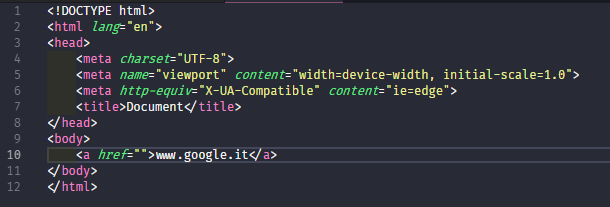
href is empty instead of http://www.google.it, in Sublime href is correctly filled so I think there is a bug in this command implementation.
I'm using VScode Insiders (last version) on Windows 10
 emilime
All 15 comments
The problem is that when we expand the definitive abbreviation, we treat the text to be wrapped as plain text, there is no logic to when it has another meaning (in this case, being a URL).
I wonder if there are other cases with similar behaviour.
@ramya-rao-a any thoughts? We are relying on the selected_text variable to insert the snippets properly, and to solve this we'd need to completely replace that logic, which sounds excessive if this is the only scenario where it hurts.
 gushuro
on 22 Jul 2018
gushuro
on 22 Jul 2018
I am having the same issue. Would be really great if this works for a hrefs and mailtos
 dariovolaric
on 23 Jul 2018
dariovolaric
on 23 Jul 2018
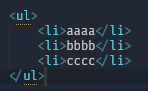
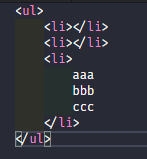
@gushuro I don't if it's the same case but also wrapping x rows with a list gives an incorrect result.
Example:
aaa
bbb
ccc
wrapped with ul >li*
result in Sublime:
result in Vscode:
emilime
on 23 Jul 2018
@emilime You are trying to wrap individual lines. Use the command Emmet: Wrap Individual Lines with Abbreviation command.
@sergeche Are there other examples like the a abbreviation, where the end result of a Wrap with abbreviation actions ends up with more than just wrapping the selected text? The a abbreviation in this case adds the wrapped text as href if it is a url
 ramya-rao-a
on 23 Jul 2018
ramya-rao-a
on 23 Jul 2018
Yes, it’s a missing feature with filling href attribute with wrapped value. Will fix it.
BTW, there’s shouldn’t be explicit Wrap Individual Lines with Abbreviation command, you should always pass array of (unindented) lines to wrap and Emmet will either wrap with implicitly repeating element or insert contents into deepest node
 sergeche
on 24 Jul 2018
sergeche
on 24 Jul 2018
@ramya-rao-a thanks, I didn't know about this different behaviour, Sublime is more direct and intuitive in this implementation. I agree with @sergeche
emilime
on 24 Jul 2018
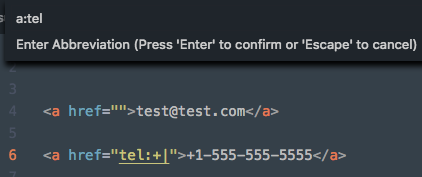
The same thing happens with e-mails.
Wrap preview
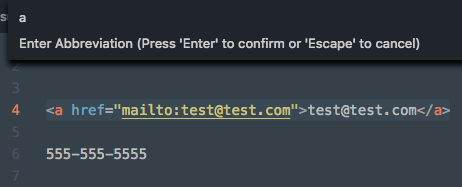
(note you can also type a:mail and it will produce the same result)
After hitting enter
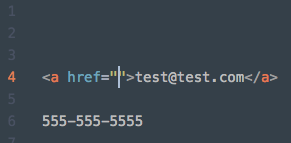
On a related note, it would be nice if phone numbers could be automatically entered after tel: like the first screenshot.
 cbejensen
on 17 Aug 2018
cbejensen
on 17 Aug 2018
We can definitely do this by updating the parsed abbreviation. PRs are welcome.
At https://github.com/Microsoft/vscode/blob/1.26.1/extensions/emmet/src/abbreviationActions.ts#L605, we have access to the wrapping node.
If the wrapping node is a and if the selected text is a url or email, we can update the node's attributes.
ramya-rao-a
on 21 Aug 2018
Actually, inserting URLs and e-mails into <a> tag is already supported: https://github.com/emmetio/html-transform/blob/master/lib/repeater-content.js#L182
I think there’s issue somewhere in VSCode plugin
sergeche
on 25 Aug 2018
repeater-content.js is a good place to add more patterns for special cases of wrapped content.
Also, you can check out codemirror-plugin which has most recent features support and currently used in https://codepen.io project. It also contains most recent experiments and ideas for customization and React
sergeche
on 25 Aug 2018
May I work on this If somebody already isn't?
 Kacppian
on 28 Aug 2018
Kacppian
on 28 Aug 2018
@Kacppian Of course, go ahead. You can follow the hints at https://github.com/Microsoft/vscode/issues/54711#issuecomment-414488762
ramya-rao-a
on 14 Sep 2018
BTW, there’s shouldn’t be explicit
Wrap Individual Lines with Abbreviationcommand, you should always pass array of (unindented) lines to wrap and Emmet will either wrap with implicitly repeating element or insert contents into deepest node
This caught me since there _is_ a Wrap Individual Lines command and, for example, giving just li resulted in all the lines being wrapped in a single <li> tag. Running the same command but entering li* as the abbreviation results in the expected behavior of each individual line being wrapped. Very surprised. (I thought it had been broken for a while now and only got frustrated enough today to search for an answer.)
 contentfree
on 12 Dec 2018
contentfree
on 12 Dec 2018
I read others article then use Emmet to save my life. But Wrap Individual Lines with Abbreviation drive me upset, and I google & stackoverflow it can't find what I want.
Emmet is great! Sublime's emmet is different with VScode. Is there some guys give a full handbook for it?
 Yensan
on 5 Mar 2019
Yensan
on 5 Mar 2019
I have a temporary workaround. I too experienced the same problem as the original post. Upon wrapping the selected URL or email address, the preview was correct but upon pressing enter, the URL disappears from the output. I noticed this ONLY happens when using the "Wrap with abbreviation" single line feature within VS code Version 1.36.1 on Mac.
The fix: Use 'Wrap individual lines with abbreviation'. Not sure why it works, but it does. It works for URLs as well as email addresses.
After selecting [email protected], here's the output:
<a href="mailto:[email protected]" target="_blank">[email protected]</a>
After selecting asdf.com, here's the output:
<a href="http://asdf.com" target="_blank">asdf.com</a>
Hope this helps.
 63now
on 22 Jul 2019
63now
on 22 Jul 2019
Related issues
 Tyriar
·
187Comments
Tyriar
·
187Comments
 hsdk123
·
263Comments
hsdk123
·
263Comments
 ghost
·
234Comments
ghost
·
234Comments
 Brakkar
·
364Comments
Tyriar
·
200Comments
Brakkar
·
364Comments
Tyriar
·
200Comments
Most helpful comment
Yes, it’s a missing feature with filling
hrefattribute with wrapped value. Will fix it.BTW, there’s shouldn’t be explicit
Wrap Individual Lines with Abbreviationcommand, you should always pass array of (unindented) lines to wrap and Emmet will either wrap with implicitly repeating element or insert contents into deepest node