Vscode: AutoImport showing multiple imports and always imports relative
Issue Type: Bug
See screen shot below, all my imports end up like this rather than expected @angular/core or whatever. Plus getting loads of additional imports listed and on may occasions does not even find my imports even though they are there and have to manually add them

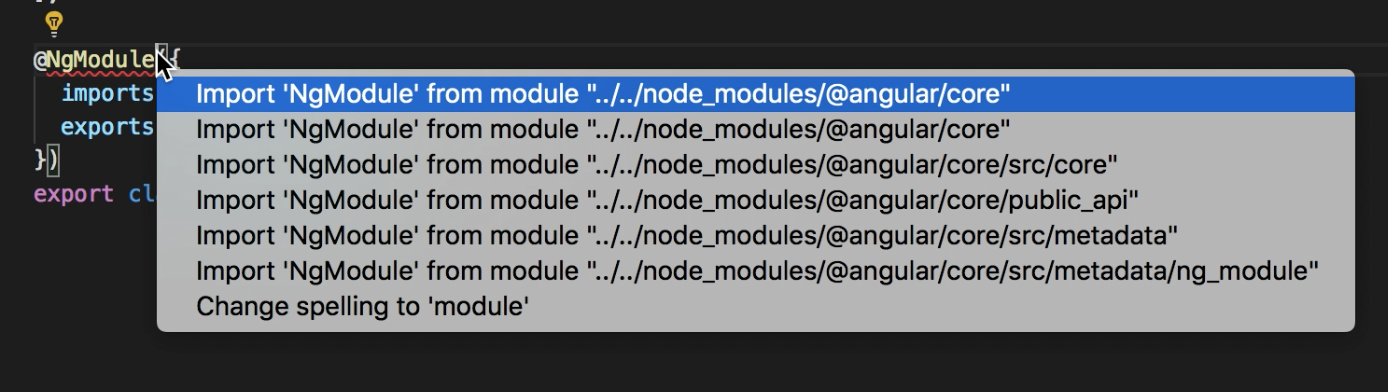
This primarily when using Cmd+. but Ctrl+Space gives the same result
Steps to replicate
- Create an angular project
- Add new file called app-router.module.ts
- Enter the following code
@NgModule() - Position cursor at end of
NgModuleand press either Ctrl+Space or Cmd+.
VS Code version: Code - Insiders 1.25.0-insider (0f080e5267e829de46638128001aeb7ca2d6d50e, 2018-07-04T14:06:34.850Z)
OS version: Darwin x64 17.6.0
System Info
|Item|Value|
|---|---|
|CPUs|Intel(R) Core(TM) i7-7920HQ CPU @ 3.10GHz (8 x 3100)|
|GPU Status|2d_canvas: enabled
flash_3d: enabled
flash_stage3d: enabled
flash_stage3d_baseline: enabled
gpu_compositing: enabled
multiple_raster_threads: enabled_on
native_gpu_memory_buffers: enabled
rasterization: enabled
video_decode: enabled
video_encode: enabled
vpx_decode: enabled
webgl: enabled
webgl2: enabled|
|Load (avg)|2, 2, 3|
|Memory (System)|16.00GB (0.33GB free)|
|Process Argv|/Applications/Visual Studio Code - Insiders.app/Contents/MacOS/Electron -psn_0_3134205|
|Screen Reader|no|
|VM|0%|
Extensions (19)
Extension|Author (truncated)|Version
---|---|---
sort-imports|ama|6.0.0
ng-template|Ang|0.1.9
npm-intellisense|chr|1.3.0
path-intellisense|chr|1.4.2
EditorConfig|Edi|0.12.4
tslint|eg2|1.0.33
vscode-npm-script|eg2|0.3.4
auto-close-tag|for|0.5.6
code-runner|for|0.9.3
git-indicators|lam|2.1.1
code-beautifier|mic|2.1.0
vscode-scss|mrm|0.6.2
debugger-for-chrome|msj|4.7.0
color-highlight|nau|2.3.0
vscode-html-scss|P-d|0.0.42
typescript-hero|rbb|2.3.2
vscode-icons|rob|7.24.0
vsfire|tob|1.3.2
vscode-wakatime|Wak|1.2.2
 StickNitro
All 21 comments
Please try upgrading your workspace to use typescript@next by following these instructions. Do you still see this issue when using typescript@next?
 mjbvz
on 5 Jul 2018
mjbvz
on 5 Jul 2018
I'm running into this same issue today after updating to the 1.25.0 release of VSCode, also in an Angular project (Angular v6+ running TS 2.8.4). @mjbvz After installing the latest version of typescript (TS 3.0.0-dev.20180705) the imports work correctly.
Another thing of note that may be helpful, with TS 2.8.4 it seems that only libraries imported from the node_modules folder seem to be affected, all of my references defined in the paths section of the tsconfig file still work correctly with the auto-import.
 dallastjames
on 5 Jul 2018
dallastjames
on 5 Jul 2018
@mjbvz After upgrading to typescript@next auto-import works as expected.

 bowl-of-petunias
on 6 Jul 2018
bowl-of-petunias
on 6 Jul 2018
I had a similar issue at hand after updating to the latest version of VSCode and using @mjbvz suggestion is working by upgrading the global version of typescript to typescript@next.
 mainawycliffe
on 6 Jul 2018
mainawycliffe
on 6 Jul 2018
I face the same issue after upgrading my VSCode to version 1.25.0. VSCode will auto edit all my imports, whenever I create new file within my workspace.
 kimmanwky
on 6 Jul 2018
kimmanwky
on 6 Jul 2018
The same issue for me. After upgrade all imports are suggested as relative to the path.
All paths in suggestions for node_modules looks like ../../node_modules/*
Environment is: Angular 5.2.10 project with default tsconfig.json. Changing baseUrl in the config has no effect. Upgrade to typescript@next also has no effect (and such upgrade looks like a hack, because i don't want to use dev version of TS)
 andreyjamer
on 6 Jul 2018
andreyjamer
on 6 Jul 2018
Hi
I use React with Babel and I faced same issue. Upgrade to typescript@next had no effect.
UPD: Run Code with --disable-extensions doesn't fix problem
 Aeonrush
on 6 Jul 2018
Aeonrush
on 6 Jul 2018
I have the same issue since I updated VS Code to the latest version today. Before the update, it was working as expected
 manospasj
on 6 Jul 2018
manospasj
on 6 Jul 2018
@Aeonrush did you update "typescript.tsdk" to reflect the path to the updated typescript@next? Also install the typescript@next globally instead of locally.
mainawycliffe
on 6 Jul 2018
@andreyjamer Yes, its a hack but don't update typescript in your local development environment but install it globally. then add the path to your typescript.tsdk under user/work space settings. This doesn't seem to affect angular strict typescript requirement at all.
mainawycliffe
on 6 Jul 2018
@MainaWycliffe
Sorry, I didn't understand that I have to put the absolute path to Typescript, that installed globally, into VSCode settings.
Works for me. Thank you @MainaWycliffe @mjbvz
Aeonrush
on 6 Jul 2018
Thank you for testing this. It sounds like the issue is generally fixed with typescript 3.0 which we will pick up for VS Code insiders soon and for VS Code 1.26.
Closing as upstream. If you do not see this working when using typescript@next, please open a new issue
mjbvz
on 6 Jul 2018
@mjbvz
but that mean that regular user will have to wait 1 month before seeing the fix (unless we do the typescript@next which I personally don't want to do). I would say it's not ideal, especially that it's the stable version, can't you do a patch 1.25.1? which usually happens 1 week after release
 ghiscoding
on 6 Jul 2018
ghiscoding
on 6 Jul 2018
We don’t adopt major TS versions in VS Code recovery releases because they have not been tested widely and introduce risk of regressions. Use insiders or upgrade Ts versions manually if this is blocking your work
mjbvz
on 6 Jul 2018
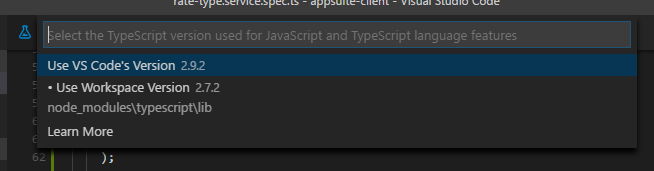
I was able to fix this issue by telling vs code to use my workspace version of TS (2.7.2) instead of VS Codes (2.9.2). Though that worked for me, seems like TS should be fixed and patched to 2.9.3 and vs code should release a fix with the fix for TS. This seems likes its breaking dev workflows and hitting productivity hard.
 elylucas
on 7 Jul 2018
elylucas
on 7 Jul 2018
Is anyone have vscode 1.24.x download link? I want to downgrade it. This seem like a breaking changes for me. I won't want to use typescript@next. This is not a proper way.
kimmanwky
on 9 Jul 2018
Seems like the old links are all available through the blog for each month. Here's the May 2018 blog
ghiscoding
on 9 Jul 2018
I configured VS Code to use the local installation of typescript (v2.7.2) instead of the global (v2.9.2) one and it works.
manospasj
on 9 Jul 2018
You can do what @manospasj said by clicking on the version number at the bottom:
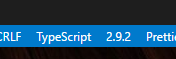
And clicking Use workspace version
 starquake
on 11 Jul 2018
starquake
on 11 Jul 2018
Is it planned to resolve this issue with an official patch (instead of just changing the TS version)? It seems to be kind of a regression... 😞
 maximelafarie
on 18 Jul 2018
maximelafarie
on 18 Jul 2018
This has been fixed in VS Code insiders. On the current version of VS Code, you can also upgrade your workspace to use Typescript 3.0. We did not backport the fix due to lack of testing, engineering cost, and concerns about causing other regressions.
Locking this issue to make it clear that the issue is fixed in insiders and that a workaround exists for current version users. If you see this issue when using TS 3.0, please open a new issue
mjbvz
on 18 Jul 2018
Related issues
 curtw
·
3Comments
curtw
·
3Comments
 lukehoban
·
3Comments
lukehoban
·
3Comments
 philipgiuliani
·
3Comments
philipgiuliani
·
3Comments
 trstringer
·
3Comments
trstringer
·
3Comments
 ryan-wong
·
3Comments
ryan-wong
·
3Comments
Most helpful comment
I was able to fix this issue by telling vs code to use my workspace version of TS (2.7.2) instead of VS Codes (2.9.2). Though that worked for me, seems like TS should be fixed and patched to 2.9.3 and vs code should release a fix with the fix for TS. This seems likes its breaking dev workflows and hitting productivity hard.