Vscode: With custom titlebar, even times of maximization leaves a gap on top
Issue Type: Bug
Testing the new custom titlebar implementation (#51422)
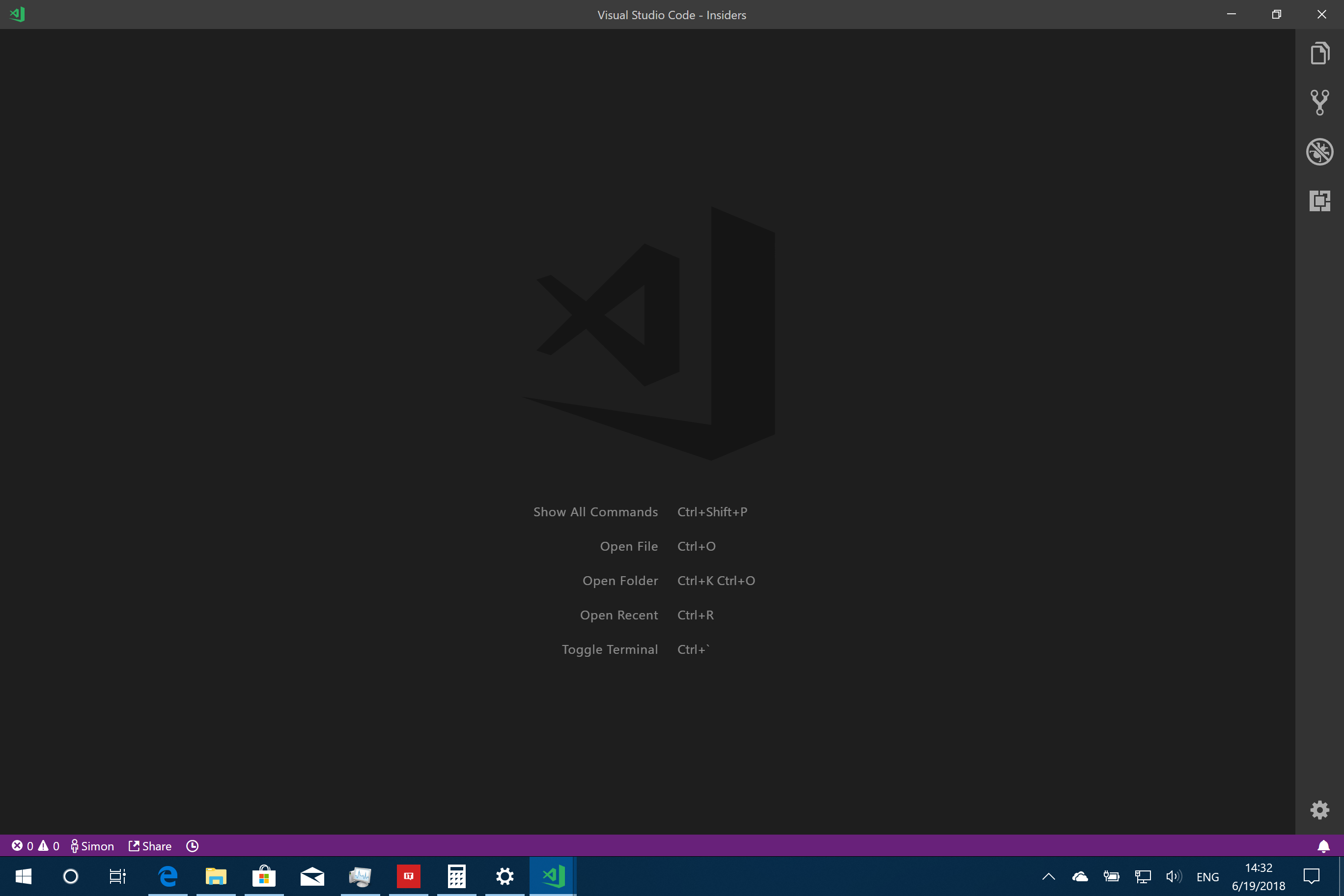
odd times to maximize the window
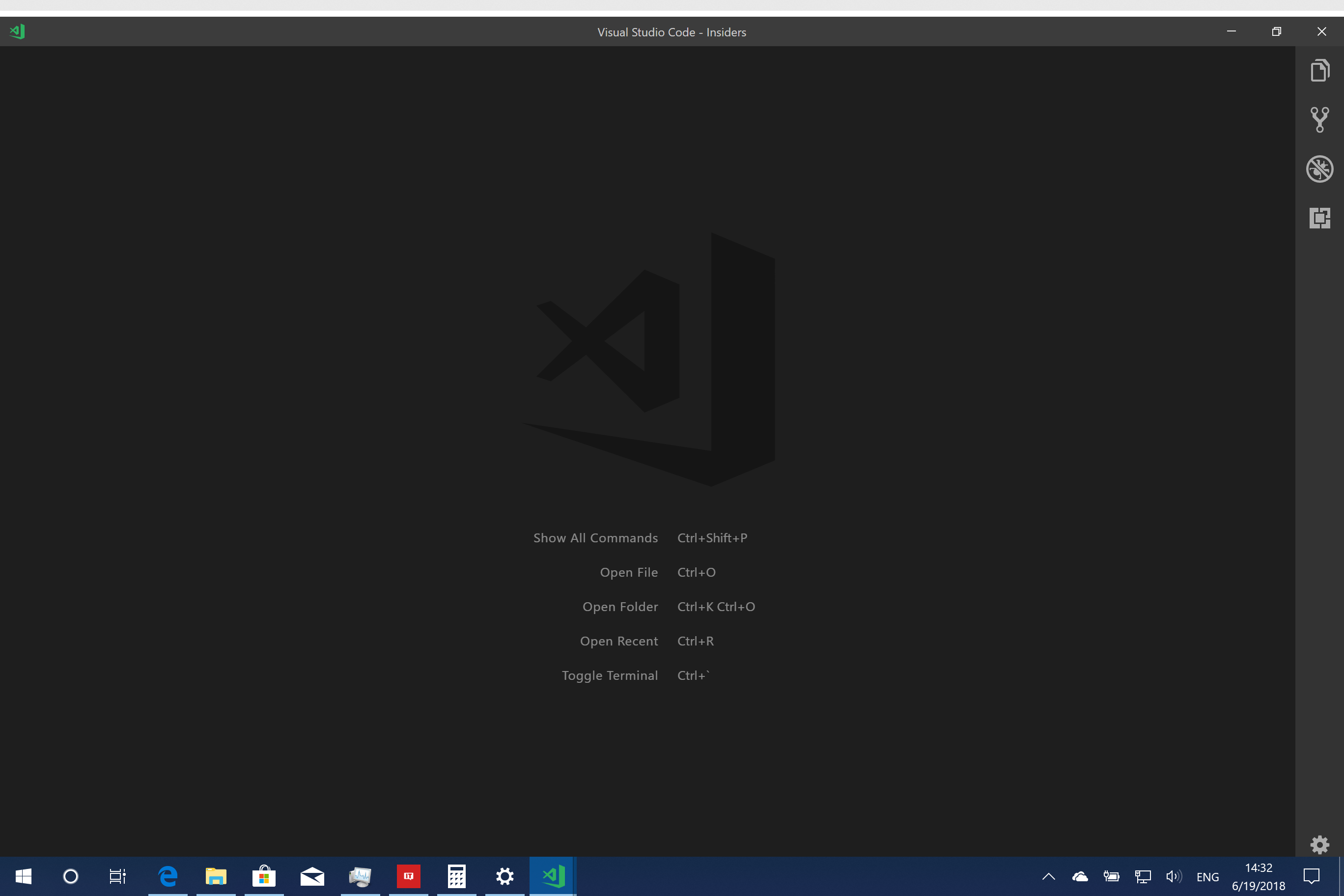
even times to maximize the window, notice there is a gap between the screen top and the window top
A quick search leads to an upstream bug
https://github.com/electron/electron/issues/12971
There are also some workarounds might can be used to mitigate the problem.
VS Code version: Code - Insiders 1.25.0-insider (2cb30794e7e0b4edd2907be895a0410fd601b736, 2018-06-19T05:18:30.374Z)
OS version: Windows_NT x64 10.0.17134
System Info
|Item|Value|
|---|---|
|CPUs|Intel(R) Core(TM) i5-7300U CPU @ 2.60GHz (4 x 2712)|
|GPU Status|2d_canvas: enabled
checker_imaging: disabled_off
flash_3d: enabled
flash_stage3d: enabled
flash_stage3d_baseline: enabled
gpu_compositing: enabled
multiple_raster_threads: enabled_on
native_gpu_memory_buffers: disabled_software
rasterization: enabled
video_decode: enabled
video_encode: enabled
webgl: enabled
webgl2: enabled|
|Memory (System)|7.93GB (3.01GB free)|
|Process Argv|C:\Program Files\Microsoft VS Code Insiders\Code - Insiders.exe|
|Screen Reader|no|
|VM|0%|
Extensions: none
 yume-chan
All 17 comments
This is actually an issue with electron - for me and every other user I have asked about it every electron app (Discord, Spotify, Atom, Vs code) Which is running in frameless mode displays this behavior - on every other maximization there is an 8 pixel offset. It seems like it will likely have to be fixed on their end, and afaik they are already aware of the issue.
Noticed you actually pointed this out in the Issue, my bad for working with such a small screen. I'll leave the comment in case it helps give context for anyone else
 Ayplow
on 20 Jun 2018
Ayplow
on 20 Jun 2018
@TomSputz yes, I know it's an upstream issue.
I tried to track down this problem, seems the maximization logic is implemented in libchromiumcontent (in my knowledge it equals to chromium).
Thus to fix it, Electron maintainers might need to report it to chromium, wait for chromium team to fix it, then update its libchromiumcontent version, then Code team can update its Electron version.
It will takes a long time, and every time Code update Electron, it introduces more bugs, need more time to fix.
So I hope Code team can quickly pick a workaround from the Electron issue to mitigate it.
yume-chan
on 20 Jun 2018
This problem only occur with Windows 10.
This is something between Win10 and electron, because every single _electron-powered-app-with-custom-title-bar_ i have got the same problem. occur on : Twitch app, Discord app, VScode.
The problem occur exactly and periodically 1/2 times for every app :
On Vscode and Discord the problem occur with both [win + up / double click on titlebar] shortcut and mouse drag to the top of the screen.
On Twitch, it append only when dragging to the top.
I presume Discord use an electron version close of Vscode, and Twitch uses another.
this bug does not reproduce on Win7 in any case. I have no info about other Win versions, or other OS.
 Guema
on 23 Jul 2018
Guema
on 23 Jul 2018
I updated my Windows 10 build to KB4340917 and this issue is not happening on my side anymore - neither is it with other programs that had this issue (such as Discord, earlier Chrome, etc).
Now, I'll be honest, I'm not 100% sure this is what fixed it, especially since there's no mention of this kind of issue in the update's logs, but I think it may be worth a try on your machine too.
Can anyone try it and confirm this Windows 10 update fixed it?
 V-ed
on 5 Aug 2018
V-ed
on 5 Aug 2018
Same here for me, tested it before updating and the issue was still there and after restarting it's gone
 Alexendoo
on 5 Aug 2018
Alexendoo
on 5 Aug 2018
Verified fixed after the update as well!
 andyvanosdale
on 5 Aug 2018
andyvanosdale
on 5 Aug 2018
Almost fixed but not quite yet. There is still an issue with window positioning after every second Unmaximisation. Every second time window position is a little bit higher/lower (not sure is it connected to the title bar issue but it appeared in the same time).
 Astrych
on 5 Aug 2018
Astrych
on 5 Aug 2018
@Astrych I don't see what you explain - can you provide screenshots? On my side, it is consistent (there's no window positioning problems, it being a bit higher/lower).
V-ed
on 5 Aug 2018
Ok, I will provide screenshots later today. To recreate it position vscode window relative to some background, for example another window, maximize vscode window, unmaximize it: window should be a little bit higher than before first maximization (in my case 8 px). Repeat it again (maximize, unmaximzie): window should return to initial position. The amount of pixels it moves depends on screen scaling. For example with 150% scale it's more than 8 px. I have noticed this issue because window is jumping a little bit. It doesn't look smooth (compared to other windows without this issue).
Astrych
on 6 Aug 2018
The most annoying part of the problem is fixed for me too with 10 last build
@Astrych
I noticed too. The behaviour is not quite the same between an OS driven window and a webkit/chromium driven ones.
I get the problem on multiple - seamingly - chromium or/and electron driven apps with custom titlebar like Twitch Discord and maybe Logitech G hub too.
Maybe this is a shared fault (?) and chromium team should now correct their part (?)
Anyway, this one is, by far, lower priority in my opinion
Guema
on 6 Aug 2018
@V-ed Ok, here it is (sorry for low quality)

Astrych
on 6 Aug 2018
@Astrych Your explanation paired with the gif now makes it clear for me what you mean, thanks for the explanation!
Yeah, I see that it's a little inconsistent and can be a bit annoying, especially when you multitask on a single monitor (or with apps behind VSCode).
Like @Guema said though, I feel this is far less of an annoyance than the issue reported by OP and while it's clearly an issue, I think it can be filed in a new issue and this one (#52265) can be closed. Also, I see that you also shared your thoughts on this issue in https://github.com/electron/electron/issues/12971#issuecomment-410540977 - I would also create a new issue (if there's not another one already) in the Electron's repo since the problem is different - if the problem is in electron, of course!
V-ed
on 6 Aug 2018
Closing as per comments, it looks like a Windows update fixed it.
 bpasero
on 4 Sep 2018
bpasero
on 4 Sep 2018
@V-ed @Astrych
Any new ticket for this minor one ?
I think it would be unrelated to continue it here,
however maybe it could be interesting to keep a track on it.
(even if it is on Electron or Chromium repo)
Guema
on 4 Sep 2018
@Guema I haven't seen any issue for that height change problem and like I said in my previous comment, I do believe we should open another issue for it!
V-ed
on 4 Sep 2018
Hi, I have the same issue like yume-chan when window.titleBarStyle=custom. For me it started after the update to 1.28.1. Was this already fixed?
There is still a white gap between screen top and window top when window is maximized.
What makes it worse is, my mouse clicks are registered at the wrong position: I need to click ~5px above the spot I want to hit, the offset is the same height of the gap I guess. Changing to window.titleBarStyle=native fixes both issues.
I'm using Visual Code as Windows-Server-RemoteApp on my windows 10. Visual Studio Code 1.28.1.
 X-Coder
on 15 Oct 2018
X-Coder
on 15 Oct 2018
@X-Coder Since this issue was resolved by a windows update, it is possible your version of windows or the server hosting the remote app does not have this fix. however, on later versions of windows 10 this issue is resolved.
 sbatten
on 18 Oct 2018
sbatten
on 18 Oct 2018
Related issues
 curtw
·
3Comments
curtw
·
3Comments
 sirius1024
·
3Comments
sirius1024
·
3Comments
 philipgiuliani
·
3Comments
philipgiuliani
·
3Comments
 biij5698
·
3Comments
biij5698
·
3Comments
 trstringer
·
3Comments
trstringer
·
3Comments
Most helpful comment
I updated my Windows 10 build to
KB4340917and this issue is not happening on my side anymore - neither is it with other programs that had this issue (such as Discord, earlier Chrome, etc).Now, I'll be honest, I'm not 100% sure this is what fixed it, especially since there's no mention of this kind of issue in the update's logs, but I think it may be worth a try on your machine too.
Can anyone try it and confirm this Windows 10 update fixed it?