Vscode: VSCode Insiders 1.26.x Segmentation Fault on start
VSCode Insiders 1.25 crashes upon startup:
/usr/bin/code-insiders: line 35: 20557 Segmentation fault (core dumped) ELECTRON_RUN_AS_NODE=1 "$ELECTRON" "$CLI" "$@"
Program received signal SIGSEGV, Segmentation fault.
0x0000000000b6ed00 in ?? ()
(gdb) bt
#0  0x0000000000b6ed00 in  ()
#1  0x00007ffff7b8e1d2 in node::http2::Http2Session::Callbacks::Callbacks(bool) () at /usr/share/code-insiders/libnode.so
#2  0x00007ffff7b8e295 in  () at /usr/share/code-insiders/libnode.so
#3  0x00007ffff7de677a in call_init.part () at /lib64/ld-linux-x86-64.so.2
#4  0x00007ffff7de6876 in _dl_init () at /lib64/ld-linux-x86-64.so.2
#5  0x00007ffff7dd7fba in _dl_start_user () at /lib64/ld-linux-x86-64.so.2
#6  0x0000000000000001 in  ()
#7  0x00007fffffffd747 in  ()
#8  0x0000000000000000 in  ()
I have experienced these with the last two nightly builds:
- code-insiders-1.25.0-1528867473.el7.x86_64.rpm
- code-insiders-1.25.0-1528953847.el7.x86_64.rpm
This problem goes away when I downgrade to code-insiders-1.24.0-1528217814.el7.x86_64.rpm
Node: 10.1.0
npm: 6.0.1
- VSCode Version: 1.25.x
- OS Version: Fedora Rawhide
- Kernel: 4.18.0-0.rc0.git5.1.fc29.x86_64
Steps to Reproduce:
- start 'code-insiders'
2.
Does this issue occur when all extensions are disabled?: Yes/No
 phea
phea
All 40 comments
@phea can you run this in a clean environment from the terminal (see https://unix.stackexchange.com/questions/48994/how-to-run-a-program-in-a-clean-environment-in-bash) to see if it is some environment variable?
 bpasero
on 15 Jun 2018
bpasero
on 15 Jun 2018
I am getting this with the LIve share extension everytime I start VSCode:
[Client I] Extension, IDE, OS : VSLS/0.3.292 VSCode/1.24.1 Linux/4.16.13-300.fc28.x86_64
[Client I] Did not find user settings at </<redacted>/<redacted>.json>
[Client I] Passed version check for Linux: found 4.16.13-300.fc28.x86_64
[Client I] No workspaceId found in workspace settings.
[Client I] No workspace url found in cascade.json file.
[Client.Agent I] Agent dependency check for Linux failed: Command failed: dpkg --list libssl1.0.? | grep "^ii"
/bin/sh: dpkg: command not found
[Agent I] (1002) Trace log: /tmp/VSFeedbackVSRTCLogs/20180615_061257_Agent.log
[Agent I] vsls-agent v0.3.292.48773 (pid: 16049)
[Agent I] Reminder: You may only use this software with Visual Studio and Visual Studio Code, as described in the license (https://go.microsoft.com/fwlink/?linkid=872556).
[Agent I] Start time: 2018-06-15 06:12:56.964
[Agent I] Using VSLS service: https://insiders.liveshare.vsengsaas.visualstudio.com/
[Agent I] VSLSAgent/0.3.292.48773 VSLS/2.2 PlatformName/Linux 4.16.13 PlatformVersion/4.16.13.300
[Agent I]
[Agent I] Proxy settings from env variable: http_proxy was null and https_proxy was null
[Agent I] (1001) Listening on pipe "a8afff9171be42ea86afec3e6ff969fb"
[Client.Rpc V] Agent connection not completed: Error: connect ENOENT /tmp/CoreFxPipe_a8afff9171be42ea86afec3e6ff969fb; Retrying...
[Client.Rpc V] Agent connection not completed: Error: connect ENOENT /tmp/CoreFxPipe_a8afff9171be42ea86afec3e6ff969fb; Retrying...
[Client.Rpc V] Agent connection not completed: Error: connect ENOENT /tmp/CoreFxPipe_a8afff9171be42ea86afec3e6ff969fb; Retrying...
[Client.Rpc V] Agent connection not completed: Error: connect ENOENT /tmp/CoreFxPipe_a8afff9171be42ea86afec3e6ff969fb; Retrying...
[Client.Rpc V] Agent connection not completed: Error: connect ENOENT /tmp/CoreFxPipe_a8afff9171be42ea86afec3e6ff969fb; Retrying...
[Client.Rpc I] Agent connection success - net.pipe://localhost/a8afff9171be42ea86afec3e6ff969fb
[Client.Rpc V] < version.exchangeVersions()
[Client.Rpc V] < telemetry.initialize()
[Agent I] Accepted incoming pipe connection.
[Agent I] RPC session #1 established.
[Agent V] > #1 [0] version.exchangeVersions(<0:>)
[Agent V] < #1 [0] Result: <87:b6ea382b>
[Telemetry V] > #1 [1] telemetry.initialize(<0:>)
[Telemetry V] < #1 [1] Result: <19:eb35edae>
[Client.Rpc V] > version.exchangeVersions() succeeded
[Client I] Client version: 0.3.292 (VSLS/2.2), agent version: 0.3.292.48773 (VSLS/2.2)
[Client.Rpc V] > telemetry.initialize() succeeded
[Client.Rpc.Auth V] < auth.loginWithCachedToken()
[Agent.Rpc.Auth V] > #1 [2] auth.loginWithCachedToken(<0:>)
[Agent.Auth V] secret_password_lookup_sync(<9:8858cdcf>, <9:8858cdcf>) => 0
[Agent.Auth V] secret_password_lookup_sync(<9:8858cdcf>, <6:6e52cabb>) => 0
[Agent.Auth V] secret_password_lookup_sync(<6:6e52cabb>, <14:8a5ca1d6>) => 0
[Agent.Auth I] Passed token validation: isValidExpirationTime=True (7/8/18 11:42:04 AM - 6/16/18 6:12:59 AM), isValidIssuedAtTime=True (6/14/18 11:42:04 AM - 24), isValidAudience=True (https://insiders.liveshare.vsengsaas.visualstudio.com/api/v0.2/ - https://insiders.liveshare.vsengsaas.visualstudio.com/)
[Agent.Auth V] secret_password_lookup_sync(<8:af146b41>, <21:85e450d0>) => 0
[Agent.Auth I] Profile cache hit (expires 6/19/18 11:42:05 AM)
[Agent.Auth V] secret_password_clear_sync(<6:6e52cabb>, <14:8a5ca1d6>) => 0
[Agent.Auth V] secret_password_store_sync(<6:6e52cabb>, <14:8a5ca1d6>) => 0
[Agent.Auth V] secret_password_clear_sync(<9:8858cdcf>, <6:6e52cabb>) => 0
[Agent.Auth V] secret_password_store_sync(<9:8858cdcf>, <6:6e52cabb>) => 0
[Agent.Auth V] secret_password_clear_sync(<9:8858cdcf>, <14:8a5ca1d6>) => 0
[Agent.Auth V] secret_password_store_sync(<9:8858cdcf>, <14:8a5ca1d6>) => 0
[Agent.Auth V] secret_password_clear_sync(<9:8858cdcf>, <9:8858cdcf>) => 0
[Agent.Auth V] secret_password_store_sync(<9:8858cdcf>, <9:8858cdcf>) => 0
[Agent.Rpc.Auth V] < #1 [2] Result: <82:2dbfd2d8>
[Client.Rpc.Auth V] > auth.loginWithCachedToken() succeeded
This seems like a bad bug:
[Client.Agent I] Agent dependency check for Linux failed: Command failed: dpkg --list libssl1.0.? | grep "^ii"
/bin/sh: dpkg: command not found
Clearly I'm running a RHEL based system (Fedora 28)
 frezbo
on 15 Jun 2018
frezbo
on 15 Jun 2018
@frezbo your issue seems unrelated to the Electron update or this issue, can you file it separately against the LiveShare extension? Go here: https://github.com/MicrosoftDocs/live-share/issues
bpasero
on 15 Jun 2018
[pd@XPS ~]$ env -i bash --noprofile --norc
bash-4.4$ code-insiders
which: no readlink in ((null))
/usr/bin/code-insiders: line 35: 9563 Segmentation fault (core dumped) ELECTRON_RUN_AS_NODE=1 "$ELECTRON" "$CLI" "$@"
bash-4.4$ code
which: no readlink in ((null))
bash-4.4$
I don't understand the readlink error, but the regular VSCode edition runs fine along with VSCode Insiders 1.24.x.
phea
on 15 Jun 2018
@phea does it make any difference if you start from the dock?
bpasero
on 15 Jun 2018
@bpasero I am unable to launch from either terminal or desktop. In Gnome it will just silently fail after a few seconds.
phea
on 15 Jun 2018
@phea is there any more output on the stacktrace if you try follow https://github.com/Microsoft/vscode/wiki/Native-Crash-Issues ?
bpasero
on 15 Jun 2018
@bpasero here's the full gdb output
[pd@XPS ~]$ coredumpctl gdb
PID: 6689 (code-insiders)
UID: 1000 (pd)
GID: 1000 (pd)
Signal: 11 (SEGV)
Timestamp: Fri 2018-06-15 12:20:30 EDT (1min 31s ago)
Command Line: /usr/share/code-insiders/bin/../code-insiders /usr/share/code-insiders/bin/../resources/app/out/cli.js
Executable: /usr/share/code-insiders/code-insiders
Control Group: /user.slice/user-1000.slice/[email protected]/gnome-terminal-server.service
Unit: [email protected]
User Unit: gnome-terminal-server.service
Slice: user-1000.slice
Owner UID: 1000 (pd)
Boot ID: 5c512fcac0b4401498af7a0e56d129e6
Machine ID: 00f0c28967214e6ab21e7c35a008f87e
Hostname: XPS.local
Storage: /var/lib/systemd/coredump/core.code-insiders.1000.5c512fcac0b4401498af7a0e56d129e6.6689.1529079630000000.lz4
Message: Process 6689 (code-insiders) of user 1000 dumped core.
Stack trace of thread 6689:
#0 0x0000000000b6ed00 n/a (code-insiders)
GNU gdb (GDB) Fedora 8.1.50.20180605-18.fc29
Copyright (C) 2018 Free Software Foundation, Inc.
License GPLv3+: GNU GPL version 3 or later <http://gnu.org/licenses/gpl.html>
This is free software: you are free to change and redistribute it.
There is NO WARRANTY, to the extent permitted by law. Type "show copying"
and "show warranty" for details.
This GDB was configured as "x86_64-redhat-linux-gnu".
Type "show configuration" for configuration details.
For bug reporting instructions, please see:
<http://www.gnu.org/software/gdb/bugs/>.
Find the GDB manual and other documentation resources online at:
<http://www.gnu.org/software/gdb/documentation/>.
For help, type "help".
Type "apropos word" to search for commands related to "word"...
Reading symbols from /usr/share/code-insiders/code-insiders...(no debugging symbols found)...done.
[New LWP 6689]
[Thread debugging using libthread_db enabled]
Using host libthread_db library "/lib64/libthread_db.so.1".
warning: Loadable section ".note.gnu.property" outside of ELF segments
warning: Loadable section ".note.gnu.property" outside of ELF segments
warning: Loadable section ".note.gnu.property" outside of ELF segments
warning: Loadable section ".note.gnu.property" outside of ELF segments
warning: Loadable section ".note.gnu.property" outside of ELF segments
warning: Loadable section ".note.gnu.property" outside of ELF segments
warning: Loadable section ".note.gnu.property" outside of ELF segments
warning: Loadable section ".note.gnu.property" outside of ELF segments
warning: Loadable section ".note.gnu.property" outside of ELF segments
warning: Loadable section ".note.gnu.property" outside of ELF segments
warning: Loadable section ".note.gnu.property" outside of ELF segments
warning: Loadable section ".note.gnu.property" outside of ELF segments
warning: Loadable section ".note.gnu.property" outside of ELF segments
warning: Loadable section ".note.gnu.property" outside of ELF segments
warning: Loadable section ".note.gnu.property" outside of ELF segments
warning: Loadable section ".note.gnu.property" outside of ELF segments
warning: Loadable section ".note.gnu.property" outside of ELF segments
warning: Loadable section ".note.gnu.property" outside of ELF segments
warning: Loadable section ".note.gnu.property" outside of ELF segments
warning: Loadable section ".note.gnu.property" outside of ELF segments
warning: Loadable section ".note.gnu.property" outside of ELF segments
warning: Loadable section ".note.gnu.property" outside of ELF segments
warning: Loadable section ".note.gnu.property" outside of ELF segments
warning: Loadable section ".note.gnu.property" outside of ELF segments
warning: Loadable section ".note.gnu.property" outside of ELF segments
warning: Loadable section ".note.gnu.property" outside of ELF segments
warning: Loadable section ".note.gnu.property" outside of ELF segments
warning: Loadable section ".note.gnu.property" outside of ELF segments
warning: Loadable section ".note.gnu.property" outside of ELF segments
warning: Loadable section ".note.gnu.property" outside of ELF segments
warning: Loadable section ".note.gnu.property" outside of ELF segments
warning: Loadable section ".note.gnu.property" outside of ELF segments
warning: Loadable section ".note.gnu.property" outside of ELF segments
warning: Loadable section ".note.gnu.property" outside of ELF segments
warning: Loadable section ".note.gnu.property" outside of ELF segments
warning: Loadable section ".note.gnu.property" outside of ELF segments
warning: Loadable section ".note.gnu.property" outside of ELF segments
warning: Loadable section ".note.gnu.property" outside of ELF segments
warning: Loadable section ".note.gnu.property" outside of ELF segments
warning: Loadable section ".note.gnu.property" outside of ELF segments
warning: Loadable section ".note.gnu.property" outside of ELF segments
warning: Loadable section ".note.gnu.property" outside of ELF segments
warning: Loadable section ".note.gnu.property" outside of ELF segments
warning: Loadable section ".note.gnu.property" outside of ELF segments
warning: Loadable section ".note.gnu.property" outside of ELF segments
warning: Loadable section ".note.gnu.property" outside of ELF segments
warning: Loadable section ".note.gnu.property" outside of ELF segments
warning: Loadable section ".note.gnu.property" outside of ELF segments
warning: Loadable section ".note.gnu.property" outside of ELF segments
warning: Loadable section ".note.gnu.property" outside of ELF segments
warning: Loadable section ".note.gnu.property" outside of ELF segments
warning: Loadable section ".note.gnu.property" outside of ELF segments
warning: Loadable section ".note.gnu.property" outside of ELF segments
warning: Loadable section ".note.gnu.property" outside of ELF segments
warning: Loadable section ".note.gnu.property" outside of ELF segments
warning: Loadable section ".note.gnu.property" outside of ELF segments
warning: Loadable section ".note.gnu.property" outside of ELF segments
warning: Loadable section ".note.gnu.property" outside of ELF segments
warning: Loadable section ".note.gnu.property" outside of ELF segments
warning: Loadable section ".note.gnu.property" outside of ELF segments
warning: Loadable section ".note.gnu.property" outside of ELF segments
warning: Loadable section ".note.gnu.property" outside of ELF segments
warning: Loadable section ".note.gnu.property" outside of ELF segments
warning: Loadable section ".note.gnu.property" outside of ELF segments
warning: Loadable section ".note.gnu.property" outside of ELF segments
warning: Loadable section ".note.gnu.property" outside of ELF segments
Core was generated by `/usr/share/code-insiders/bin/../code-insiders /usr/share/code-insiders/bin/../r'.
Program terminated with signal SIGSEGV, Segmentation fault.
#0 0x0000000000b6ed00 in ?? ()
Missing separate debuginfos, use: dnf debuginfo-install code-insiders-1.25.0-1528953847.el7.x86_64
(gdb) bt
#0 0x0000000000b6ed00 in ()
#1 0x00007f394ab0c1d2 in node::http2::Http2Session::Callbacks::Callbacks(bool) () at /usr/share/code-insiders/libnode.so
#2 0x00007f394ab0c295 in () at /usr/share/code-insiders/libnode.so
#3 0x00007f394ad6477a in call_init.part () at /lib64/ld-linux-x86-64.so.2
#4 0x00007f394ad64876 in _dl_init () at /lib64/ld-linux-x86-64.so.2
#5 0x00007f394ad55fba in _dl_start_user () at /lib64/ld-linux-x86-64.so.2
#6 0x0000000000000002 in ()
#7 0x00007ffe23a786ea in ()
#8 0x00007ffe23a78718 in ()
#9 0x0000000000000000 in ()
(gdb)
@phea does it reproduce if you run "code-insiders --user-data-dir <some dir>" to start with a fresh data directory?
bpasero
on 15 Jun 2018
@bpasero yes same problem and trace. Clearing the directory ~/.config/Code\ -\ Insiders/ does not solve the issue either.
phea
on 15 Jun 2018
I tried building from source and get the same segfault
[pd@XPS scripts]$ ./code.sh
[19:13:22] Syncronizing built-in extensions...
[19:13:22] You can manage built-in extensions with the --builtin flag
[19:13:22] [marketplace] [email protected] ✔︎
[19:13:22] [marketplace] [email protected] ✔︎
Segmentation fault (core dumped)
(gdb) bt
#0 0x0000000000a4fa30 in ()
#1 0x00007f3698e342b2 in node::http2::Http2Session::Callbacks::Callbacks(bool) () at /home/pd/go/src/github.com/Microsoft/vscode/.build/electron/libnode.so
#2 0x00007f3698e34375 in () at /home/pd/go/src/github.com/Microsoft/vscode/.build/electron/libnode.so
#3 0x00007f369908c64a in call_init (l=<optimized out>, argc=argc@entry=2, argv=argv@entry=0x7ffd545444a8, env=env@entry=0x7ffd545444c0) at dl-init.c:72
#4 0x00007f369908c746 in call_init (env=0x7ffd545444c0, argv=0x7ffd545444a8, argc=2, l=<optimized out>) at dl-init.c:30
#5 0x00007f369908c746 in _dl_init (main_map=0x7f36992a5130, argc=2, argv=0x7ffd545444a8, env=0x7ffd545444c0) at dl-init.c:119
#6 0x00007f369907dfba in _dl_start_user () at /lib64/ld-linux-x86-64.so.2
#7 0x0000000000000002 in ()
#8 0x00007ffd545466d0 in ()
#9 0x00007ffd545466e9 in ()
#10 0x0000000000000000 in ()
gcc (GCC) 8.1.1 20180502 (Red Hat 8.1.1-1)
ldd (GNU libc) 2.27.9000
phea
on 25 Jun 2018
Here's the function it appears to be failing on https://github.com/nodejs/node/blob/15c627f185608951775f48a2e2d9b2cb2fe0ce3c/src/node_http2.cc#L417
 Tyriar
on 25 Jun 2018
Tyriar
on 25 Jun 2018
@phea do you still hit this with latest from electron-2.0.x branch (we had to remove the update from master)?
bpasero
on 4 Jul 2018
@bpasero yes I am able to start version 1.25.0-1530717770.el7. Thanks.
phea
on 4 Jul 2018
@phea I should have linked to a build with Electron 2.0.x, please try with https://az764295.vo.msecnd.net/insider/c13b8641174a66e6316d809c785fdc884998bc89/code-insider-1.26.0-1530689613_amd64.tar.gz
bpasero
on 5 Jul 2018
@bpasero, I encounter the same http2 segfault with that version. Also checked out the c13b86 commit and same issue building from source.
phea
on 5 Jul 2018
I came across this thread with someone having the same issue with skype in Fedora Rawhide: https://answers.microsoft.com/en-us/skype/forum/skype_linux-skype_startms-skype_installms/skype-not-opening-on-fedora-rawhide/c14eb9d2-563d-4697-b77d-077db7d77ffa
According to a poster there, the bug is related to electron and my current version of glibc. It seems probably as I get the same http2 segfault with 'skype' and 'atom-beta' so I'm going to close for now.
phea
on 5 Jul 2018
I get the segfault on Rawhide too:
`0x0000000000ab6fd0 in ()
1 0x00007ffff7d849a2 in node::http2::Http2Session::Callbacks::Callbacks(bool) () at /usr/share/code-insiders/libnode.so
2 0x00007ffff7d84a65 in () at /usr/share/code-insiders/libnode.so
3 0x00007ffff7fe381a in call_init.part ()
at /lib64/ld-linux-x86-64.so.2
4 0x00007ffff7fe391a in _dl_init () at /lib64/ld-linux-x86-64.so.2
5 0x00007ffff7fd50ca in _dl_start_user ()
at /lib64/ld-linux-x86-64.so.2
6 0x0000000000000001 in ()
7 0x00007fffffffde2d in ()
8 0x0000000000000000 in ()`
I get this on code-insiders-1.26.0-1532928289 but not on code-insiders-1.26.0-1531817090. Maybe worth some investigation?
 djshaji
on 30 Jul 2018
djshaji
on 30 Jul 2018
Same issue here on Arch with the latest git master (Electron 2.0.5) and glibc 2.28. Works fine with glibc downgraded to 2.27 though...
Update: seems like an issue with the prebuilt Electron binaries VSCode uses - running it with upstream Electron from the Arch repos at least launches the editor, though I'm not sure if there are any footguns that I'm not aware of.
 K900
on 5 Aug 2018
K900
on 5 Aug 2018
Can confirm @K900
Installed from arch repo (which pulls latest), doesn't launch, results in segfault.
 jaidmin
on 6 Aug 2018
jaidmin
on 6 Aug 2018
I am getting this issue on arch as well. It broke after updating. last time I updated was a couple days ago.
Repository : AUR
Name : visual-studio-code-insiders
Version : 1533299529-1
Maintainer : dcelasun
URL : https://code.visualstudio.com/
AUR URL : https://aur.archlinux.org/packages.php?ID=531756
License : custom: commercial
Votes : 15
Popularity : 0.29%
Installed : Yes
Out Of Date : No
Depends On : fontconfig
libxtst
gtk3
python
cairo
alsa-lib
gconf
nss
gcc-libs
libnotify
libxss
gvfs
Make Deps : None
Check Deps : None
Optional Deps : None
Provides : vscode
visualstudiocode
Conflicts With : None
Replaces : None
Package Base : visual-studio-code-insiders
Last Update : Sat Aug 4 04:05:19 2018
Description : Editor for building and debugging modern web and cloud applications (insiders version)
For now, is there a current workaround for this?
 autoferrit
on 7 Aug 2018
autoferrit
on 7 Aug 2018
I'm having the same issue as @K900. Seems like the issue is reported here: https://github.com/Microsoft/vscode/issues/55934
 ghost
on 7 Aug 2018
ghost
on 7 Aug 2018
@autoferrit:
For now, is there a current workaround for this?
$ electron resources/app
Worked for me, anyway!
 webavant
on 14 Aug 2018
webavant
on 14 Aug 2018
Yeah, just run electron resources/app in the folder where VS Code is installed, for me that would be:
electron /opt/visual-studio-code/resources/app
I'm also on Arch Linux by the way.
 telmotrooper
on 14 Aug 2018
telmotrooper
on 14 Aug 2018
I just updated VSCode from the AUR repo on my Arch Linux machine and I'm having the same issue.
Running electron /opt/visual-studio-code/resources/app works for now. But I'm not sure, is this an issue that electron needs to fix? Or is it likely that VSCode will fix this in future updates?
I had the same problem with Slack client last week. I removed and installed the app a few days later and its working fine now.
I'm just not sure whether I need to do something on my part to prevent all my electron apps from crashing on updates.
 faahim
on 14 Aug 2018
faahim
on 14 Aug 2018
I agree with @faahim , I just updated my antergos machine and got exactly the same error, and the electron /opt/visual-studio-code/resources/app workaround also seems to work fine.
Just for the record, I'm using:
$ uname -a
Linux antergos 4.17.14-arch1-1-ARCH #1 SMP PREEMPT Thu Aug 9 11:56:50 UTC 2018 x86_64 GNU/Linux
Any idea when this will be fixed?
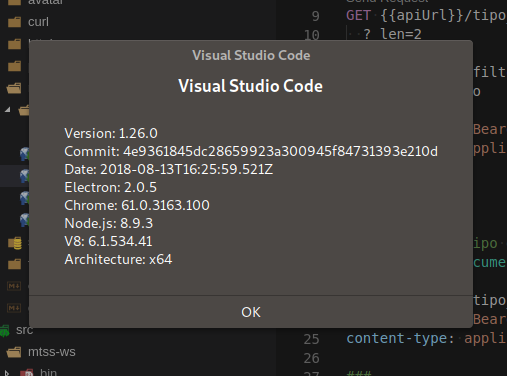
edit: I can confirm that as of today, 2018-08-14, I've just updated antergos packages, which installed a new vscode version, and the problem seems to be fixed.
 opensas
on 14 Aug 2018
opensas
on 14 Aug 2018
Felow Arch Linux users, I have just done a git pull on my visual-studio-code-bin AUR package and it works. The version on there says 1.26.0-2. If your distro hasn't updated the package yet, an update should be coming out soon.
 anderfernandes
on 14 Aug 2018
anderfernandes
on 14 Aug 2018
@anderfernandes wait, are you publishing a package of VSCode that users that see this crash are running and not our official release???
bpasero
on 14 Aug 2018
Ok looks like https://github.com/Microsoft/vscode/issues/55934 is the one we want to keep open.
bpasero
on 14 Aug 2018
The last update to the AUR package fixed the issue with the Segmentation fault. It launches and works fine. But now when I try to open a project by clicking File > Open Folder, the app crashes.
I can open the folder by running code . in my project directory just fine though.
faahim
on 15 Aug 2018
@faahim sounds like https://github.com/Microsoft/vscode/issues/56342#issuecomment-413093895
bpasero
on 15 Aug 2018
Oh yeah! I'll follow that one. Thanks a ton @bpasero :slightly_smiling_face:
faahim
on 15 Aug 2018
I am just a user. I don't get the open folder problem on Arch Linux. Try browsing to your project folder using bash and doing "code ." - Very handy.
anderfernandes
on 15 Aug 2018
I had same problem, when I updated libc6(glibc) to 2.28 on Ubuntu 18.10. Started to work again, when I downgraded back to 2.27
 Nicceboy
on 27 Aug 2018
Nicceboy
on 27 Aug 2018
@Nicceboy I'm trying to downgrade to 2.27 but can't find much information on it, removing libc6 removes a lot of other files too 8Gb+ of packages, can you explain how you did it?
 ItsWendell
on 5 Sep 2018
ItsWendell
on 5 Sep 2018
Just got the same issue with core dump on startup, with a Mageia linux release. How to downgrade from 2.28 is not obvious. I don't understand the electron resources/app workaround, I don't have any electron command. code.x86_64 1.26.1-1534444904.el7 and glibc-6:2.28-7
 yanntm
on 5 Sep 2018
yanntm
on 5 Sep 2018
@ItsWendell First fair warning: I wont recommend for downgrading back to 2.27. I ended up to updating back to 2.28 myself, and using newer version of Electron manually, since it is the problem.
Following will happen with Ubuntu 18.10 at least:
If you downgrade back to 2.27, all of the packages, which will require libc version 2.28 will be uninstalled (at least those, which have been installed with package manager). Those which aren't, will not work. You will miss a lot of updates, if you decide to stick with 2.27. You have to manually disable, that 2.28 is not installed automatically again.
2.28 should be backwards compatible, but apparently not with electron.
Better temporal solution would be to build vscode with electron 2.0.8, but I don't know how.
So I ended up for downloading electron 2.0.8 here, electron-v2.0.8-linux-x64.zip, and starting vscode just with in my case:
$electron /usr/share/code-insiders/resources/app
You can edit your code/vscode/code-insiders.desktop file, so it will launch vscode like that.
Some functionalities will not work, like right clicking folder, and "open with other application" and select vscode. It does not open folder inside vscode in that way.
But I can live with it, once the official version is built with electron >=2.08
But anyway, if you want to downgrade libc version still, here are some guidelines in Ubuntu 18.10
I won't recommend of doing this, since you might break your system. It might not be best way, more like a hack.
You can downgrade actual libc to 2.27 with:
sudo apt install libc6=2.27-3ubuntu1
At least in my case, it removed libc-bin as well. And some of its binaries we required in downgrade process.
So during downgrade process, I had to download older libc-bin version here, and copy these binaries to correct place. I did not try to install .deb file directly, It might install or might not, depending on, which version of libc package manager thinks to be the current libc6 version.
After that, I was able to complete downgrade process.
Nicceboy
on 5 Sep 2018
vscode 1.27 not working on ubuntu 18.10, vscode 1.28 (insider) working...
 gocarlos
on 16 Sep 2018
gocarlos
on 16 Sep 2018
Looks like latest vscode insider is running now with electron 2.0.9, so this libc problem is solved for insiders version at least.
Nicceboy
on 16 Sep 2018
Fedora 29 -beta-ish with1.28.0-insider works
Version: 1.28.0-insider
Commit: 79f79a2c971d6eab36b92d78505402b42ffcae93
Date: 2018-09-24T05:21:23.908Z
Electron: 2.0.9
Chrome: 61.0.3163.100
Node.js: 8.9.3
V8: 6.1.534.41
Architecture: x64
 space88man
on 25 Sep 2018
space88man
on 25 Sep 2018
Related issues
Tyriar
·
204Comments
ghost
·
234Comments
 Tekbr
·
191Comments
Tekbr
·
191Comments
 hsdk123
·
263Comments
hsdk123
·
263Comments
 Perkovec
·
191Comments
Perkovec
·
191Comments
Most helpful comment
I agree with @faahim , I just updated my antergos machine and got exactly the same error, and the
electron /opt/visual-studio-code/resources/appworkaround also seems to work fine.Just for the record, I'm using:
Any idea when this will be fixed?
edit: I can confirm that as of today, 2018-08-14, I've just updated antergos packages, which installed a new vscode version, and the problem seems to be fixed.