Vscode: Allow the user to resize the debug console input
Hi,
I'm not sure if some people could see this future useful but, it would be very nice to allow users to resize the debug console. We can resize the height of the panel , but not the the console itself.
Sometimes, I find that the console is a bit little small compared to the debug console output.
I know we can "shift+enter" to expand the console, but if I want to get the default size, I need to close Visual Studio Code and reopen it. It would be very nice if we could resize the console itself like we can resize the panel.
Here's a GIF demonstrating what feature to add :

This feature should replace the default cursor for the resize arrows and should allow the user to resize the console. Maybe we can store the console size in the settings. With that information stored, when the user will reopen Visual Studio Code, the console will be exactly like the user want it.
Let me know if it's possible the add this feature.
Thanks!
 yanckst
All 21 comments
(Experimental duplicate detection)
Thanks for submitting this issue. Please also check if it is already covered by an existing one, like:
![vscodebot[bot] picture](https://avatars2.githubusercontent.com/in/2406?v=4&s=40) vscodebot[bot]
on 12 Jun 2018
vscodebot[bot]
on 12 Jun 2018
This is a fair feature request thus leaving it open.
Yes, you are correct currently this is only possible via shift + enter for multiple lines
 isidorn
on 13 Jun 2018
isidorn
on 13 Jun 2018
@isidorn Thank you !
yanckst
on 13 Jun 2018
This iteration we focus on issue grooming. This issue is being closed to keep the number of issues in our inbox on a manageable level, we are closing issues that are not going to be addressed in the foreseeable future: We look at the number of votes the issue has received and the number of duplicate issues filed. More details here. If you disagree and feel that this issue is crucial: We are happy to listen and to reconsider.
If you wonder what we are up to, please see our roadmap and issue reporting guidelines.
Thanks for your understanding and happy coding!
vscodebot[bot]
on 21 Sep 2018
This issue should _not_ be closed, it's the only thing wrong with VSCode right now. Shift + Enter makes the console larger but how do we make it smaller?? That's the main problem.
Often I open a new tab and want to paste code in it for a new file but for some reason if the debug console is open it will focus on there, and paste it into the debug console input instead making it really large and thus takes up all the space in the debug console. Then there's no way to revert it back to default size without restarting VSCode...
With attached mobile emulators open, a restart of VSCode can be annoying to say the least. Not to mention you lose all your undo history. Surely it can't be that difficult to implement this? It really causes much annoyance on a daily basis.
 hasen6
on 8 Oct 2019
hasen6
on 8 Oct 2019
You make it smaller by pressing enter.
isidorn
on 8 Oct 2019
@isidorn Wow where've you been, that sure does work. Nobody in this thread has mentioned that yet and I even posted previously on Stackoverflow with zero answers. Thanks.
hasen6
on 8 Oct 2019
Sorry about that, this somehow slipped through my radar.
isidorn
on 8 Oct 2019
Glad that I'm not the only one that wants this feature haha.
In that case, should we re-open this issue?
I think it could be a good feature to have.
Yes I understand there's a workaround, but it could be a nice-to-have 🙂
yanckst
on 8 Oct 2019
@yanckst I think we don't need to re-open it since it can be resized using enter. I never would have guessed it would be enter, since I would have thought enter would have _added_ an extra line if anything. I was just trying things like right clicking looking through menus how to do it etc.
hasen6
on 9 Oct 2019
Yes, we will not re-open. Thanks for understanding.
isidorn
on 9 Oct 2019
hi @isidorn - It's difficult to reach the debug console input using mouse given it's just 1 line in height by default. I think we should still have this feature. Can we re-open ?
 anshray
on 23 Nov 2019
anshray
on 23 Nov 2019
Hi. You can reach it by keyboard by pressing Cmd+J, or cmd+shift+y. The focus goes immediatly in the console and you can re-szie via shift+enter
isidorn
on 25 Nov 2019
Please re-open
It is difficult to move the mouse to a tiny line at the bottom of the screen
Shift-Enter will resize the input, but it will not persist between statements.
That means you have to enter it every time. If we could make it larger please, thanks.
 fullstackwebdev
on 27 Dec 2019
fullstackwebdev
on 27 Dec 2019
@isidorn Wow where've you been, that sure does work. Nobody in this thread has mentioned that yet and I even posted previously on Stackoverflow with zero answers. Thanks.
where is the stack overflow question? Care to share?
 brando90
on 24 Jan 2020
brando90
on 24 Jan 2020
@isidorn
how do you resize the whole pane debug console?
I tried:
control + command + up arrow or down arrow
but that only seems to work for the terminal.
brando90
on 24 Jan 2020
You can use the mouse for the sash.
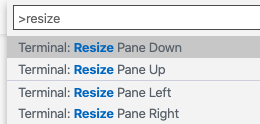
As for the keyboard, you can use the following commands:
Resize Pane Up, Resize Pane Down
isidorn
on 27 Jan 2020
You can use the mouse for the sash.
As for the keyboard, you can use the following commands:
Resize Pane Up, Resize Pane Down
so there is no keyboard short cut? Why does the shortcut I suggested only work for the terminal pane?
brando90
on 27 Jan 2020
You can assign a custom keyboard shortcut for any command.
Preferences > Keyboard Shortcut
That shortcut is probably only assigned by the terminal. @Tyriar would know more
isidorn
on 28 Jan 2020
@isidorn yes you're right.
This should probably eventually be a more generic command that does it for the focused view, rather than just the terminal. Maybe something to consider after the view refactors are further along?
 Tyriar
on 28 Jan 2020
Tyriar
on 28 Jan 2020
@Tyriar agree. So fyi @sbatten
isidorn
on 28 Jan 2020
Related issues
 trstringer
·
3Comments
trstringer
·
3Comments
trstringer
·
3Comments
trstringer
·
3Comments
 omidgolparvar
·
3Comments
omidgolparvar
·
3Comments
 v-pavanp
·
3Comments
v-pavanp
·
3Comments
 NikosEfthias
·
3Comments
NikosEfthias
·
3Comments
Most helpful comment
This issue should _not_ be closed, it's the only thing wrong with VSCode right now. Shift + Enter makes the console larger but how do we make it smaller?? That's the main problem.
Often I open a new tab and want to paste code in it for a new file but for some reason if the debug console is open it will focus on there, and paste it into the debug console input instead making it really large and thus takes up all the space in the debug console. Then there's no way to revert it back to default size without restarting VSCode...
With attached mobile emulators open, a restart of VSCode can be annoying to say the least. Not to mention you lose all your undo history. Surely it can't be that difficult to implement this? It really causes much annoyance on a daily basis.