Vscode: JS files getting emptied with `editor.formatOnSave: true`
Hi, this bug has been happening to me a lot recently and is extremely annoying… I first noticed it 1 or 2 weeks ago (?) so it’s probably related to an update?
I first thought it was a Prettier/ESLint issue but since I managed to reproduce with all extensions disabled, it’s probably coming from VS Code itself.
- VSCode Version: 1.23.1
- OS Version: MacOS High Sierra 10.13.4
Steps to Reproduce:
- Create an empty
.jsfile (I can’t seem to reproduce with other file extensions?!) - Add some characters
- Press CMD+W to quit the file, and press enter to save it before exiting
- Re-open it with CMD+SHIFT+T
- Don’t make any changes, just press CMD+S (might not be needed?) and then quit the file with CMD+W again
- Re-open the file, it should now be empty
☝️ This is the best way I found to reproduce the issue but as I said, it is happening a lot to me when using VS Code under normal conditions. It seems like you have to be quick to reproduce it, though.
Does this issue occur when all extensions are disabled?: Yes
Full speed GIF (with Keyboard Viewer open so that you can see what keys I’m pressing):
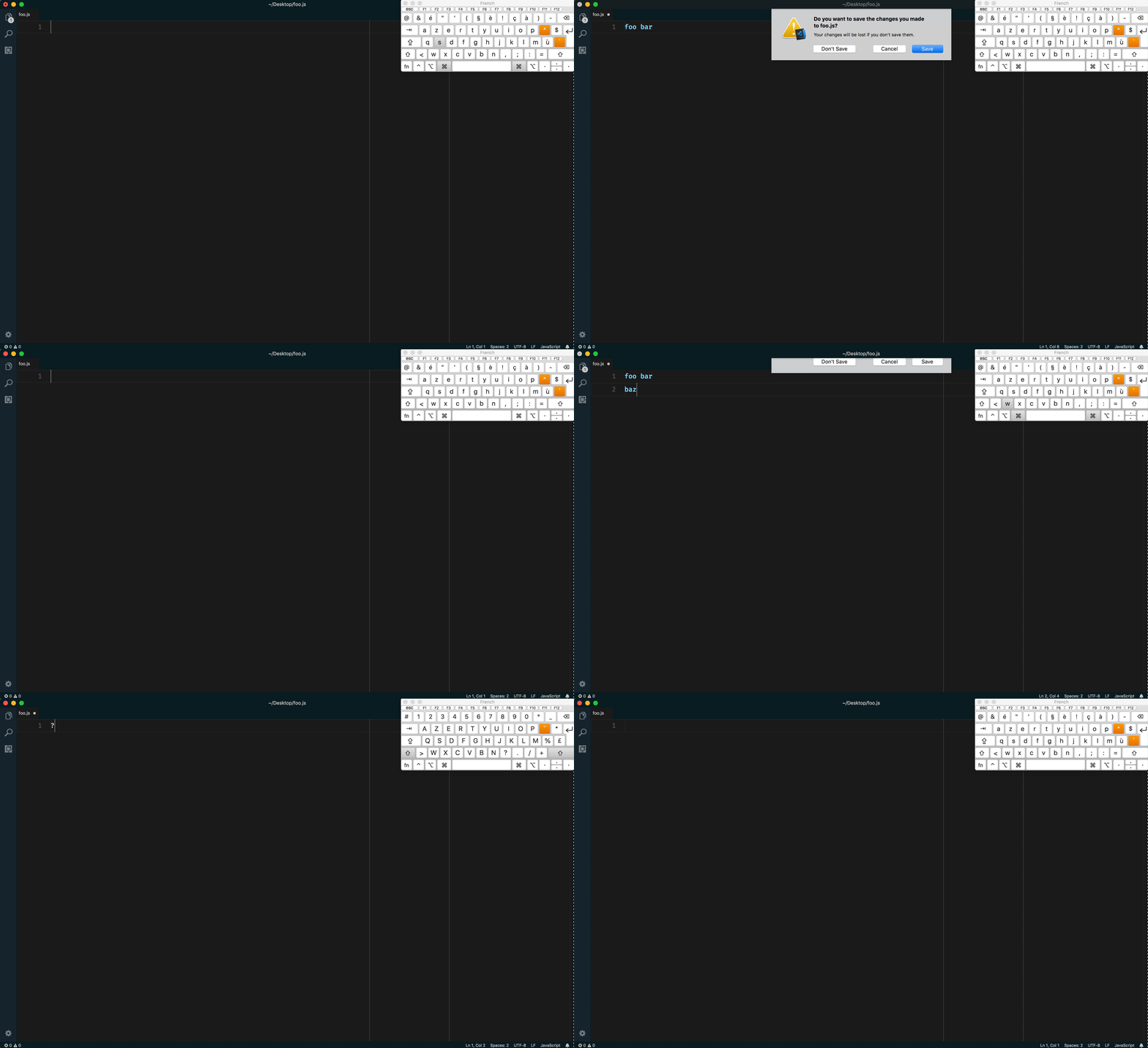
Slowed down GIF:

You can see that the file gets emptied AFTER I re-open it, and so I was able to press CMD+Z to get the content back, but that’s not always the case!
I’m not sure if it’ll help but here are my settings. I can’t see anything that could cause issues, except that
editor.formatOnSave and files.insertFinalNewline are activated.
{
  "editor.cursorBlinking": "smooth",
  "editor.fontFamily": "Fira Code",
  "editor.fontLigatures": true,
  "editor.fontSize": 20,
  "editor.fontWeight": "500",
  "editor.formatOnPaste": true,
  "editor.formatOnSave": true,
  "editor.insertSpaces": true,
  "editor.lineHeight": 40,
  "editor.minimap.enabled": false,
  "editor.mouseWheelScrollSensitivity": 1,
  "editor.mouseWheelZoom": true,
  "editor.multiCursorModifier": "ctrlCmd",
  "editor.renderLineHighlight": "all",
  "editor.renderWhitespace": "none",
  "editor.rulers": [
    80,
    100
  ],
  "editor.smoothScrolling": true,
  "editor.tabSize": 2,
  "eslint.enable": true,
  "editor.foldingStrategy": "indentation",
  "editor.showFoldingControls": "always",
  "extensions.ignoreRecommendations": true,
  "files.defaultLanguage": "markdown",
  "files.insertFinalNewline": true,
  "files.trimTrailingWhitespace": true,
  "javascript.validate.enable": false,
  "path-intellisense.showHiddenFiles": true,
  "prettier.printWidth": 80,
  "prettier.bracketSpacing": true,
  "prettier.eslintIntegration": true,
  "prettier.jsxBracketSameLine": false,
  "prettier.parser": "babylon",
  "prettier.semi": false,
  "prettier.singleQuote": true,
  "prettier.tabWidth": 2,
  "prettier.trailingComma": "none",
  "prettier.useTabs": false,
  "window.title": "${activeEditorMedium}${separator}${rootName}",
  "window.zoomLevel": -1,
  "workbench.activityBar.visible": true,
  "workbench.colorCustomizations": {
    … probably not useful to you ;)
  },
  "workbench.colorTheme": "Oceanic Next",
  "workbench.fontAliasing": "default",
  "workbench.iconTheme": "file-icons",
  "workbench.startupEditor": "none",
  "workbench.statusBar.feedback.visible": false,
  "workbench.editor.tabSizing": "shrink",
  "workbench.statusBar.visible": true,
  "editor.formatOnType": false
}
Edit: I edited the title since, after investigating further, it seems like all you need to reproduce this bug is:
{
    "editor.formatOnSave": true
}
I tried switching it to false and I couldn’t reproduce anymore.
 Tom-Bonnike
All 7 comments
(Experimental duplicate detection)
Thanks for submitting this issue. Please also check if it is already covered by an existing one, like:
![vscodebot[bot] picture](https://avatars2.githubusercontent.com/in/2406?v=4&s=40) vscodebot[bot]
on 2 Jun 2018
vscodebot[bot]
on 2 Jun 2018
I've had the same happening to me.
This has led to the complete loss of a few un-committed files that I was working on.
 quentez
on 3 Jun 2018
quentez
on 3 Jun 2018
Good to know it’s not only me! 🙈
Tom-Bonnike
on 3 Jun 2018
Btw this error popped up from time to time during my tests (before disabling all extensions, though):

Tom-Bonnike
on 3 Jun 2018
I had no luck reproducing it. @Tom-Bonnike Would you mind trying https://code.visualstudio.com/insiders/ and see if you can repro the issue?
@Tom-Bonnike and @quentez - sorry for the issue. Can you let us know:
- Did this start to happen only after you upgrade to 1.23?
- Can you run Help -> Toggle Developer Tools and paste trace of the "failed to save" error here?
 octref
on 4 Jun 2018
octref
on 4 Jun 2018
Sorry for that, thanks for the bug. It has been reported as https://github.com/Microsoft/vscode/issues/50942 already and we will look into a fix for our next release this week.
 bpasero
on 4 Jun 2018
bpasero
on 4 Jun 2018
Oh. Sorry, I searched for a bit but didn’t find it 🙄 Not sure what keywords I used. Thank you.
Tom-Bonnike
on 4 Jun 2018
Related issues
 DovydasNavickas
·
3Comments
DovydasNavickas
·
3Comments
 v-pavanp
·
3Comments
v-pavanp
·
3Comments
 sijad
·
3Comments
sijad
·
3Comments
 NikosEfthias
·
3Comments
NikosEfthias
·
3Comments
 VitorLuizC
·
3Comments
VitorLuizC
·
3Comments
Most helpful comment
Oh. Sorry, I searched for a bit but didn’t find it 🙄 Not sure what keywords I used. Thank you.