Vscode: Invalid missing workspace folder warning
- in stall memfs-extension
- run memfs > create workspace
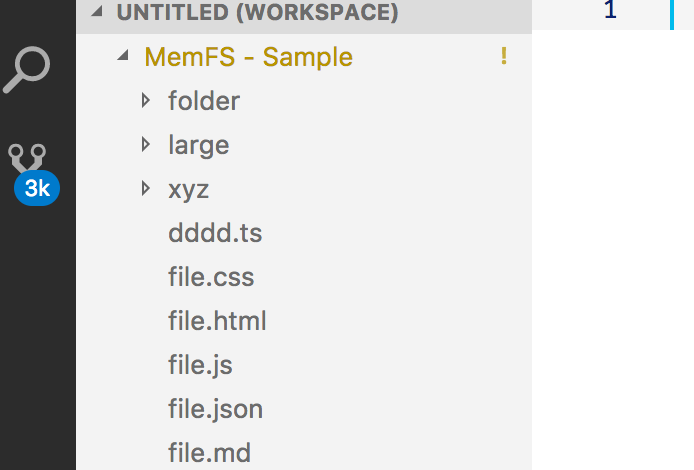
- 🐛 warning shows and sticks
 jrieken
👍26
All 2 comments
It seems if you update the settings via editing the workspace settings in JSON configuration file directly. Closing the workspace and re-importing it '"solves" the issue.
Changing the order of the folders in the editor results in the "can not resolve workspace" error again. Files are saved and viewed correctly though.
 Metachemix1
on 16 Jun 2018
Metachemix1
on 16 Jun 2018
👍1
I'm seeing this too, without using extensions or editing any settings files.
Repro steps:
- Start
code --disable-extensions - File > Open Folder
- Select a folder
- File > Add Folder To Workspace
- Select a different folder
Result:
The second folder has a yellow highlight and exclamation point in the Explorer sidebar, but otherwise works as expected. Hovering over it shows the message "Can not resolve workspace folder". If steps 4-5 are repeated, the same thing happens with the additional folders.
 taradinoc
on 19 Jun 2018
taradinoc
on 19 Jun 2018
👍14
Was this page helpful?
0 / 5 - 0 ratings
Related issues
 sirius1024
·
3Comments
sirius1024
·
3Comments
 vsccarl
·
3Comments
vsccarl
·
3Comments
 philipgiuliani
·
3Comments
philipgiuliani
·
3Comments
 omidgolparvar
·
3Comments
omidgolparvar
·
3Comments
 trstringer
·
3Comments
trstringer
·
3Comments
Most helpful comment
I'm seeing this too, without using extensions or editing any settings files.
Repro steps:
code --disable-extensionsResult:
The second folder has a yellow highlight and exclamation point in the Explorer sidebar, but otherwise works as expected. Hovering over it shows the message "Can not resolve workspace folder". If steps 4-5 are repeated, the same thing happens with the additional folders.