Vscode: I set Dolphin as default file manager, but VSCode opens Nautilus instead of Dolphin
- VSCode Version: 1.24.0-insider
- OS Version: Ubuntu 18.04 with GNOME, KDE, Unity and XFCE
Steps to Reproduce:
- I set Dolphin as default file manager via command and in the defaults.list.
- I open VSCode Insiders
- I open a folder
- VSCode opens Nautilus instead of Dolphin
VSCode does not recognise that Dolphin is a new default file manager.
Does this issue occur when all extensions are disabled? Yes
 gusbemacbe
All 42 comments
(Experimental duplicate detection)
Thanks for submitting this issue. Please also check if it is already covered by an existing one, like:
![vscodebot[bot] picture](https://avatars2.githubusercontent.com/in/2406?v=4&s=40) vscodebot[bot]
on 24 May 2018
vscodebot[bot]
on 24 May 2018
@gusbemacbe what do you mean by step 3 "open a folder"?
"Opening a folder" in VS Code means clicking on the folder in the explorer (and that works fine for me).
 weinand
on 24 May 2018
weinand
on 24 May 2018
Inside VSCode, I selected File -> Open Folder ...
gusbemacbe
on 24 May 2018
Aha, you mean VS Code uses the wrong "open file dialog".
weinand
on 24 May 2018
I'm also facing same problem
 saileshkush95
on 30 Jul 2018
saileshkush95
on 30 Jul 2018
@weinand and @bpasero, the same problem still insists. I am using Deepin OS and Manjaro, VSCode opens the ugly X11/Xorg-based Nautilus instead of Deepin File (Deepin OS's default file manager) and Dolphin (Manjaro's).
gusbemacbe
on 31 Jul 2018
@gusbemacbe did you try with our latest insider release that comes with Electron 2.0.x and GTK3 support? Just wondering if that would change anything here.
 bpasero
on 6 Aug 2018
bpasero
on 6 Aug 2018
@bpasero
Sorry for my absence, I was sick.
ON Manjaro, it supports perfectly GTK3, but it still opens Nautilus instead of Dolphin File.
On Deepin OS, it does not support GTK3, and still also opens Nautilus instead of Deepin File Manager.
gusbemacbe
on 9 Aug 2018
Still an issue.
Would be nice if VSCode just used the default file manager or if there was at least a setting for changing this manually. Nautilus can be used, but it does not integrate well in KDE, it sometimes is quite annoying.
 davidpomerenke
on 19 Feb 2019
davidpomerenke
on 19 Feb 2019
@bpasero
gusbemacbe
on 19 Feb 2019
Please recommend to me better solution for this issue. I want to use deepin file manager but vscode runs.
 ulziibat-n
on 11 Mar 2019
ulziibat-n
on 11 Mar 2019
Same problem here
 cmpute
on 22 Apr 2019
cmpute
on 22 Apr 2019
Seems not to be fixed yet. Could you reopen the issue and (if you agree) remove the "more info needed" tag? @gusbemacbe @bpasero
davidpomerenke
on 22 Apr 2019
I called him twice. This issue passed one year. Nobody considered this issue as important. I am already used to use GTK-based dialg in KDE.
It is the moderator who will decide or not to reopen.
gusbemacbe
on 22 Apr 2019
+1
ulziibat-n
on 23 Apr 2019
I have the same problem on Kubuntu 18.04 as well.
 chrisshyi
on 24 Apr 2019
chrisshyi
on 24 Apr 2019
Me too. I am using Deepin 15.9.2
ulziibat-n
on 24 Apr 2019
How does VS Code communicate with the operating system's file manager, I wonder? If someone could point me to the code that does this it'd be great.
chrisshyi
on 25 Apr 2019
@chrisshyi
As VSCode is written in GTK, it will use GTK2-based Xorg dialog. The GTK-based apps can not communicate with non-GTK standard file managers. To open the KDE-based dialog or Dolphin as a standard file manager, VSCode needs to be written in QT.
gusbemacbe
on 25 Apr 2019
@gusbemacbe
I see, that really clarifies things. Would you mind pointing me to where the GTK part of the source code resides? I'd love to learn more about how VSCode works internally.
Thanks!
chrisshyi
on 25 Apr 2019
VSCode is not built with GTK but with TypeScript with packaging and run time via Electron. Electron needs to be updated to be aware of its desktop environment. Every Electron app has this issue - ie its an upstream issue and not VSCode - https://github.com/electron/electron/issues/2911#issuecomment-429474776
 tomdavidson
on 25 Apr 2019
tomdavidson
on 25 Apr 2019
@chrisshyi
VSCode uses Electron and Nodejs, which compiles only for GTK.
But @sylveon, which is responsible for making VSCode's transparency compatible with KDE, must know how to solve it.
Like VSCode, on KDE, Firefox, Google, Inkscape, etc., are GTK-based and open the GTK2-based Xorg dialog.
gusbemacbe
on 25 Apr 2019
https://wiki.archlinux.org/index.php/Uniform_look_for_Qt_and_GTK_applications#KDE_file_dialogs_for_GTK+_applications
 sylveon
on 25 Apr 2019
sylveon
on 25 Apr 2019
@sylveon
I installed kgtk-wrapper, tested it with VSCode and it did not work. And kgtk does not support GTK3-based apps, as Inkscape.
gusbemacbe
on 25 Apr 2019
That article mentions kdialog for Chromium. Since Electron uses Chromium, I'd expect it to work.
sylveon
on 25 Apr 2019
In multiple Linux distros using KDE/plasma with kdialog (mint,arch/manjaro, kubuntu ) chrome and chromium use the default file browser (dolphin), but in none of these distros code uses it. It still uses a GTK based dialog, so that's not a solution.
Also, addressing @begusbemacbe comment, firefox uses a gtk-based dialog but the solution listed in the arch wiki works, that's using xdg-desktop-portal and editing its .desktop file. So all these non-kde apps may use dolphin to open files, isn't the case for vscode.
 matrs
on 30 Apr 2019
matrs
on 30 Apr 2019
Yeah this is definitely possible, since it works for firefox and other apps. Anyone know is this is an issue with Electron or VSCode?
 atyshka
on 24 Jun 2019
atyshka
on 24 Jun 2019
Thumbs up the first post, although this is closed i think that's the only way to bring some attention to this. It should be possible, but it seems clear that it isn't important for this project.
matrs
on 25 Jun 2019
This is an Electron issue. I do prefer if I could use Dolphin.
 madprops
on 14 Aug 2019
madprops
on 14 Aug 2019
It seems that there is a truck used by IntelliJ IDEA developers:
message()
{
  TITLE="Cannot start IntelliJ IDEA"
  if [ -n "$(command -v zenity)" ]; then
    zenity --error --title="$TITLE" --text="$1" --no-wrap
  elif [ -n "$(command -v kdialog)" ]; then
    kdialog --error "$1" --title "$TITLE"
  elif [ -n "$(command -v notify-send)" ]; then
    notify-send "ERROR: $TITLE" "$1"
  elif [ -n "$(command -v xmessage)" ]; then
    xmessage -center "ERROR: $TITLE: $1"
  else
    printf "ERROR: %s\n%s\n" "$TITLE" "$1"
  fi
}
@bpasero
There is something interested that drew my attention. I used Gitahead, that used Dolphin dialog instead of X dialog:
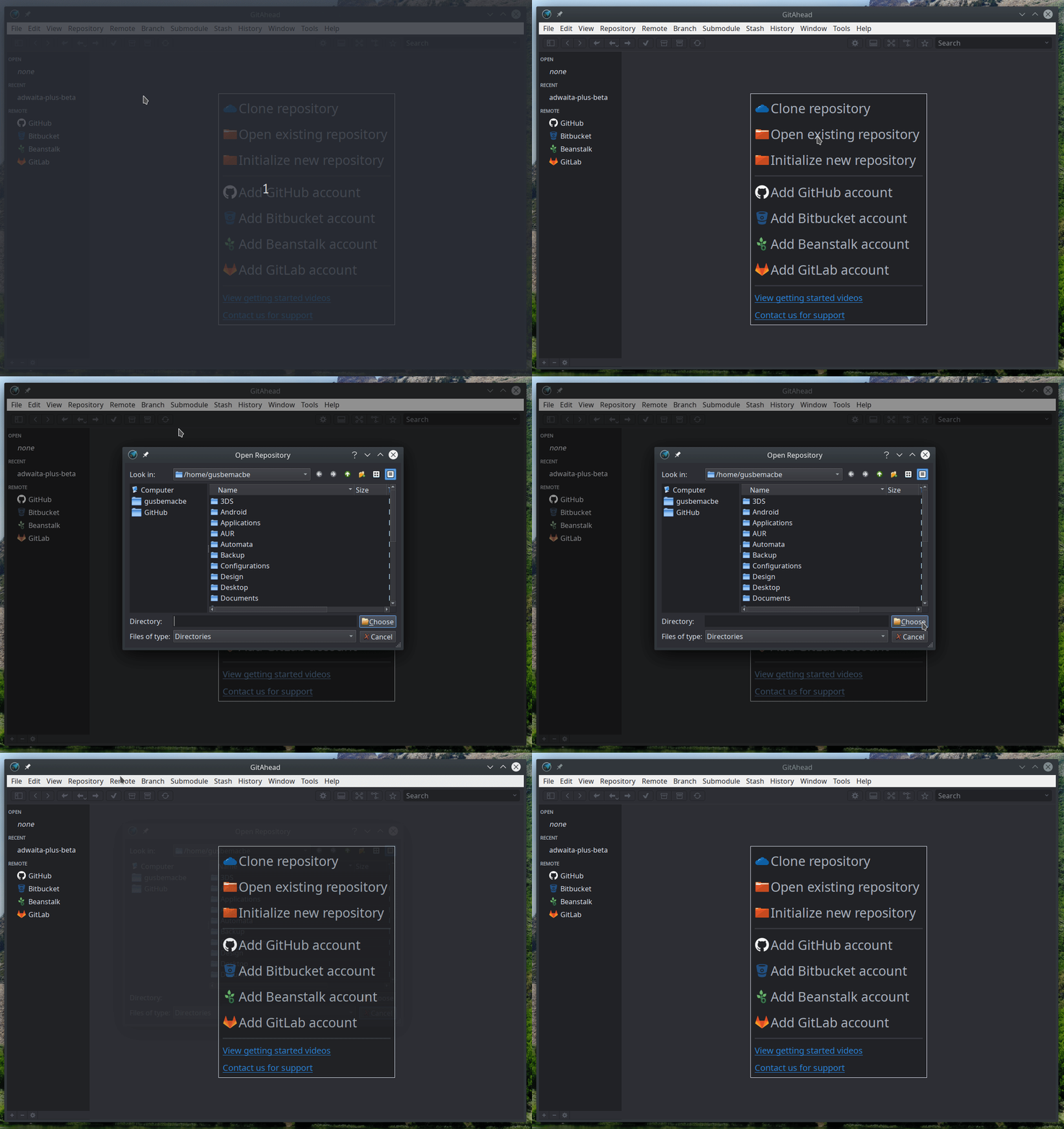
But Gitahead is not an Electron-based.
And SVG Cleaner opens the KDE dialog instead too:
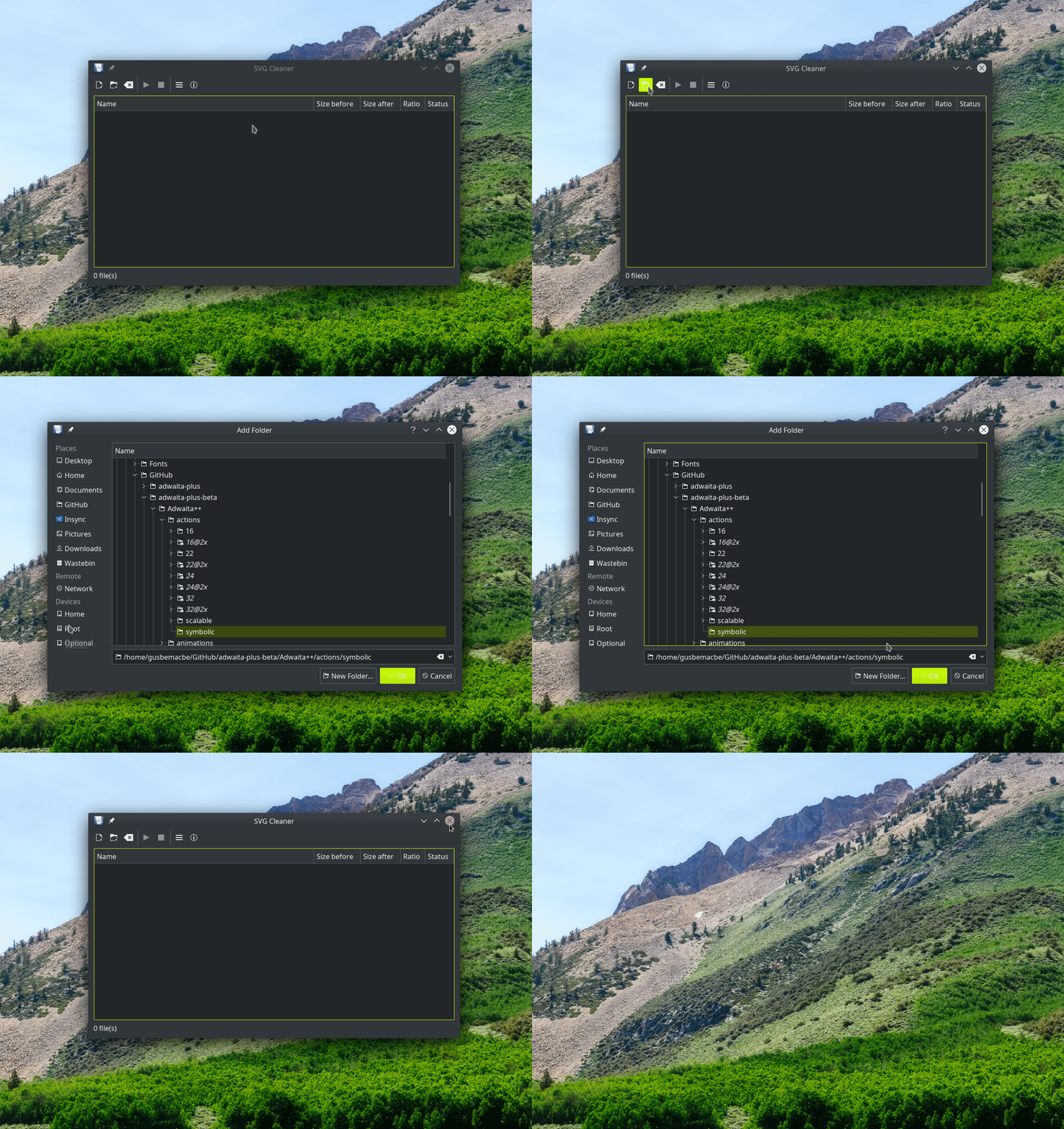
gusbemacbe
on 22 Sep 2019
We are building exploration builds that use a much newer version of our UI framework (Electron version 6.0.x). I wonder if this issue reproduces with one of these builds, could you try? Download:
bpasero
on 10 Oct 2019
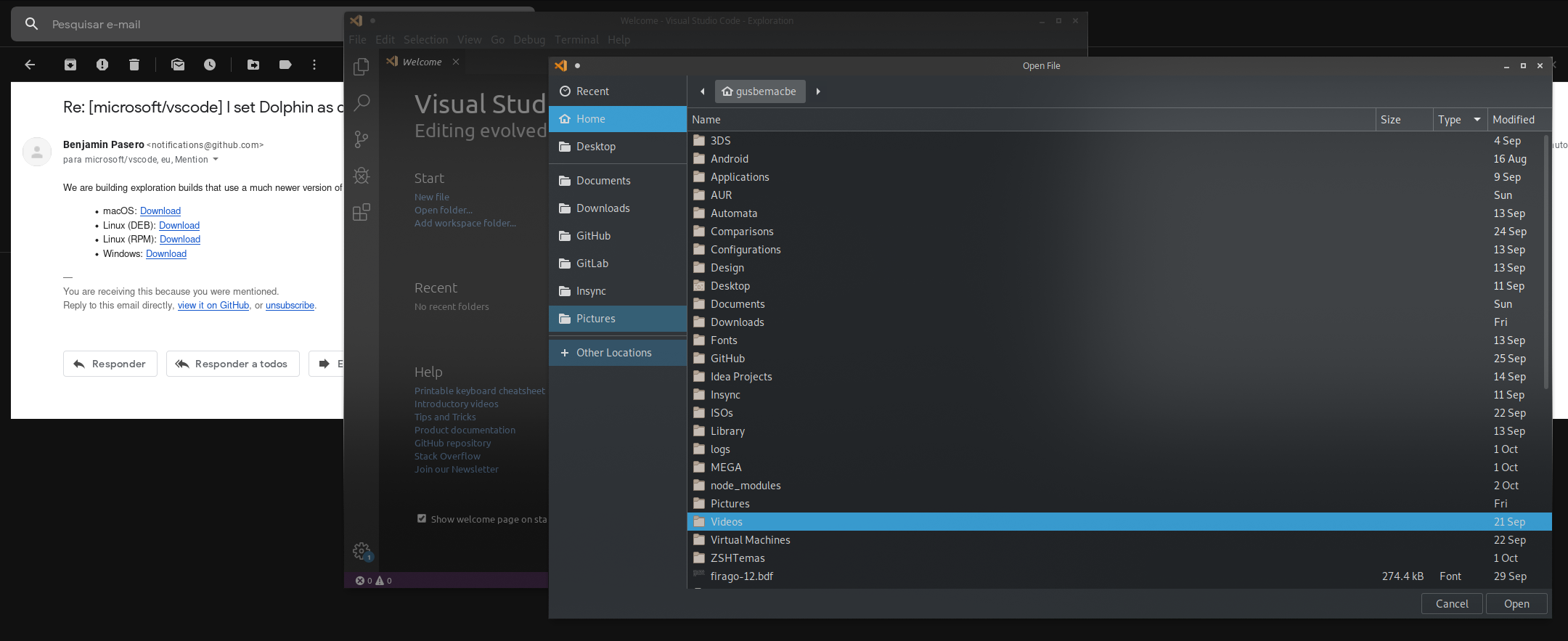
I am on Arch Linux with KDE, the which uses pacman or AUR, but I installed manually the package. It seems that it does not work yet. I will test yet.
gusbemacbe
on 10 Oct 2019
In the second test, I installed via rm installed from AUR, and installed Electron 6, but it was still the same thing.
Maybe better I test on Fedora with KDE.
gusbemacbe
on 10 Oct 2019
@gusbemacbe thanks, would you be willing to test out Electron bare (without VSCode) to see if it reproduces? I can guide you through it, but you would need to install Electron Fiddle: https://electronjs.org/fiddle
bpasero
on 10 Oct 2019
In the third test, on Fedora with KDE, it is still the same problem. It does not open Dolphin instead.
I installed Electron Fiddle, and ran the run, it still opens the awful GTK dialog instead:
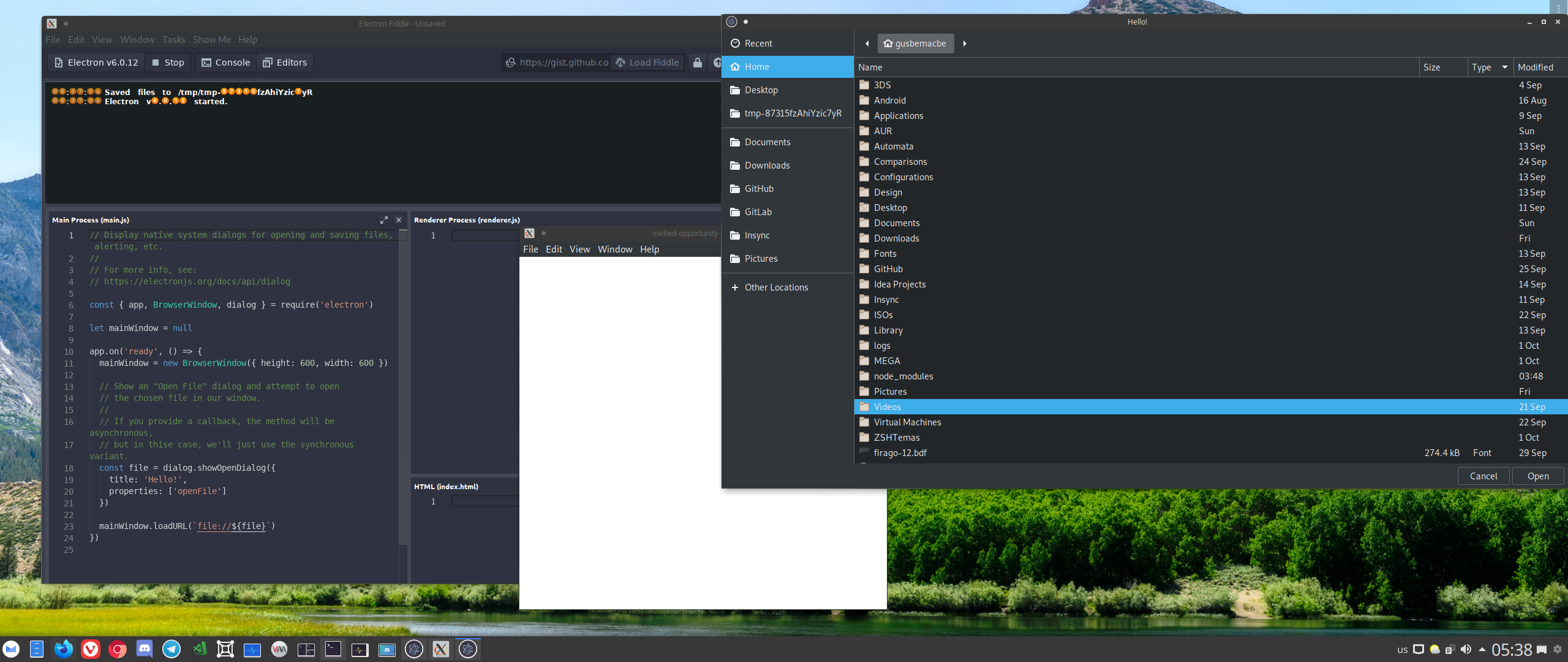
Maybe you create two versions of VSCode for Linux, one for any KDE/QT-based environment, and another version for any GTK-based environment, like the openSUSE developers created the KDE version of Firefox.
gusbemacbe
on 10 Oct 2019
@gusbemacbe thanks, would you be willing to test out Electron bare (without VSCode) to see if it reproduces? I can guide you through it, but you would need to install Electron Fiddle: https://electronjs.org/fiddle
bpasero
on 10 Oct 2019
@bpasero, you duplicated the same text. I have already tested on Fiddle.
gusbemacbe
on 10 Oct 2019
@gusbemacbe great, can you report this as issue then to Electron? See https://github.com/atom/electron
bpasero
on 10 Oct 2019
@bpasero, ready.
gusbemacbe
on 10 Oct 2019
Same problem.
 aderchox
on 19 Jul 2020
aderchox
on 19 Jul 2020
I'm running into this issue as well. I'm on Manjaro KDE. Was there a solution?
 Natetronn
on 9 Nov 2020
Natetronn
on 9 Nov 2020
Related issues
 chrisdias
·
3Comments
chrisdias
·
3Comments
 biij5698
·
3Comments
biij5698
·
3Comments
 villiv
·
3Comments
villiv
·
3Comments
 NikosEfthias
·
3Comments
NikosEfthias
·
3Comments
 omidgolparvar
·
3Comments
omidgolparvar
·
3Comments
Most helpful comment
In multiple Linux distros using KDE/plasma with
kdialog(mint,arch/manjaro, kubuntu ) chrome and chromium use the default file browser (dolphin), but in none of these distroscodeuses it. It still uses a GTK based dialog, so that's not a solution.Also, addressing @begusbemacbe comment,
firefoxuses a gtk-based dialog but the solution listed in thearchwiki works, that's usingxdg-desktop-portaland editing its.desktopfile. So all these non-kde apps may usedolphinto open files, isn't the case for vscode.