Vscode: The terminal has strange ghost effect
Issue Type: Bug
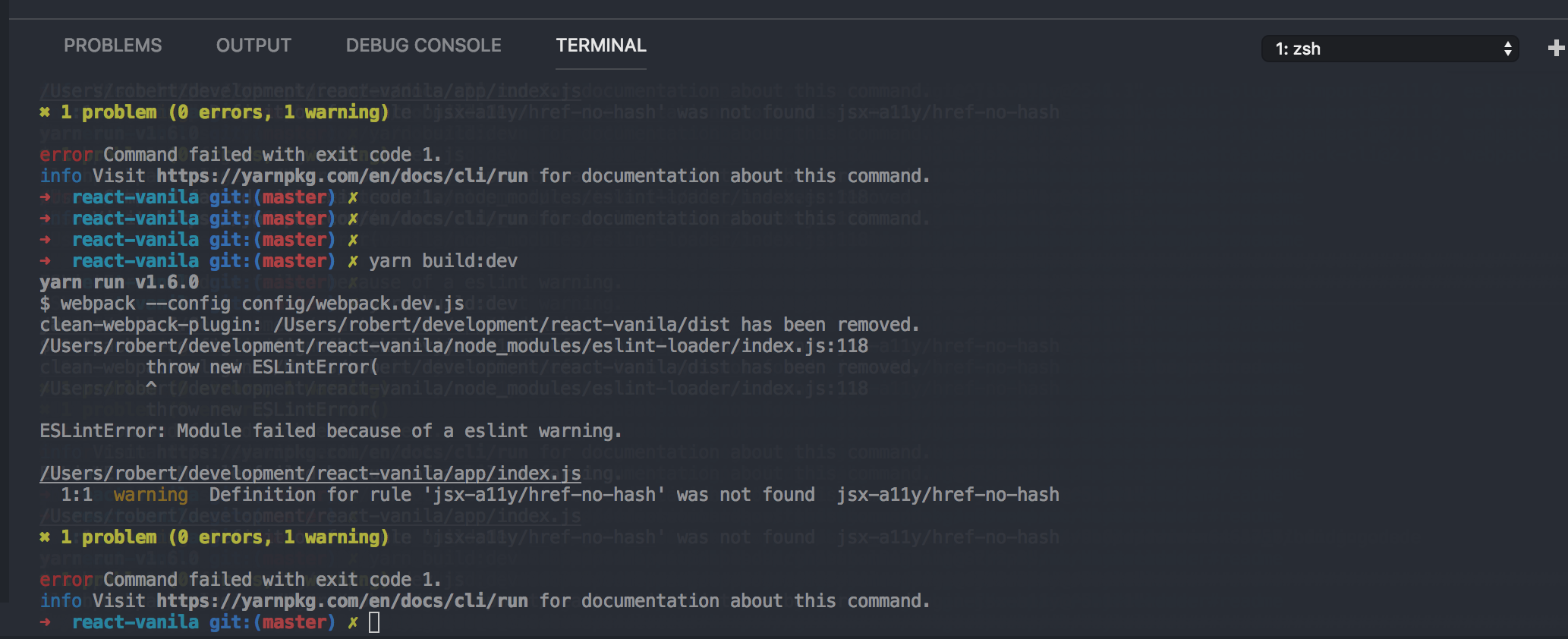
Since the last update the text output in my terminal has a strange ghosting effect.
A few minutes ago, I updated VSCode. Opened up a project, opened the terminal window, started typing some yarn commands and I noticed the strange ghost effect. The text is slightly blurred, and I can see some feight traces of text in the background.
I'm using zsh.
VS Code version: Code - Insiders 1.24.0-insider (8a07c8d935998d1b1153dde0c5b337189d35cea0, 2018-05-08T05:10:44.902Z)
OS version: Darwin x64 17.5.0
System Info
|Item|Value|
|---|---|
|CPUs|Intel(R) Core(TM) i7-7700HQ CPU @ 2.80GHz (8 x 2800)|
|GPU Status|2d_canvas: enabled
flash_3d: enabled
flash_stage3d: enabled
flash_stage3d_baseline: enabled
gpu_compositing: enabled
multiple_raster_threads: enabled_on
native_gpu_memory_buffers: enabled
rasterization: enabled
video_decode: enabled
video_encode: enabled
vpx_decode: enabled
webgl: enabled
webgl2: enabled|
|Load (avg)|3, 3, 2|
|Memory (System)|16.00GB (0.90GB free)|
|Process Argv|/Applications/Visual Studio Code - Insiders.app/Contents/MacOS/Electron|
|Screen Reader|no|
|VM|0%|
Extensions (13)
Extension|Author (truncated)|Version
---|---|---
bracket-pair-colorizer|Coe|1.0.48
vscode-docker|Pet|0.0.26
vscode-eslint|dba|1.4.8
vscode-html-css|ecm|0.2.0
prettier-vscode|esb|1.3.1
file-icons|fil|1.0.12
auto-close-tag|for|0.5.6
auto-rename-tag|for|0.0.15
rest-client|hum|0.18.4
vscode-styled-components|jpo|0.0.18
python|ms-|2018.4.0
sass-indented|rob|1.4.9
vscode-todo-highlight|way|0.5.12
(1 theme extensions excluded)
 PosloviInfostud
All 16 comments
same here
osx 10.13.4
terminal (default)
vscode Version 1.24.0-insider (1.24.0-insider)
 zanettin
on 8 May 2018
zanettin
on 8 May 2018
same here
VS Code version: Code - Insiders 1.24.0-insider (8a07c8d935998d1b1153dde0c5b337189d35cea0, 2018-05-08T05:10:44.902Z)
OS version: Darwin x64 17.4.0
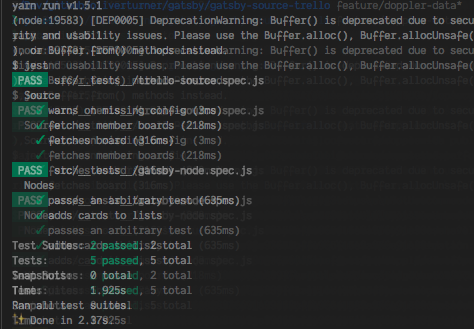
Screenshot:
System Info
|Item|Value|
|---|---|
|CPUs|Intel(R) Core(TM) i7-4870HQ CPU @ 2.50GHz (8 x 2500)|
|GPU Status|2d_canvas: unavailable_software
flash_3d: enabled
flash_stage3d: enabled
flash_stage3d_baseline: enabled
gpu_compositing: enabled
multiple_raster_threads: enabled_on
native_gpu_memory_buffers: enabled
rasterization: unavailable_software
video_decode: enabled
video_encode: enabled
vpx_decode: enabled
webgl: enabled
webgl2: enabled|
|Load (avg)|2, 2, 2|
|Memory (System)|16.00GB (0.19GB free)|
|Process Argv|/Applications/Visual Studio Code - Insiders.app/Contents/MacOS/Electron|
|Screen Reader|no|
|VM|0%|
Extensions (20)
Extension|Author (truncated)|Version
---|---|---
vscode-jest|Ort|2.7.0
material-icon-theme|PKi|3.4.0
code-settings-sync|Sha|2.9.2
fish|Ted|0.0.4
better-toml|bun|0.3.2
vscode-exports-autocomplete|cap|0.5.4
npm-intellisense|chr|1.3.0
path-intellisense|chr|1.4.2
gitignore|cod|0.5.0
vscode-eslint|dba|1.4.8
prettier-vscode|esb|1.3.1
flow-for-vscode|flo|0.8.1
vscode-styled-components|jpo|0.0.18
graphql-for-vscode|kum|1.11.0
vsliveshare|ms-|0.3.93
debugger-for-chrome|msj|4.4.3
polacode|pnp|0.2.2
vscode-spotify|shy|2.4.0
babelrc|wad|1.0.0
vscode-todo-highlight|way|0.5.12
(1 theme extensions excluded)
 oliverturner
on 8 May 2018
oliverturner
on 8 May 2018
Found a workaround on this comment: https://github.com/Microsoft/vscode/issues/46374#issuecomment-376704158 which is basically adding this to your settings:
"workbench.colorCustomizations": {
    "terminal.background": "#0000"
},
Restart the integrated terminal and should be gone.
 edderrd
on 9 May 2018
edderrd
on 9 May 2018
The above workaround doesn't seem to stick for me in the case of a script that's manipulating terminal colours (_i.e._ the workaround seems fine until terminal colours get involved, then it seems to break)
 mgaudet
on 9 May 2018
mgaudet
on 9 May 2018
Same here, seems to be not only on OSX:
Ubuntu 18.04 with Nvidia graphics and current proprietary drivers.
VS Code version: Code - Insiders 1.24.0-insider (84d023798b51a8ad607fd865dd8e16949ee3c398, 2018-05-09T05:11:31.333Z)
OS version: Linux x64 4.15.0-20-generic
System Info
|Item|Value|
|---|---|
|CPUs|Intel(R) Core(TM) i7-7700K CPU @ 4.20GHz (8 x 4500)|
|GPU Status|2d_canvas: enabled
flash_3d: enabled
flash_stage3d: enabled
flash_stage3d_baseline: enabled
gpu_compositing: enabled
multiple_raster_threads: enabled_on
native_gpu_memory_buffers: disabled_software
rasterization: disabled_software
video_decode: unavailable_software
video_encode: enabled
vpx_decode: unavailable_software
webgl: enabled
webgl2: enabled|
|Load (avg)|0, 0, 0|
|Memory (System)|31.34GB (19.96GB free)|
|Process Argv|/usr/share/code-insiders/code-insiders .|
|Screen Reader|no|
|VM|0%|
Extensions (20)
Extension|Author (truncated)|Version
---|---|---
npm-intellisense|chr|1.3.0
path-intellisense|chr|1.4.2
gitignore|cod|0.5.0
vscode-eslint|dba|1.4.8
jupyter|don|1.1.4
gitlens|eam|8.2.4
EditorConfig|Edi|0.12.1
vscode-npm-script|eg2|0.3.4
vscode-npm|fkn|3.3.0
search-node-modules|jas|1.3.0
postgresql|JPT|0.0.2
restructuredtext|lex|65.0.0
prettify-json|moh|0.0.3
python|ms-|2018.4.0
vsliveshare|ms-|0.3.93
vscode-versionlens|pfl|0.21.0
vscode-icons|rob|7.23.0
rust|rus|0.4.2
vscode-todo-highlight|way|0.5.12
debug|web|0.22.0
(2 theme extensions excluded)
 dunkelstern
on 9 May 2018
dunkelstern
on 9 May 2018
Upstream issue: https://github.com/xtermjs/xterm.js/issues/1424
 Tyriar
on 9 May 2018
Tyriar
on 9 May 2018
Thanks for all the feedback, I'll revert the change that caused this but I'm still looking for the root cause (it doesn't appear to happen all the time). Insiders should get the fix in tonight build (in around 12 hours).
Could people that are seeing this post the theme they're using when the issue occurs? Also does setting terminal.background as @edderrd suggests to #000 also fix the issue?
Tyriar
on 9 May 2018
It doesn't appear to happen all the time.
It does for me: any piped output (e.g. running tests, installing node modules, etc.) will reliably trigger it.
Also does setting terminal.background as @edderrd suggests to #000 also fix the issue?
Only on the most temporary basis.
oliverturner
on 9 May 2018
@Tyriar
i'm using these theme:
"workbench.colorTheme": "React Ocean Next Extended",
    "workbench.colorCustomizations": {
      "[React Ocean Next Extended]": {
        "editor.lineHighlightBackground": "#ffffff05",
        "editor.lineHighlightBorder": "#ffffff00"
      },
    },
it always happening to me when running any yarn command (building with webpack, execute any tasks, tests, etc).
the workaround with the black BG color doesn't fixed the issue for me at all
zanettin
on 9 May 2018
@Tyriar it appears on mouse scrolling, my theme is material dark, thanks for the quick fix 👍
 LeonFedotov
on 9 May 2018
LeonFedotov
on 9 May 2018
comfirming. Happens to me also always, i.e. when installing npm packages or running webpack builds etc.
also, thx for the quick fix 👏
 juristr
on 9 May 2018
juristr
on 9 May 2018
color theme:
"workbench.colorTheme": "Oceanic Next (dimmed bg)",
setting terminal.background does not fix the issue for me
 donovanhiland
on 10 May 2018
donovanhiland
on 10 May 2018
My color theme
"workbench.colorTheme": "Default Dark+"
PosloviInfostud
on 10 May 2018
I just updated VSCode to the laster version and the terminal works fine now.
PosloviInfostud
on 10 May 2018
@Tyriar I'm using the Atom One Dark Theme, and was getting this issue before the latest update. Not on that version anymore, so can't check if the terminal bg color worked for me
 chrisdothtml
on 10 May 2018
chrisdothtml
on 10 May 2018
Fixed for good in https://github.com/Microsoft/vscode/commit/ce27adfec15027dbc973e81d6f04fdae91f3ecd5
Tyriar
on 21 May 2018
Related issues
 shanalikhan
·
3Comments
shanalikhan
·
3Comments
 chrisdias
·
3Comments
chrisdias
·
3Comments
 omidgolparvar
·
3Comments
omidgolparvar
·
3Comments
 villiv
·
3Comments
villiv
·
3Comments
 trstringer
·
3Comments
trstringer
·
3Comments
Most helpful comment
Thanks for all the feedback, I'll revert the change that caused this but I'm still looking for the root cause (it doesn't appear to happen all the time). Insiders should get the fix in tonight build (in around 12 hours).
Could people that are seeing this post the theme they're using when the issue occurs? Also does setting
terminal.backgroundas @edderrd suggests to#000also fix the issue?