Vscode: Option to have the search results collapsed by default
- VSCode Version: 1.22.2
- OS Version: Win10 64bit
Steps to Reproduce:
- Do a search in your project (for instance via CTRL + SHIFT + F)
- Make sure there are items that match your search
When you do this, you'll notice that all matching files are by default uncollapsed. There is a button that you can use that makes it possible to collapse all, but you can't (via a setting) make this the default option. I would love to have this option.
 marcelvanlangen
All 9 comments
Can I just add to this.
Often when doing a search, I find some files collapsed and some expanded. I presume it is based on whether I manually collapsed the file in a previous search, but I just find it really annoying.
Perhaps there could be a new setting e.g. "search.collapseFiles" that can be true, false, or "rememberLast"?
As a bonus, the 'Collapse All' button could act as a toggle - if all files are already collapsed, then expand all.
 TrekkerUK
on 25 Apr 2018
TrekkerUK
on 25 Apr 2018
That is based on how many results there are. <10 in the file, it's expanded. >, it's collapsed. Unless there's only one file, then it's expanded regardless.
 roblourens
on 26 Apr 2018
roblourens
on 26 Apr 2018
Ahh thank you, that does make sense now it's explained.
TrekkerUK
on 26 Apr 2018
Would like to have a setting that controls whether files are collapsed at all in the search results. In my case I want all files to be either collapsed or expanded, because having some collapsed and others expanded leads to me missing the collapsed one as it's buried in the middle of the search results and I have to expand each of them manually.
As a bonus, the 'Collapse All' button could act as a toggle - if all files are already collapsed, then expand all.
Would be a good feature.
 rightaway
on 28 Apr 2018
rightaway
on 28 Apr 2018
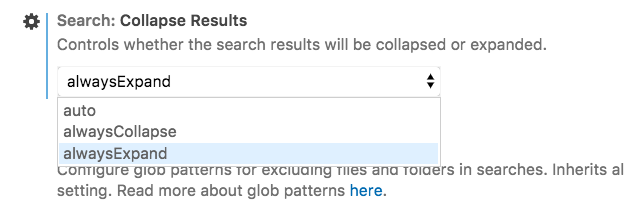
@roblourens for consistency I would also add a description to the other enum values:
 bpasero
on 29 Aug 2018
bpasero
on 29 Aug 2018
I think the others are self-explanatory, I think we should only add enumDescriptions when needed.
roblourens
on 29 Aug 2018
is there a keyboard binding/shortcut for collapsing or can one be created?
 dschinkel
on 26 Sep 2018
dschinkel
on 26 Sep 2018
You can add a keybinding for search.action.collapseSearchResults
roblourens
on 26 Sep 2018
I feel like this should be "built-in" already like intelliJ but thanks. This is one of the reasons I'm still sticking with intelliJ are small things like this I don't have to sit and add stuff for. 🤷♂️ There's also no expand, only collapse on search which is strange nobody's implemented that yet. Again I've got that in intelliJ as well as built-in keybinding for it already there too.
dschinkel
on 26 Sep 2018
Related issues
 trstringer
·
3Comments
trstringer
·
3Comments
 omidgolparvar
·
3Comments
omidgolparvar
·
3Comments
 lukehoban
·
3Comments
lukehoban
·
3Comments
 ryan-wong
·
3Comments
ryan-wong
·
3Comments
 chrisdias
·
3Comments
chrisdias
·
3Comments
Most helpful comment
Would like to have a setting that controls whether files are collapsed at all in the search results. In my case I want all files to be either collapsed or expanded, because having some collapsed and others expanded leads to me missing the collapsed one as it's buried in the middle of the search results and I have to expand each of them manually.
Would be a good feature.