Vscode: Buttons to hide errors and/or warnings and/or infos in Problems Panel - like in browsers devTools console
I propose buttons to hide errors and/or warnings and/or infos in Problems Panel - like in browsers devTools console.
 lukaszpolowczyk
All 18 comments
This would be very helpful because I'm currently working on migrating a legacy codebase from Javascript to Typescript and frequently see hundreds of warnings (e.g. from TSlint) & errors (e.g. from TS compiler) and it's very helpful to focus on the errors and not the warnings, at least some times.
 wwwillchen
on 18 Jan 2019
wwwillchen
on 18 Jan 2019
I've started using VS Code with Java, which displays TODOs as infos, so an ability to easily hide the infos in the Problems Panel would indeed be extremely helpful.
 moocat
on 4 Apr 2019
moocat
on 4 Apr 2019
NEED THAT TOO!
currently im working on java projects with vs code, but it keeps warning me (600+ times) that a class does not declare serialVersionUID...
 HarveyTvT
on 12 Jul 2019
HarveyTvT
on 12 Jul 2019
I need this too!!!!
 Mike-the-one
on 27 Jul 2019
Mike-the-one
on 27 Jul 2019
Me too ^-^
 Matix-Media
on 5 Aug 2019
Matix-Media
on 5 Aug 2019
Working on a big C# codebase with a similar situation: plenty of warnings I'll eventually clean up, but for now I want to filter/hide those and only see errors. Visual Studio has separate toggles for info, warning, error - that would be a nice pattern here.
 nbarbettini
on 5 Aug 2019
nbarbettini
on 5 Aug 2019
I am looking forward to have this!!
 ppmadalin
on 14 Aug 2019
ppmadalin
on 14 Aug 2019
This feature is useful also if you are working on legacy code. In my case, I'm adding E4X code in my Javascript file and errors just pop up even though the code is really working upon running it.
 ezekielcodisto
on 18 Sep 2019
ezekielcodisto
on 18 Sep 2019
this would be VERY useful and without it it's almost impossible to work on a large project
 lfarkas
on 25 Sep 2019
lfarkas
on 25 Sep 2019
This is very helpful for some python project with special tricks, which cannot be understood by IntelliSence.
 plus2047
on 28 Sep 2019
plus2047
on 28 Sep 2019
need this too.
 JettChenT
on 3 Nov 2019
JettChenT
on 3 Nov 2019
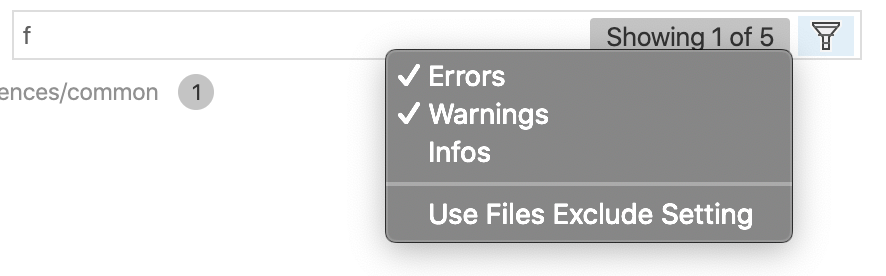
One of the approaches to filter by type is shown below. Thanks @tfenster for the PR. Please try it out and provide us the feedback.
 sandy081
on 7 Nov 2019
sandy081
on 7 Nov 2019
Is it possible to have specific buttons for Errors, Warnings and Infos instead of a dropdown?
As seen below on a "regular" 16:9 1080p monitor theres a lot of unused screenspace left to work with and specific button with a visible toggle state for each type would help avoid missing messages because one has forgotten to reenable all options for this. Visual Studio does do a great job with their implementation.

 MeikTranel
on 20 Nov 2019
MeikTranel
on 20 Nov 2019
Well, thought about that but not got approved in our UX.
sandy081
on 25 Nov 2019
@sandy081 as you know, I would also prefer separate buttons. Would an implementation with a setting "show separate buttons" (default false) have a chance to get past your UX team?
 tfenster
on 25 Nov 2019
tfenster
on 25 Nov 2019
I would probably wait for the feedback before rushing/
sandy081
on 25 Nov 2019
sure, I wouldn't do anything before knowing whether it has a chance or not
Maybe to clarify: I would be happy to provide a PR for that
tfenster
on 25 Nov 2019
But this filter won't affect errors / warnings / infos counter, which is still pretty annoying.
Btw, I'm using imported classes source files from a book's website which their codebase have some deprecated usage of language standard libraries APIs.
 escape0707
on 27 Nov 2019
escape0707
on 27 Nov 2019
Related issues
 mrkiley
·
3Comments
mrkiley
·
3Comments
 trstringer
·
3Comments
trstringer
·
3Comments
 v-pavanp
·
3Comments
v-pavanp
·
3Comments
 philipgiuliani
·
3Comments
trstringer
·
3Comments
philipgiuliani
·
3Comments
trstringer
·
3Comments
Most helpful comment
This would be very helpful because I'm currently working on migrating a legacy codebase from Javascript to Typescript and frequently see hundreds of warnings (e.g. from TSlint) & errors (e.g. from TS compiler) and it's very helpful to focus on the errors and not the warnings, at least some times.