Vscode: ... hint indicator should only show on first line of suggestion
Steps to reproduce
For the JS:
module.exports = function() {

}
Bug
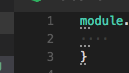
... shown on all lines. It should only show on the first line
 mjbvz
mjbvz
All 8 comments
@jrieken / @sandy081 Should I workaround this specifically for JS/TS but do we want to change the global behavior
mjbvz
on 6 Apr 2018
We can fix that in the editor, maybe ;-)
 jrieken
on 9 Apr 2018
jrieken
on 9 Apr 2018
@jrieken 👏 Is this going to make it to the next release? It's SUPER annoying.
 nagarjun
on 11 Apr 2018
nagarjun
on 11 Apr 2018
Yep, should be in insiders today and with be part of the 1.22.2 recovery release.
jrieken
on 11 Apr 2018
it would be grate if this was opt-in rather than confusing out of the box :)
 unlucio
on 11 Apr 2018
unlucio
on 11 Apr 2018
@unlucio it is, see https://code.visualstudio.com/updates/v1_22#_suggestion-code-actions-for-javascript-and-typescript
jrieken
on 11 Apr 2018
@alexandrudima reviewed the change, @mjbvz Can you verify please, thanks
jrieken
on 11 Apr 2018
@jrieken english is not my 1st language but:
Suggestion Code Actions are enabled by default
to me looks like a "opt-out" feature: aka it's enabled by default until you turn it off.
Imho it's pretty annoying when a tool you use every day starts doing weird stuff because of a new (non-fundamental) feature :) (aka "confusing out of the box")
unlucio
on 11 Apr 2018
Related issues
 ryan-wong
·
3Comments
ryan-wong
·
3Comments
 sijad
·
3Comments
sijad
·
3Comments
 NikosEfthias
·
3Comments
NikosEfthias
·
3Comments
 philipgiuliani
·
3Comments
philipgiuliani
·
3Comments
 biij5698
·
3Comments
biij5698
·
3Comments
Most helpful comment
@jrieken english is not my 1st language but:
Suggestion Code Actions are enabled by defaultto me looks like a "opt-out" feature: aka it's enabled by default until you turn it off.
Imho it's pretty annoying when a tool you use every day starts doing weird stuff because of a new (non-fundamental) feature :) (aka "confusing out of the box")