Vscode: All UI state was lost after todays update
- VSCode Version: 1.23.0-ins
- OS Version: win7x64
12 hours ago was an update from 1.22.0-insiders to 1.23.0-insiders.... everything was OK.
But now, after one more update ...
Version 1.23.0-insider
Commit 95101bf3f6d00105621cdddb639ea62b95ea2468
Date 2018-04-06T08:49:48.798Z
Shell 1.7.12
Renderer 58.0.3029.110
Node 7.9.0
Architecture x64
Does this issue occur when all extensions are disabled?: Yes/No
... all open editors just disappeared. Instead of them - a "Welcome" page.
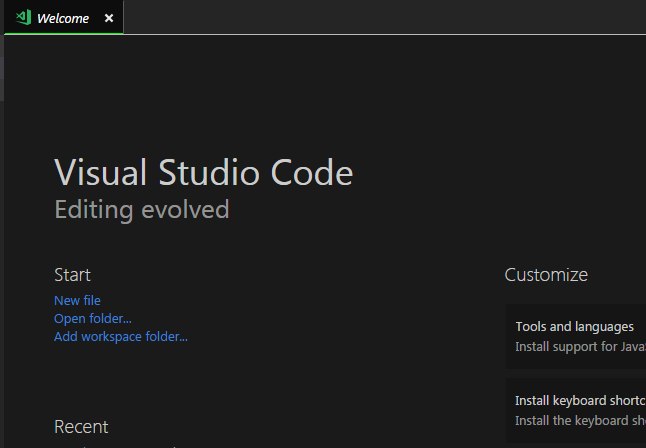
Hm.
PS: it really can be because of _laggy frozen downloading error_ of the new updates.
So, the problem is when you try to check updates - clock appears on the gear icon ...

... and it gets frozen. No reaction at all. If you hover cursor - it will say "Update is downloading....".
And that's it. So, the only way to bring it back to life is to restart VS Code by closing it. Maybe it causes the damage of the workspace files. I don't know.
 user3323
All 5 comments
@user3323 sorry we had a hickup that caused us to release a newer version with breaking changes to the UI storage. To recover:
- shutdown VSCode Insiders
- open the
Local Storagefolder (see below) - find files that end with
.vscbakand remove that extension (e.g.file__0.localstorage.vscbakbecomesfile__0.localstorage(if the files without extension already exist, make sure to delete them first) - start again
Location:
Windows: C:\Users\<name>\AppData\Roaming\Code - Insiders/Local Storage
Linux: /home/<name>/.config/Code - Insiders/Local Storage
macOS: /Users/<name>/Library/Application Support/Code - Insiders/Local Storage
 bpasero
on 6 Apr 2018
bpasero
on 6 Apr 2018
@bpasero , thanks for reaction!
Yes, it worked.
And a little remark about renaming process...
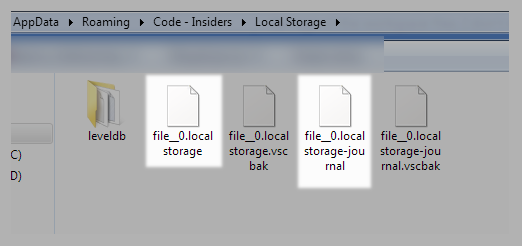
... in the case, that new localstorage's files already exist - first you need to delete those.
user3323
on 6 Apr 2018
@user3323 great to hear this recovery worked, I have updated the steps to make sure to delete the existing files first.
bpasero
on 6 Apr 2018
Closing, will point other users to this in case we have more.
bpasero
on 6 Apr 2018
I saw the same thing in that extension enabled/disabled state was lost. The recovery above fixed it.
 eamodio
on 6 Apr 2018
eamodio
on 6 Apr 2018
Related issues
 NikosEfthias
·
3Comments
NikosEfthias
·
3Comments
 v-pavanp
·
3Comments
v-pavanp
·
3Comments
 vsccarl
·
3Comments
vsccarl
·
3Comments
 trstringer
·
3Comments
trstringer
·
3Comments
 DovydasNavickas
·
3Comments
DovydasNavickas
·
3Comments
Most helpful comment
@user3323 sorry we had a hickup that caused us to release a newer version with breaking changes to the UI storage. To recover:
Local Storagefolder (see below).vscbakand remove that extension (e.g.file__0.localstorage.vscbakbecomesfile__0.localstorage(if the files without extension already exist, make sure to delete them first)Location:
Windows:
C:\Users\<name>\AppData\Roaming\Code - Insiders/Local StorageLinux:
/home/<name>/.config/Code - Insiders/Local StoragemacOS:
/Users/<name>/Library/Application Support/Code - Insiders/Local Storage