Vscode: [macos][10.13.4] No visible mouse cursor when mouse over editor or terminal areas.
:star: :star: :star: Known workaround :star: :star: :star:
From @florin-machedon in https://github.com/Microsoft/vscode/issues/47179#issuecomment-378890064
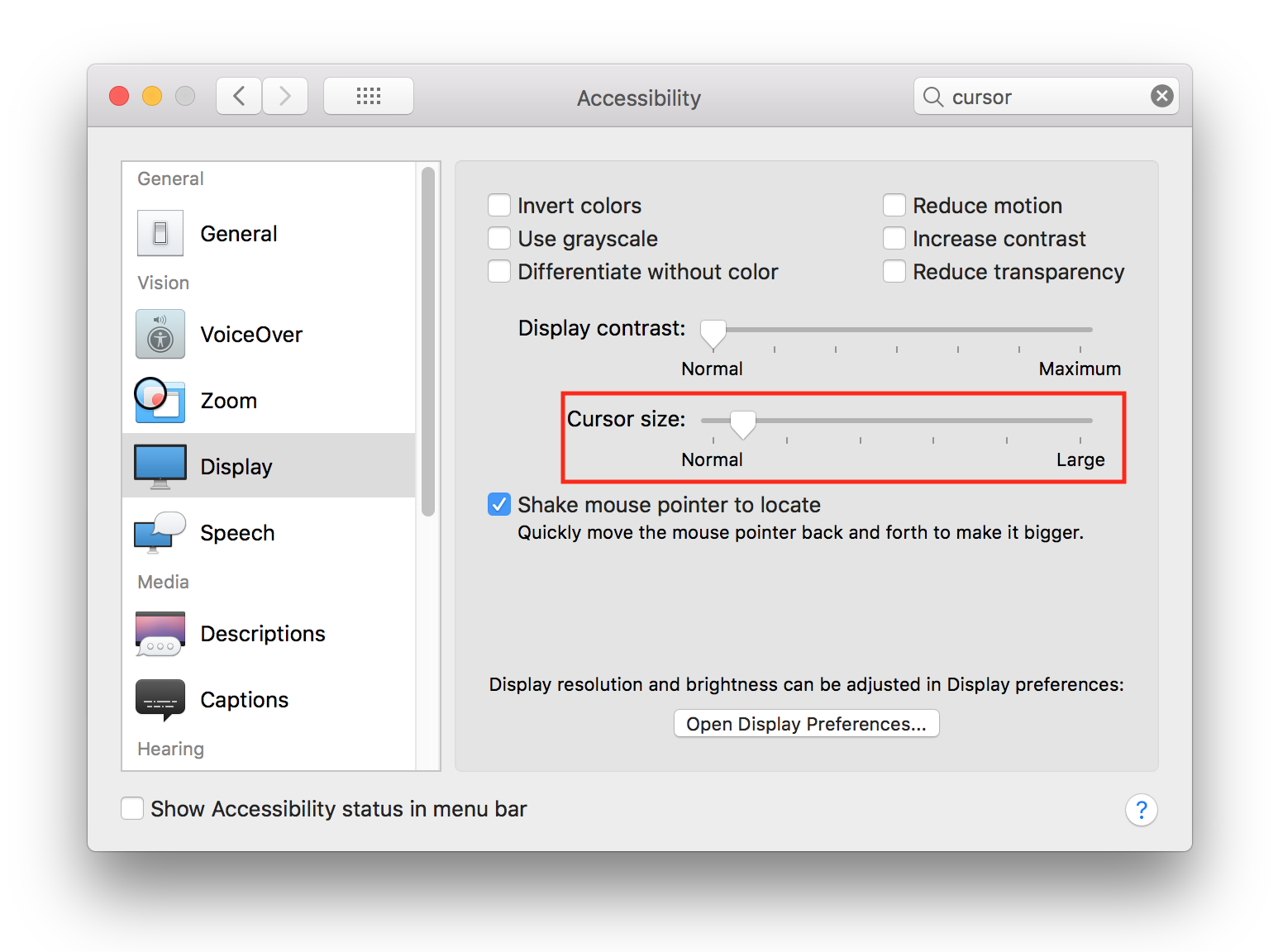
increasing the cursor size a tiny bit fixed the issue for me, if it's normal size then it disappears.
go to System Preferences > Accessibility > Display > Cursor size.
Issue Type: Bug
- Update to macOS 10.13.4
- Run latest 1.21.1 VSCode
- Move mouse pointer over editor or terminal area
VS Code version: Code 1.21.1 (79b44aa704ce542d8ca4a3cc44cfca566e7720f1, 2018-03-14T14:39:09.335Z)
OS version: Darwin x64 17.5.0
System Info
|Item|Value|
|---|---|
|CPUs|Intel(R) Core(TM) i7-7567U CPU @ 3.50GHz (4 x 3500)|
|Load (avg)|3, 8, 7|
|Memory (System)|16.00GB (2.11GB free)|
|Process Argv|/Applications/Visual Studio Code.app/Contents/MacOS/Electron|
|Screen Reader|no|
|VM|0%|
Extensions (51)
Extension|Author (truncated)|Version
---|---|---
language-x86-64-assembly|13x|2.2.11
xml|Dot|1.9.2
crane|Hvy|0.3.8
html-css-class-completion|Zig|1.17.1
vscode-javascript-snippet-pack|aka|0.1.5
vscode-standardjs|che|1.2.1
npm-intellisense|chr|1.3.0
gitignore|cod|0.5.0
vscode-svgviewer|css|1.4.3
arm|dan|0.1.2
vscode-eslint|dba|1.4.8
vscode-instant-markdown|dba|1.4.1
vscode-npm-source|dku|1.0.0
bower|don|0.0.3
jquerysnippets|don|0.0.1
vscode-babel-coloring|dza|0.0.4
vscode-npm-script|eg2|0.3.3
json-tools|eri|1.0.2
php-debug|fel|1.12.2
php-intellisense|fel|2.3.0
vscode-npm|fkn|3.3.0
auto-close-tag|for|0.5.6
terminal|for|0.0.10
language-typelanguage|goo|0.1.1
vue-snippets|hol|0.1.5
rest-client|hum|0.18.1
intellij-idea-keybindings|k--|0.2.22
node-module-intellisense|lei|1.5.0
sftp|lix|1.1.7
Go|luk|0.6.77
gitignore|mic|1.0.1
vscode-exec-node|mir|0.5.0
Arduino|moo|0.0.4
easy-less|mrc|1.4.5
vscode-csscomb|mrm|5.2.2
mssql|ms-|1.3.0
cpptools|ms-|0.16.1
debugger-for-chrome|msj|4.3.0
vetur|oct|0.11.7
platformio-ide|pla|0.14.0
view-in-browser|qin|0.0.5
sass-indented|rob|1.4.8
gitconfig|sid|1.0.1
html5-boilerplate|sid|1.0.1
autolinting-for-javascript|t-s|1.3.0
pdf|tom|0.2.0
vscode-lua|tri|0.12.3
bootstrap-3-snippets|wcw|0.1.0
debug|web|0.22.0
JavaScriptSnippets|xab|1.5.0
vscode-proto3|zxh|0.1.3
(1 theme extensions excluded)
Reproduces without extensions
 amurchick
All 31 comments
I'm facing the same issue only on high resolution settings on my external 4k monitor, when I reduce the resolution to <1080p the mouse cursor will show but on higher resolutions it wouldn't.
The issue seems to be fixed when I change to a light color theme but on all available dark themes the cursor will just disappear.
 mouhannad-sh
on 2 Apr 2018
mouhannad-sh
on 2 Apr 2018
I think the terminal copies the cursor style from the editor, @rebornix maybe it doesn't work in HDPI displays?
 Tyriar
on 2 Apr 2018
Tyriar
on 2 Apr 2018
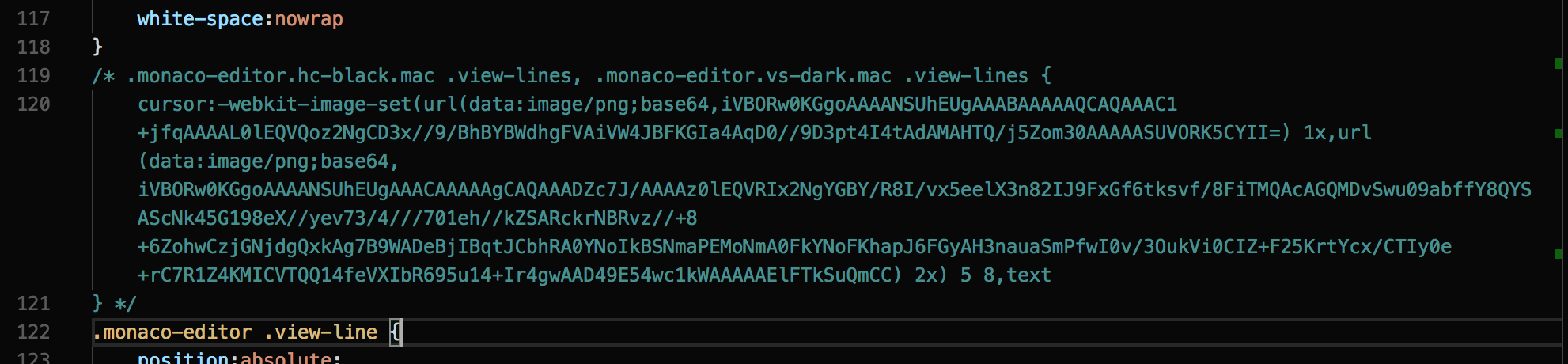
For a temporary workaround, edit Visual Studio Code.app/Contents/Resources/app/out/vs/workbench/workbench.main.css ,
and comment out (or delete) the CSS rule for ".monaco-editor.hc-black.mac .view-lines, .monaco-editor.vs-dark.mac .view-lines"
 GBirkel
on 3 Apr 2018
GBirkel
on 3 Apr 2018
I'm facing the same issue only on high resolution settings on my external 4k monitor, when I reduce the resolution to <1080p the mouse cursor will show but on higher resolutions it wouldn't.
@mouhannad-sh I am have same result.
For a temporary workaround, edit Visual Studio Code.app/Contents/Resources/app/out/vs/workbench/workbench.main.css ,
and comment out (or delete) the CSS rule for ".monaco-editor.hc-black.mac .view-lines, .monaco-editor.vs-dark.mac .view-lines"
@GBirkel Thank you - it is helps for me.
For fix cursor in integrated terminal - I am commented.vs-dark .monaco-workbench.mac .panel.integrated-terminal .terminal:not(.enable-mouse-events)

amurchick
on 3 Apr 2018
This Stackoverflow question prompted me to fiddle with Cursor Size in System Preferences (Accessibility > Display > Cursor Size). If I set it just a little bit larger than Normal, the cursor behaves properly in Atom and VS Code, with no changes to CSS or themes.
 rayhinton
on 3 Apr 2018
rayhinton
on 3 Apr 2018
I need help from a CSS guru. This is the CSS we are currently using:
.monaco-editor.vs-dark.mac .view-lines,
.monaco-editor.hc-black.mac .view-lines {
    cursor: -webkit-image-set(url('data:image/png;base64,iVBORw0KGgoAAAANSUhEUgAAABAAAAAQCAQAAAC1+jfqAAAAL0lEQVQoz2NgCD3x//9/BhBYBWdhgFVAiVW4JBFKGIa4AqD0//9D3pt4I4tAdAMAHTQ/j5Zom30AAAAASUVORK5CYII=') 1x, url('data:image/png;base64,iVBORw0KGgoAAAANSUhEUgAAACAAAAAgCAQAAADZc7J/AAAAz0lEQVRIx2NgYGBY/R8I/vx5eelX3n82IJ9FxGf6tksvf/8FiTMQAcAGQMDvSwu09abffY8QYSAScNk45G198eX//yev73/4///701eh//kZSARckrNBRvz//+8+6ZohwCzjGNjdgQxkAg7B9WADeBjIBqtJCbhRA0YNoIkBSNmaPEMoNmA0FkYNoFKhapJ6FGyAH3nauaSmPfwI0v/3OukVi0CIZ+F25KrtYcx/CTIy0e+rC7R1Z4KMICVTQQ14feVXIbR695u14+Ir4gwAAD49E54wc1kWAAAAAElFTkSuQmCC') 2x) 5 8, text;
}
It came in via PR #4654
 alexdima
on 5 Apr 2018
alexdima
on 5 Apr 2018
I cannot reproduce on macOS High Sierra version 10.13.3.
When I set the external 4K display to the largest possible resolution (i.e. More Space, everything super tiny) I see the mouse cursor (I) in VS Code.
alexdima
on 5 Apr 2018
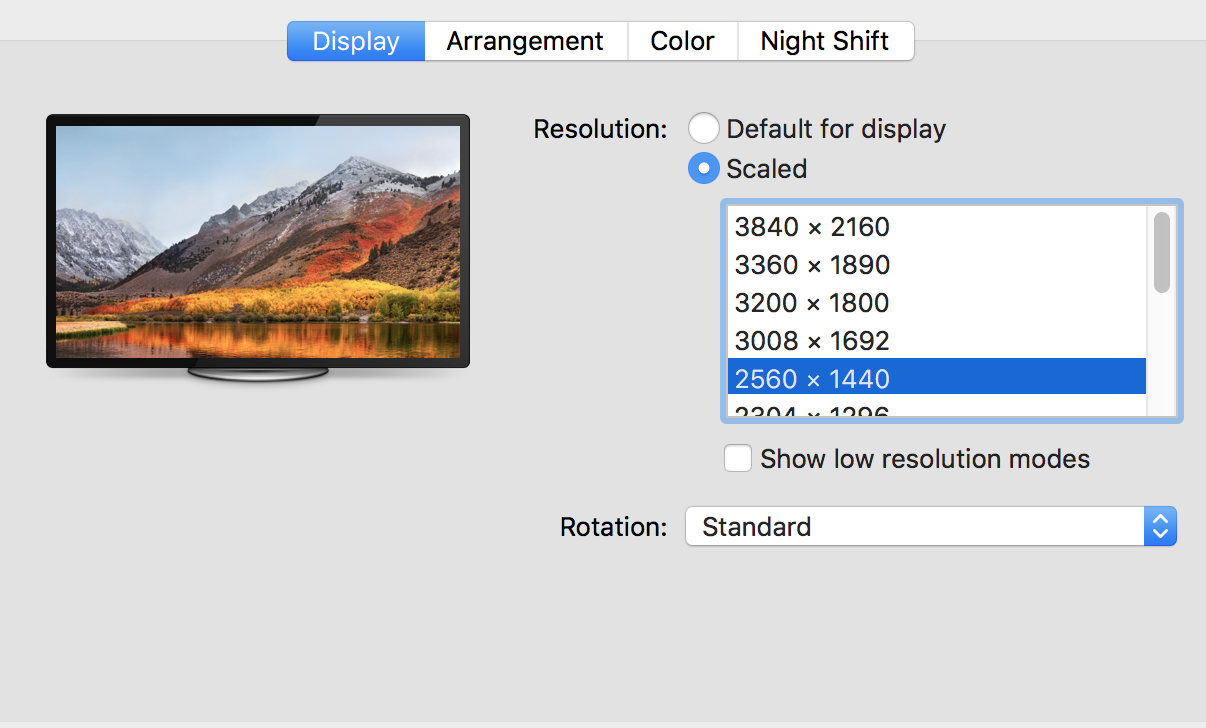
I've just updated to macOS High Sierra version 10.13.4 and I cannot reproduce. I have tried with a 4K monitor at all the resolutions listed for me:
- 1152x648
- 1280x720
- 1504x846
- 1600x900
- 1680x945
- 1920x1080
- 2048x1152
- 2304x1296
- 2560x1440
- 3008x1692
- 3200x1800
- 3360x1890
- 3840x2160
And I always see the cursor
alexdima
on 5 Apr 2018
I got the same issue and it only happens when I am connected to my 4k screen at work! I even seeing it happen in my Iterm using a dark theme (also based on Base16 Ocean Dark.
Maybe that it only happens with specific themes? I currently have this theme pack installed AndrsDC.base16-themes and specifically the Base16 Dark Oceanic Next color palet.
I use Shan.code-settings-sync to sync all my config with a gist. If you use that you could have the exact same things installed as I have now (might be a combination of things).
I have to say that this only happend after updating to MacOS 10.13.4 (might be a coincidence... I do use vscode daily so unless there was a release since the time I updated. I updated my MacOS on Mar 30).
(Also if I shake my mouse pointer (and it activates the Accessibility enlarge point thingy) it is visible for as long as its in it's larger state).
 Ilyes512
on 5 Apr 2018
Ilyes512
on 5 Apr 2018
@Tyriar @rebornix Can you reproduce ?
alexdima
on 5 Apr 2018
@alexandrudima Are you using a dark theme? And what size is your cursor set to in Accessibility preferences? Finally, what color profile are your using for your monitor? Sorry for the interrogation, but these are all little things I've uncovered while trying to fix the issue for myself. 😄
For reference, I also reported a similar issue at electron/electron#12519.
rayhinton
on 5 Apr 2018
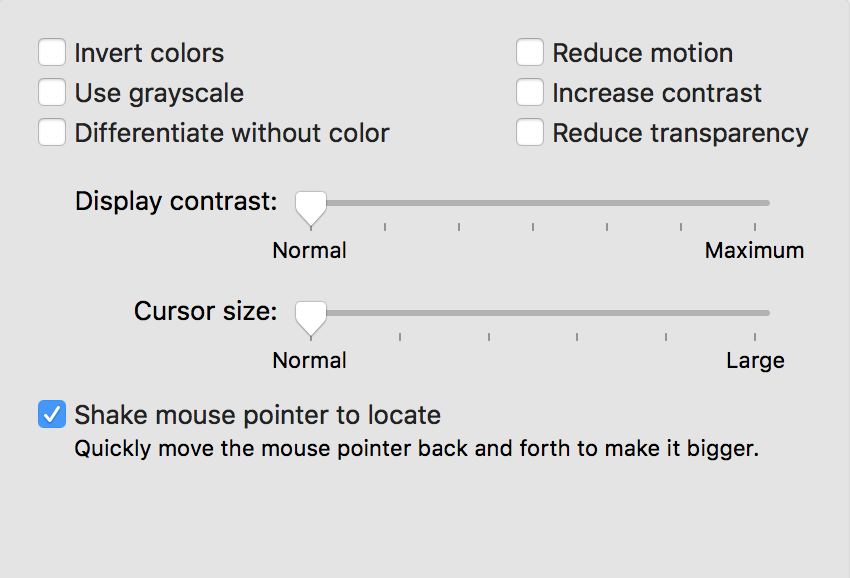
Here are the accessibility preferences I have:
Here is the resolution I'm trying with:
And yes, I'm trying with the Dark theme:
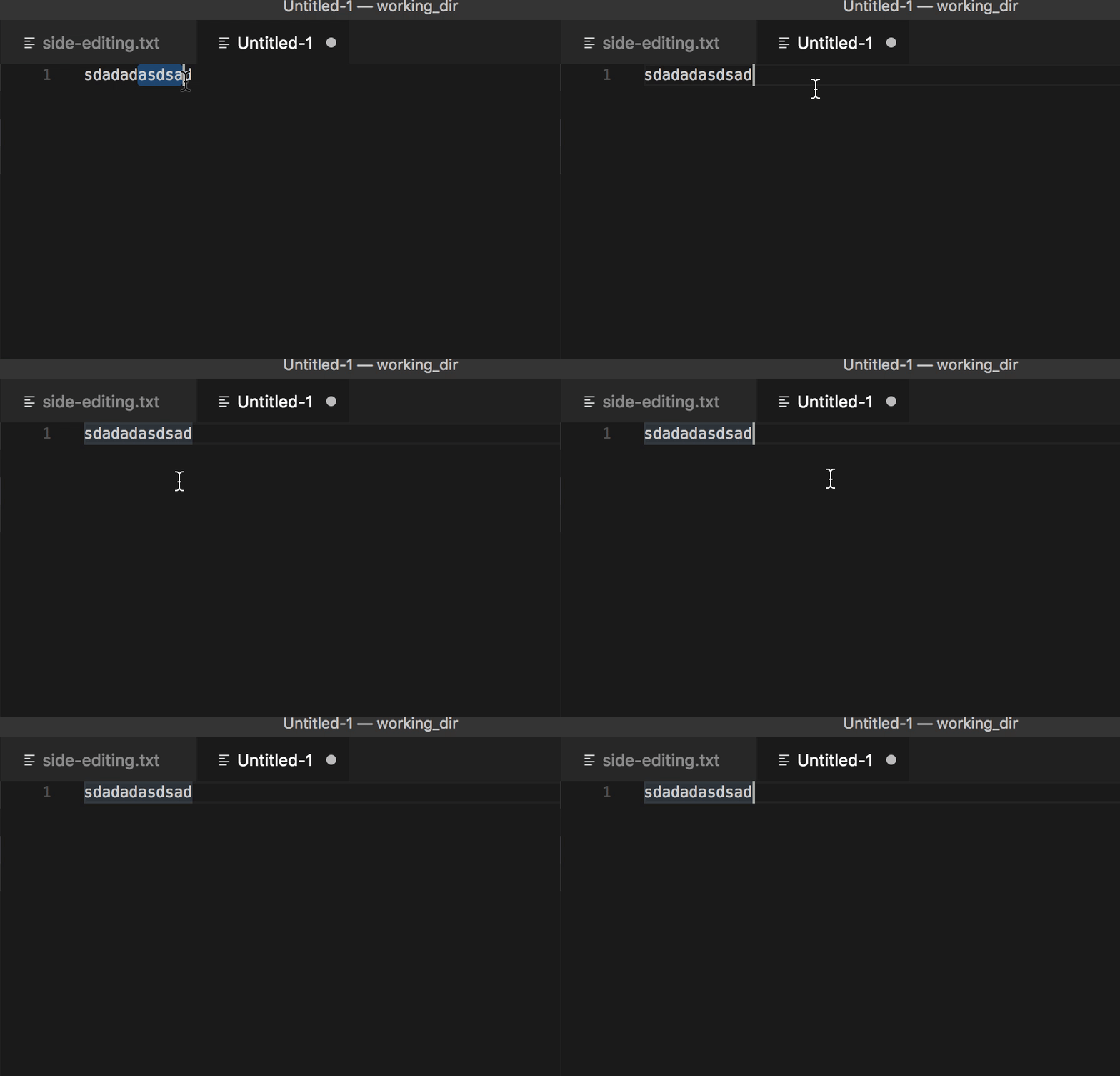
I'm using an external 4K display, connected through a USB-C to DisplayPort adapter to a MacBook Pro (13-inch, 2016, Four Thunderbolt 3 Ports)
alexdima
on 5 Apr 2018
My acces pref are the same as the screenshot. I also have my 13-inch, 2017, Four Thunderbolt 3 Ports connected with usb-c to displayport. I also have "Use dark menu bar and Dock" enabled:

Ilyes512
on 5 Apr 2018
similar
https://github.com/Microsoft/vscode/issues/44211#issuecomment-378010728
 EbXpJ6bp
on 6 Apr 2018
EbXpJ6bp
on 6 Apr 2018
@amurchick @mouhannad-sh What could I be doing differently . i.e. I cannot reproduce...
alexdima
on 6 Apr 2018
Could it be a display scaling issue (combined with settings for dark themes)?
This issue arises only on my external Dell P2715Q monitor in certain resolutions (again, only with the dark themes):
- 1920 x 1080: okay
- 2560 x 1440: bad
- 3840 x 2160: okay
The native resolution of the display is 3840 x 2160, and 1920 x 1080 is half that resulting in exactly double the pixel size.
I tested it on a BENQ PD2710QC, native resolution 2560 x 1440, and I could not reproduce the issue in any of the lower scaled resolutions.
 gi
on 6 Apr 2018
gi
on 6 Apr 2018
To be annoust I do think that it’s something upstream in MacOS it self and that it’s not something in vscode. Multiple applications have the same problem as non-electron apps (like for example iTerm - For me it does not show the cursor there as well)
Ilyes512
on 7 Apr 2018
On my monitor 4K LG 27UD68
the mouse works only on this resolution
- 2560x1440 - bad
- 3008x1692 - bad
- 3360x1890 - bad
- 3840x2160 - OK
 PTiCA1
on 9 Apr 2018
PTiCA1
on 9 Apr 2018
I've updated the initial post to document a known workaround.
Unfortunately, I still cannot reproduce on my 4K LG...
alexdima
on 9 Apr 2018
Also happening for me on my 13-inch, 2017, Four Thunderbolt 3 Ports connected with usb-c to displayport using a 4K HP Envy 27s.
The cursor size fix did help. But as @alexandrudima also mentioned it happens to more apps that are also not electron with dark themes.
I do think there is a OSX issues. With 10.13.4 they have introduced the ability for external GPU's and I think it has something to do with that, since I am experiencing a lot of other graphical issues when connected to the 4K monitor.
Numerous people are pointing it it might be a bad quality cable since Apple does not officially make USB-C to DisplayPort cables and thus the current existing cables are using "non-patented" technology. Which might be true but still I bought my third party cable at an Apple Store, so I sort of assume they should work.
Alas I am still not sure why it is happening, what I do know is is that it started happening after the High Sierra 10.13.4 update.
 Shuyinsama
on 9 Apr 2018
Shuyinsama
on 9 Apr 2018
Same problem here, 12" MB with 38" LG
 aocneanu
on 9 Apr 2018
aocneanu
on 9 Apr 2018
Same problem here, 13" MBP with 28" 4K Asus. The workaround did the trick though.
 BaldemarJanrain
on 10 Apr 2018
BaldemarJanrain
on 10 Apr 2018
Same problem, 13'' MBP with dual external 1080p monitors. One is horizontal and one is vertical. The mouse disappears on the vertical monitor. Increasing size fixed it.
I doubt this is an issue with VSC, it started happening after updating to High Sierra 10.13.4
 jcrsilva
on 10 Apr 2018
jcrsilva
on 10 Apr 2018
I am running into the exact same issue as @jcrsilva after updating to High Sierra 10.13.4.
Not sure if it has to do with the vertical setting or with the DisplayPort. But I feel it doesn't have to do with VSC, rather it is something High Sierra itself.
 davidc604
on 10 Apr 2018
davidc604
on 10 Apr 2018
Yeah, this smells like some High Sierra + webkit shenanigans.
If you go into Visual Studio Code.app/Contents/Resources/app/out/vs/workbench/workbench.main.css and change the 5 8,text part of the css rule to 5 1.99999999, text, it magically works - but with the wrong offset, of course. Then if you change it to 5 2, text it's broken again.
Or, if you activate screen zoom, and zoom in even a little, it works.
GBirkel
on 11 Apr 2018
I cannot reproduce, I don't have a 4K monitor though.
Tyriar
on 11 Apr 2018
Guys I don't know if this is VSCode specific. Same thing is happening to me in iTerm2. FWIW I also have a 4k monitor Dell P2715Q
 tristan957
on 11 Apr 2018
tristan957
on 11 Apr 2018
I have the same issue and I can confirm it's happening in iTerm2 as well for me.
 acoushawk
on 11 Apr 2018
acoushawk
on 11 Apr 2018
I believe this is an error with High Sierra. I cannot see my cursor with no apps open on my second monitor.
Logged here:
https://discussions.apple.com/thread/8141322
 lucasrim
on 12 Apr 2018
lucasrim
on 12 Apr 2018
I have a strong feeling this is a High Sierra 10.13.4 bug and not vscode. I experience this issue frequently in Slack and Spotify, which I usually keep open on my built-in MacBook Pro monitor, while I do work on my external monitors (both connected via Thunderbolt). The mouse cursor is fine on the 2 external monitors, but disappears frequently on the MacBook's display.
I originally thought it might be an Electron incompatibility (since both Spotify and Slack appear to be Electron apps), but if folks are saying it also happens in iTerm then it most likely is High Sierra to blame.
It's certainly annoying, but at least the workaround (Cmd-Tab to make another app active, then Cmd-Tab back to the app that had missing cursor) works reliably.
 briantully
on 12 Apr 2018
briantully
on 12 Apr 2018
Yep this looks like a mac bug, closing in favor of https://discussions.apple.com/thread/8141322
Tyriar
on 12 Apr 2018
Related issues
 ryan-wong
·
3Comments
ryan-wong
·
3Comments
 sijad
·
3Comments
sijad
·
3Comments
 omidgolparvar
·
3Comments
omidgolparvar
·
3Comments
 NikosEfthias
·
3Comments
NikosEfthias
·
3Comments
 shanalikhan
·
3Comments
shanalikhan
·
3Comments
Most helpful comment
I'm facing the same issue only on high resolution settings on my external 4k monitor, when I reduce the resolution to <1080p the mouse cursor will show but on higher resolutions it wouldn't.
The issue seems to be fixed when I change to a light color theme but on all available dark themes the cursor will just disappear.