Vscode: [json] "There is no formatter for 'json'-files installed." for a specific (large) JSON document
- VSCode Version: 1.21.1
- OS Version: Win10Pro 1709
Steps to Reproduce:
- Open json file https://data.cdc.gov/api/views/6vp6-wxuq/rows.json?accessType=DOWNLOAD (378mb)
- Shift-Alt-F to format document
Observe: Error message: "There is no formatter for 'json'-files installed."
Other json files will format just fine.
Does this issue occur when all extensions are disabled?: Yes
 toddlindsey
All 32 comments
@aeschli i think the reason might be that we don't sync large files to extension host.
 dbaeumer
on 29 Mar 2018
dbaeumer
on 29 Mar 2018
Can we improve the error message then?
 aeschli
on 29 Mar 2018
aeschli
on 29 Mar 2018
not so easy... unless we have something generic ala 'not installed or the file is too large or doesn't match a language selector...'
 jrieken
on 29 Mar 2018
jrieken
on 29 Mar 2018
Seeing same issue here with latest build. Thought that it was perhaps a limitation of the 32-bit version so I replaced it with the 64-bit version but I am still seeing the same (subtle) error message. How is it possible that a 64-bit application can't handle formatting a 30 MB JSON file? Since these are data files and the world is embracing "big data", I would expect a 64-bit application to be able to handle files up to the limits of the machine's virtual memory (albeit, potentially slowly), but certainly with no issues if the file fits in RAM, which this one easily does (machine has 64 GB RAM). Thanks.
 System-Arch
on 6 Apr 2018
System-Arch
on 6 Apr 2018
Same issue here.
 bertolo1988
on 24 May 2018
bertolo1988
on 24 May 2018
Seeing same with a small local file vstsbulkeditor.json - renamed to .txt to make github happy.
Version 1.23.1, Architecture x64, Window 10
 jawn
on 25 May 2018
jawn
on 25 May 2018
This is very annoying, especially for small JSON files that were saved as "one liners" and need to be quickly viewed in a more human-readable format.
I'm using version 1.24.0 if that matters.
Could the message be changed to suggest a plug-in that, at a minimum, will perform some default formatting? Bonus points if the plug-in allows some customization.
 fmorriso
on 13 Jun 2018
fmorriso
on 13 Jun 2018
so far I never had this problem.
Today I updated from VS Code 1.24 to 1.24.1 and now I get the same error - for any size JSON file.
 marcelh-gh
on 15 Jun 2018
marcelh-gh
on 15 Jun 2018
It's possible to disable the JSON formatter with "json.format.enable": false. Can you check your settings?
aeschli
on 15 Jun 2018
aeschli: my setting is:
"json.format.enable": true,
Yet, I get the error about no formatter for json-files installed.
I'm having a hard time believing that Visual Studio Code has been around as long as it has without either a built-in JSON file formatter/pretty-print or an add-on that does the same thing.
fmorriso
on 18 Jun 2018
@fmorriso VSCode always had and still has a built-in JSON formatter. Also it works for me.
Reasons for not getting the formatter:
- JSON extension disabled: Go to the extensions viewlet and enter
@disabledin the search field. JSON language support should not show up "json.format.enable": false: Please set totrue- the file you have open is not associated with the JSON mode: Please verify that the editor shows 'JSON' in the lower right corner
- It's a huge file. Please also try with a small file to verify that this is the problem
aeschli
on 18 Jun 2018
@aeschli I verified all of your above points and the formatter is not working with the aforementioned error message.
I am using version 1.24.1 and the json file has 9KB
 rweyand
on 26 Jun 2018
rweyand
on 26 Jun 2018
Can you guys check whether JSON code completion works? E.g. in the settings editor, you should see proposals for setting keys:

If you add the "json.trace.server": "verbose" to the settings, can you go to the output view and open the JSON Language Server' tab and find (Ctrl +F)client/registerCapability` in it?
It should say:
 "registrations": [
        {
            "id": "316396bc-15d2-46a2-8d5c-e8541e8bc3e9",
            "method": "textDocument/rangeFormatting",
            "registerOptions": {
                "documentSelector": [
                    {
                        "language": "json"
                    },
                    {
                        "language": "jsonc"
                    }
                ]
            }
        }
    ]
So, the following happened:
I cannot make vscode output the verbosity output above and also the code completion does not work.
But for some weird reason after restarting vscode, I can format now
rweyand
on 26 Jun 2018
@rweyand Interesting. So it looks like the JSON language server is not started. Whan you see this again, can you also check the log views in the output view for any mentioning of the json-language-features.
e.g.

Also the output of the Log (window) view is interesting.
aeschli
on 26 Jun 2018
@aeschli will do if it happens
rweyand
on 26 Jun 2018
Updated 2018-07-14: the problem is still happening with VS Code 1.25.1, exactly as described below.
Updated 2018-07-09: the problem is still happening with VS Code 1.25.0. No error message. No formatting takes place. The bottom-right corner say JSON as the file type, so I am at a loss to understand why VS Code cannot perform at least some rudimentary reformatting of even a tiny, one-liner like the one I mention below.
I created the following tiny one-liner in VS Code 1.24.1 ::
{
    "root": {
        "sublevel1": {
              "a": "1"
    }
  }
}
I then pressed Shift+Alt+F (Format Document)
Nothing happens. No error. Nothing happens.
How can I get VS Code to reformat the above to a more readable form ::
{
"root": {
"sublevel1": {
"a": "1"
}
}
}
I was trying to change the tab spacing settings for json files from 4 to 2 spaces by setting all of the following in my user settings:
"editor.tabSize": 2,
"json.format.enable": true,
"[json]": {
"editor.tabSize": 2
}
But seems the tabSize setting doesn't take, and then I saw this error pop-up. It does actually do some formatting though. So maybe this is a false-error?
[Edit]
Setting "json.format.enable": true did make the error dialog go away, but nothing else.
But even without that setting, the json files did get some formatting applied, and not sure what that setting enabled, since the tabSize setting still didn't get obeyed. But that could be a different issue than this thread.
 joem-msft
on 30 Jun 2018
joem-msft
on 30 Jun 2018
I have the same issue, but my JSON files are way much smaller (around 500 lines). What solved a problem for me was removing the first and the last square brackets from JSON, so then Shift+Alt+F worked for me.
 biniosuaf
on 5 Jul 2018
biniosuaf
on 5 Jul 2018
@joem-msft That sounds like an different issue. Can you file a new issue with a sample and steps?
aeschli
on 9 Jul 2018
When I try Shift-Alt-F I am getting the following error on large files. Sometimes it fixes itself if I restart VS Code.
[Error - 10:01:45] Request textDocument/rangeFormatting failed.
Error: Connection got disposed.
    at Object.dispose (c:\Program Files\Microsoft VS Code\resources\app\extensions\json-language-features\node_modules\vscode-jsonrpc\lib\main.js:825:25)
    at Object.dispose (c:\Program Files\Microsoft VS Code\resources\app\extensions\json-language-features\node_modules\vscode-languageclient\lib\client.js:57:35)
    at LanguageClient.handleConnectionClosed (c:\Program Files\Microsoft VS Code\resources\app\extensions\json-language-features\node_modules\vscode-languageclient\lib\client.js:1983:42)
    at LanguageClient.handleConnectionClosed (c:\Program Files\Microsoft VS Code\resources\app\extensions\json-language-features\node_modules\vscode-languageclient\lib\main.js:126:15)
    at closeHandler (c:\Program Files\Microsoft VS Code\resources\app\extensions\json-language-features\node_modules\vscode-languageclient\lib\client.js:1970:18)
    at CallbackList.invoke (c:\Program Files\Microsoft VS Code\resources\app\extensions\json-language-features\node_modules\vscode-jsonrpc\lib\events.js:71:39)
    at Emitter.fire (c:\Program Files\Microsoft VS Code\resources\app\extensions\json-language-features\node_modules\vscode-jsonrpc\lib\events.js:135:36)
    at closeHandler (c:\Program Files\Microsoft VS Code\resources\app\extensions\json-language-features\node_modules\vscode-jsonrpc\lib\main.js:221:26)
    at CallbackList.invoke (c:\Program Files\Microsoft VS Code\resources\app\extensions\json-language-features\node_modules\vscode-jsonrpc\lib\events.js:71:39)
    at Emitter.fire (c:\Program Files\Microsoft VS Code\resources\app\extensions\json-language-features\node_modules\vscode-jsonrpc\lib\events.js:135:36)
    at IPCMessageReader.AbstractMessageReader.fireClose (c:\Program Files\Microsoft VS Code\resources\app\extensions\json-language-features\node_modules\vscode-jsonrpc\lib\messageReader.js:135:27)
    at ChildProcess.<anonymous> (c:\Program Files\Microsoft VS Code\resources\app\extensions\json-language-features\node_modules\vscode-jsonrpc\lib\messageReader.js:253:61)
    at emitTwo (events.js:111:20)
    at ChildProcess.emit (events.js:194:7)
    at maybeClose (internal/child_process.js:899:16)
    at Socket.<anonymous> (internal/child_process.js:342:11)
    at emitOne (events.js:96:13)
    at Socket.emit (events.js:191:7)
    at Pipe._handle.close [as _onclose] (net.js:510:12)
[Error - 10:01:45] Request textDocument/hover failed.
Error: Connection got disposed.
    at Object.dispose (c:\Program Files\Microsoft VS Code\resources\app\extensions\json-language-features\node_modules\vscode-jsonrpc\lib\main.js:825:25)
    at Object.dispose (c:\Program Files\Microsoft VS Code\resources\app\extensions\json-language-features\node_modules\vscode-languageclient\lib\client.js:57:35)
    at LanguageClient.handleConnectionClosed (c:\Program Files\Microsoft VS Code\resources\app\extensions\json-language-features\node_modules\vscode-languageclient\lib\client.js:1983:42)
    at LanguageClient.handleConnectionClosed (c:\Program Files\Microsoft VS Code\resources\app\extensions\json-language-features\node_modules\vscode-languageclient\lib\main.js:126:15)
    at closeHandler (c:\Program Files\Microsoft VS Code\resources\app\extensions\json-language-features\node_modules\vscode-languageclient\lib\client.js:1970:18)
    at CallbackList.invoke (c:\Program Files\Microsoft VS Code\resources\app\extensions\json-language-features\node_modules\vscode-jsonrpc\lib\events.js:71:39)
    at Emitter.fire (c:\Program Files\Microsoft VS Code\resources\app\extensions\json-language-features\node_modules\vscode-jsonrpc\lib\events.js:135:36)
    at closeHandler (c:\Program Files\Microsoft VS Code\resources\app\extensions\json-language-features\node_modules\vscode-jsonrpc\lib\main.js:221:26)
    at CallbackList.invoke (c:\Program Files\Microsoft VS Code\resources\app\extensions\json-language-features\node_modules\vscode-jsonrpc\lib\events.js:71:39)
    at Emitter.fire (c:\Program Files\Microsoft VS Code\resources\app\extensions\json-language-features\node_modules\vscode-jsonrpc\lib\events.js:135:36)
    at IPCMessageReader.AbstractMessageReader.fireClose (c:\Program Files\Microsoft VS Code\resources\app\extensions\json-language-features\node_modules\vscode-jsonrpc\lib\messageReader.js:135:27)
    at ChildProcess.<anonymous> (c:\Program Files\Microsoft VS Code\resources\app\extensions\json-language-features\node_modules\vscode-jsonrpc\lib\messageReader.js:253:61)
    at emitTwo (events.js:111:20)
    at ChildProcess.emit (events.js:194:7)
    at maybeClose (internal/child_process.js:899:16)
    at Socket.<anonymous> (internal/child_process.js:342:11)
    at emitOne (events.js:96:13)
    at Socket.emit (events.js:191:7)
    at Pipe._handle.close [as _onclose] (net.js:510:12)
 kostapsimoulis
on 12 Jul 2018
kostapsimoulis
on 12 Jul 2018
I just hit this issue as well. Here is what I noticed.
Open large file (vscode disables language features)
Close large file.
Open small file (vscode formatting won't respond).
Restart vscode.
Open small file again (vscode formatting working again).
 jarrettv
on 17 Jul 2018
jarrettv
on 17 Jul 2018
I ran into the same problem with 1.27.2. Following @jarrettv's steps solved the problem.
 DavidPotter
on 26 Sep 2018
DavidPotter
on 26 Sep 2018
Issue report I reported earlier also gets fixed with @jarrettv's steps as a workaround.
jawn
on 26 Sep 2018
Just upgraded to latest version of VS Code (1.28.1) and it still fails to format large (e.g., 100 MB) JSON file. When looking for data errors / anomalies in .json files, it is much easier to spot them if the file is nicely formatted. Given that VS Code can read these "large" files and manipulate them with ease, it is a shame that it can not format them.
Given the comment above by @dbaeumer about "[not] sync[ing] large files to extension host" is there some way to control the size at which this happens and/or to perform the formatting operation locally (it can't be that computationally intensive). Thanks.
System-Arch
on 17 Oct 2018
the weird thing is that if you switch the type of the file to javascript, then it formats just fine.
seems like a bug to me.
 Spongman
on 8 Jan 2019
Spongman
on 8 Jan 2019
it looks there has been a regression here, as in 1.36.1 this fails even for 100kb files
 alefranz
on 15 Jul 2019
alefranz
on 15 Jul 2019
I have experienced a similar issue, when loading a 15MB json file, the extension host keeps crashing, which ends up making it so that I can't format the json file, and all other files. Should this be a separate ticket?
I also removed all extensions related to json files.
 Adondriel
on 18 Jul 2019
Adondriel
on 18 Jul 2019
@Adondriel A separate issue with steps to reproduce the crash would be very helpful!
aeschli
on 19 Jul 2019
After selecting the filetype manually to JSON, I got the warning below:
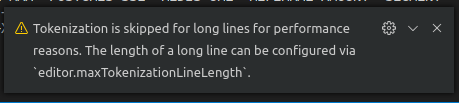
Then, I set editor.maxTokenizationLineLength to be higher.
It worked just fine without performance degradation for me since it was a 4k lines JSON object.
 rodrigo4244
on 19 Sep 2019
rodrigo4244
on 19 Sep 2019
Just ran into this with a 3.17MB file of JSON I wanted to format.
Steps:
- Save a JSON file of that length to disk with .json extension and open with VS Code (or paste into a new VS Code tab and save as x.json)
- Get same error message as @rodrigo4244 above.
- Alt + Shift + F no longer works, saying that no .json file formatter is installed.
If the warning message about the tokenization is related, e.g. formatter isn't found because tokenization is off, then at the very least that warning message could be updated to include "Formatters will not work. "?
 benmccallum
on 24 Sep 2019
benmccallum
on 24 Sep 2019
fixed through #71652.
aeschli
on 30 Sep 2019
Related issues
 mrkiley
·
3Comments
mrkiley
·
3Comments
 lukehoban
·
3Comments
lukehoban
·
3Comments
 shanalikhan
·
3Comments
shanalikhan
·
3Comments
 omidgolparvar
·
3Comments
omidgolparvar
·
3Comments
 biij5698
·
3Comments
biij5698
·
3Comments
Most helpful comment
This is very annoying, especially for small JSON files that were saved as "one liners" and need to be quickly viewed in a more human-readable format.
I'm using version 1.24.0 if that matters.
Could the message be changed to suggest a plug-in that, at a minimum, will perform some default formatting? Bonus points if the plug-in allows some customization.